Key takeaways
- Choose AI for solopreneurs around one valuable, feasible workflow.
- Start with one agent and add orchestration only when needed.
- Set execution caps, retry limits, cost alerts, and approval points.
- Require observable workflow state and a recovery path before recurring use.
Which AI is best for small business owners?
The best AI is the one that can run your chosen workflow reliably within limits you understand. That answer is less tidy than naming a universal winner, but it is much more useful when you work alone and own every failure.
A credible candidate needs three foundations: a capable model, well-defined tools, and clear, structured instructions. The model has to handle the work. Its tools have to expose the right actions. Its instructions have to define what the agent should do with them. A strong model can't compensate for a tool that grants vague authority or instructions that leave success open to interpretation.
Then look beyond the entry price. AI adoption costs can include training, system integration, maintenance, updates, data storage, security, and backup solutions. A free starting point can sit beside work and expense in those categories. Assess each candidate in two parts. First, determine whether its model, tools, and instructions meet the workflow's needs. Then account for the full operating arrangement, not access alone.
Make the foundation test concrete. Can the model handle the work you have defined? Does each tool expose a well-defined action? Are the instructions clear and structured enough to guide the run? Reliable operation requires all three, so a product comparison should not collapse them into one broad capability score.
Give the cost side the same treatment. Identify any training the setup requires. List the systems that need integration and the work needed for maintenance and updates. Account for data storage, security, and backup solutions as their own categories. You can then compare access prices without losing the other adoption costs that remain attached to the workflow.
Map AI for solopreneurs before you choose tools
Agents that execute work end to end are suited to uses with complex decisions, unstructured data, or brittle rule-based systems. For one real workflow, fill the "Current choice" column with an explicit decision and name a test you can run before recurring use.
| Decision field | Question | Current choice | Test before use |
|---|---|---|---|
| Value and feasibility | Is the workflow valuable and feasible enough to automate? | Name the broader goal and the exact work in scope. Assess both value and feasibility. | Run the smallest version that can test the stated value and feasibility. Record what result would justify continuing. |
| Workflow complexity | Does the work involve complex decisions, unstructured data, or brittle rules? | Describe the workflow, risk tolerance, and scale. Those factors determine the appropriate orchestration approach. | Give one agent a representative end-to-end task before deciding that the workflow needs multiple agents. |
| Tool permissions | Which tools and actions does this run actually require? | List only the required tools. Every tool definition in context consumes tokens, even if unused, so least-privilege access also controls efficiency and spend. | Remove an unneeded permission. Check whether the intended task still completes with the smaller tool set. |
| Data boundary | What content can enter the model, customer infrastructure, or third-party services? | Record each system that can transmit or store content. OpenAI residency coverage excludes transmission or storage caused by customer infrastructure and third-party services, as well as data other than Customer Content. | Trace one representative input through every system it touches. Record where each transmission and storage action occurs. |
| Success criteria | What observable result counts as success or failure? | Write an unambiguous, robust criterion and choose thoughtful graders of multiple types. | Score realistic tasks, including tasks drawn from observed failures, against the criterion. Inspect any disagreement between graders. |
| Approval gate | Which proposed actions must wait for a person? | Name the action and reviewer state. Production guardrails should cover input filtering, tool use, and human intervention. | Pause a representative action and confirm that the workflow waits for human intervention. |
| Execution and retry budget | When must the run, retries, or spend stop? | Set execution caps, retry limits, real-time token monitoring, and human cost alerts. Give each threshold an explicit value. | Force an execution, retry, or cost threshold. Confirm that execution stops or the human alert occurs as specified. |
| Checkpoint and recovery behavior | What state must survive, and how will repeated side effects be prevented? | Version the workflow definition with its checkpoint or discard an incompatible checkpoint. Store an idempotency key in shared state for side-effecting calls. | Change the workflow shape and test checkpoint compatibility. Interrupt another run, resume it, and inspect its state and side effects. |
What deserves an approval gate?
Put an approval gate in front of actions that create meaningful external consequences. Customer messages, financial updates, access changes, deletions, and operational commitments should require approval before execution.
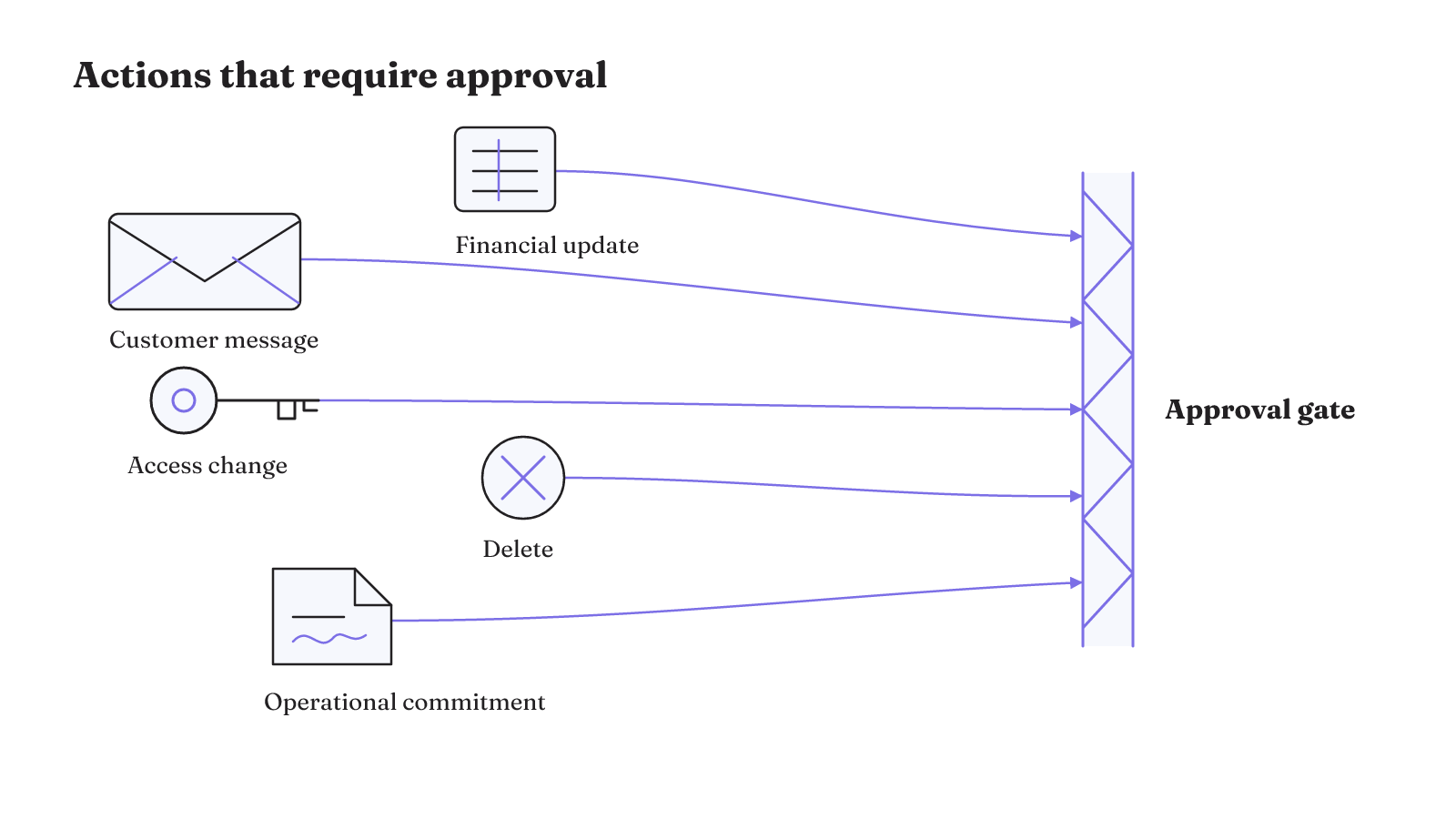
That gives you five clear triggers:
- sending a customer message;
- making a financial update;
- changing access;
- deleting something; or
- making an operational commitment.
Picture a proposed customer message waiting at the gate. The review state includes the source context and the exact proposed output, so the reviewer can see both the input and the action. It also states why the case was escalated. The reviewer can then approve, edit, reject, or return it. The same four options give the gate an explicit outcome instead of a vague request to "check this."
Approval controls an action before it happens. A separate problem appears when some work has already happened and the run stops.
Can a failed run resume without repeating the damage?
Consider a write-heavy workflow that partially completes a mutation. The transport-level signal does not reveal the workflow state or the side effect, so the runner treats the attempt as failed. If it retries without a record of the prior execution, it can duplicate the partially completed mutation.
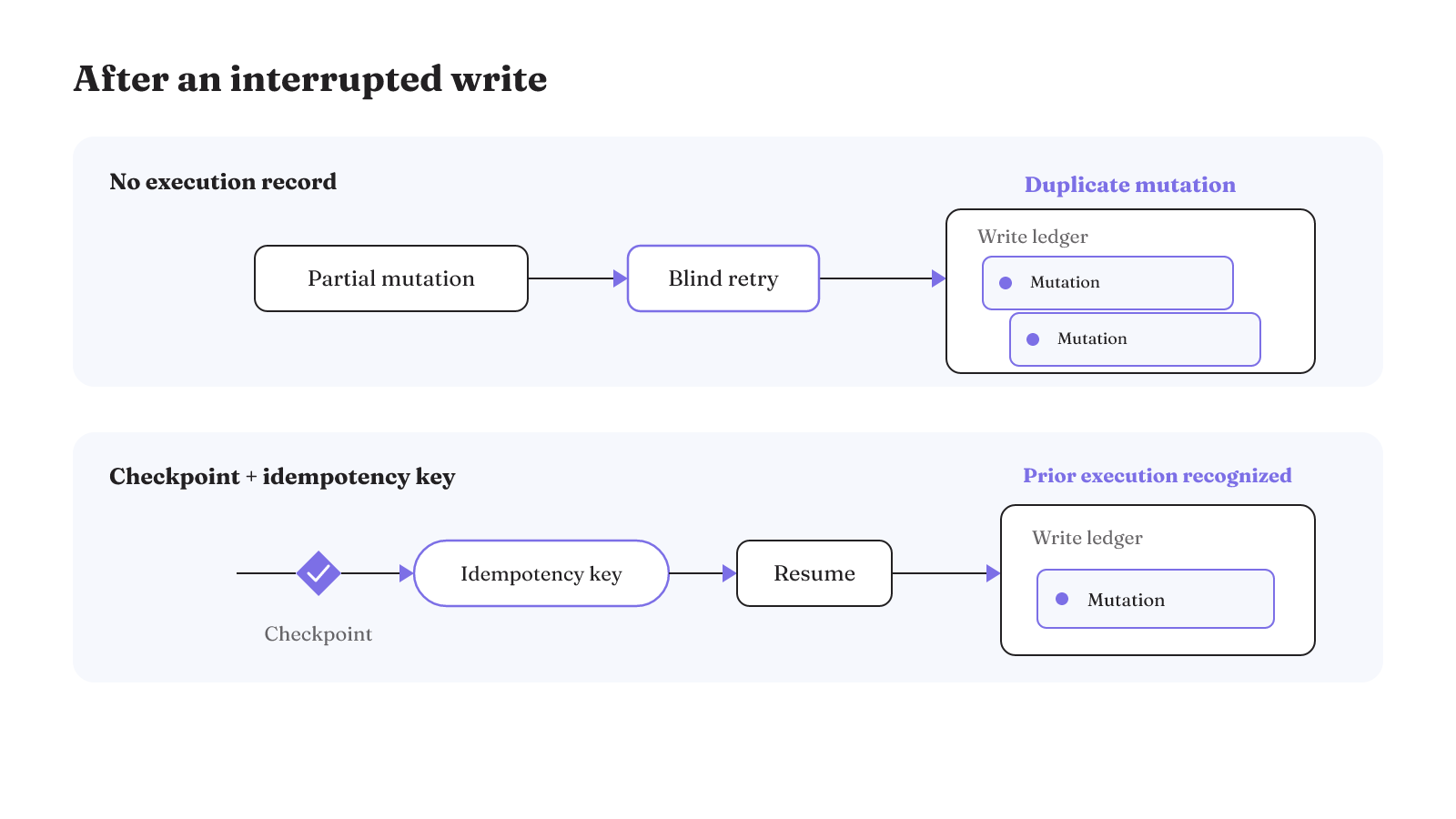
Recovery therefore has to observe workflow state and side effects directly. A transport success or failure signal can miss both. The run needs enough durable state to tell what completed before the interruption and whether a repeated call would create another effect.
This is where checkpoints and idempotency work together. The checkpoint preserves the relevant workflow state. The stored idempotency key lets a side-effecting call recognize prior execution after the workflow resumes. Recovery is not merely the ability to start again. It is the ability to continue without blindly repeating work that already changed something.
When you compare recovery behavior, ask what state the control observes and which side effects it can see. Then force an interruption after a write begins. The result should tell you whether the workflow can distinguish prior execution from work that still needs to happen. A transport signal can miss that workflow state and those effects.
The execution trace is part of the result
A final answer can look acceptable even when the run that produced it was not. An agent's work includes intermediate decisions, tool choices, generated parameters, and retrieved context. Scoring only the final answer can overlook failures in those steps.
Imagine a research run that returns a plausible summary. The final text alone does not reveal whether the agent chose an unsuitable tool, generated a wrong parameter, or retrieved the wrong context. A trace review can expose the intermediate failure even when the surface result gives no obvious clue.
Review the trace as a sequence of choices. Which decision led to the tool call? Which tool did the agent select? What parameters did it generate, and what context had it retrieved? Those questions locate a failure at the step where it entered the run. They also keep a polished final answer from hiding a broken path.
Start agent evaluation early with realistic tasks drawn from observed failures. If a run fails because of a tool choice or generated parameter, turn that failure into a task the system must face again. The success criteria still need to be unambiguous, and the trace gives the graders more than the last block of text to inspect.
Good observability makes the path legible: what context entered the run, which decision followed, what tool was chosen, what parameters it received, and what happened afterward. That record changes evaluation from a judgment about polished output into an inspection of the work that produced it.
Start with one agent and add complexity only when needed
Begin with one agent. Move to multiple agents only when the workflow actually needs that complexity. Agent orchestration should match the workflow, while complexity, risk tolerance, and scale determine the broader approach.
A single agent gives you a smaller permission surface and a shorter execution path to evaluate. If the defined workflow later requires more orchestration, add it for that reason. The number of agents is an architecture choice, not a measure of how advanced your stack is.
Keep the first version narrow enough that one agent can attempt the complete task. If that agent handles the workflow, there is no need to add coordination. If the workflow itself requires more complexity, you have a concrete reason to introduce another agent and a defined task against which to evaluate the change.
Free AI tools for solopreneurs are useful test surfaces
Free entry points can help you test a workflow boundary before committing to a larger stack. They do not erase the integration, maintenance, storage, security, or backup questions in the canvas.
Free and Go users have access to GPT-5.6 Terra in ChatGPT Work and Codex. That availability applies to those named environments. It gives you a model entry point, while the workflow still determines which tools, instructions, permissions, and tests are required.
Open Multi-Agent provides an orchestration runtime with tools, memory, checkpoints, traces, a command-line interface, and an offline run viewer. Its starter templates include a no-key local demo. The demo is the free local test surface here. The runtime capabilities describe the wider project, so keep those two scopes clear when deciding what you are testing.
There is also a useful default boundary in OpenAI's coding-agent environments. In the default workspace-write sandbox mode for the ChatGPT desktop app, Codex command-line interface, and integrated development environment extension, network access remains disabled until it is explicitly enabled. That boundary is concrete and inspectable. It does not answer every permission or data question, but it gives you one explicit constraint to record in the canvas.
Use free options to inspect behavior, traces, state, and permission boundaries. A free plan or local demo is a place to run a small test, not a verdict on the complete operating cost.
Treat each option as a bounded trial. In ChatGPT Work or Codex, give GPT-5.6 Terra one defined task. In the Open Multi-Agent local demo, inspect its tools, memory, checkpoints, traces, and offline viewer. In a workspace-write environment, observe the default network boundary before deciding whether the task needs network access. Record what each trial actually tests.
More authority creates more ways for a workflow to fail
Prompt injection uses malicious instructions encountered during a task to manipulate an agent's behavior. If your workflow retrieves material while it runs, ask what instructions the agent may encounter and what authority it will have at that moment. Record the answers before giving the workflow tools that can create external effects.
In simulated environments, agentic misalignment generalized across many frontier models. The observed scope was simulation, not a production deployment. For your workflow, treat that boundary as a reason to test behavior under the conditions you plan to use and to keep the agent's authority explicit.
Turn both risks into questions about the run you are designing. What material can the agent encounter while completing the task? Could that material contain instructions aimed at changing its behavior? What tools would remain available if its behavior changed? Keep the agent's authority explicit in every answer.
These risks call for concrete boundaries already recorded in the canvas: input filtering, scoped tool use, human intervention, execution limits, and observable state. The point is not to predict every failure. It is to decide what the workflow may read, what it may do, where it must stop, and what record remains when it does something unexpected.
The architecture behind those decisions includes tools, memory, routing, and reliability controls. Our guide to production AI agent architectures goes deeper into how those parts fit together.
Which workflow should you test first?
Test one workflow that is useful enough to matter and small enough to inspect. Market research is a practical candidate. Solopreneurs can delegate market research and outreach to an AI agent while developing the core business and testing adjacent opportunities.
For a market-research test, define a narrow question and the sources the agent may use. Give it only the tools needed for that work. Write the success criterion before the run, then inspect the retrieved context, tool choices, parameters, and final output. If the workflow can create an external effect, put the relevant approval and recovery controls in place first.
Start small, validate the deployment with real users, and add capabilities over time. Give the first version a real task within the boundary you defined. Watch for failures in its decisions, tool choices, generated parameters, retrieved context, and final output. Turn observed failures into realistic evaluation tasks before expanding the workflow.
Outreach can be a separate first candidate. If the test reaches a customer message, keep that action behind approval before execution. Market research may instead let you concentrate on retrieved context, success criteria, and trace review.
Add capabilities over time after validation with real users. Review the execution trace because final-answer scoring can overlook intermediate failures. After an interrupted write, inspect workflow state and side effects directly because a transport signal can miss them.
Run the eight-row canvas on that one workflow before adding another AI tool. Make every blank an explicit decision, run the smallest realistic test, and keep the trace. Expand only after the workflow has a clear success test, bounded authority, operating limits, and a recovery path you have exercised.