Key takeaways
- Options span terminal, IDE, desktop, and visual workflows.
- Codex offers GPT-5.6 Terra to Free and Go users.
- Cline requires file-edit and terminal-command approval by default.
- Coding agents can edit files, run commands, call APIs, open pull requests, and interact with CI.
The best AI agent to use for coding depends on more than the model behind it. We use "best" here to mean a fit between the working surface, the model and hosting route, and the authority the surrounding system grants. That definition matters once an agent can move beyond suggestions and act on a repository.
This guide compares six open source AI agents for coding on four stable questions: where the agent works, how it is licensed, whether it can be self-hosted, and how it reaches a model. It then examines file, shell, network, verification, and orchestration boundaries. We do not turn provider count into a quality score, and we do not rank edit quality or reliability without a shared evaluation.
Which open source AI agents for coding fit each working surface?
A terminal-native agent, an IDE extension, a desktop runtime, and a visual workspace put the work in different places. That is the first practical split among these six candidates. The interface tells you where the agent presents its work. The license, hosting path, and model route tell you what else must sit around it.
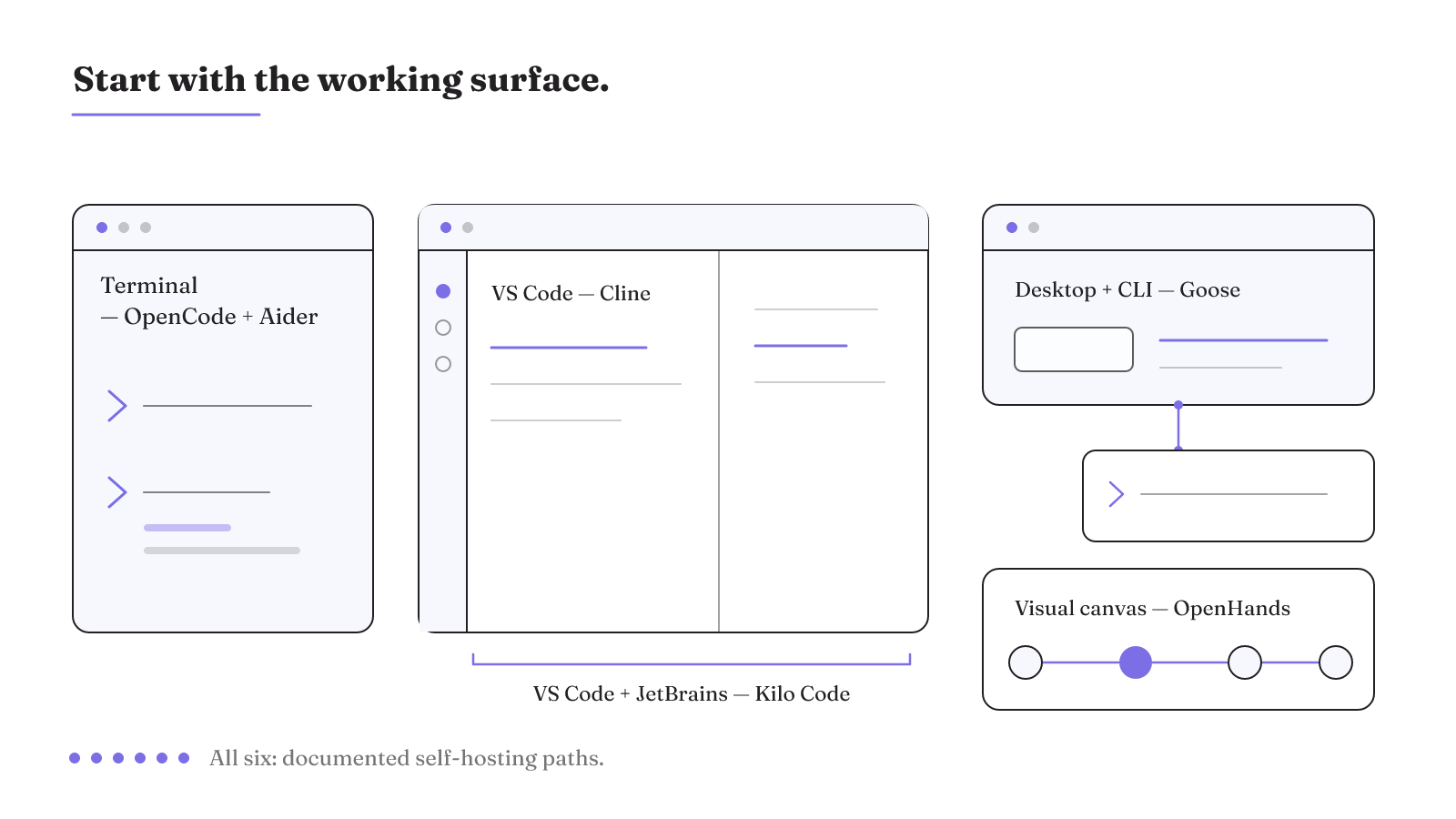
| Agent | Primary working surface | License | Self-hosting or model route |
|---|---|---|---|
| OpenHands | Visual Agent Canvas | MIT | Self-hostable, including VPC or air-gapped patterns; BYOK or local models through 100+ providers |
| OpenCode | Terminal TUI | MIT | Self-hosting; BYOK or local models through 75+ providers |
| Cline | VS Code, with an IDE extension and CLI | Apache-2.0 | Air-gapped self-hosting; BYOK or local models through 30+ providers |
| Aider | Terminal CLI | Apache-2.0 | Self-hosting; BYOK or local models; Git-native edits represented as reviewable commits |
| Goose | Desktop and CLI | Apache-2.0 | Self-hosting; BYOK or local models through 25+ providers; deep MCP extensibility |
| Kilo Code | VS Code and JetBrains, with an IDE extension and CLI | Apache-2.0 | Self-hosting; support for 500+ models |
The rows show six genuinely different operating surfaces. OpenHands centers a visual Agent Canvas. OpenCode and Aider are terminal-first. Cline centers VS Code. Goose offers desktop and CLI interfaces, while Kilo Code spans VS Code and JetBrains.
That surface is not a cosmetic choice. It determines where the agent presents work and where a person encounters its actions. Aider, for example, represents Git-native edits as reviewable commits. Our definition of diff review goes deeper on the review object itself. If the real shortlist is already terminal-first Aider versus VS Code-centered Cline, use our Aider and Cline comparison to keep that narrower decision separate from the six-tool field.
License, self-hosting, and model route answer different ownership questions. All six rows have a documented self-hosting path, but their interfaces and model routes differ. The provider totals are implementation facts only. They do not serve as scores in this comparison.
What is the best open source AI software for coding? In this field, the useful answer begins with a concrete workload. A terminal workflow points to a different pair of candidates than a JetBrains workflow or a visual workspace. Air-gapped operation also appears in the documented OpenHands and Cline routes, while the other rows state broader self-hosting support. These facts narrow a shortlist. They do not establish which tool produces the strongest edits.
Is there a free AI agent for coding?
Yes. There are documented free-access routes, but "free" can describe plan access, authentication, included allowances, or software you operate with a separate model route. Those arrangements should not be collapsed into one promise of unlimited use.
The clearest current example is Codex: Free and Go users have access to GPT-5.6 Terra in Codex. Codex also supports two other authentication paths. A user can sign in with ChatGPT through a Plus, Pro, Business, Edu, or Enterprise plan. An API key is another route, although it requires additional setup. These are distinct access arrangements for the same coding-agent surface.
The GitHub Copilot app provides another no-plan route. It can connect an external model provider with a user-supplied API key and use that model in agent sessions. This requires a GitHub sign-in, but it does not require a Copilot plan. A user who does have a Copilot plan can use both the external provider and GitHub-hosted models.
Cloud execution adds a different meter. Copilot cloud agent consumes GitHub Actions minutes and AI credits. AI-credit use depends on the chosen model and the number of tokens processed. Included allowances can cover that use without an additional charge, but Actions minutes and AI credits remain part of the operating path.
So the useful answer to "Is there any free AI agent for coding?" is yes, with the route named precisely. Codex exposes GPT-5.6 Terra to Free and Go users. The Copilot app can use an external provider without a Copilot plan. The second route still includes a GitHub sign-in, a user-supplied API key, and an external model provider. Cloud-agent work introduces Actions-minute and AI-credit use.
This is also why an open-source license cannot settle the whole operating-cost question. The matrix tells you what software can be hosted and how it can reach a model. The access routes tell you which account, key, provider, allowance, or metered service sits around that software. We do not claim a lowest-cost winner because these documented routes describe different inputs.
For a real cost comparison, name the input attached to the route. Codex plan authentication names a ChatGPT plan. Codex API authentication names an API key and additional setup. Copilot BYOK names a GitHub sign-in, a user-supplied key, and an external provider. Copilot cloud-agent work names Actions minutes and AI credits. That inventory is more precise than applying one "free" label to all four arrangements.
Approval modes define file and shell authority
Once an agent can edit files and run commands, its planning interface and execution permissions become separate engineering choices. Cline makes that split explicit. In Plan mode, Cline explores the codebase, asks clarifying questions, and proposes a strategy. Act mode executes the aligned plan.
By default, Cline requires approval for every file edit and terminal command. Auto-approve allows autonomous execution. The important distinction is concrete: Plan and Act describe phases of work, while the approval setting governs whether proposed file and command actions wait for a person.
Claude Code exposes a different permission mechanism. Its fine-grained permissions specify what the agent may and may not do. Those settings can be checked into version control for organization-wide sharing and remain customizable by each developer. That turns a local permission choice into something a repository can carry while preserving individual customization.
Claude Agent SDK plan mode narrows execution further. The agent explores the codebase and produces a plan without editing source files. File edits are never auto-approved. On Claude Code v2.1.212 or later, modifying shell commands reach the canUseTool callback.
Our authority comparison therefore keeps four facts visible: whether exploration is separated from action, whether edits need approval, whether shell commands need approval, and whether permission settings can travel with the repository. A label such as "plan mode" does not answer all four. Cline's default approvals, its auto-approve option, Claude Code's reusable permission settings, and the Agent SDK callback describe different control points.
These controls also expose a real tradeoff. Per-action approval places a person between the proposal and each file or terminal action. Auto-approve removes that default pause in Cline. A plan-only phase can produce a strategy without changing source files, but execution still needs its own permissions. This distinction is more useful than treating every approval prompt as the same kind of control.
The practical authority questions are specific. Does exploration stop at a plan? Does every edit wait for approval? Does every terminal command wait as well? Can the permission policy be shared in version control and still be customized by a developer? For modifying shell commands in the Claude Agent SDK, does the installed Claude Code version provide the canUseTool callback behavior described for v2.1.212 or later? These questions identify the control point without assuming that the word "approval" means the same behavior everywhere.
What network access can the agent reach?
Network authority includes traffic created by commands and their subprocesses, not just requests made by the agent's visible interface. Codex provides a concrete sequence for seeing that boundary.
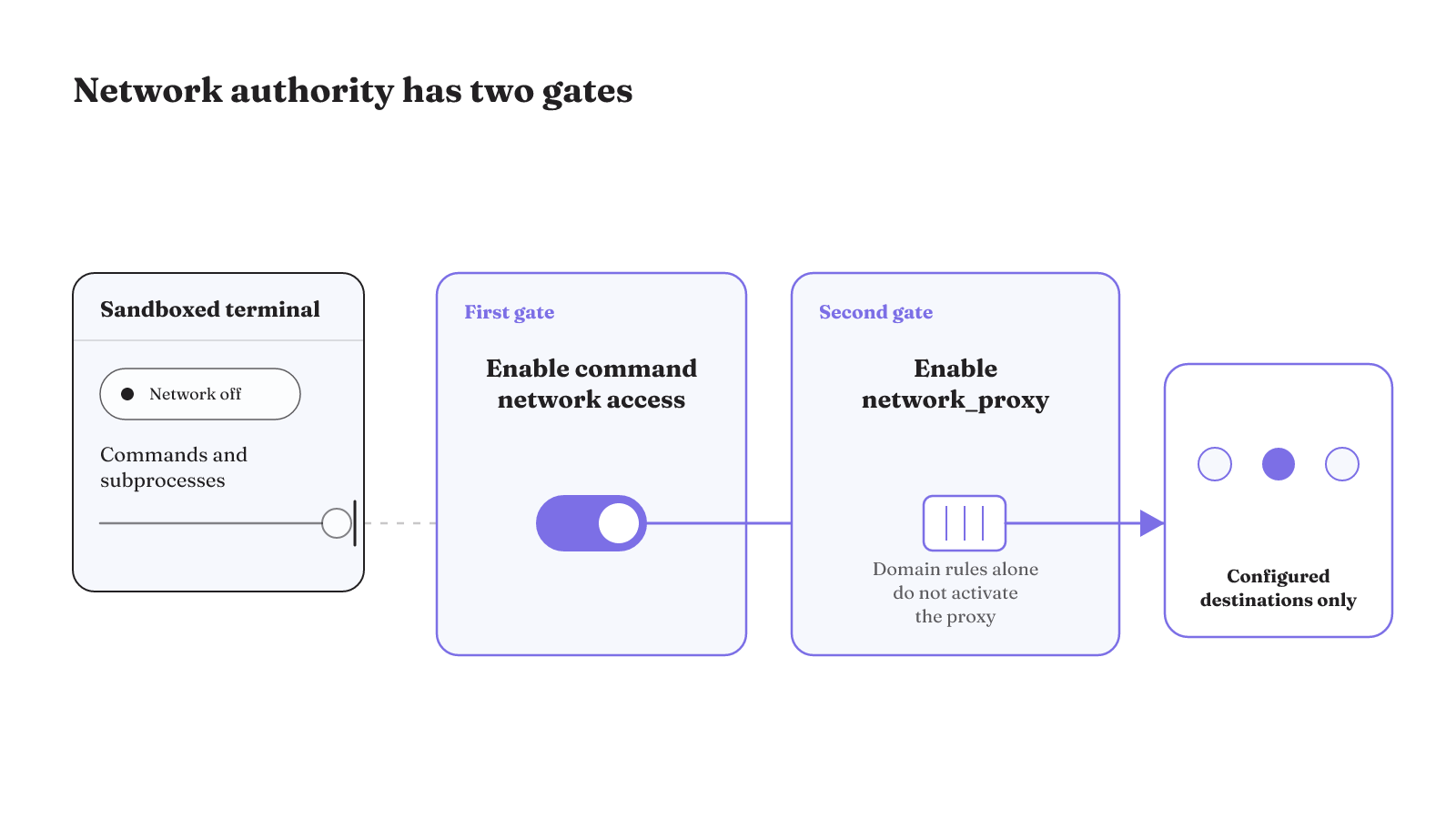
In the default workspace-write sandbox mode used by the ChatGPT desktop app, Codex CLI, and IDE extension, network access begins disabled. It must be explicitly enabled. Once command network access is on, the network_proxy feature can constrain traffic to a configured destination policy. Those rules apply to scripts, programs, and subprocesses spawned by commands. Domain rules alone do not activate the proxy.
That order matters to the resulting configuration. First, command network access is enabled. Then network_proxy constrains that traffic according to the configured policy. A domain list without the proxy does not produce the same network boundary.
Coding agents can edit files, run commands, call APIs, open pull requests, and interact with CI/CD systems. Documented risks include indirect prompt injection, excessive permissions, secret leakage, supply-chain manipulation, runaway automation, and unclear delegation. A prompt hierarchy is not an authorization boundary when the agent reads potentially hostile repository content.
File approval and network policy should therefore remain visible as distinct parts of the harness. An edit prompt governs a file action. The Codex proxy policy governs traffic from commands and subprocesses after network access is enabled. Neither fact turns repository text into trusted authorization.
A network review can stay concrete: is command network access enabled, is network_proxy enabled, and which destination policy constrains it? Scripts and subprocesses belong in that review because the Codex rules apply to traffic they create. Repository content needs a separate trust decision because prompt hierarchy does not supply an authorization boundary against hostile material.
Verification belongs inside the workflow
An agent-oriented repository can pair automated tests with guardrails. That makes verification part of the work path, not merely a judgment applied to the final response. The repository and its automation become part of the system in which the agent acts.
GitHub shows one explicit human gate in that path. When Copilot coding agent opens a pull request or pushes changes, GitHub Actions workflows require human approval before running. The gate can protect workflows that may reach tokens, secrets, or repository permissions. It also slows test feedback. The protection and the delay belong to the same control choice.
That tradeoff is easier to reason about when the workflow names the object under review. The agent proposes repository changes through a pull request or push. A person approves the workflow run. Actions then provide the test path. This is more specific than saying a system has "human oversight," because it identifies the boundary and the work that waits there.
Monitoring adds another layer, but it does not replace evaluation or preventative control. A defense-in-depth stack can combine monitoring and monitorable reasoning traces with complementary evaluations and preventative controls. Subtler misbehavior may escape monitoring, and false-negative rates on open-ended traffic can remain uncertain without control evaluations and red-teaming.
The resulting verification loop has three named mechanisms. An agent-friendly repository can provide automated tests and guardrails. A human approval gate can stand before workflows that may access secrets or repository permissions. Monitoring can operate alongside evaluations and preventative controls. These mechanisms cover different parts of an execution trajectory, so the workflow should expose each one rather than compress them into a single safety claim.
The tradeoffs are equally concrete. The workflow approval can protect access to tokens, secrets, or repository permissions, but the wait slows test feedback. Monitoring can examine behavior and reasoning traces, but subtler behavior may escape it. Complementary evaluations, preventative controls, control evaluations, and red-teaming remain part of the documented defense-in-depth stack.
When does a coding assistant become an orchestration problem?
A coding assistant becomes an orchestration concern when the work is assigned and tracked through a control plane, not only requested in one interactive session. Symphony turns a project-management board such as Linear into a control plane for coding agents. That mechanism connects project state to agent work.
One internal Codex beta shows how broad the resulting work surface can become. Agents wrote application logic, tests, CI configuration, documentation, observability, and internal tooling, while humans steered and agents executed. This is one organization's internal experiment, not a shared benchmark or a universal outcome. It does show why orchestration must account for more than source-code edits when agents participate across the engineering system.
The board-based control plane and the internal beta answer different questions. Symphony names a mechanism for assigning and tracking agent work through project state. The beta names the categories of work that agents produced under human direction. Together, they show the point at which a coding session expands into a system of work, control, and verification.
Our comparison is deliberately bounded. It records current interfaces, licenses, hosting paths, model routes, and named authority mechanisms. It does not measure which candidate writes better code, passes more tests, needs fewer interventions, or recovers faster. Those questions need a common workload and an evaluation of the execution trajectory. Our open-source agentic AI framework guide explains the surrounding architecture when the decision has moved beyond one coding surface.
For the deeper control, recovery, and workload questions, compare your shortlist with our open-source agent harness guide.