Key takeaways
- LangGraph owns workflow state, orchestration, and routing.
- Claude Agent SDK owns the tool loop, execution, and context.
- Your application must own crash detection, resume coordination, locking, journaling, and safe recovery.
Is Claude Agent SDK better than LangGraph?
Neither runtime is better in the abstract. The useful question is which runtime role your workload needs. Claude Agent SDK provides infrastructure for sophisticated single agents. LangGraph provides control for complex, custom workflows. OpenAI Agents SDK emphasizes multi-agent coordination through handoffs. Those are different starting points, not positions on one feature ladder. There is no single best framework independent of the builder's needs.
Choose Claude Agent SDK when the main job is an agent loop with tools and context. Choose LangGraph when the workflow itself needs explicit state, routing, and custom control. Consider OpenAI Agents SDK when handoffs among agents are central to the design. If you need both a graph-controlled workflow and a capable tool loop inside one step, combining LangGraph with Claude Agent SDK becomes a coherent option.
The tradeoff appears at the boundary. Provider-native SDKs offer tighter model integration and simpler setup, but they also create vendor lock-in. Independent frameworks such as LangGraph add an abstraction layer while providing model flexibility. Combining a graph runtime with a provider-native agent runtime keeps both sets of properties. It does not make either layer disappear.
Our decision rule starts with ownership. If one agent runtime can express the whole workload, a second runtime adds another boundary to operate. If a custom workflow truly needs graph state and routing while one node needs an agentic tool loop, the split has a clear purpose. Our AI agent framework guide can help frame that broader choice. For the closer runtime comparison, see LangGraph versus OpenAI Agents SDK.
Frame the choice around the dominant runtime job. A sophisticated single agent points toward Claude Agent SDK. A complex custom workflow points toward LangGraph. A system organized around agent handoffs points toward OpenAI Agents SDK. The framework name matters less than the responsibility it is being asked to own.
Then account for the cost attached to that role. Claude Agent SDK's tighter model integration and simpler setup come with provider lock-in. LangGraph's model flexibility comes with another abstraction layer. OpenAI Agents SDK supplies handoff-based coordination, but that capability does not make it a universal answer. The workload still decides whether handoffs are the central requirement.
This comparison also prevents a common category error. A sophisticated agent is not automatically a complex custom workflow, and a custom workflow is not automatically a multi-agent system. Decide which description matches the work before comparing features. A runtime can be strong in its intended role without being the right owner for another role.
Add orchestration only when simpler agent designs fall short
Start with the simplest design that can complete the work. Anthropic's guidance is to begin with simple prompts and add multi-step agentic systems only when simpler solutions fall short. That makes the threshold for adding LangGraph concrete: the graph should solve a workflow problem you already have, not merely surround an SDK call.
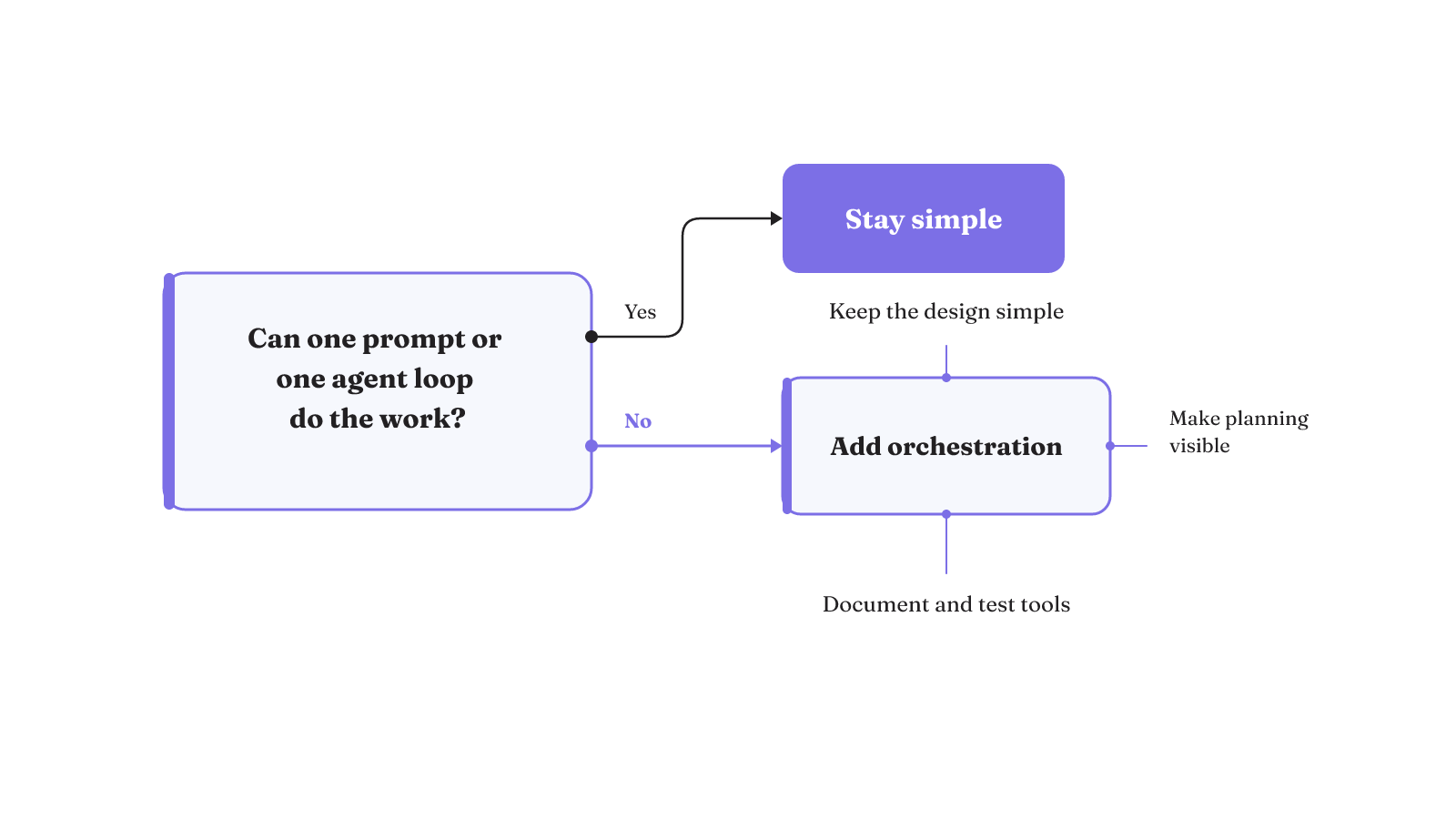
Four checks keep that decision honest:
- Simpler solutions have fallen short. A prompt or a single agent loop cannot express the required work well enough.
- The proposed design remains simple. Adding orchestration has not turned one clear loop into several ambiguous ones.
- Planning is visible. The agent's planning steps are explicit enough to inspect instead of being hidden behind a successful final response.
- The agent-computer interface is documented and tested. Tool behavior is treated as an interface that needs precise documentation and thorough testing.
These checks focus attention on the part of the system that creates the need for another layer. LangGraph can earn its place through workflow state and routing. Claude Agent SDK can earn its place through the agent loop, tool execution, and context management. When those responsibilities are not distinct, the integration is likely carrying complexity without a clear owner.
This is also a useful point to examine the whole surrounding system. Our agent harness guide treats the model as one part of a larger execution path, with state, tools, permissions, evaluation, and recovery around it.
The first check is a threshold. The other three are constraints on whatever you build after crossing it. A multi-step design should still be simple enough to follow. Its planning steps should be visible. Its tool interface should be documented and tested. Passing the threshold does not suspend those design standards.
Visible planning deserves special attention because the final response is not the whole execution. Explicit planning steps make the path inspectable while the agent is deciding what to do. Tool documentation and testing serve a different boundary: they make the interface between the agent and the computer concrete. Both controls should exist before an additional runtime makes the path longer.
Is Claude Agent SDK the same as Claude Code?
No. Claude Code is an agentic coding tool for delegating coding tasks. Claude Agent SDK is for building agents that run inside a process operated by the developer. The SDK provides the tools, agent loop, and context management that power Claude Code, but the two are not the same product.
There is a third layer that is easy to confuse with both: Claude API client SDKs. With a client SDK, the application sends each request and handles each response. Claude Agent SDK operates at a higher level, with an agent loop, tool execution, and a runtime.
The distinction changes the architecture discussion. Claude Code is an application you use for coding work. Claude Agent SDK is a runtime component you place inside an application you operate. A Claude API client SDK leaves the request-response loop with your application. Only the middle option is the agent runtime being placed inside the LangGraph node discussed here.
That boundary also prevents an appealing but faulty shortcut: behavior associated with Claude Code should not be assumed to define how an application built on Claude Agent SDK runs. For the integration, design around the SDK's documented runtime and the process your application operates.
The three options place work at different levels. With Claude Code, you delegate a coding task to an agentic coding tool. With Claude Agent SDK, you build and operate the process that contains the agent loop. With a Claude API client SDK, your application sends every request and handles every response. The name "SDK" does not make the latter two equivalent.
For LangGraph with Claude Agent SDK, the developer-operated process is the important fact. Your application is not merely sending an isolated model request. It is hosting an SDK runtime with tool execution and context management, and LangGraph is calling that runtime from a node. This is the boundary that needs operational ownership.
Where should you start with Claude Agent SDK documentation and examples?
Start with the Claude Agent SDK overview. Its quickstart builds an agent that finds and fixes bugs, and Anthropic also provides demo applications for local development. Together, those examples give you a small SDK-owned loop to understand before placing it inside a graph node.
Pay particular attention to custom-tool errors. In a custom tool, an uncaught handler exception stops the agent loop and causes the query() call to fail. Returning isError: True instead allows the loop to continue and exposes the tool error to Claude for retry or adaptation. That is an execution choice inside the SDK loop, not a substitute for workflow recovery outside it. The custom-tool error behavior is therefore worth testing before the graph adds another failure boundary.
A practical learning sequence is small: run the bug-fixing quickstart, inspect a local demo, then create one custom tool with both error branches. Observe the difference between a stopped loop and an error returned into the loop. Once that behavior is legible, place the same SDK call behind a LangGraph node. The graph integration should preserve your understanding of the SDK loop instead of hiding it.
The two custom-tool branches deserve separate tests because they produce different runtime outcomes. An exception that escapes the handler ends the loop and fails query(). A returned isError: True result stays inside the loop, where Claude can retry or adapt. The first path ends the SDK invocation. The second gives the loop another chance to respond to the tool failure.
That distinction tells you what the surrounding node can receive. A stopped invocation reaches the graph as a failed SDK call. A returned tool error remains part of the SDK-owned execution. Test both before adding graph-level retry behavior, so an in-loop adaptation is not confused with recovery of the whole node.
LangGraph with Claude Agent SDK starts at a graph-node boundary
At the top level, a LangGraph node calls Claude Agent SDK. In this documented pattern, LangGraph owns workflow orchestration, state, and routing. Claude Agent SDK owns execution, tools, context, and agent capabilities. The surrounding application still needs explicit responsibility for operating the combined system.
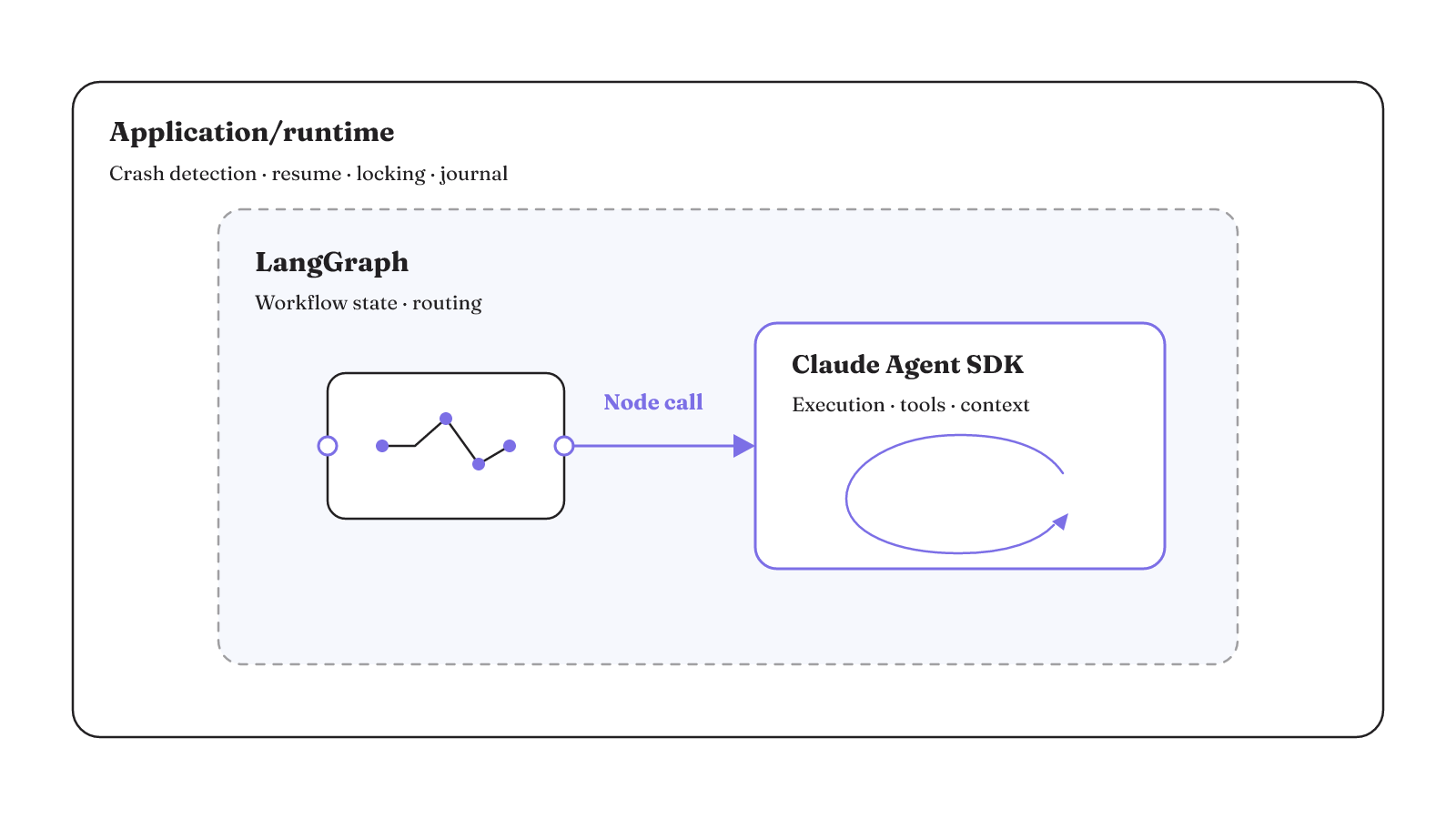
The ownership matrix below makes that split inspectable. A dash means the responsibility is not assigned to that layer in this pattern.
| Responsibility | LangGraph | Claude Agent SDK | Application/runtime |
|---|---|---|---|
| Workflow and routing | Owns graph orchestration, workflow state, and routing | Runs when the graph node invokes it | Operates the combined process |
| Agent execution and context | Supplies the node call boundary | Owns execution, tools, context, and agent capabilities | Operates the process containing the SDK agent |
| Tool-event hooks | Contains the node in the wider workflow | Emits hook events for tool calls, session starts, and execution stops | Runs application code in response to hook events |
| Dangerous-operation blocking | Routes work to the SDK node | Hooks can block an operation before execution; plan mode can produce a plan without editing files | Provides the canUseTool callback required for plan-mode file edits |
| Human approvals | Holds workflow state around the node | Hooks can require approval for sensitive database writes or API calls | Keeps human approvals durable |
| Audit logs | Holds graph-state snapshots | Hooks can log and audit every tool call | Stores the execution journal |
| Graph-state persistence | A checkpointer saves state snapshots at every step | Executes inside the checkpointed graph node | Provides and operates the checkpoint store |
| Crash detection and resume coordination | Supplies the last successful graph state | Does not own graph recovery | Detects crashes, resumes with the correct thread ID, and coordinates distributed locking |
| Retry and side-effect recovery | Restores graph state for coordinated resumption | Can receive a returned tool error for retry or adaptation | Uses an execution journal, idempotent tool boundaries, versioned prompts and tools, and recovery tests |
If approvals are the main boundary in your workflow, our LangGraph human-in-the-loop guide provides a focused way to reason about where those pauses belong.
What does LangGraph persistence actually recover?
In-memory checkpoints lose progress. In the documented AWS implementation, integrating DynamoDBSaver with LangGraph provides durability, point-in-time workflow resumption, long-running sessions, and human oversight.
The concrete mechanism is the last successful checkpoint. DynamoDBSaver can query that checkpoint and resume the workflow from it. A compiled LangGraph checkpointer saves graph-state snapshots at each step and can restart from the last successful step after a node failure.
That recovered snapshot answers, "What graph state can we restart from?" It does not answer every operational question around the restart. A checkpointer alone does not automatically handle crash detection, resumption, or concurrent recovery. The application must detect the crash, resume with the correct thread ID, and coordinate distributed locking. Those responsibilities are part of the runtime design even when graph state is safely stored.
This is the useful limit to keep in view. DynamoDBSaver can preserve and retrieve the checkpoint needed for point-in-time resumption. The application coordinates the act of resuming. A durable state snapshot and an operating recovery process are both needed, but they are not the same mechanism.
The documented implementation uses that durable checkpoint path to support long-running sessions and human oversight. The workflow can return to its last successful checkpoint instead of relying on in-memory progress. Design the restart around that exact checkpoint, thread ID, and application-owned coordination.
Test the boundary before enabling side effects
Begin with a read-only Claude Agent SDK test configuration. When tests permit file writes, system commands, or MCP calls, plan for environment reset and test isolation. That keeps the first integration exercise focused on the runtime boundary before external effects make failures harder to interpret.
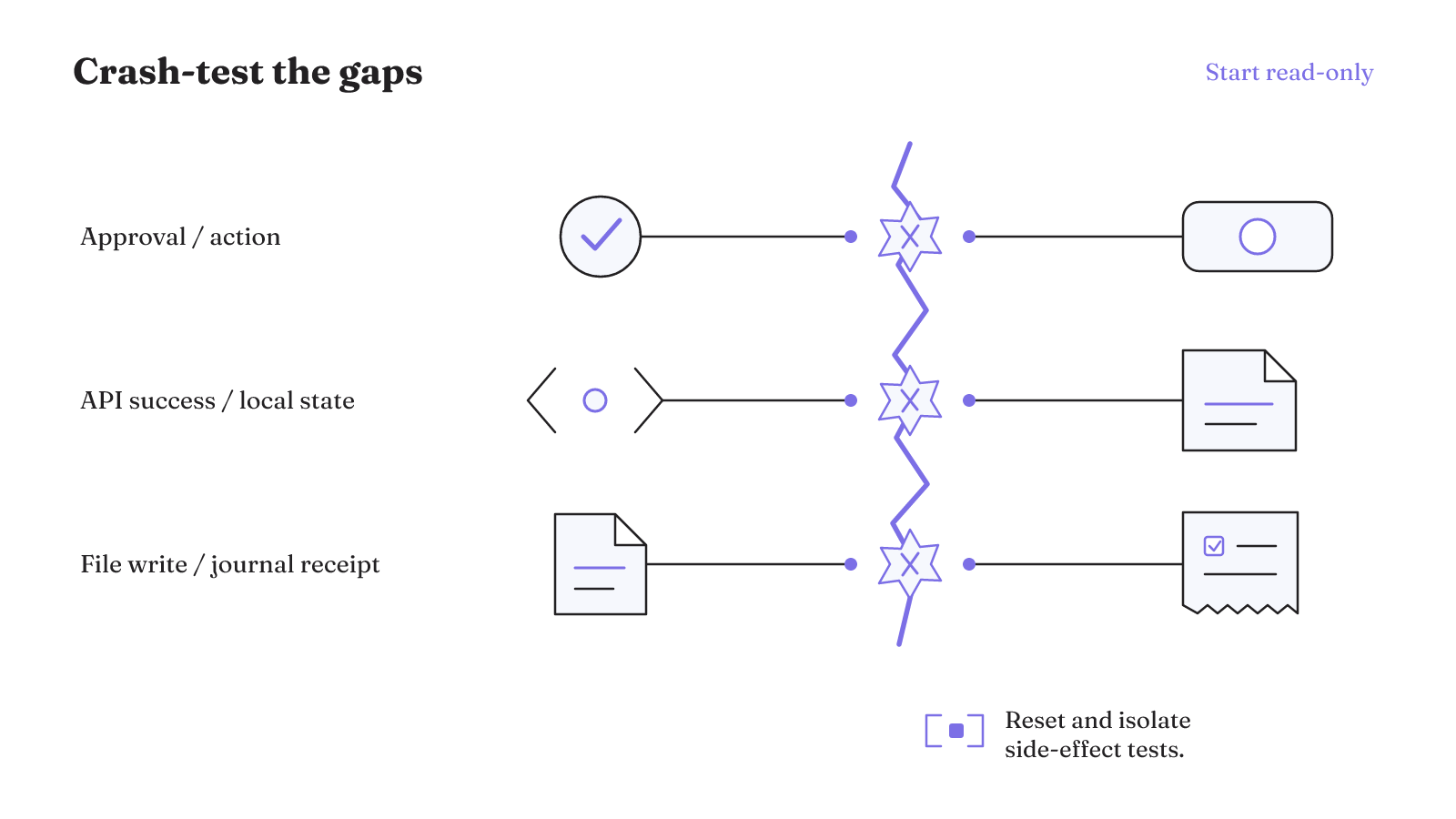
Crash the runtime at each of these recovery boundaries:
- Crash after a model response.
- Crash after an external API succeeds but before local state is written.
- Crash after a file write but before the journal receipt.
- Crash after human approval but before the approved action.
- Crash during trace export.
- Crash during prompt or tool version rotation.
- Crash while an outbound message is queued.
These cases exercise different parts of the combined harness. They test whether the application can distinguish a completed effect from work that is merely ready to retry. They also test whether approvals, versions, and queued messages survive the recovery path without becoming detached from the action they governed.
The goal is not to prove that a node invocation works. It is to learn what happens when the invocation stops at an inconvenient boundary. Run these tests against the execution journal, idempotent tool boundary, durable approval record, and graph checkpoint that the design assigns to recovery.
Keep read-only tests separate from tests that can change an environment. File writes, system commands, and MCP calls need both reset plans and test isolation. Those plans are part of the test design once side effects are enabled.
The crash location should be deliberate. A crash after an API succeeds is not the same boundary as a crash before the call. A file write followed by a missing journal receipt creates a different recovery question from a model response that produced no external effect. Approval, trace export, version rotation, and queued messages each have their own boundary in the checklist.
Run the same cases after changing prompt or tool versions. Durable agents need versioned prompts and tools, and the recovery test includes a crash during version rotation. Keep the journal, durable approval, and recovery test in scope alongside those versioned components.
When that control boundary is clear, compare LangGraph with OpenAI Agents SDK by the control surfaces each runtime exposes. Use the workload, authority, failure mode, and recovery path as the decision criteria.