Key takeaways
- An OpenAI Agent SDK human in the loop flow pauses at a risky tool call and surfaces the interruption.
- The reviewer approves or rejects the pending action.
- The application preserves state and resumes the same run, including when review happens later.
How does OpenAI Agents SDK human in the loop work?
Human approval is a pause inside a run, not a separate conversation. When execution reaches an approval point, the OpenAI Agents SDK pauses the run and exposes the interruption. The application then:
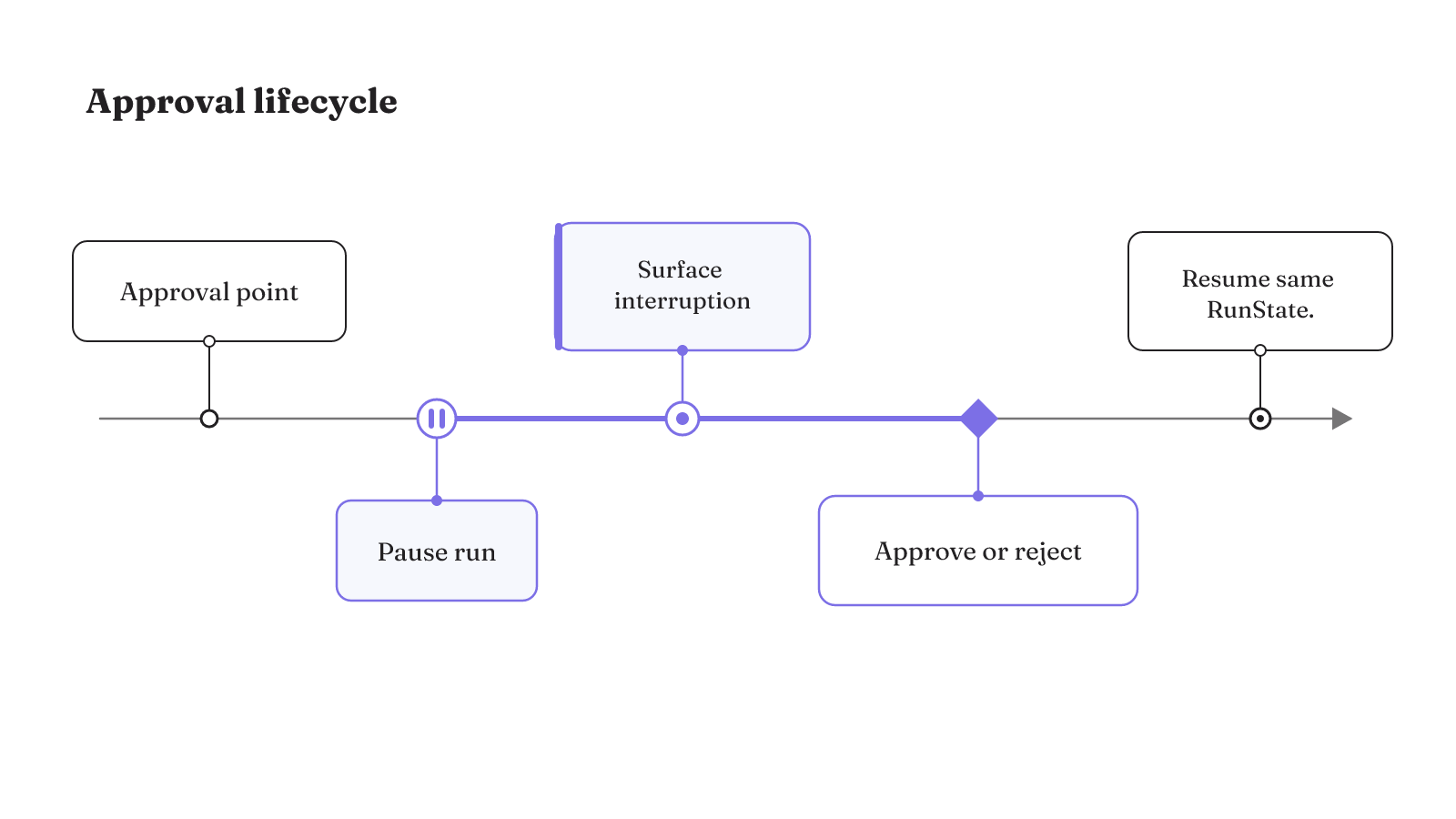
- Reaches the approval point.
- Pauses execution.
- Surfaces the interruption for review.
- Applies an approval or rejection.
- Resumes from the same
RunState.
That lifecycle is the useful foundation for an approval gate. The syntax marks the pause. The harness still has to decide where the pause belongs and what must survive while a person makes the decision.
Gate by consequence and reversibility
Place approval where an action becomes irreversible, ambiguous, or expensive to unwind. Routine steps should not consume the same human attention as a card charge, data deletion, or production change. Those risky side effects are the actions that human approval is meant to catch.
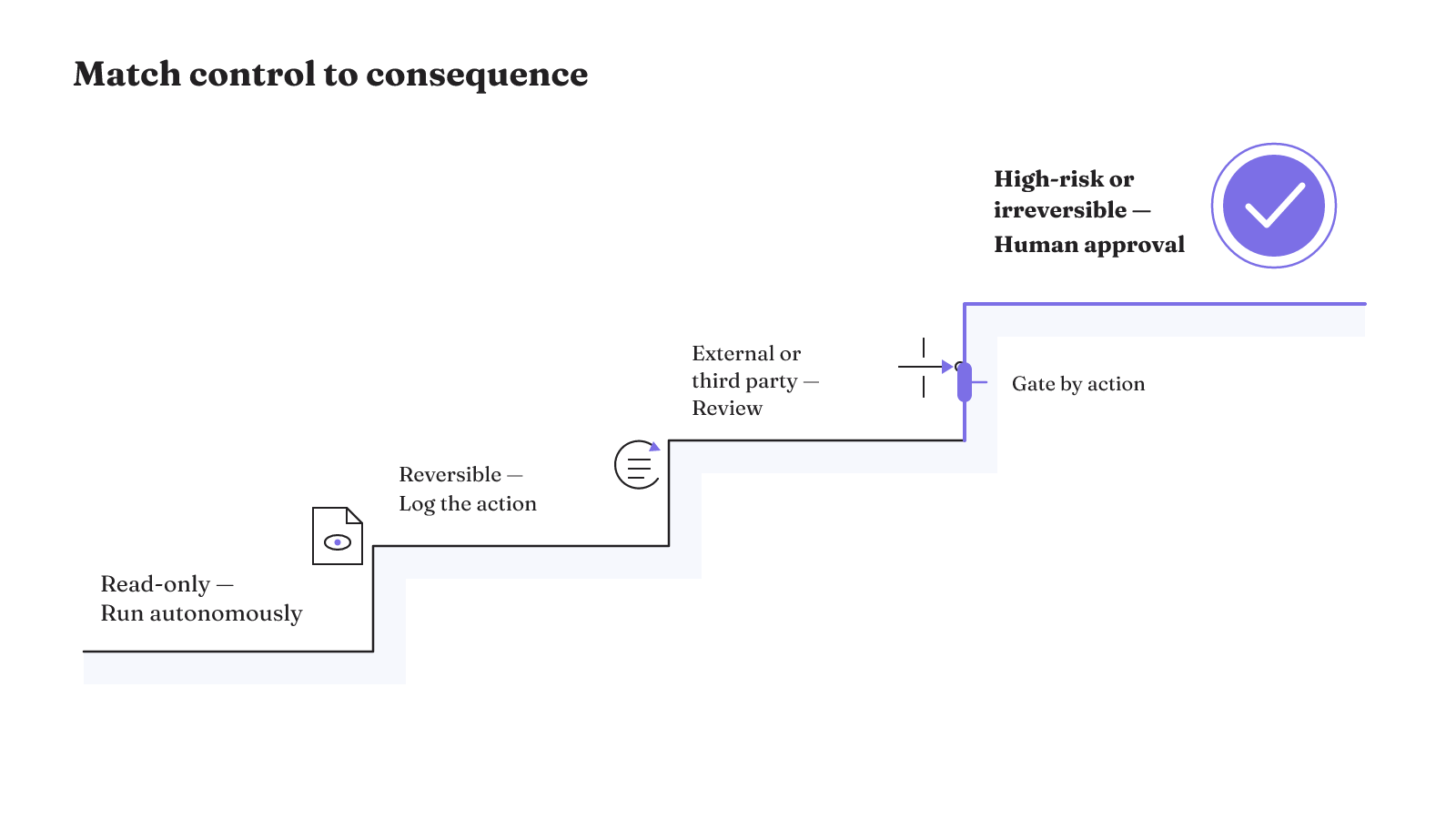
The control should come from the action, not from the model's reading of the request. Enforce the requirement in the workflow definition. This keeps the authority boundary stable even when prompts, users, or model outputs vary.
| Action class | Matching control |
|---|---|
| Read-only work | Let the action run autonomously. |
| Reversible action | Run it with a log of the action. |
| Action touching an external system or third party | Put the action through review. |
| High-risk or irreversible action | Require human approval. |
This four-row matrix is a starting point for classifying a tool call. A risk-proportionate control model adds useful detail. Low-risk, non-sensitive internal work can move quickly. Moderate-risk customer-facing or operational work can use guardrails and audit trails. High-risk work involving PII, finance, or regulated activity adds enhanced logging, human review, and isolation.
The middle of the matrix deserves care. An action can need guardrails and an audit trail without requiring a person to approve it. Human review is the stronger boundary for consequential actions, not the default control for every tool. This distinction keeps routine work moving while reserving a decision point for effects that matter.
Before shipping a tool, name the side effect in plain language and place it in one row. If the action can cross rows depending on its inputs, the workflow still has to determine the applicable gate from the action being attempted. The agent should not negotiate its own permission at runtime.
A resumable approval needs a complete handoff record
A pause may last longer than the process that created it. Treat delayed approval as a durable handoff between the running system and the reviewer. The pending action, the decision, and the state needed for continuation all have to remain legible.
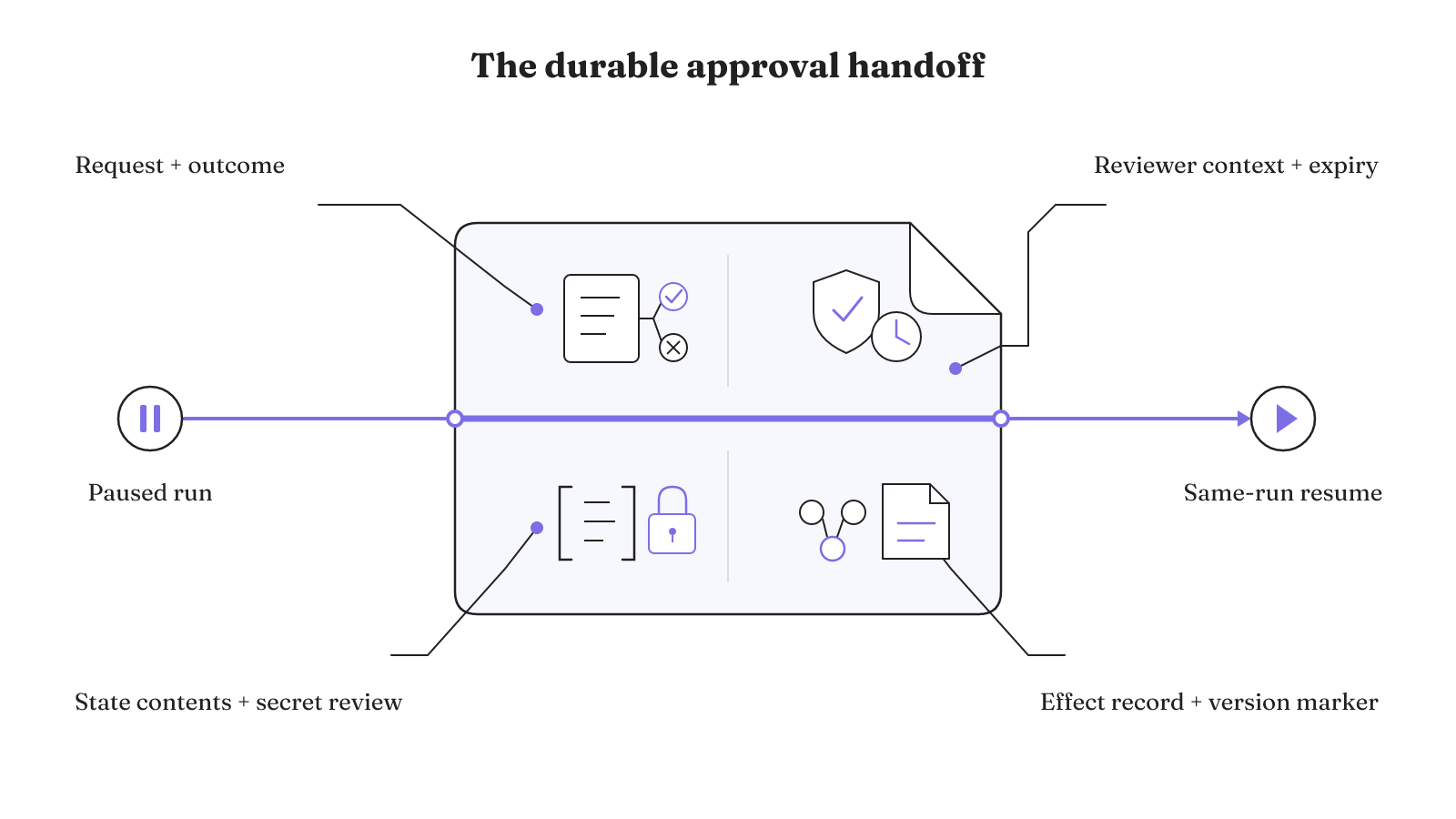
Use this eight-item checklist for each approval request:
- Exact request: Hold the precise action awaiting review.
- Decision outcome: Define what approval and rejection mean for that action.
- Reviewer context and authority: Give the reviewer enough context to judge the request and make sure that person has authority to decide.
- Decision expiry: Expire a decision when it has become stale.
- Downstream-effect record: Connect the resulting effect to the evidence record.
- Serialized-state contents: Account for application context and SDK-managed metadata carried in the stored state.
- Secret review: Check whether persisted context contains secrets that would travel with stored or transmitted state.
- Version marker: Store the agent-definition or SDK version needed to route the state back to compatible code.
The Python run-state documentation makes the persistence boundary concrete. Serialized state can contain application context along with approvals, usage, serialized tool input, nested agent-as-tool resumptions, trace metadata, and server-managed conversation settings.
Those contents belong in the design of the approval handoff. The exact request and decision outcome describe what the reviewer is deciding. Context and SDK metadata supply the state that will continue after that decision. The downstream-effect record links the result back to the approval record. Each part remains available when review happens outside the process that first paused the run.
That state boundary also creates a secrets boundary. Treat RunContextWrapper.context as persisted data whenever state will be stored or transmitted. Do not put secrets there unless they are intentionally meant to travel with the state. A background worker, queue, database, or reviewer interface is not neutral if the serialized context carries material you did not mean to move.
Long-lived requests add a compatibility problem. Store an agent-definition or SDK version marker beside serialized state. When models, prompts, tool definitions, or SDK definitions change, the marker can route deserialization to matching code and avoid incompatibilities. The reviewer may be deciding on yesterday's request after today's code has changed. The state needs a path back to the code that understands it.
Taken together, the checklist defines a resumable unit of work. It holds a specific action, a qualified decision, the state needed to continue, and the record of the resulting effect. It also makes two quiet risks explicit: persisted context can carry secrets, and stored state can outlive compatible code. Both risks belong in the approval design before a request is allowed to wait.
Separate tool access, guardrails, approvals, and skills
Approval is one control layer. It does not decide which tools an agent can see, replace request and output checks, or define the reusable workflow itself.
Start with tool visibility. Choose which tools are available to the agent, then put approval checks on the actions that need review. A hidden tool cannot be called. A visible tool can still have a gated side effect. These are separate authority decisions, and combining them makes the resulting policy harder to read.
Guardrails check requests and outputs. Approvals pause risky side effects. Lifecycle callbacks provide logging, tracing, and audit events. Each control has a different job in the harness:
- Put product behavior in
Agent.instructions. - Put repository guidance in
AGENTS.md. - Put reusable workflows in
.agents/skills/*/SKILL.md. - Put runtime review on the tool action through its approval check.
This is also the cleanest way to think about OpenAI Agent SDK skills. A skill is reusable workflow material. It is not the agent's identity, a runtime permission, or the executable tool itself. Keep agent identity, reference material, executable logic, and runtime configuration separate as well. A reviewer should be able to see that an action stopped because of its approval policy, not because a skill happened to describe cautious behavior.
The separation also prevents descriptive guidance from becoming an authority grant. Agent.instructions can define product behavior, and a skill can package a repeatable workflow. The available tool set still determines what the agent can reach. The approval check still decides whether a pending side effect needs review. The workflow remains the place where that requirement is enforced.
The broader agent loop remains responsible for connecting these layers. Instructions shape behavior. Tools create possible actions. Guardrails inspect requests and outputs. Approval determines whether a pending side effect may proceed. Logs and callbacks preserve what happened.
Python approval in one complete flow
The Python path is compact enough to show as one control-flow skeleton. Declare the tool with @function_tool(needs_approval=True), run the agent, convert the first result with first.to_state(), resolve every interruption on that state, and pass the state back to Runner.run.
@function_tool(needs_approval=True)
async def consequential_action(request):
 ...

first = await Runner.run(agent, input=user_input)
state = first.to_state()

for interruption in first.interruptions:
 if reviewer_approved(interruption):
 state.approve(interruption)
 else:
 state.reject(interruption)

result = await Runner.run(agent, state)
The important object is state. Approval or rejection is applied there, and the resumed call receives that same state. The official migration example documents this sequence. Your application supplies the reviewer decision; the SDK supplies the paused-run continuation path.
What happens when review arrives later or streaming is on?
Both cases use the same paused-run model. Approval should remain part of the interrupted run instead of becoming a new turn. That treatment keeps turn counts, history, and server-managed continuation IDs consistent.
For a streamed run, wait for the run to settle before inspecting its interruptions. The application then resolves the approval decisions and resumes from the same state. The streamed approval flow therefore changes when the application inspects the pause, but it does not create a second continuation model.
Delayed review changes where the waiting state lives. Serialize and store the state, let the decision arrive later, then continue the same run from that stored state. This is the path for an approval that cannot be completed inside the request that first reached the gate.
The distinction matters at the application boundary. Streaming asks the current process to wait for settlement before it handles interruptions. Asynchronous review asks the application to persist the serialized state until a decision exists. Both paths return to the same run. Neither requires treating the human response as a fresh user message.
That consistency is a strong design test for an OpenAI Agent SDK tutorial or example. If streaming, delayed review, and immediate review each invent a different conversational path, the example hides the core state transition. The implementation should make the pause visible, preserve the state, apply the decision, and continue the original trajectory.
How do JavaScript and nested agents surface approval?
In JavaScript, an approval-required tool call also pauses the run, returns interruptions, and can resume later from the same RunState. The JavaScript human-in-the-loop guide describes approval as a run-wide surface.
Run-wide means the interruption may come from more than the current agent. Approval covers tools on that agent, agents reached by handoff, and nested agent.asTool() execution. A nested tool call does not create a private approval channel that the root run cannot see.
For agent.asTool(), there are two possible approval layers. The agent tool itself can require approval through needsApproval. A tool invoked later inside the nested agent can also require approval. In both cases, nested interruptions surface on the outer run. The application approves or rejects them there, then resumes the original root run.
That outer-run behavior gives the reviewer one interruption surface even when execution crosses an agent boundary. It also keeps the pending decision attached to the trajectory that requested it. The application does not have to turn the nested agent's pause into an unrelated conversation.
Ownership is a separate architecture choice. In Python, agent.as_tool(...) keeps the main agent in charge. With handoffs=[...], a specialist takes ownership of the final response. Pick the ownership model for the work, then apply approval to the consequential tools reachable through that model. An ownership boundary does not erase the approval boundary.
This is where simple OpenAI Agent SDK examples often need one more test. Exercise both the approval on the nested agent tool and an approval raised by a tool inside that agent. Confirm that each interruption appears on the outer run and that the original root run is the one resumed after the decision.
Use traces and diagnostics for audits and debugging
An approval record should show more than the final text. The normal server-side Agents SDK path includes tracing, and the Traces dashboard can inspect model calls, tool calls, handoffs, and guardrails. Those events expose the path that reached the approval boundary.
The SDK's richer result and diagnostic objects can expose item-level tool and handoff records, raw model responses, guardrail results, and usage details. These records support audits, custom interfaces, and deep debugging.
For an approval flow, connect those diagnostics to the durable handoff record. The exact request gives the reviewer the pending action. The decision record captures approval or rejection. Tool, handoff, model, and guardrail records show the surrounding execution. Usage and raw response details remain available when a deeper investigation needs them.
The final response is only one output of an acting system. The useful unit for review is the trajectory: what the model produced, which tool it attempted, where the workflow paused, who decided, and which state resumed. Tracing and diagnostics make that path inspectable. They do not replace the approval boundary, but they give its decisions an execution record.
Map one consequential tool call through the matrix before you ship it. Then test the pause, the stored handoff, both reviewer outcomes, and the same-run resume. If you are still choosing a runtime, compare LangGraph and OpenAI Agents SDK by control surface against that exact workload.