Key takeaways
OpenClaw multi agent orchestration can isolate agents inside one Gateway. Independent work is the stronger fit for multiple agents; tightly interleaved work favors one agent using tools in sequence. Treat any logged-in browser profile as an account and data boundary, not just a convenience.
Can OpenClaw run multiple agents?
Yes. OpenClaw can run multiple isolated agents in one Gateway process. Each can have a separate workspace, state directory, and SQLite-backed session history. That answers the capability question, but it does not decide whether a particular workload should be split.
For OpenClaw multi agent setup, the CLI gives you a direct inventory. The openclaw agents command manages isolated agents across workspaces, authentication, and routing. Run it without a subcommand to get the OpenClaw agents list. The result tells you which agents are configured. It is a useful starting point for tracing who owns state and where messages go.
The inventory becomes useful when you connect each listed agent to its workspace, authentication boundary, and routing assignment. Read a listed name together with those three settings. The name shows what is configured. The settings show what the agent controls and how work reaches it.
If you are looking for an OpenClaw multi agent GitHub starting point, the public raulvidis/openclaw-multi-agent-kit repository describes templates for multi-agent AI teams with Telegram supergroup integration. Read that description literally. It establishes the repository's stated template and integration scope, not current compatibility, maintenance, licensing for your use, or production readiness.
More agents are therefore possible. The harder question is whether the workload gives those agents clean boundaries.
Which orchestration pattern fits your workload?
Choose the pattern from the shape of the work, not the number of agent names you can configure. In a comparison of common patterns, subagents fit parallel execution and large-context domains. Skills fit single and repeat requests. Handoffs also fit single and repeat requests. A router fits single requests, parallel execution, and large-context domains.
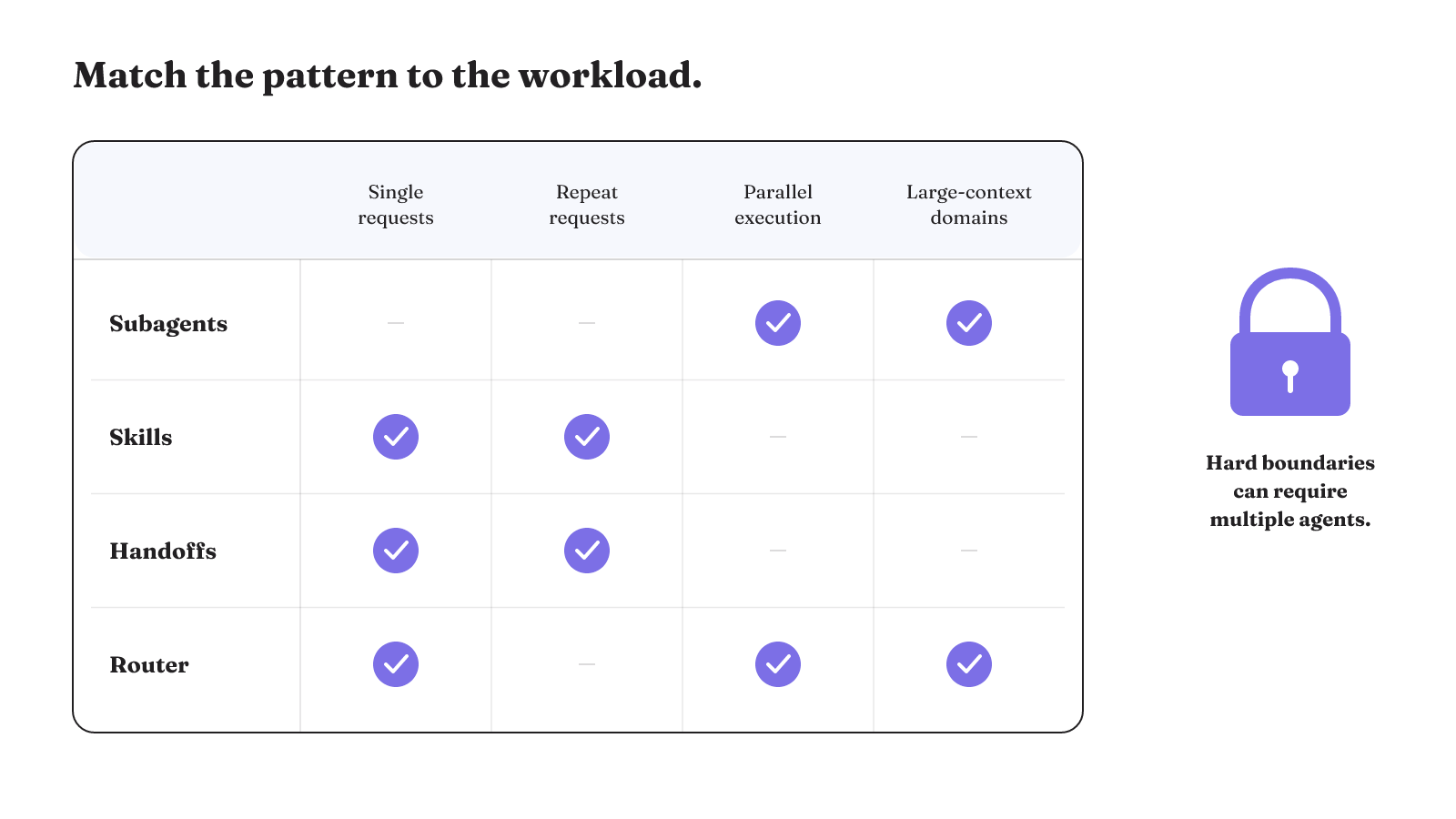
Those patterns solve different problems:
- A subagent pattern matches work that can proceed in parallel or needs a large, separate context.
- A skill matches a request that one agent can handle with a repeatable capability.
- A handoff matches a request that should move from one agent to another.
- A router matches a request that needs to be directed, including parallel work and large-context domains.
The overlap is narrow: subagents and routers both cover parallel, large-context work, while skills and handoffs both cover single and repeat requests.
The split becomes more compelling when the boundary is not optional. Security, compliance, organizational separation, or guaranteed multi-domain scaling can create hard architectural boundaries that warrant multiple agents. For an OpenClaw design built from isolated agents, independent work is also a better fit for multi-agent execution. Tightly interleaved work is better handled by one agent making sequential tool calls.
So what is the best AI agent orchestrator? There is no useful answer apart from the workload. We choose agent architectures by workload, authority, failure mode, and recovery requirements, not by labels or feature counts. Our agent orchestration framework guide gives that broader framework decision the same treatment. For OpenClaw, the immediate test is whether each proposed agent can own a coherent slice of work and state.
State ownership is the first setup boundary
An OpenClaw persona is more than a prompt. Its scope includes workspace files, authentication profiles, model registry, and session store. If two proposed roles need different boundaries across those parts, the agent split has something concrete to enforce. If ownership remains vague, adding another persona name does not resolve it.
The workspace deserves particular care. OpenClaw describes it as the working directory for file tools and workspace context, and says to treat it as private memory. That makes the workspace an operating boundary. Identify the files and context that belong to each agent before the workflow runs.
The workspace is also separate from ~/.openclaw/. OpenClaw stores configuration, credentials, and sessions under that state location. Keeping these concepts distinct helps you inspect the right surface: workspace content on one side, and configuration, credentials, and sessions on the other.
There is a configuration detail worth making visible in the design record. A non-default agent without an explicit workspace resolves to <state-dir>/workspace-<agentId>, not the shared default workspace. That fallback provides an agent-specific path. It does not replace the need to decide what that agent should own.
For every agent, write down the workspace, authentication profile, model registry, and session store. That is the minimum state map. Once the state boundary is named, message routing becomes a concrete path instead of an assumption about which persona will answer.
Review that map from both directions. Start with an agent and identify the state it owns. Then start with a workspace, authentication profile, registry, or session store and identify its owning agent. This catches a different design question: whether every important state surface has an owner, not merely whether every persona has a directory. Keep the literal configured paths in the record so the intended map can be compared with the running layout.
OpenClaw bindings route inbound messages
Bindings route inbound messages to agents. A binding maps a channel account, such as a Slack workspace or WhatsApp number, to an agent. This is the core OpenClaw multi agent communication path for inbound traffic. Your design needs an explicit answer for which account maps to which agent.
Isolation also needs to be observable. In one affected OpenClaw multi-agent Gateway run, one agent's conversation history and instructions appeared in another agent's session logs. This was an affected run, not a claim about every Gateway deployment. It is still a sharp inspection case: session logs can reveal whether the intended boundary held during real execution.
Do not confuse routing with the protocol used for another layer. The Model Context Protocol standardizes access to tools and contextual data. The Agent-to-Agent protocol covers peer coordination, negotiation, and delegation. Those roles do not establish that either protocol is built into OpenClaw. They simply separate tool-and-context access from peer coordination when you reason about an orchestration system.
This gives OpenClaw multi agent communication three separate surfaces to inspect. The binding identifies which agent receives an inbound message. Session logs show what each agent actually carried during a run. Protocol choice describes either access to tools and context or coordination between peers. Keeping those surfaces distinct makes a routing error easier to distinguish from a session-boundary or protocol-design error.
Once an agent can receive a message and reach tools, authority becomes the next boundary.
Browser access inherits the profile's reach
A browser profile is an authority boundary. When browser control uses a profile with logged-in sessions, the model can access the accounts and data available through that profile. The profile you select therefore defines what an acting agent can reach.
OpenClaw's browser-control guidance prefers a dedicated agent profile over a personal daily-driver profile. That is a specific recommendation about profile choice. It does not mean profile separation removes prompt-injection, data-exfiltration, or account-compromise risk.
The boundary is especially consequential with a remote Gateway. OpenClaw states that browser control in that setting is equivalent to operator access to everything the selected browser profile can reach. If the profile holds several logged-in accounts, all of those reachable accounts and their available data sit inside the browser-control boundary.
Treat profile selection as you would any other grant of authority. Name the chosen profile in the agent's permission map and inspect the accounts and data it exposes. A dedicated profile narrows the selection from a personal daily-driver profile, but the system still needs controls for the content the agent consumes and the actions its connected tools permit.
Connected tools expand the permission surface
An email can look like ordinary work while carrying instructions for the agent. OpenClaw prompt-injection exposure includes instructions embedded in emails, messages, or linked content. The risk enters through material the agent consumes, so a clean routing map alone does not settle what the agent may act on.
The outbound path can look ordinary too. OpenClaw data-exfiltration exposure includes an agent reading files and forwarding their contents through chat or email channels that resemble normal activity. That joins two permissions that may each appear routine: reading a file and sending a message. Inspect the combined reach of the tools assigned to an agent, including which files it can read and which chat or email channels it can use.
Treat those permissions as a chain. File access plus a chat or email channel creates the path described above, even when each permission looks routine on its own. When a new tool or token joins the chain, review the whole reachable path and the agent policy that contains it.
Authority can also drift after the initial setup. Privilege creep can occur as more tools are connected, tokens accumulate, permissions expand, and the blast radius is not revalidated. Review the current tool and token set for each agent, not only the original configuration.
A reply is not a completion signal
Conversational activity can coexist with stalled execution. In affected OpenClaw runs, agents appeared to accept tasks while producing placeholder responses, stalled work, or little visible execution detail. A reply can show that the conversational surface is active without showing what work was performed.
Those affected runs included four distinct failure categories: upstream model errors, Gateway instability, conversational filler without tool execution, and a gap between backend logs and user-visible status. None of that establishes universal OpenClaw behavior. It does show why task acceptance and a natural-sounding response are weak completion checks on their own.
For a tool-dependent run, we recommend inspecting tool execution, backend logs, work output, and user-visible status. Define the intended end state before the run, then choose the output or execution record that will show whether the work reached it. This is our readiness check for a tool-dependent workflow.
Start with the expected work output. Then check whether the required tool ran and whether the backend record agrees with what the user saw. If those surfaces disagree, do not let the reply settle the question. Keep the mismatch as failure evidence for the next run.
Six checks for OpenClaw multi agent orchestration
Use this matrix on one real workflow before increasing the agent count. Score each row yourself: 0 means the design has no answer, 1 means it has a partial answer, and 2 means the answer is explicit and inspectable. The total is a self-audit of design clarity, not a benchmark or prediction of production performance.
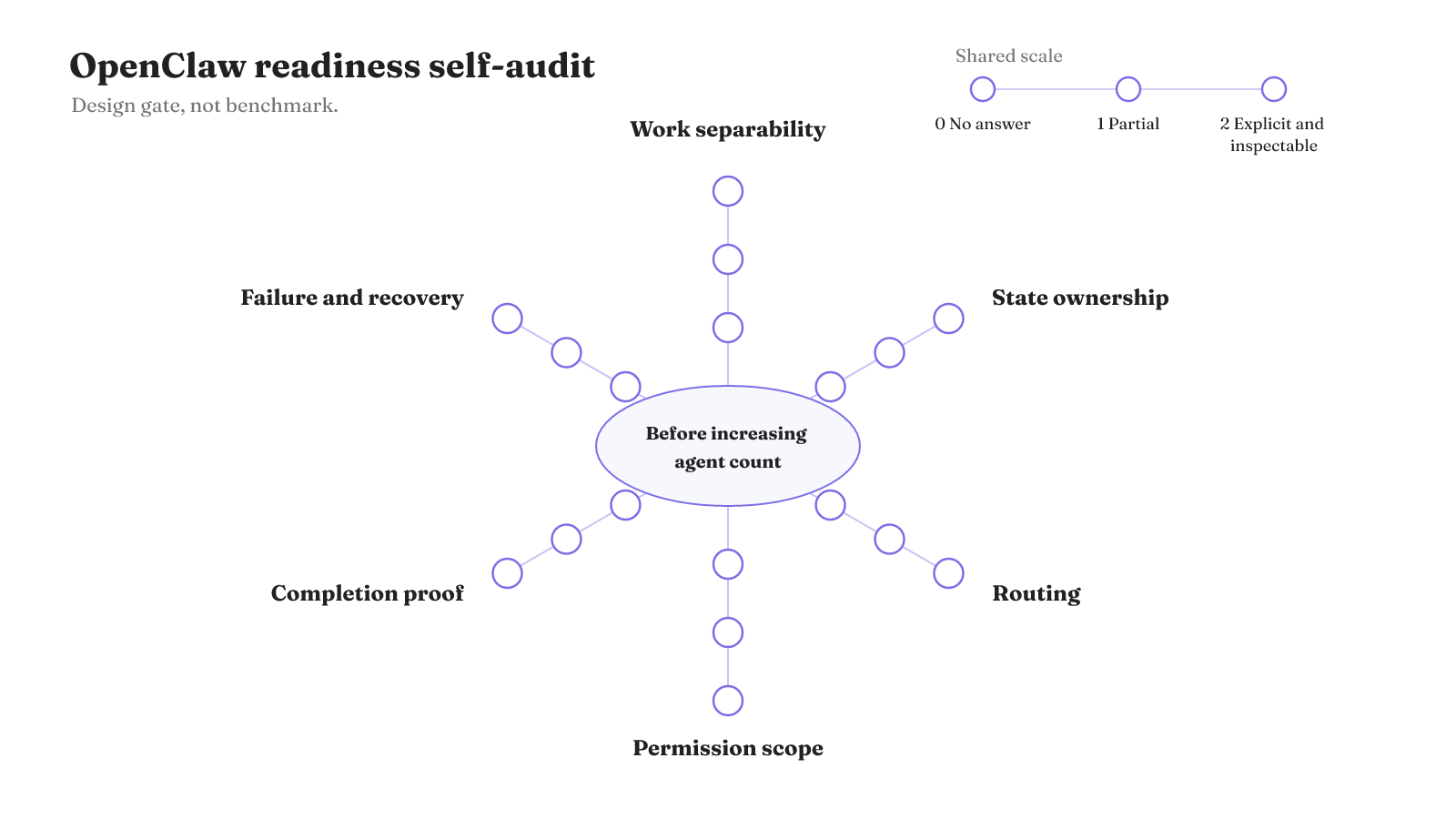
| Check | Design question | Evidence to inspect | Your 0-to-2 score |
|---|---|---|---|
| Work separability | Can the proposed agents do independent work, or is the work tightly interleaved? | The task split and any sequential tool dependencies | 0 / 1 / 2 |
| State ownership | Does each agent own a defined workspace, state directory, and session store? | Agent configuration and the actual state paths | 0 / 1 / 2 |
| Routing and communication | Does every inbound channel account map to the intended agent? | Bindings, channel accounts, and session logs | 0 / 1 / 2 |
| Permission blast radius | Does each agent have a bounded policy and separate credentials where distinct scopes are needed? | Policies; credentials with distinct scope, revocation, monitoring, and audit trails; connected tools; tokens; browser profile reach | 0 / 1 / 2 |
| Completion verification | What observable event will you inspect to decide whether the assigned work finished? | Tool execution, backend logs, work output, and user-visible status | 0 / 1 / 2 |
| Failure or recovery evidence | What record will show a stall, repeated failure, or recovery attempt? | Failure records, the last recorded tool execution, backend logs, and recovery records | 0 / 1 / 2 |
Use the result as a design gate, not a ranking. If tightly interleaved work scores 0 on separability, keep one agent making sequential tool calls instead of adding another. If security, compliance, organizational separation, or guaranteed multi-domain scaling creates a hard architectural boundary, a high total elsewhere cannot answer that requirement. Resolve the boundary before you add agents. For independent work, the matrix can expose unanswered control choices without pretending the total predicts speed, quality, cost, reliability, or production performance.
Apply the matrix to one workflow, using evidence from the configuration and an actual run. Then compare the result with our coordination-budget architecture guide before choosing a framework or adding another agent.