Key takeaways
- Use multiple agents when dependencies, files, and workstreams separate cleanly.
- You still guide the workflow, review actions, and decide which changes to keep.
- Agent communication costs money and time. It can erase the gain from parallel work.
We treat multi-agent coding as a partition-and-control problem. The editor can host several agents, but the harness determines when each one can act and how its work becomes acceptable. The unit to design is not "an agent." It is a bounded coding slice with known inputs, a defined write area, and a release condition. That framing puts the hard questions before execution: whether the work can separate, where authority changes, and what happens when an operation stops halfway through. More activity is easy to create. A legible execution path takes design.
What VS Code multi-agent orchestration can do
VS Code multi-agent orchestration brings several coding-agent surfaces into one editor, but the useful boundary is the work each surface can carry. Given a high-level goal, a VS Code agent can gather context, plan the work, edit files, run commands, and iterate on the result. That is a broad execution path, not merely a code-completion loop.
The available mix widened with VS Code 1.109 in January 2026. That release enabled Claude and Codex agents to run directly alongside GitHub Copilot. You can therefore keep interactive work in the editor while choosing among agent surfaces for different jobs.
The important choice is not how many agents the interface can display. It is what authority each agent receives, what state it can change, and what must happen before its work is accepted. Our broader agent architecture patterns frame that distinction around the workload and its control boundaries. In a coding run, those boundaries become concrete: files, prerequisites, approvals, validation, and recovery.
The high-level goal does not confine the agent to one kind of action. Context gathering and planning happen alongside operations that can change the repository or execute commands. Iteration can then continue on the result. An orchestration plan must account for that whole action range. Naming only the final coding assignment leaves the intermediate reads, decisions, commands, and edits outside the control record.
Can I use subagents in VS Code with Copilot?
Yes. VS Code can delegate focused subtasks to independent subagents. Each subagent works on its assigned part and reports the result to the main agent. That pattern is useful when the main agent should retain the larger task while a narrower investigation or implementation step happens separately.
Copilot sessions also include a built-in research agent, but its output has a different shape. It produces a standalone, shareable report. A focused subagent returns its result to the main agent; the research agent produces a document that can stand on its own. That distinction matters when deciding whether an output feeds another agent or becomes a reviewable artifact for people.
Neither surface decides whether the underlying task is safe to split. Delegation is an execution feature. The partition still needs an engineering boundary. Before opening several sessions, describe each proposed slice precisely enough that another worker can tell what it depends on and where it is allowed to write.
Split coding work only where the boundaries are clear
Start with a decomposition pass. Classify each task by its dependencies, files touched, and logical workstream. These three fields expose whether a proposed slice is independent or merely looks independent from the prompt.
Task card
Dependencies: What must exist before this task can start?
Files touched: Which files belong to this task's write set?
Workstream: Which logical change does this task complete?
Parallel decomposition can shorten the critical path. The same research also finds that cross-agent dependencies require costly context transfer. More agents introduce communication overhead, which costs more and can offset the efficiency gained from parallel work.
The card makes that cost visible before execution. A dependency exposes context that must cross from one agent to another. The files field exposes the proposed write boundary. The workstream keeps the slice attached to one logical body of work. Taken together, the fields show where parallel decomposition may reduce critical-path computation and where communication will be added back.
Use this as an admission test for parallel work. A proposed slice is ready only when all three fields can be recorded. If its dependencies, file set, or workstream remain unclear, the decomposition pass is not finished. That does not prove the task can never run in parallel. It means the current task description has not yet established the boundary required by this method.
The control map for a parallel coding run
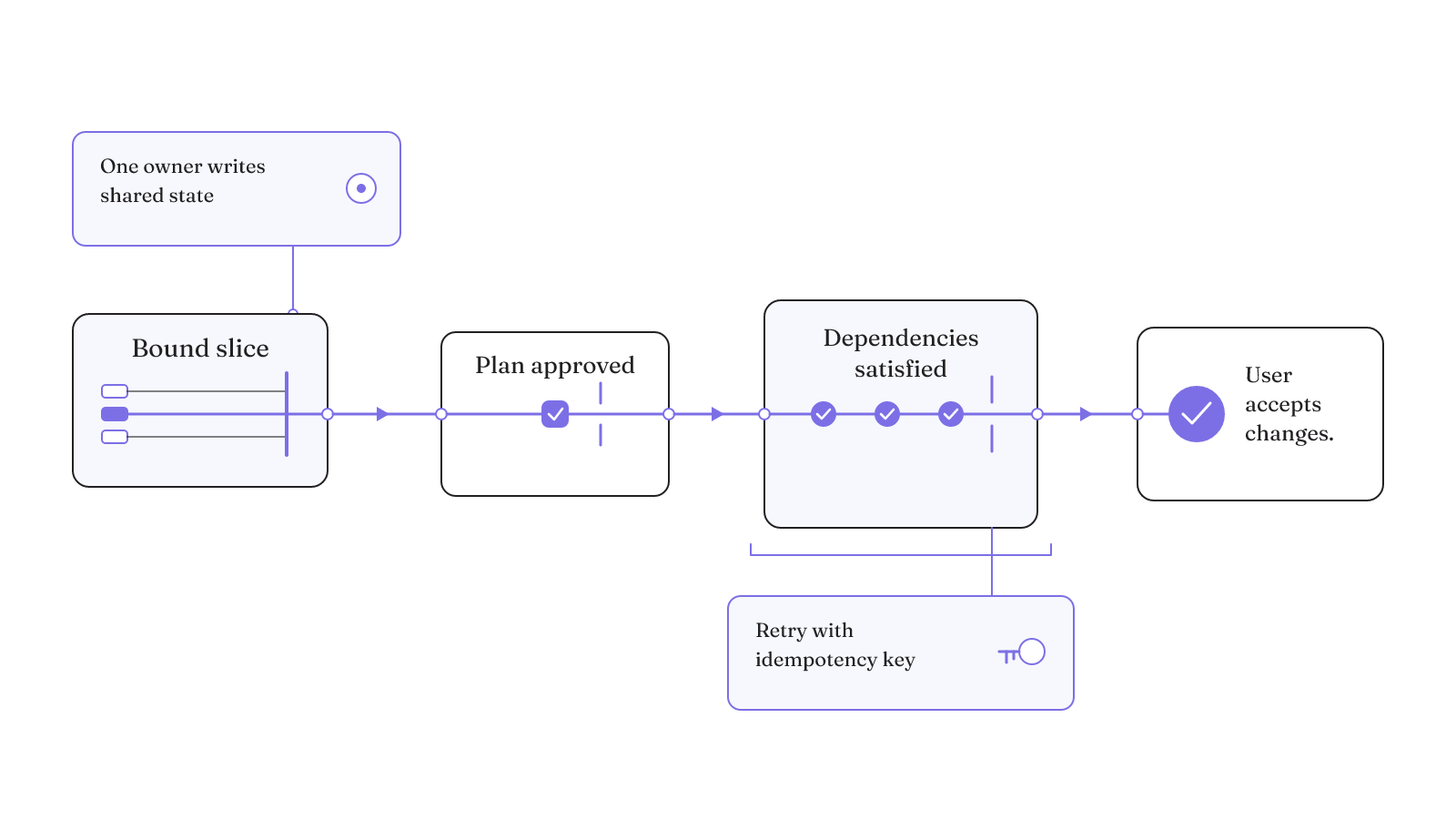
Once the slices are clear, assign the controls that govern their release and acceptance. The matrix below is our practical record for one parallel coding run. It joins the boundary, owner, and release rule in one place so the execution path remains legible.
| Control | Boundary to record | Responsible owner | Release or recovery rule |
|---|---|---|---|
| Decomposition | Dependencies, files touched, and workstream | Decomposition pass | Release only the bounded slices recorded by the pass |
| Plan approval | Proposed steps before code changes | User | Release implementation after plan review and approval |
| Prerequisite release | Upstream dependencies for each file | Event-driven scheduler | Release a file when its upstream dependencies are satisfied |
| Shared-file ownership | Plan, task list, or checklist; concurrent writes can duplicate updates, overwrite stale reads, or leave an incomplete file | One designated agent | Route every other agent's write request through that owner |
| Validation | Agent actions and proposed changes | User | Keep only the changes the user accepts after review |
| Mutation retries | Identity of the mutation attempt | Mutation operator | Retry with an idempotency key, not a naive repeat |
Give one agent write access to the plan, task list, or checklist. Route every other agent's requested update through that owner.
Copilot and Claude Code put planning before implementation
Planning mode creates a useful authority boundary when the task is still ambiguous. Copilot's plan agent uses read-only tools and codebase analysis to identify requirements and constraints. It breaks the task into manageable, actionable steps and includes open questions where requirements remain unclear.
The plan becomes a review object before it becomes an execution path. After approval, the Copilot plan can be handed to the default agent. It can also be saved for further refinement, review, or team discussion. Those choices keep planning and mutation separate while the intended change is still being settled.
The open-question step is especially useful for ambiguous work. Copilot can record uncertainty inside the plan instead of turning every unclear requirement into an implementation step. The user then reviews both the proposed actions and the unresolved questions before code changes begin. If the plan is ready, handoff starts implementation. If it is not, the saved plan can remain a discussion and refinement artifact.
Claude Code exposes a similar boundary with a different documented workflow. Plan mode reads files and proposes a plan without editing until the user approves. Separating research and planning from implementation reduces the risk of solving the wrong problem in Claude Code.
These planning paths are most valuable before authority widens. Read-only analysis can surface constraints and open questions without changing the repository. Approval then marks the point where an agent may move from examining the codebase to editing it. In a parallel run, that boundary belongs before workers begin writing, because a flawed plan can otherwise be multiplied across several workstreams.
Planning is not automatically the right choice for every task. Its cost depends on the uncertainty and size of the change, which is why orchestrator selection should begin with the workload rather than a product label.
What is the best agent orchestrator for your workload?
There is no useful universal winner in the assigned choices. The best agent orchestrator is the surface whose documented boundary fits the job you actually have. We use three workload profiles to make that decision.
Small, clear fixes
Direct execution avoids needless planning overhead for a typo, log line, or variable rename. Claude Code's own guidance says plan mode adds overhead for these clear, small fixes. If the change is already understood and tightly bounded, an extra planning phase does not answer a new question.
Uncertain or multi-file work
Planning becomes more useful when the approach is uncertain, the change spans multiple files, or the code is unfamiliar. That profile needs requirements, constraints, actionable steps, and open questions before implementation. The planning surface is doing control work here, not merely adding ceremony.
Interactive and longer-running work
VS Code can start Claude and Codex as local agents for interactive work or delegate longer-running work asynchronously to a cloud agent. Cloud routing carries an operating cost. Copilot's cloud agent consumes GitHub Actions minutes and AI credits, with credit use depending on the model and tokens processed.
Extensions add another orchestration shape. AgentX is a VS Code multi-agent orchestration extension. Its 8.4.28 listing names bounded parallel delivery, task-bundle commands, plugin operations, and AI evaluation-contract scaffolding. Those are documented mechanisms, not proof of faster or better results.
These profiles answer different operating questions. Direct execution addresses a clear, small edit. Planning addresses uncertainty, several files, or unfamiliar code. Local and cloud routing address interactive and longer-running work, with the cloud path consuming Actions minutes and AI credits. AgentX shows an extension-based surface with explicit parallel-delivery and task-bundle mechanisms.
Use our coordination-budget guide to decide whether your workload needs several agents. Record the coordination cost before selecting the surface.
Faster parallelism can trade away consistency
A lower-latency run is not necessarily the stronger run. On CodeProjectEval, Claude Code with Agent Teams recorded the lowest latency among the evaluated baselines. Its pass rate was 16.3%, below the sequential baseline's 20.1%.
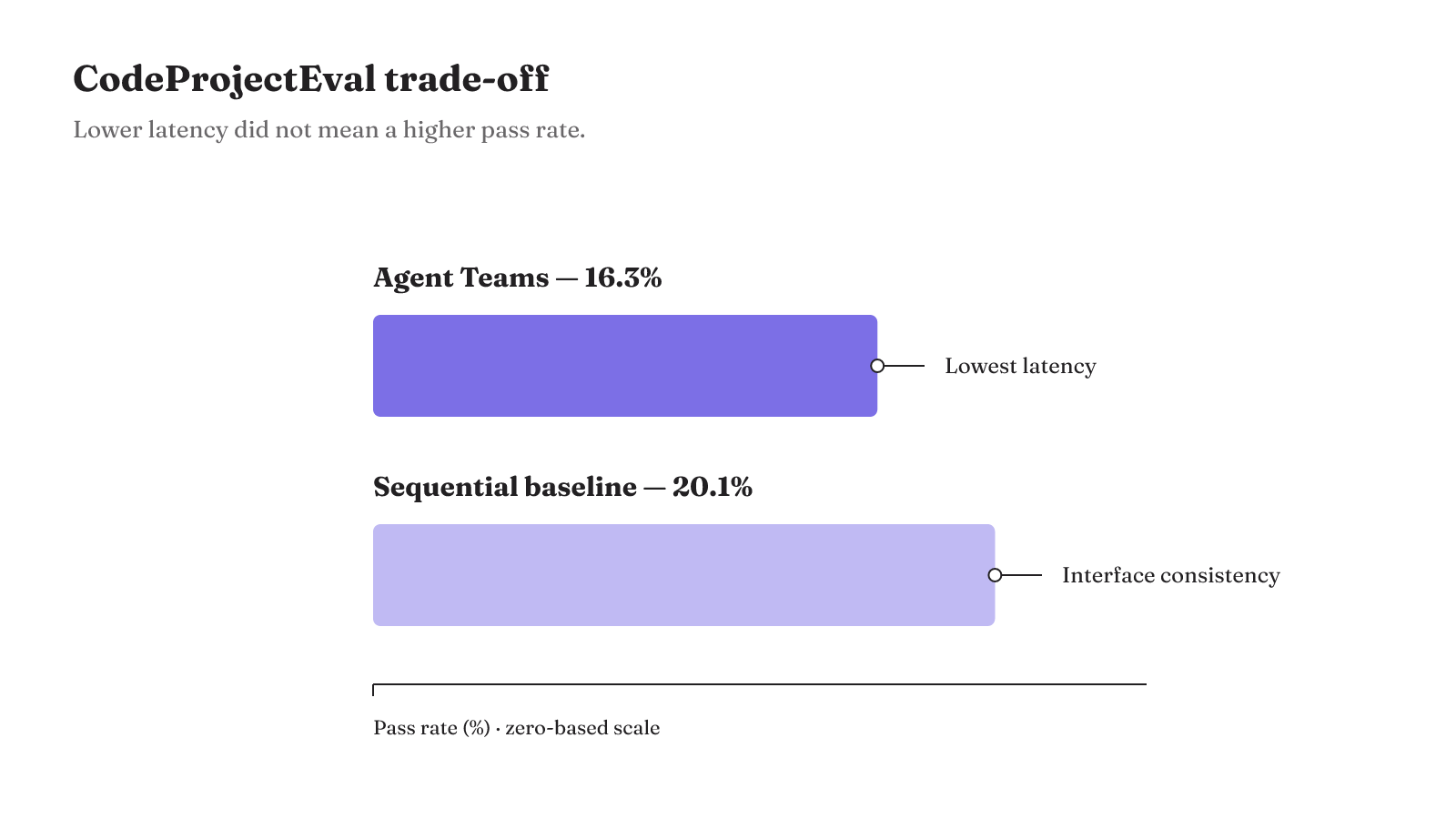
The same CodeProjectEval comparison found that the sequential baseline maintained interface consistency but could not exploit parallelism. Within this benchmark, the tradeoff was concrete: the Agent Teams setup had lower latency and a lower pass rate, while sequential execution preserved interface consistency without parallel execution.
Contain automatic actions and recover writes from recorded state
For Copilot CLI, GitHub documents local or cloud sandboxing as a way to mitigate risks from automatic approvals. Sandboxing is the concrete containment control for that documented behavior.
Recovery needs a different signal. A successful transport response can miss the workflow state and side effects of a long-running action. Recovery controls therefore need to observe both. Otherwise, the harness may treat an incomplete operation as if the intended work finished.
Write-heavy flows make the failure mode sharper. A retry can duplicate a partially completed mutation when recovery logic has no record of the earlier execution. That is why the control record needs the mutation attempt's identity before a retry occurs. The idempotency key connects the second attempt to work that may already have happened.
The recovery question is not only whether the agent process is still reachable. It is whether the workflow reached its intended state and which side effects occurred before the interruption. A transport-level success signal can miss both. Observing workflow state and side effects gives recovery logic the information that the transport response may not carry.
This boundary separates resuming computation from repeating a side effect. The system should not infer completed work from transport success alone, and it should not issue a naive repeat when prior execution is unknown. Containment limits where automatic action can happen. Recorded execution state makes recovery inspectable after interruption.
Repository rules give each instruction a clear scope
Parallel agents also need instructions at the right scope. Copilot code review accepts repository-wide and path-specific instructions. GitHub distinguishes four instruction surfaces:
- Repository-wide Copilot rules apply across the repository.
- Path-specific rules apply to the paths they cover.
AGENTS.mdcarries standing rules across agents.- Skills carry instructions for a specific task.
This mapping lets a stable repository rule remain stable while a task-specific skill stays tied to one job. It also avoids making every worker depend on a fresh prompt for standing constraints. The scope is part of the harness: it determines which agent receives which direction during the run.
Repository-wide and path-specific instructions also give code review two levels of direction. The repository layer can carry rules that apply everywhere. The path layer can hold instructions for the covered files. AGENTS.md supplies standing cross-agent rules, while a skill remains specific to its task. These scopes are documented as separate instruction surfaces, so they can be assigned without collapsing every kind of direction into one prompt.
If orchestrator and worker roles are still unclear, review the agent orchestration glossary. Then use the coordination-budget guide to record your workload's dependencies, write boundaries, approval point, validation owner, and recovery rule before adding another agent.