Key takeaways
- Pi is a terminal coding harness built from separate packages.
- Pi packages can carry extensions, skills, prompts, and themes.
- Third-party packages run with full system access. Confirm the repository and review its source before installation.
The repository name settles only the first question. Harness fit also depends on package authority, runtime control, state ownership, evaluation, and recovery. Pi exposes model access, an agent runtime, a coding CLI, a terminal UI, and telemetry as named packages. That separation lets you inspect the part that will own each responsibility.
Which Pi GitHub project are you looking for?
Is there a GitHub project for the Pi coding agent? Yes. The earendil-works/pi repository identifies @earendil-works/pi-coding-agent as its interactive coding-agent CLI.
Use the confirmed role to find the right surface before you interpret its name:
| Name encountered | Repository or package | Confirmed role | Distinguishing fact |
|---|---|---|---|
| Pi coding agent | earendil-works/pi, @earendil-works/pi-coding-agent | Interactive coding-agent CLI within the Pi package stack | Pi is a minimal terminal coding harness intended for adaptation without changing its internals. |
| oh-my-pi | can1357/oh-my-pi | Monorepo containing a coding-agent CLI and SDK | It separately identifies a browser collaboration client, LLM client, agent runtime, coding CLI and SDK, and terminal UI library. |
| Ant Colony for Pi | telagod/pi-agent-colony | Multi-agent plugin for complex coding tasks | It adds scouting, decomposition, parallel execution, review, and recovery loops. Its oh-pi transition name is not an affiliation with the other project named oh-pi. |
| Pi agent GUI | minghinmatthewlam/pi-gui | Public GitHub repository | The repository is publicly accessible on GitHub. |
| Emacs pi-coding-agent | dnouri/pi-coding-agent | Emacs interface | The package is available from MELPA and starts with M-x pi-coding-agent. |
| Pi chat | earendil-works/pi-chat | Separate Slack and chat automation repository | Chat workflows live outside the coding-agent package stack. |
Our agent harness definition separates the model from the surrounding system.
The Earendil repository is a package stack
The Earendil repository does not collapse model access, runtime behavior, interaction, and observation into one unnamed component. It assigns each concern to a package in the same stack.
@earendil-works/pi-ai is the unified multi-provider LLM API. It is the model-access layer named by the repository. @earendil-works/pi-agent-core is the agent runtime, with tool calling and state management. This is where the loop and its working state live.
@earendil-works/pi-coding-agent is the interactive coding-agent CLI. That is the package to inspect when the job is terminal-based coding-agent interaction. A GUI, an Emacs interface, and a plugin have their own confirmed roles.
The interaction layer has its own package too. @earendil-works/pi-tui is a terminal UI library with differential rendering. Observation is separate again: @earendil-works/pi-telemetry provides vendor-neutral telemetry contracts, typed schemas, conformance tests, and a reference adapter.
Those boundaries give you a more precise question than “Does Pi support coding agents?” You can ask whether you need the model API, the stateful runtime, the CLI, the terminal UI, or the telemetry contract. The Earendil package repository documents all five roles at the same source.
Platform setup and session state have dedicated documentation
The coding-agent documentation separates environment setup from session-state details. Its setup index has dedicated pages for Windows, Termux on Android, tmux, terminal setup, and shell aliases. That is the right place to resolve an environment-specific setup question without treating a general repository page as an install guide.
State has a documented surface as well. Pi describes a JSONL session-file format, the entry types stored in that format, and a SessionManager API. For a builder, that is more informative than a vague promise that sessions are persistent. It identifies a file format and an API that can be inspected when session ownership or tooling integration matters.
Use the Pi coding-agent documentation index for those platform paths and session details.
Where do Pi packages install?
Pi packages can bundle four kinds of resources: extensions, skills, prompts, and themes. They can be shared through npm or git, and the source changes where they are placed.
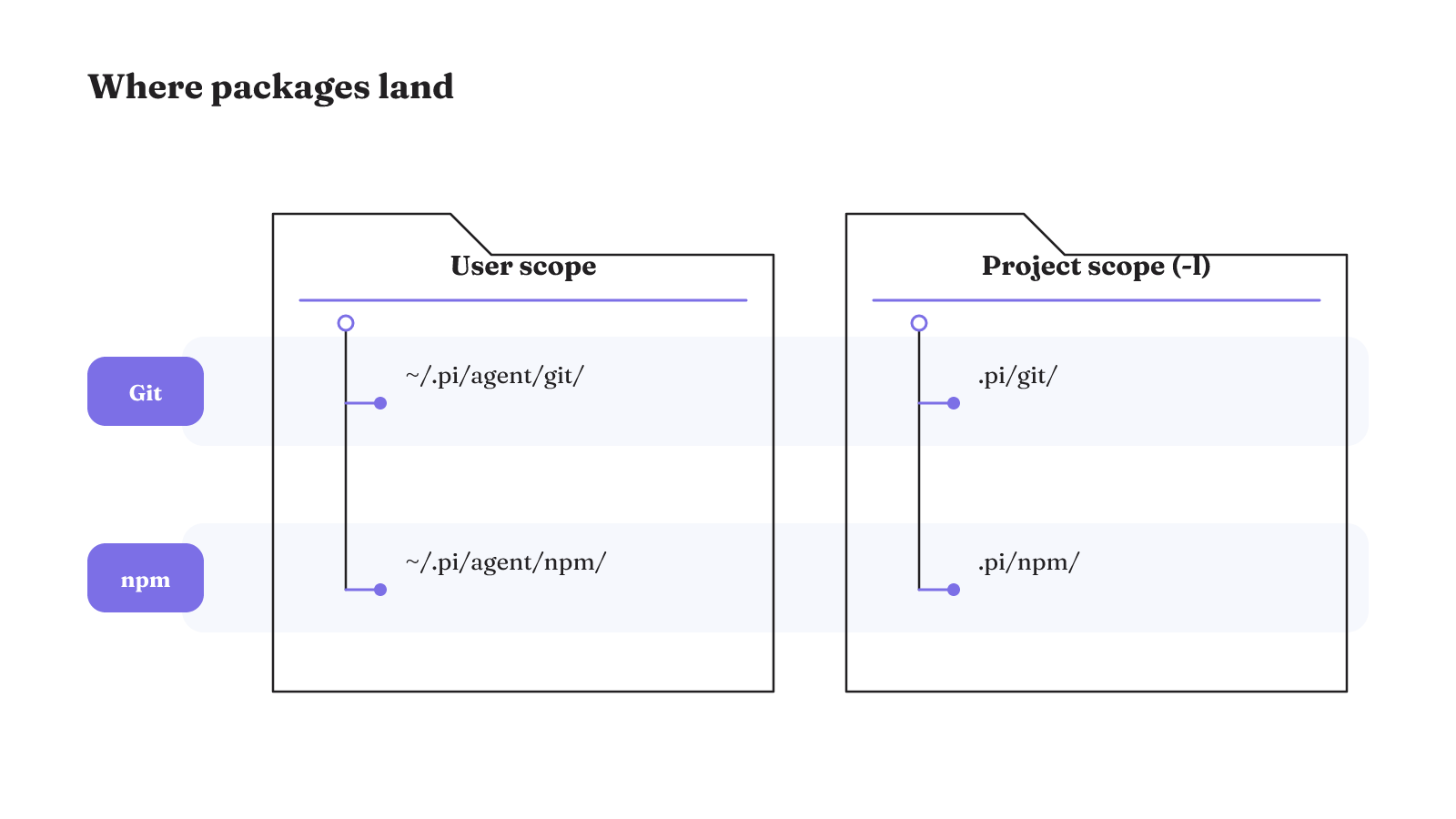
Git-sourced packages install globally under ~/.pi/agent/git/. Npm-sourced packages install globally under ~/.pi/agent/npm/. Those locations put the resources in the user's Pi area.
The -l option changes the scope to the current project. A local git package goes under the project's .pi/git/ directory. A local npm package goes under the project's .pi/npm/ directory.
That directory boundary is useful when you need to distinguish resources available to the user from resources attached to one project. It does not, by itself, describe the code's authority. Location answers where a package is stored. The package's contents and runtime permissions answer a different operational question.
The Pi coding-agent package guide documents both sources, all four directories, and the project-local option.
Pinned and filtered packages narrow what changes
A git package reference can be pinned to a tag or commit. Pi skips pinned packages during both pi update --extensions and pi update --all. Pinning therefore gives a package reference a fixed revision while those broad update commands run.
Filtering works at the resource level. The tmustier/pi-extensions package can be installed from git through Pi, then filtered in ~/.pi/agent/settings.json so that only selected extensions are enabled. Its documented example selects files-widget/index.ts rather than enabling the whole package entry.
These controls answer two different maintenance questions. A pinned git reference narrows whether that package changes under broad update commands. A filtered entry narrows which extensions from a package are enabled. Neither fact says the selected code has less system authority once it runs.
Why does third-party package review matter?
Pi packages run with full system access. That is the authority boundary to examine before treating a Pi agent plugin as a small interface add-on.
The package resource types also carry different paths to action. Pi extensions execute arbitrary code. Pi skills can instruct the model to take actions that include running executables. A prompt or theme may look like a lightweight resource beside them, but a package can bundle several resource types together.
The Pi documentation therefore says to review third-party package source code before installation. Source review is especially relevant when a repository is unfamiliar or a package combines executable extensions with model-facing skills. The package name alone cannot tell you what code will execute or what actions a skill may direct.
This is where we separate extensibility from authority. The ability to add a Pi agent plugin says what the harness can load. Full system access says what loaded code can reach. A package filter may reduce the selected extensions, but it does not establish a sandbox. Pinning may hold a revision steady, but it does not establish what that revision is allowed to do.
Project trust is a per-command control
Pi exposes project trust choices on specific commands. pi config and project package commands accept --approve or --no-approve. For that command, those flags trust or ignore project-local settings.
The scope is important. These are per-command controls over project-local settings. They are not evidence that package code is sandboxed, and they do not change the documented fact that Pi packages run with full system access.
Update behavior also needs its own check. pi update does not prompt for project trust. If a workflow depends on an approval prompt appearing during updates, the documented command behavior does not provide that prompt.
Read the flags as command-level decisions, not as a general security label for the project. --approve and --no-approve answer whether local settings are trusted for the command being run. They do not replace review of the package source, its enabled resources, or its runtime authority.
Instructions are not runtime boundaries
A natural-language instruction is not a security boundary when the runtime still permits the prohibited operation. Telling a model not to write a file leaves the underlying action available if its tool can still write arbitrary files.
The stronger design question is what action surface the harness exposes. A scoped, read-only tool interface creates places to enforce authorization, validate parameters, audit operations, and limit blast radius. A generic execution capability does not provide those same control points.
This distinction changes how we inspect a coding-agent harness. We look past the prompt and ask what the runtime will actually allow. The harness determines whether a model-proposed action can occur and under what identity, permissions, environment, and policy. Capability and permission are separate properties of the system.
For example, “use this repository only for analysis” is an instruction. A read-only repository tool is a runtime surface. The second design can constrain available operations, while the first still depends on the model following text.
The broader agent harness architecture matters here because a model is only one part of an acting system. The runtime-boundary analysis supports a practical test: inspect identity, permissions, environment, and policy at the point of action.
Runtime control reaches containment and workflow transitions
Authorization decides whether an action is permitted. Sandboxing addresses what happens when permitted behavior goes wrong. Its containment boundaries can include filesystem limits, network isolation, resource limits, and scoped credentials.
That separation prevents one control from carrying a job it does not perform. An authorization check can permit a tool call, while a sandbox limits the consequences of incorrect behavior during that call. The --approve and --no-approve project settings are not evidence that these containment boundaries exist.
A harness can also control more than individual tool calls. It can enforce workflow transitions and decide whether a proposed transition is legal. This matters when an agent moves between states such as planning, execution, review, or completion. The control point is the transition itself, not merely the tool chosen inside a state.
When comparing AI agent frameworks, inspect permission, containment, and legal workflow transitions as separate mechanisms. A feature list rarely makes those failure boundaries clear.
State ownership and recovery shape long-running fit
Harness state can extend far beyond conversation history. It can include retrieved context, tool outputs, execution logs, task plans, generated files, preferences, memory records, prior attempts, decision assumptions, compacted context, and the relationships between artifacts and decisions.
For portability, ask four concrete questions:
- Is the stored data inspectable and queryable?
- Can the state migrate between harnesses?
- Is model choice separable from memory ownership?
- Does the state remain usable after a model-provider change?
Recovery needs equally specific mechanisms. The pi-dsh implementation lists durable pre-tool checkpoints, append-only interrupted-run repair, and NOT_STARTED versus OUTCOME_UNKNOWN classification. It also lists compaction checks, history provenance, and durable add-and-revoke constraints.
Keep that recovery set attached to pi-dsh. It is not evidence that the main Pi coding-agent package provides the same mechanisms. The useful comparison is whether the implementation you are evaluating exposes the state and recovery properties your workload needs. A long-running task with consequential actions asks more of state and recovery than a short, disposable interaction.
How should you evaluate a coding-agent harness?
The best agentic harness is not a universal repository choice. Fit depends on the workload, the authority it receives, the failures you expect, and the recovery you require. Evaluation should inspect what the system produced and how it acted.
Our comparison method begins with the workload and its allowed authority. We then name a plausible failure mode and the recovery state needed to continue or stop safely. Package counts and interface names do not answer those questions.
Use three separate tests:
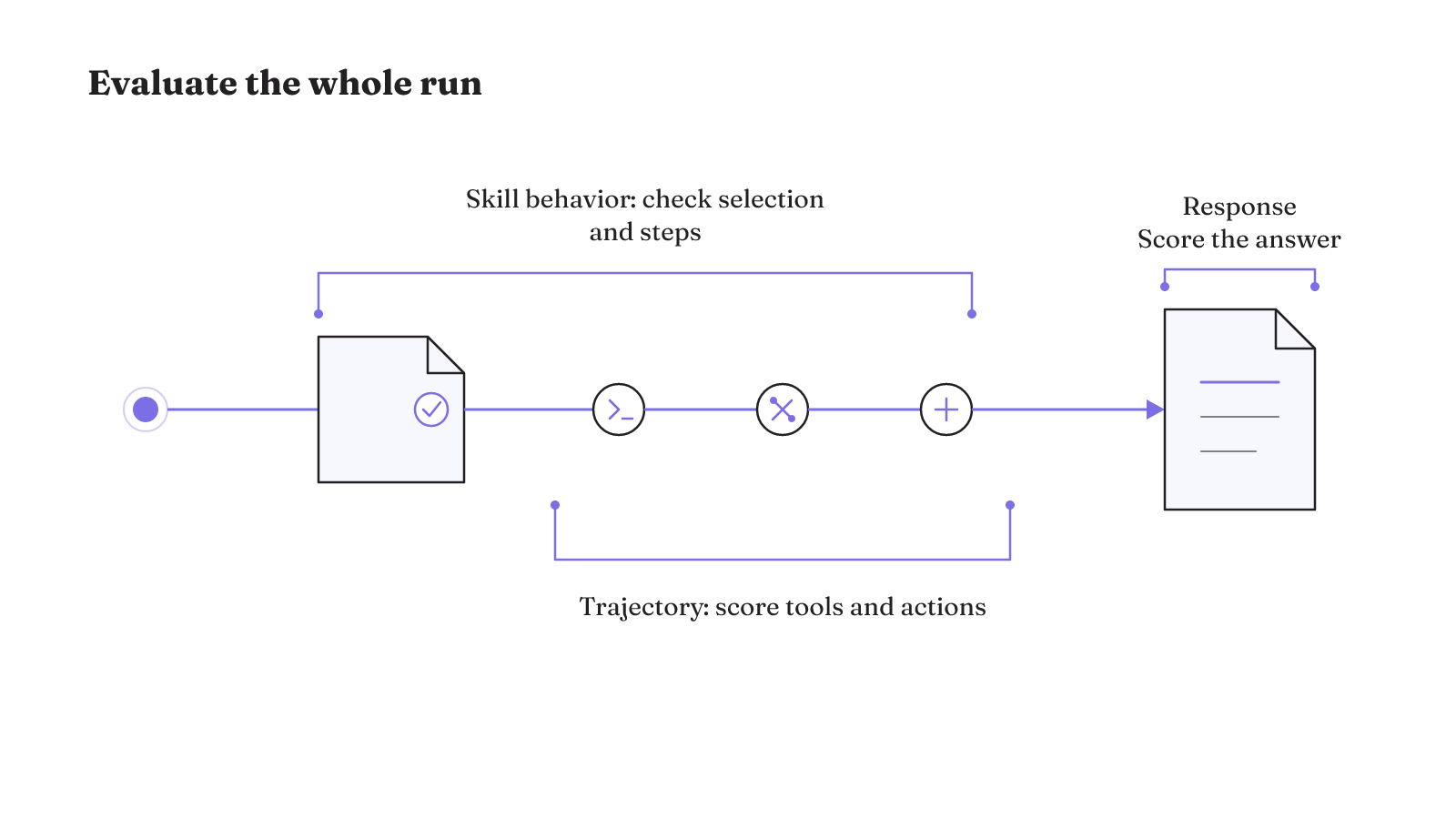
- Score the response. Agent responses can be evaluated with custom LLM-as-a-judge criteria. Write the criteria for the actual output you need, then inspect the result against them.
- Score the trajectory. Tool usage and action sequences can be evaluated as trajectories with helper scoring functions. A good final answer does not erase a problematic path taken to produce it.
- Score skill behavior. Check which runtime-offered skill the agent selected and whether it followed that skill's steps. Selection and execution are distinct observations.
Keep the records from these tests distinct. Response scoring describes the delivered answer. Trajectory scoring describes tool use and the action sequence. Skill evaluation describes whether the runtime offered the relevant skill, whether the agent selected it, and whether its steps were followed. A single quality label would hide those separate observations.
The strands-agents/evals repository documents all three evaluation surfaces. Our agent evaluation glossary provides a stable term for the broader practice.
This gives the Pi repository decision a clear order. Identify the surface whose confirmed role matches your job. Inspect its package authority, runtime constraints, state ownership, and recovery behavior. Then evaluate both output and trajectory under the workload you actually plan to run.
Use the repository matrix above to open the matching Pi surface. If you need a reusable control lens for that inspection, continue with our agent harness guide and compare the workload against its failure boundaries.