Key takeaways
- Human input must arrive before the agent continues.
- Durable approval preserves state across pause and resume.
- Every pending approval needs a timeout.
- Tool access needs identification and authorization controls.
What is a human-in-the-loop AI SDK?
A human-in-the-loop AI SDK gives an agent a controlled stopping point. The defining behavior is simple: the agent requires human input before it continues.
An agentic loop may fetch tools and resources several times, updating its data, context, or prompts as it reasons. That pattern is described in the NIST concept paper on agent identity and authorization. Human approval can become one state transition inside that loop:
- The agent selects a tool and proposes an action.
- Execution stops before the tool runs.
- A person reviews the proposed action.
- The person's input lets the workflow continue or take another recorded outcome.
The loop can keep changing its working context as it fetches resources. The approval point has a narrower job. It stops continuation at the proposed action until human input arrives. That distinction prevents "human in the loop" from becoming a vague label for any system that happens to have a person nearby.
To implement the pattern, make the stop visible in execution state. You should be able to identify the proposed action, the point where continuation is blocked, the input expected from a person, and the state used when work continues. Those are the parts an SDK must help you express or let your harness supply.
This is how human-in-the-loop works in an acting system. It is also why an approval button alone says little about the runtime. A useful evaluation follows the full agent loop: where it stops, which state remains available, what input restarts it, and what record survives afterward.
Agentic AI can therefore have a human in the loop, but the approval point should reflect the consequence of the proposed action.
Put approval at high-consequence actions
Require approval when the proposed action is irreversible, costly, regulated, or has a high blast radius. That rule gives the agentic loop a concrete boundary. The runtime does not ask for approval merely because a tool was called. It asks because this tool call crosses the boundary set for that action.
Consider a router with two paths. An irreversible action goes to an approval state every time. A low-risk action can enter a sampling policy instead. One documented pattern samples 5-20% of low-risk actions while pairing that sample with exception monitoring and periodic audits of automatically approved actions.
In a worked routing policy, the first branch tests whether the next action is irreversible, costly, regulated, or high blast radius. A match routes the action to human approval. The remaining low-risk actions enter the sampling rule, with 5-20% routed for human review. Exception monitoring watches the low-risk path, and periodic audits inspect actions that were approved automatically.
The sampling rate does not replace the rest of the policy. It is one part of a risk-based pattern. Every high-risk action still requires approval, and the low-risk path still carries monitoring and audit work.
Write these routing conditions before wiring the interface. Then the Approve control represents a known policy result, and the sampling rate has a defined place beside monitoring and audits. Without that placement, the SDK can demonstrate interaction while leaving the approval policy outside the design.
Write the boundary as an explicit rule, then test whether the runtime can preserve and enforce it. Our note on the approval gate gives that control point a name. The SDK comparison can then focus on what happens when the gate actually closes.
Compare SDKs by the approval lifecycle
Choose a human-in-the-loop AI SDK by following one approval through its lifecycle. The useful comparison is not a feature count. It is the primitive that creates the pause, the surface that holds or exposes state, and the work your application still owns.
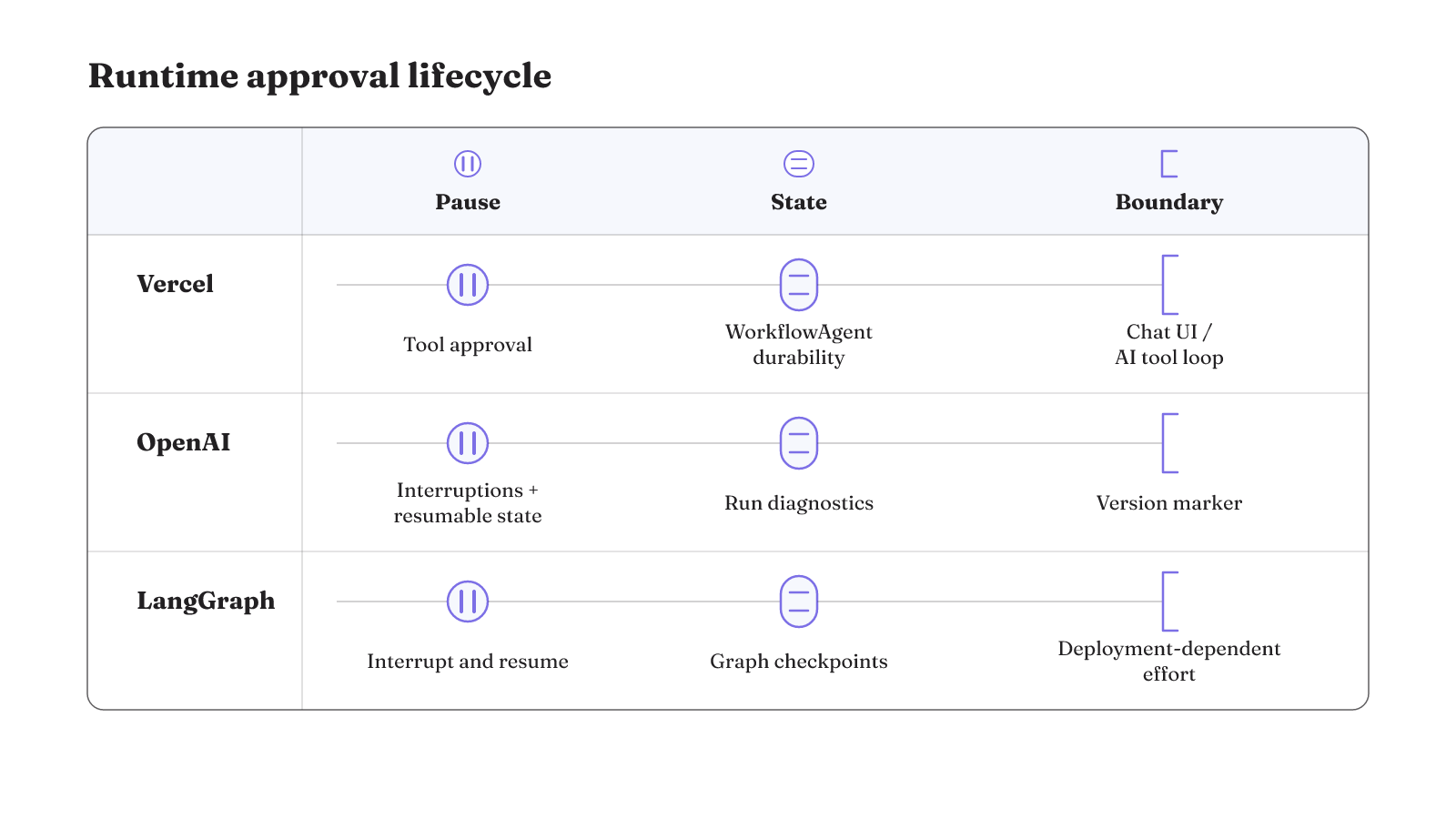
Our comparison method uses the same three questions for every option. What creates the approval pause? What durable state or inspection surface is documented? What implementation boundary remains? A human in the loop AI SDK GitHub search can help locate implementation documentation, but repository popularity is not one of these criteria.
| SDK or runtime | Approval primitive | Durable state or inspection surface | Practical boundary |
|---|---|---|---|
| Vercel AI SDK ecosystem | AI SDK supports tool approvals. | WorkflowAgent provides agent durability and supports timeouts. | In the documented architecture, Chat SDK handles interactivity while AI SDK runs the tool-calling loop. |
| OpenAI Agents SDK | A paused run can return interruptions and resumable state. | Item-level tool and handoff records, raw model responses, guardrail results, and usage details support audits, custom interfaces, and deep debugging. | Long-pending serialized state should carry an agent-definition or SDK version marker so a compatible code path can deserialize it. |
| LangGraph | The human-in-the-loop primitive is interrupt and resume. | It is positioned as a stateful inner agent runtime for agent reasoning and tool review. | Operational effort depends on deployment. Its principal lock-in is graph state and checkpoints. |
Run one identical pending action through each shortlisted option. Let the approval remain open after the initial request ends, then inspect the state and records the runtime exposes. Keep the product's documented implementation boundary in the test. This avoids crediting an SDK for state, transport, or compatibility work supplied by unrelated application code.
The matrix does not produce an overall winner. It shows where each option places the control surface. Our detailed LangGraph human-in-the-loop guide examines one of those surfaces more closely.
How does approval survive after the request ends?
Imagine an agent proposes a tool action and the original web request ends before anyone responds. The approval is still pending. When a response can arrive later, the workflow needs persisted and synchronized state plus retry management.
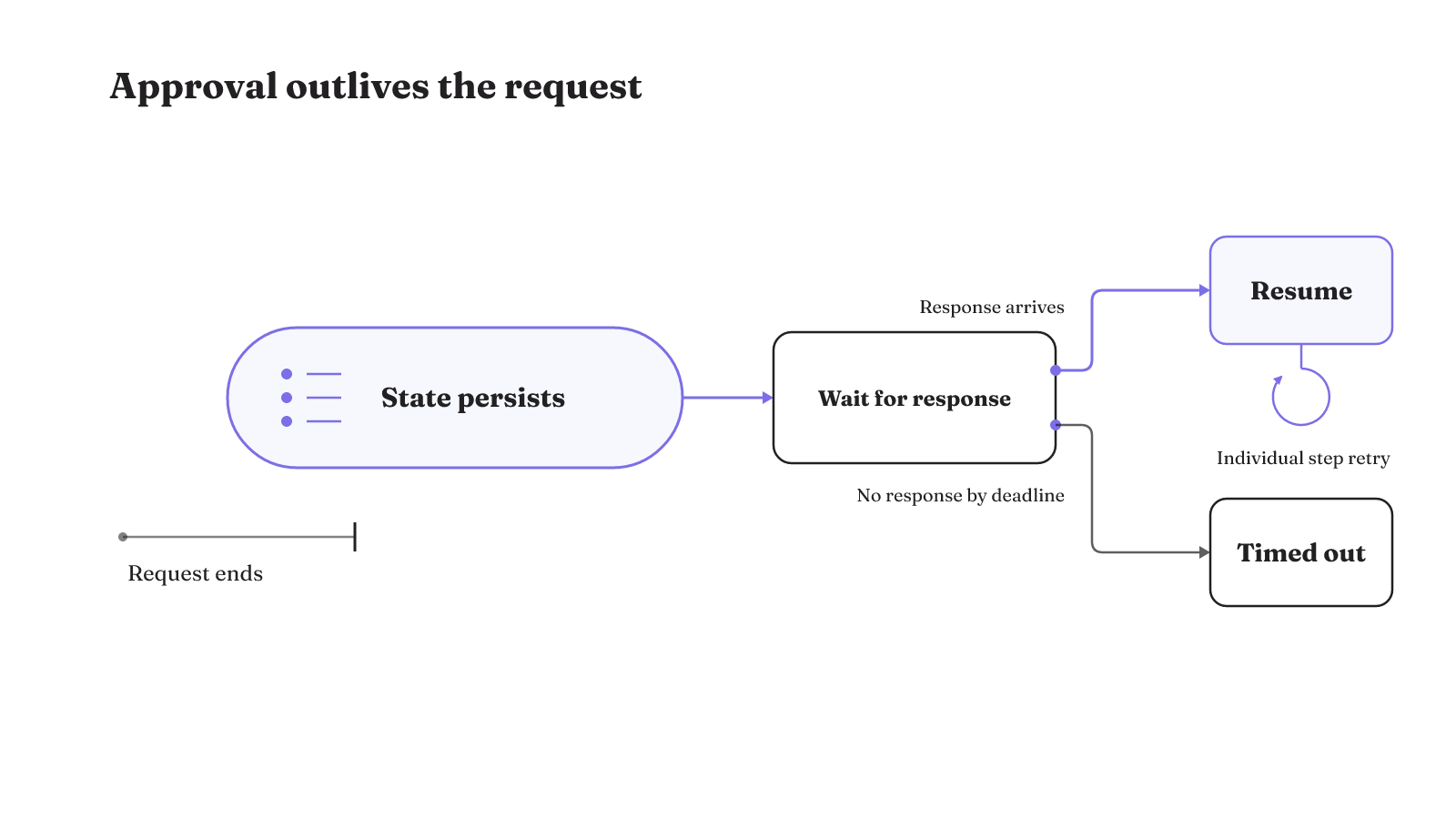
A durable execution trace looks like this:
- The runtime reaches the approval point and pauses.
- It preserves the workflow state after the request ends.
- The human response arrives through a later interaction.
- The runtime resumes from that response.
- If one step fails after the pause, that individual step can retry separately.
There must also be a no-response branch. An approval timeout prevents an abandoned request from suspending execution indefinitely. The timeout is an explicit workflow outcome, not a hope that a person will eventually click.
This trace is a better implementation test than a live demo completed in one browser session. End the request deliberately. Keep the approval pending. Then confirm that the persisted state, later response, resume path, retry behavior, and timeout remain distinct parts of the execution.
Ask the runtime five concrete questions during that test. Where is pending state persisted? How is it synchronized when the later response arrives? Which response resumes execution? Which individual step can retry after the pause? What timeout stops the pending workflow? These questions expose the state and retry work that a same-request demo can hide.
A separate step retry also narrows recovery work. The durable workflow can retry that individual step after the pause. The approval itself does not need to become an unbounded wait, because the timeout provides the abandoned path. Persistence, retry management, and timeout handling are all part of implementing the delayed response.
Transport and approval responsibility can live in different layers
A polished approval screen is a transport surface when another component decides whether execution is allowed. Keep those responsibilities visible in the architecture.
One documented Vercel path works like this:
Chat SDK Approve or Deny control -> Workflow SDK webhook callback -> suspended workflow resumes with the click payload
In that pattern, Chat SDK presents the controls while Workflow SDK suspends the workflow until the callback arrives. The workflow can resume from the approval click payload without polling, a custom approval database, or an onAction handler.
A Microsoft Agent Framework and AG-UI path divides the work differently:
MAF decides whether the tool requires approval -> AG-UI carries the request to the client -> AG-UI returns the client's decision
The documented MAF and AG-UI integration makes the boundary explicit. MAF owns the decision that approval is required. AG-UI transports the request and the decision between server and client.
These paths answer a central implementation question: does the UI merely carry a decision, or does its surrounding runtime enforce the permission boundary? The components may be separate, but the tool call still needs a control before execution.
Trace the responsibility in both directions. From the server, identify the component that decides approval is required and the component that suspends execution. From the client, identify what carries the request and what returns the person's decision. The names may differ across stacks, but the design should still reveal where transport ends and execution control begins.
Model behavior does not close that gap by itself. A recent preprint argues that model alignment and post-hoc evaluation do not provide deterministic, policy-based enforcement at the individual tool-call level. An evaluator may inspect what happened after a run. Approval enforcement must govern whether the specific action can happen at all.
That boundary also clarifies the role of evaluation. Post-hoc review can examine a completed trajectory. It does not provide the individual tool call with deterministic policy enforcement before execution. The approval owner must sit on the execution path, even when a separate interface carries the human decision.
Model approval outcomes and audit fields explicitly
The pending decision should be data, not an implicit condition hidden inside a process. A durable approval workflow can model the document, approval decision, and workflow state as serializable data structures.
A compact state model can represent six outcomes:
- pending
- approved
- rejected
- escalated
- timed out
- changes requested
Those names let the workflow preserve more than a yes-or-no click. Rejection, escalation, timeout, and a request for changes remain distinct recorded outcomes. That distinction keeps the resume path tied to the decision that actually arrived.
An approval audit entry can record a timestamp, workflow identifier, action, actor, and details. A compact entry can be just as explicit:
timestamp: <when the entry was written>
workflowId: <which workflow>
action: <what happened>
actor: <who acted>
details: <the recorded context>
The serialized workflow state and audit entry serve different jobs. State gives execution something to resume from. The audit entry gives an operator a record to inspect after the decision. Keeping both explicit makes a pending approval legible while it waits and after it resolves.
Test the model with more than the approved path. Create pending state, then represent rejection, escalation, timeout, and changes requested as their own outcomes. For the audit entry, inspect the actor and action beside the workflow identifier and timestamp. The details field can carry the recorded context. This test checks the exact data structures the workflow will serialize and the exact fields an operator will later inspect.
Sandboxing and pre-action authorization solve different control problems
Sandboxing does not replace the permission check before a tool runs. These controls operate at different points. Vercel AI SDK supports sandboxed agent execution, while pre-action authorization evaluates whether a proposed tool call may proceed.
Open Agent Passport offers one research example of the pre-action mechanism:
proposed tool call -> interception before execution -> declarative policy evaluation -> cryptographically signed audit record
The project intercepts tool calls before execution, evaluates declarative policy, and produces a signed audit record. This is an example of a control path, not evidence that its reported performance applies to production authorization systems.
Sandboxing, pre-action authorization, and model-based screening are complementary controls. They are not interchangeable. Sandboxed execution constrains the setting in which execution occurs. Pre-action authorization sits before execution and applies a policy decision. Model-based screening is another control, but it does not turn the other two mechanisms into substitutes.
Use a single tool call to test the separation. First, place the declarative policy check before execution. Record its policy result through the signed audit mechanism. Then run the permitted call in the sandboxed execution environment. The sequence gives each control its documented role without treating the sandbox as the authorization decision.
For an SDK evaluation, draw these layers around one proposed tool call. Mark where policy is evaluated, where human input is required, and where execution is sandboxed. If every label lands on the same box, the architecture is probably hiding separate responsibilities behind one feature name. The goal is not more boxes. It is a clear account of which mechanism controls which moment.
Authority scope sets the access-pattern tradeoff
Approval governs an action, but the action also carries authority. Giving an agent access to data, tools, and applications creates risks that call for identification and authorization controls.
Suppose the agent calls an API through a service account. That model centralizes the agent's authority under a non-human, system-level identity. Evaluate that identity against the actual workload: what authority it holds, how access can be revoked, how audit enforcement works, and how large the blast radius is.
No API access pattern is universally superior for AI agents. Relevant tradeoffs include attribution, operational complexity, blast radius, workload type, tenant sensitivity, compliance, revocation, and audit enforcement.
For the service-account case, write down the non-human identity first. Then examine attribution and operational complexity independently. Test the authority scope against tenant sensitivity and compliance needs. Finally, inspect the revocation path, audit enforcement, and possible blast radius. The workload determines which of these tradeoffs carry the most weight.
Keep that access decision separate from the human approval event. Identification answers which agent identity is acting. Authorization controls which access that identity has. Human approval supplies the input required before the agent continues the proposed action. The system needs an explicit account of all three when the agent reaches data, tools, or applications.
Finish the evaluation with one pending approval, not a feature checklist. Run it through pause, timeout, resume, and audit review. Include the real identity and authority attached to its proposed tool call. If LangGraph and OpenAI remain on the shortlist, use our LangGraph and OpenAI Agents SDK comparison to examine their control surfaces, then repeat the same failure-and-recovery test in your own workload.