Key takeaways
- MCP separates AI hosts, protocol clients, and capability servers.
- Local and remote servers differ in location, maintenance, access, and trust.
- Token passthrough is forbidden by the authorization specification.
- Session coupling and large tool surfaces create costs beyond deployment.
The useful way to evaluate MCP servers architecture is to look past the number of tools. Ask where code executes, who maintains it, where authorization is enforced, where session state lives, and how much context the exposed capabilities consume. Those boundaries determine what the surrounding agent harness must control.
A component diagram can be accurate and still leave the operating model unresolved. The same host, client, and server roles can appear in a local or remote deployment. Authorization may be enforced at the server or bypassed through direct token use. Session state may live on one server instance, while every connected server adds tool definitions and results to the agent's context. A defensible choice accounts for each boundary explicitly.
What is the architecture of an MCP server?
Model Context Protocol, or MCP, is an open protocol for connecting large language model applications to external data sources and tools. It uses a client-server architecture: a host manages client connections, and each client connects to a server. In MCP architecture for AI, the host is the AI application, the client is the protocol connector, and the server provides capabilities.
The separation is useful because each participant has a narrower protocol role. The host is where the AI application runs and manages multiple client connections. A client is the connector for one of those protocol relationships. The server sits on the other side as the capability provider. This lets you identify the MCP boundary without treating the model, the AI application, the connector, and the executable capability as one component.
A compact MCP client-server architecture diagram looks like this:
AI application (host)
 └── MCP client
 ├── local STDIO ────────────────┐
 └── remote Streamable HTTP ─────┤
 ▼
 MCP server
 ├── Tools
 ├── Resources
 └── Prompts
The host-client-server split is only the outer shape. The server's capabilities have distinct roles. Tools are executable functions, resources are data sources, and prompts are templates. A server can also request sampling, elicitation, roots, and logging from the client. That two-way relationship matters because the server is not simply a passive endpoint waiting for tool calls.
Those categories tell you what crosses the connection. An executable function appears as a tool. Data appears as a resource. A reusable template appears as a prompt. Sampling, elicitation, roots, and logging travel in the other direction as requests the server can make of the client. The protocol roles therefore include both server-provided capabilities and server requests to the client.
The transport path changes where the connection runs. MCP communication supports local STDIO and remote Streamable HTTP. If you need a closer definition of the server role, our MCP server glossary keeps the protocol term separate from the deployment choice. Our MCP transport glossary covers the connection layer.
This architecture answers who talks to whom. It does not decide where the server should execute, who should maintain it, or which trust boundary the connection crosses.
Which MCP server architecture fits your workflow?
The local-versus-remote decision turns on deployment, connectivity, and security. The two patterns place execution and maintenance with different parties, then trade local control and privacy against broader access and provider operation.
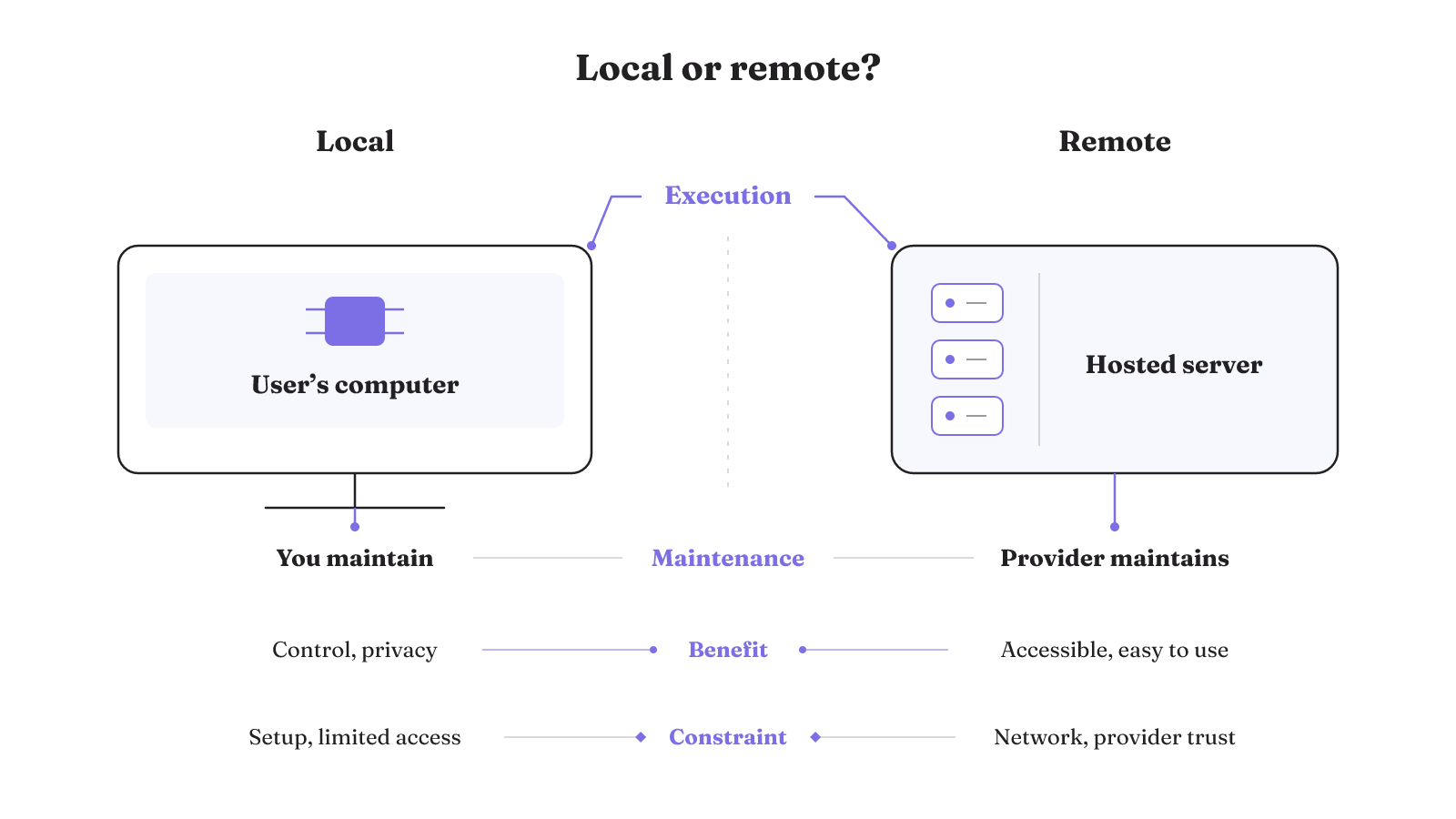
| Dimension | Local server | Remote server |
|---|---|---|
| Execution location | Runs on the user's computer | Runs on a cloud or hosted server |
| Decision factors | Deployment, connectivity, and security | Deployment, connectivity, and security |
| Operational fit | Often simpler to run and easier to secure within an existing application boundary | Better suited to shared services and broader network access |
| Maintenance owner | User | Provider |
| Benefits | Speed, control, and privacy | Accessibility and ease of use |
| Constraints | Setup complexity and limited access | Requires a network and provider trust |
The local and remote comparison makes maintenance ownership especially concrete. The user maintains the compared local pattern, while the provider maintains the compared remote pattern. Choosing the location therefore also means choosing who carries that maintenance work. Authorization, state, and context cost still need their own answers after this deployment choice.
How do LLMs and MCP servers divide the work?
An LLM cannot reach real-time data or perform outside actions solely from knowledge frozen at training time. MCP provides a standardized language for communication with external data, applications, and services. The model can work through that connection, while the MCP server presents the relevant capabilities.
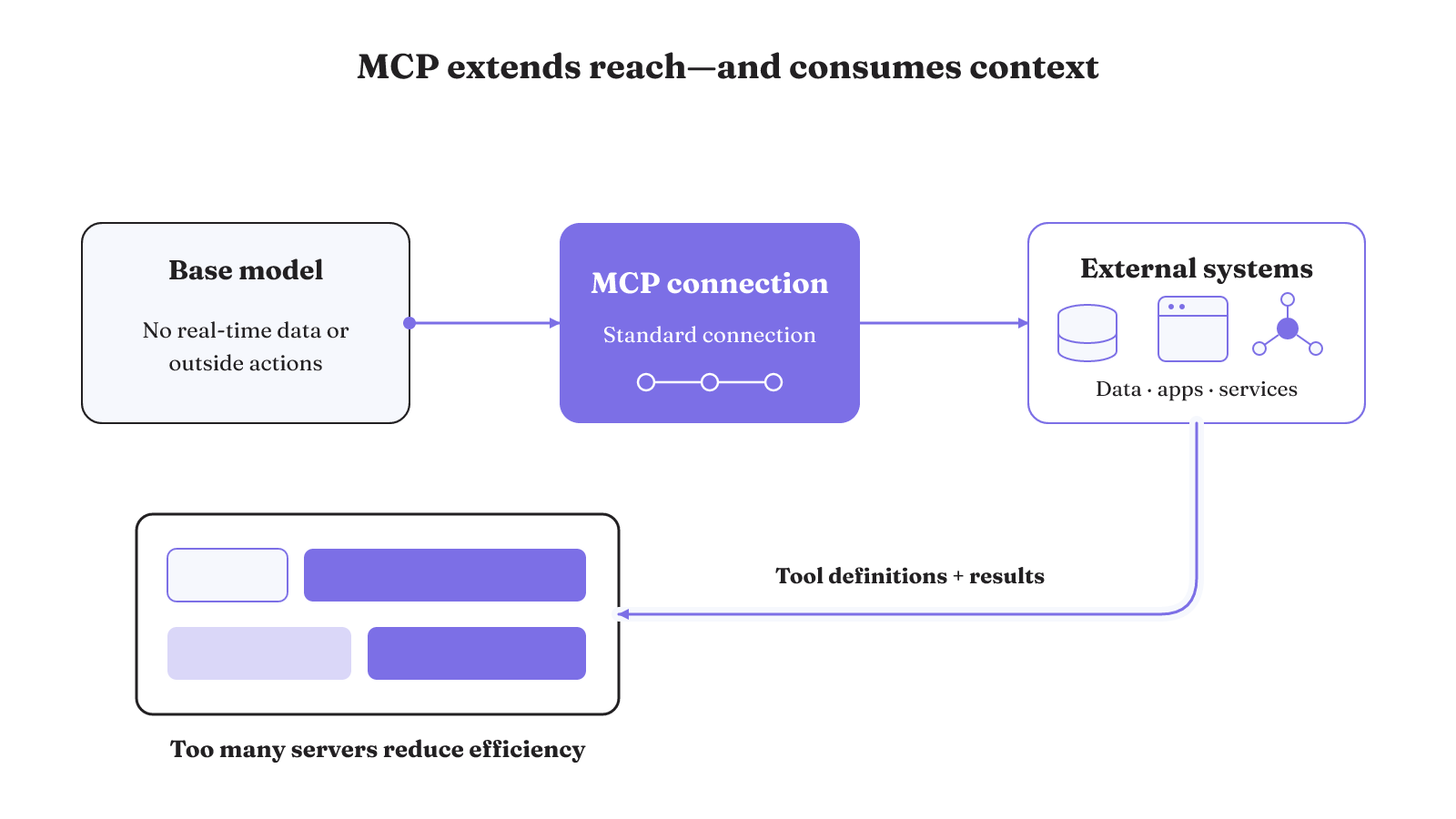
The mechanism has three parts:
- Base model: Its training-time knowledge alone cannot access real-time data or perform outside actions.
- MCP connection: The protocol gives the LLM application a standardized way to communicate with external systems.
- Context cost: Tool definitions and results consume tokens. Connecting too many MCP servers can consume excessive tokens and reduce agent efficiency.
That third part is easy to miss in an MCP architecture with an LLM. A larger tool surface is not free simply because every server connects successfully. Excessive tool definitions and results consume context, so capability breadth can work against the agent's efficiency.
Treat server count and exposed tool surface as context decisions. The relevant question is not how many integrations you can attach. It is how much capability the workflow needs to expose for the work at hand.
This changes how an architecture example should be read. A diagram with many server connections may show valid protocol relationships, but each connected server can contribute definitions and results that consume tokens. The cost comes from what enters the agent's context, not from the visual neatness of the connection. A smaller exposed surface can be the more disciplined design when the workflow does not need every available capability.
You can make that boundary visible by listing the tool definitions and results the agent will receive from each connected server. The exercise is not a tool-count contest. It is a context inventory tied to the work the agent must perform.
Credentials belong at an enforceable boundary
Consider a client calling a downstream API through an MCP server. The safe architecture question is where the token becomes valid, where its intended service is checked, and which controls remain in the request path.
MCP client
 │ client identity and credential
 ▼
MCP server
 ├── validate token and intended service
 ├── apply rate limiting
 ├── validate request
 ├── monitor traffic
 └── preserve client identity in logs
 ▼
Downstream API
The MCP authorization specification forbids token passthrough because it introduces security risks. If a client uses a token directly with a downstream API and the MCP server does not validate that token or its intended service, the path can bypass rate limiting, request validation, or traffic monitoring.
Identity can become unclear as well. Opaque access tokens issued upstream can prevent the MCP server from distinguishing clients. They can also make downstream logs show a different identity, complicating auditing and incident investigation.
The token path exposes two distinct checks. First, determine whether the MCP server validates the token and the service for which it was intended. Without that validation, direct downstream token use can bypass rate limiting, request validation, or traffic monitoring. Second, inspect whether an opaque upstream-issued token prevents the server from distinguishing clients or makes downstream logs show a different identity.
There is another authority problem to account for. A confused deputy occurs when an MCP server acts with its own privileges instead of the user's. That can expose resources the user should not control. Deployment location alone does not resolve this problem. The important boundary is the authority the server uses for the action.
The protocol specification says implementors should build consent and authorization flows, document security implications, and implement access controls and data protections. In an architecture review, trace one request from client to downstream API. Mark token validation, rate limiting, request validation, traffic monitoring, and the client identity that appears in logs. If the path skips the server's enforcement points, the credentials are sitting outside the boundary that is supposed to govern them.
This is why credential location cannot be reduced to local versus remote deployment. A remote server can still have an explicit validation boundary. A local server can still receive authority that is too broad. The protocol's consent, authorization, access-control, and data-protection requirements belong in the implementation either way. What changes is where those controls sit and which identity they can enforce.
Session state changes the scaling design
MCP's initialization handshake establishes session state between the client and server for the duration of the connection. If the server instance holds that state, the client session becomes coupled to that instance. That coupling makes deployment behind a standard load balancer challenging.
The current flow can be represented this way:
Client initialization
 ▼
Connection with session state
 ▼
Server instance A holds the state
 ▼
Later messages need that instance's state
This is not just a transport detail. It affects the shape of scale-out because a standard load balancer may send a later request somewhere other than the instance that holds the connected client's state.
Before placing a stateful server behind a standard load balancer, identify the state created by initialization and the instance that holds it. If continuity depends on that instance, distributing connections is not only a network-routing choice. It is also a session-state choice. The architecture must account for the coupling that already exists for the duration of the connection.
A protocol-level sessions proposal would define state management, continuity, and message-ID uniqueness boundaries independently of transport mechanisms:
Logical session continuity
 ├── transport connection 1
 └── transport connection 2
That is a proposal, not an adopted capability stated here. It matters because it describes the boundary being reconsidered: logical session state would no longer be defined only through a particular transport connection.
A separate proposed browser transport uses window.postMessage for communication between browser contexts. It proposes separating one-time configuration and authentication from ongoing transport. Again, the value of the proposal for architecture work is the distinction it makes. Authentication setup, ongoing communication, transport, and logical session continuity do not have to be treated as one indivisible concern.
The protocol-level sessions proposal would define message-ID uniqueness boundaries, state management, and continuity independently of transport mechanisms. A separate browser transport proposal uses window.postMessage between browser contexts and separates one-time configuration and authentication from ongoing transport. Both changes remain proposals in the current discussion.
Local execution makes client privileges part of the risk boundary
A local process may sit close to the user, but proximity does not make its execution harmless. An inadequately restricted local MCP server, or one obtained from an untrusted source, can execute arbitrary code with the MCP client's privileges.
The failure path is direct:
Untrusted or inadequately restricted local server
 ▼
Receives MCP client privileges
 ▼
Arbitrary code execution with those privileges
That makes the MCP client's privileges part of the local server's risk boundary. It also changes what matters when adopting server code. Relevant supply-chain controls include component signing, static analysis, software composition analysis, dependency scanning, and cryptographic verification for cloud-hosted servers.
The named supply-chain controls cover the component, its code, its dependencies, and cloud-hosted server verification. The execution boundary has a different concrete condition: an untrusted or inadequately restricted local server can run arbitrary code with the MCP client's privileges. Review the component controls and the client privilege boundary as separate parts of the architecture.
An MCP server separates actions, memory, sessions, and performance work
Inside the server boundary, several responsibilities support the capabilities exposed to a client. Request handlers perform actions. A context store supplies memory. Session management connects interactions. Caching improves performance. MCP can also send notifications for dynamic updates and real-time synchronization.
A compact MCP architecture example looks like this:
Incoming MCP request
 ├── Request handler: performs the action
 ├── Context store: supplies memory
 ├── Session management: connects interactions
 └── Cache: improves performance

Server notification
 └── Sends dynamic updates and real-time synchronization
Those internal roles are an implementation pattern, not a second version of the host-client-server diagram. The outer diagram identifies participants. The inner structure shows where action handling, memory, interaction state, and performance work can live within a server.
MCP-Framework is one named implementation example. It provides automatic directory-based discovery for tools, resources, and prompts, along with class-based abstractions for defining them. That example shows one way an implementation can organize the capability surface. It does not decide deployment, authorization, session placement, or how many capabilities the agent should receive.
Directory-based discovery addresses how tools, resources, and prompts are found inside this implementation. Class-based abstractions address how those capabilities are defined. Request handlers, the context store, session management, and caching still describe separate server responsibilities. Notifications add a path for dynamic updates and real-time synchronization. These internal pieces make the server more than a folder of callable functions.
If your architecture is moving toward data systems, see how these boundaries change in our analysis of MCP Toolbox for Databases. Compare its execution location, maintenance owner, credential path, session behavior, and exposed tool surface against the workflow you actually need to run.