Key takeaways
- The Model Context Protocol connects AI models to external tools.
- Agentic AI independently pursues a goal and directs its process and tool use.
- The connection can expose delegated authority, so control must cover the action, credentials, data, and code behind it.
MCP vs agentic AI at a glance
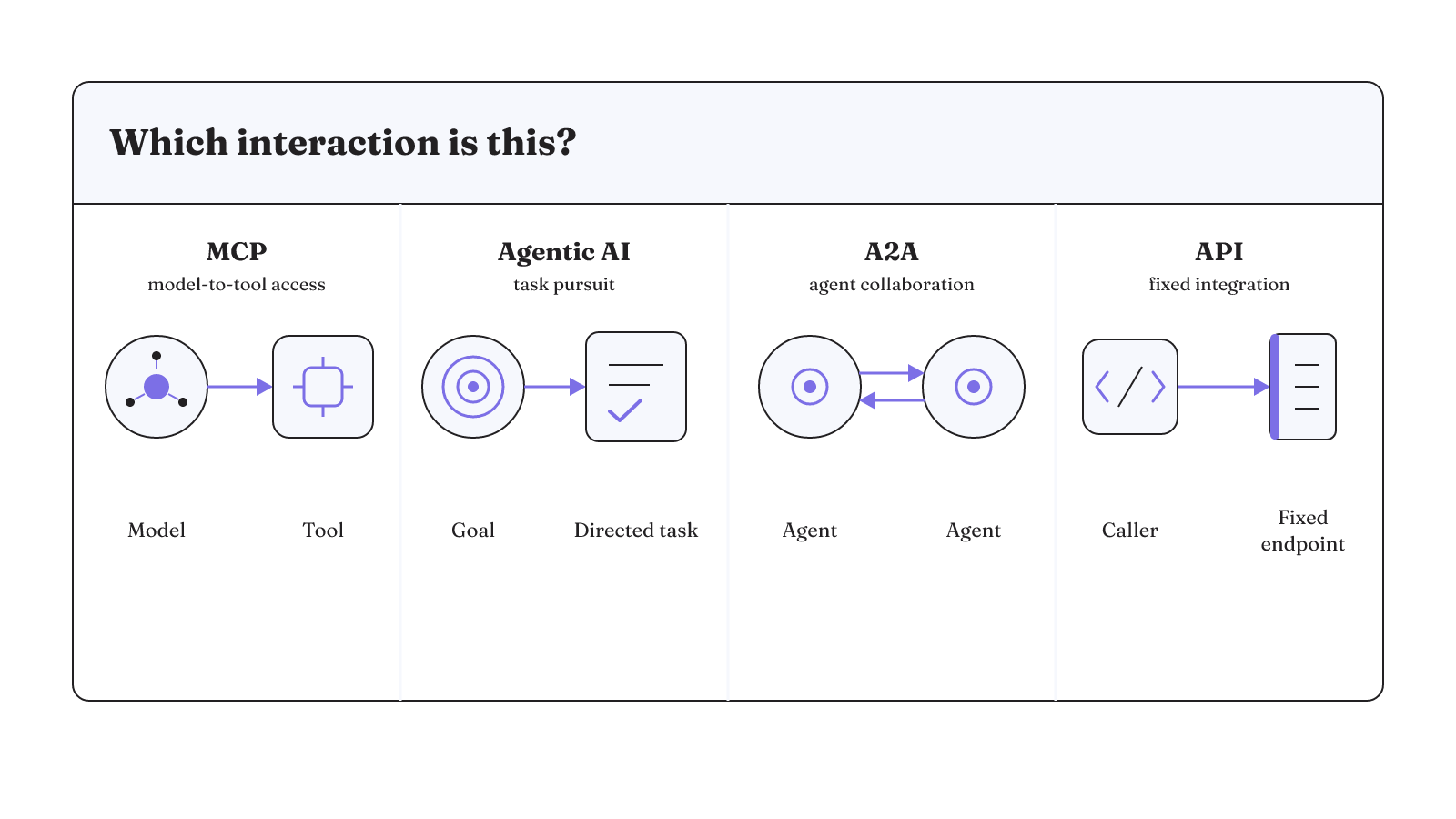
MCP and agentic AI solve different architectural problems. A2A adds another layer for collaboration between agents. Conventional APIs provide fixed endpoints with predefined inputs. The useful question is not which one wins. It is which interaction you need and where the system must inspect, approve, or stop an action.
| Layer / primary job | Interaction pattern | Control question |
|---|---|---|
| MCP: model-to-tool access | A model uses external capabilities through a universal interface | What authority does the connected tool expose? |
| Agentic AI: task pursuit | An agent directs its process and tool use with minimal human input | Which actions require approval or intervention? |
| A2A: agent collaboration | Agents have flexible, stateful interactions and partner on tasks | Which agent owns the task and its state? |
| Conventional API: fixed integration | Predefined inputs go to fixed endpoints | Which endpoint accepts which input? |
What does MCP add to an agentic system?
What is MCP in agentic AI? The Model Context Protocol acts as a universal interface between a model and external tools. It gives an agent a standard way to reach real-world systems without requiring developers to build a bespoke integration for every new model.
What is an MCP for agentic AI? In practical architecture terms, it is the model-to-tool connection. The protocol provides the common interface. The connected tool determines which real-world capability becomes available. Keep those two facts separate in your design notes so a standard connection is not mistaken for a standard level of authority.
That is an interface role, not the agent's task strategy. MCP can make a capability available. The agent may then decide when and how to use that capability as it pursues a goal.
The control boundary sits behind the connection. An agent can misuse delegated authority by accessing resources or taking actions it should not. Before granting access, inspect the actual resource and action exposed by the tool. A connection that reads a narrow resource presents a different authority surface from one that can perform an action. MCP supplies access; it does not settle how much authority the agent should receive.
What does agentic AI add beyond the connection?
Agentic AI adds independent task pursuit. Given a goal, an agent can direct its own process and tool use with minimal human input. The distinction becomes clearer when the task spans several steps instead of one tool call.
For example, an agent given a wedding-planning goal might research venues and vendors, compare pricing and availability, and create timelines and budgets. Those activities belong to one planning scenario. The agent is not merely opening a tool. It is directing a sequence of work toward the supplied goal.
In a company setting, an agent asked to prepare a board presentation might search connected Google Drive documents, extract spreadsheet metrics, and produce a report. Here, the goal shapes which connected systems it uses and what it produces from them.
These agentic AI examples show the role split. MCP can provide the route into a system. An agent decides how that route participates in a larger task. Official agent-building material also describes agents as systems that independently accomplish tasks on a user's behalf.
Authority and credentials form the first failure boundary
The moment a model can call a tool, input can influence more than generated text. Malicious user input can cause an assistant to invoke an unintended tool action through MCP. The failure path is concrete: the input reaches the assistant, the assistant invokes a connected capability, and that tool performs an action the user did not intend.
Delegated authority therefore deserves an explicit inventory. For one MCP connection, write down the resources it can access and the actions it can perform. Then compare that authority with the task the agent actually needs to complete. This is also a useful place to ask whether untracked connections have become shadow IT.
Credentials create a related boundary. Sensitive credentials may be exposed or reused when authentication is not tightly scoped and auditable. A useful audit asks which credential the connection uses, what that credential can reach, and whether its use can be audited. Those questions do not make the connection safe by themselves. They make the delegated authority visible enough to inspect before an agent acts through it.
Tool responses and executable tools widen the consequences
Tool access creates an outbound data path as well as an action path. AI output can leak proprietary data through tool responses or logs. A tool does not have to change an external system for the connection to matter. A response or log can carry data away from the resource the agent was allowed to inspect.
For a data-bearing tool, include responses and logs in the connection audit. Identify what the tool can return and where those returns are recorded. The relevant boundary is the full path from the connected resource through the tool response and into any output or log.
Executable tools raise a different consequence. When an exposed tool runs untrusted code, an attacker may use MCP to trigger a payload. That risk belongs to the capability behind the interface. Review whether a connected tool can run code before giving an agent access to it, and treat that execution authority as its own control decision.
The two paths should remain distinct during review. One concerns proprietary data leaving through responses or logs. The other concerns a payload triggered through a tool that can run untrusted code. Each calls for a control at the point where its consequence becomes possible.
Where can human control sit in the loop?
Human control can sit at different points around an agent's work. The right description depends on whether the person approves a critical action, supervises autonomous work, or stays outside a predefined task.
- Human in the loop: the agent pauses for explicit human approval before a critical action.
- Human on the loop: the agent operates autonomously while a human can intervene, override a decision, or take control.
- Human out of the loop: the agent executes a predefined task from start to finish without human involvement.
This vocabulary is useful only when it maps to an actual action boundary. For an MCP connection, list the actions available through the tool. Mark any action that must pause for approval. Then identify whether a person can intervene or take control while the rest of the task proceeds.
The three models describe different placements of human control. They do not, on their own, prevent unintended actions, credential exposure, data leakage, or code execution. Your architecture still needs a concrete place to observe the proposed action and, where appropriate, return a decision before it continues.
That place may sit around a tool call inside the agent loop. With a visible event boundary, oversight becomes an implementation detail you can inspect instead of a general promise that a human remains involved.
Tool-call hooks make intervention concrete
Claude Code provides a useful example of a visible tool boundary. Its hook handlers receive JSON event context. Command hooks receive that input on standard input, while HTTP hooks receive it as the body of a POST request. A handler can inspect the input, take an action, and optionally return a decision.
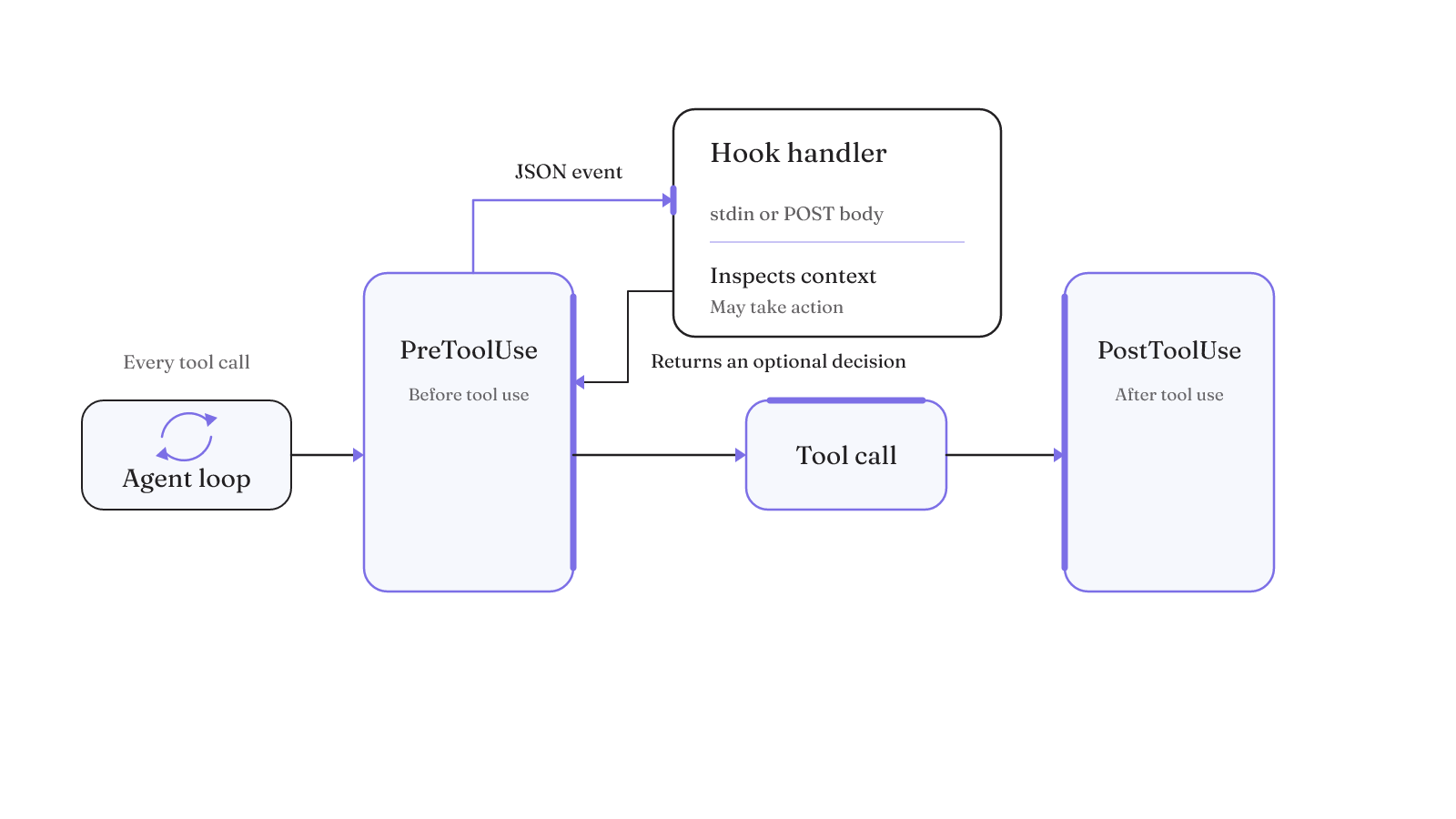
Two named events place that mechanism around tool use. PreToolUse and PostToolUse hooks fire on every tool call inside the agentic loop. The pre-call boundary gives a handler the event context before tool use. The post-call boundary provides an event after tool use.
The transport is part of the inspectable design. For a command hook, the event arrives on standard input. For an HTTP hook, it arrives in the POST request body. You can review the handler that receives that input, the action it takes, and whether it returns a decision. That is more specific than marking a diagram with a generic oversight box.
This example turns an abstract control question into an inspectable path:
- The loop reaches a tool call.
- A hook handler receives the event context through its configured input path.
- The handler inspects the input, may act, and may return a decision.
- A post-use hook provides another boundary after the call.
Hooks are control points, not automatic protection. Their value depends on what the handler inspects and what decision it returns. When you review a harness, look for the actual event data, handler behavior, and decision path. A claim that the system has hooks is much less useful than seeing the boundary around each tool call.
An integration demo is not a production system
Agent code can work on a developer machine and still require substantial engineering before it becomes a reliable production system. Connecting a tool proves that the connection can work in that setting. It does not prove that a longer task will stay on course.
Agent failures compound. A minor issue that traditional software might contain can derail an agent entirely. One failed step can send an agent onto a different trajectory and produce an unpredictable outcome. The altered trajectory matters because later steps now operate on a changed path, not merely a clean retry of the original step. A production test therefore has to expose failed steps, not only confirm that the happy path reaches the tool.
That is why the production question extends beyond whether MCP can reach a tool. You also need to know how the surrounding system behaves when a step fails. The connection, prompt, tool design, tests, and operations all participate in the result.
There is a positive case for doing that work. Multi-agent research systems can operate reliably at scale when supported by careful engineering, comprehensive testing, detailed prompt and tool design, robust operations, and cross-functional collaboration grounded in current agent capabilities. The important phrase is "supported by." Reliability comes from the system around the agents, not from adding another agent or connection in isolation.
For one MCP-enabled task, trace what follows a failed tool call. Inspect whether the agent stays on the intended task or moves onto a different trajectory. That failure trace gives you a better production test than repeating the successful demo.
Use the simplest system that can do the job
Start with the least complex design that can complete the task. Agent builders should begin with simple prompts, improve them through comprehensive evaluation, and add a multi-step agentic system only when a simpler solution falls short. Simplicity is a core principle for agent design.
That principle clarifies the MCP vs A2A and MCP vs API decisions.
MCP vs API
A conventional API uses fixed endpoints with predefined inputs. MCP introduces dynamic execution across tools and agents through contextual prompts and scoped permissions. If the task fits a fixed endpoint and predefined input, that is the simpler interaction pattern to evaluate. If a model needs to use external capabilities through a common interface, MCP addresses that access layer.
MCP vs A2A
A2A focuses on flexible, stateful collaboration in which agents partner on tasks. MCP focuses on agents using capabilities. A system may need tool access, agent collaboration, or both, but those needs should not be collapsed into one protocol choice.
Explicitly showing an agent's planning steps can improve transparency. The agent-computer interface also needs thorough tool documentation and testing. Together, visible planning, documented tools, and tested interfaces make the system easier to inspect without pretending that visibility alone controls every outcome.
The design sequence is practical: test the simple prompt, evaluate where it fails, and add the next layer only when that failure calls for it. Do not start with agent collaboration when the work only requires a fixed endpoint. Do not treat an MCP connection as a reason to introduce autonomous task pursuit.
Evals turn failures into regression protection
Early evaluation can speed agent development because a failure can become a test case, and that test case can prevent the same regression. Metrics then replace guesswork about whether a change improved the system.
Strong agent evaluation starts with realistic tasks derived from failures. It uses robust success criteria and thoughtfully designed graders. It also challenges the model, improves the signal-to-noise ratio, and includes transcript inspection.
For an MCP-enabled agent, retain the failed trajectory, the relevant tool-call context, and the resulting transcript as material for an evaluation. Define success for the complete task, not just whether the tool returned a response. Then run the test again when the prompt, tool description, permission, handler, or model changes.
Apply the layer-and-control matrix to one live MCP connection before granting it access. Record the tool's job, the interaction pattern, the authority it exposes, and the point where a person or handler can return a decision. Then run a failure-derived evaluation against that path.
For a concrete implementation reference, inspect our 21st dev Magic MCP lab note, which covers an MCP installation and verification path. Use it to compare the visible connection steps with the authority and control points in your own harness.