Key takeaways
- Reach it three ways: your agent's MCP, a web console, or the npx 21st CLI.
- You need a 21st.dev account and a Magic API key before it works.
- After it generates, check the code compiles and fits, not just renders.
This page is a synthesis of public sources and reasoned judgment, not a first-hand install benchmark. So treat the exact commands and version numbers as things to confirm at the live source, and lean on the workflow and the checks, which hold across releases.
What "21st dev magic mcp" actually points to
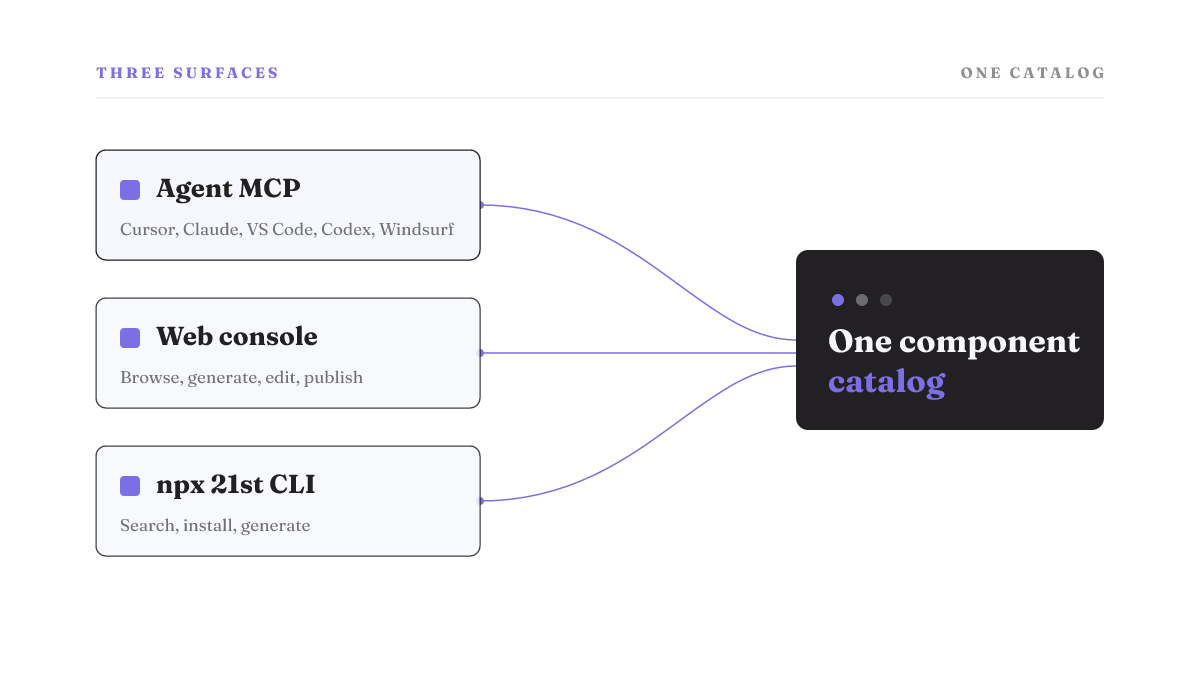
You typed the name to reach the real thing, so here it is in one line. 21st.dev Magic is a UI-component generator you drive in plain language, and it runs as an MCP integration inside AI coding agents that are listed for Cursor, Claude, VS Code, Codex, and Windsurf. The same catalog is reachable two other ways: a web editor, and a 21st CLI you call with npx 21st to search, install, and generate.
That three-surface shape matters more than the demo videos let on. The 21st dev Magic MCP server is the piece your agent talks to. The 21st dev Magic console is the full web editor, where you browse, generate, edit, and publish without leaving the browser. The CLI is the terminal path for people who live there. Pick the surface that matches how you already work, not the one a tutorial happened to record.
One thing to hold onto from the start: each prompt returns several component variants, not a single take. You compare and pick. That speeds the first draft of a component, and it also means you still own the choice and the finishing. Magic hands you options; it does not hand you a decision.
What you need before you install
Before any install command will do anything useful, two things have to exist. You need a 21st.dev account, and you need a Magic API key for authentication. The key is what proves your agent is allowed to call the service. You also need a compatible MCP client already installed, since Magic plugs into an agent rather than running on its own.
That covers the 21st dev magic mcp api key question people search for most: yes, there is one, and you get it from your 21st.dev account. Vendor documentation on the exact key-generation screen is thin in public, so get and place the key from 21st.dev directly rather than trusting a secondhand walkthrough. And treat that key like any other secret. It lives in client or repo config, which means it can leak the same way a database password leaks. Keep it out of committed files.
Install it and wire it into your agent
The install has two parts: get the server, then wire it into the specific agent you use. The 21st CLI is the front door. You run npx 21st to search, install, and generate, and the tool sets your agent up to call Magic through MCP. Claude is on the supported-client list, along with Cursor, VS Code, Codex, and Windsurf.
Here is the honest part, and it is the reason most 21st dev Magic MCP install guides age badly. The exact CLI string and the per-client config keys drift between releases. A command copied from a directory page today can already be one version behind. So this page will not pin one string and pretend it is stable. The shape of the step is: install through the 21st CLI, then add Magic to your agent's MCP config with your API key. For the current command and the exact syntax, go to the 21st CLI output and the magic-mcp repository, not a snippet you found third-hand.
A note on 21st dev Magic MCP Claude Code specifically, since it is a common search. Claude Desktop and Claude Code are different clients, and setup steps that work for one are not guaranteed to work for the other. Public, primary documentation for Claude Code parity is not settled enough to lay out as verified steps here. So confirm Claude Code support against 21st.dev and the repo before you assume it, rather than copying Desktop instructions and hoping they map across.
Generate and compare components
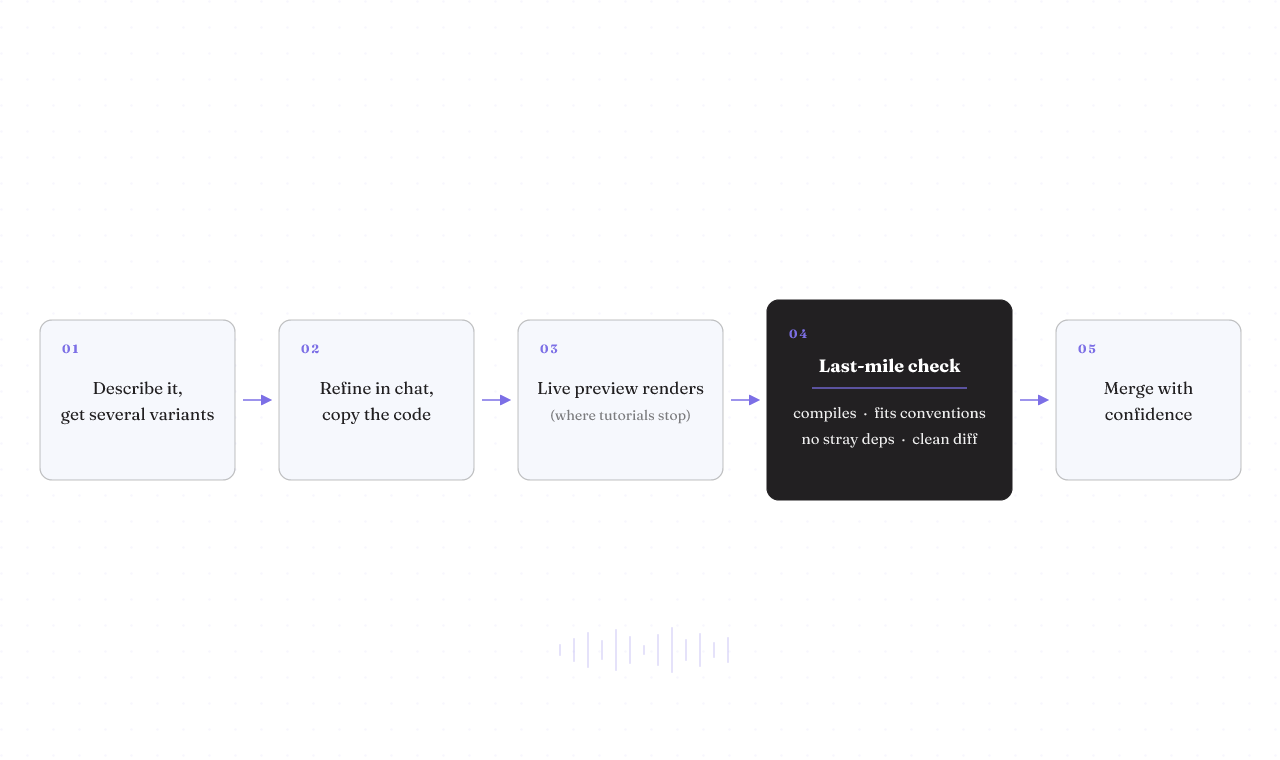
Day to day, the loop is quick. You describe the 21st dev magic mcp ui components you want in plain language, and you get back several variants to weigh side by side. You can start from any community component and remix it into your own version instead of building from a blank prompt. You keep iterating on the variant you picked in chat, tweaking styles, behavior, and copy until it reads right. When you like it, you copy the component's code, or the prompt behind it, in one click.
That chat-to-refine step is the 21st dev magic chat part people ask about. It is not a separate product. It is the same catalog, with a conversation wrapped around the variant you chose so you can push it further without regenerating from scratch.
The output comes with live preview and full TypeScript support, and the server exposes only a small set of tools to your agent, around four. That is worth sitting with. Live preview tells you the component renders. It tells you nothing about whether the component belongs in your project. A clean preview and a clean merge are two different tests, and the next section is about the second one.
The step the tutorials skip: check it compiles and fits, not just renders
Every top result stops at "it generates beautiful components." None of them name the last mile, which is where an AI-generated component quietly costs you an afternoon. A component that looks perfect in the preview pane can still drift from your project's conventions, pull in a dependency you did not want, or duplicate a pattern you already have. Preview is a rendering test. Merge is an integration test. The gap between them is yours to close.
This is reasoned judgment about a known failure mode, not a benchmark I ran. But the check is short, and it generalizes to any generated code:
- Does it compile in your project, not just in the preview sandbox? Drop it into a branch and build.
- Does it follow your conventions? Your file structure, your styling approach, your naming. A component that fights your patterns is tech debt on arrival.
- Did it add dependencies you did not intend? Diff your lockfile. A new package pulled in for one button is a real cost.
- Does it diff-review cleanly? Read the generated code the way you would read a teammate's pull request, before it merges, not after.
Run that on the first component you generate, and you turn "it renders" into "it fits." Skip it, and you find out at review time, or worse, in production.
When 21st dev Magic MCP is the right call, and when it isn't
A fit page that never says "don't use this if" is a brochure. So here is the plain version, and it is my judgment, not a vendor policy.
Magic is a good fit when you already use one of the supported agents, you want to move fast on the first draft of a UI component, and you have a review-and-test path before anything merges. If you can branch it, build it, and read the diff, the multi-variant speed is a real gain.
It is the wrong call in a few concrete cases. If you need deterministic, reproducible output, generation that returns several variants is working against you. If you cannot inspect the dependencies it introduces, you are importing risk you cannot see. If your setup would put the API key in repo config that is not properly secret-managed, fix that first. And if you have no branch-and-test path, no clean way to reject a bad component before it ships, then Magic is handing generate-and-write access to a process you cannot roll back. That is the anti-fit signal that matters most.
Notice that this checklist is not really about Magic. It is about any MCP server you are about to trust. Keep it; you will reuse it next week.
Verify against the repo before you trust any install guide, including this one
The 21st dev magic mcp github repository, magic-mcp, is the source of truth, and so is the 21st CLI. That is where you confirm the current install command, the supported-client list, and the version you are actually installing. Client-support labels and install matrices are dated facts, not stable documentation. The list that was accurate last quarter may name a client that changed, or miss one that was added.
I am deliberately not stating a current version, a star count, a license, or a release date for the repo, because no primary source in hand establishes them right now, and a number copied from a secondhand page is exactly the stale-snippet trap this whole page argues against. Better to send you to the real thing than to hand you a figure that rots.
So how do you know it worked? The signal is simple. Your /ui prompt or npx 21st generate returns a component your agent can actually place in the project, and that component passes the last-mile check above: it compiles, it fits your conventions, and its diff reads clean. Rendering in preview is the start of that test, not the end of it.
If you are wiring more MCP servers into your agent, the same verify-first habit carries over. Rifty's notes on adding MCP servers to Claude and on choosing among MCP servers work through it in more depth, and the broader case for keeping agentic tools controllable and reversible is the reason this page spends as long on the check as on the install. If you are still deciding which agent to run Magic inside, the rundown of AI coding agents is the place to start.
The one move that survives every release: verify the install command and the supported-client list against the 21st CLI and the magic-mcp repo, then run the last-mile check on the first component you generate. Do that, and a stale snippet can't cost you a merge.