Key takeaways
- Aider is terminal-native and writes your Git commits for you.
- Cline is a VS Code sidebar that waits for you to approve each change.
- Both are free, Apache 2.0, and model-agnostic, and you bring your own key.
- Pick by how you work, not by the longer feature list.
Search aider vs cline and the top result is often a developer asking how the two differ, with no clean answer underneath. The rest are feature checklists that read the same. Both tools are free, open-source, and model-agnostic, so the spec sheets blur together. That is the trap. The real question is not which one has more features. It is which surface matches how you already work: a terminal, or an editor sidebar. Get that right and the choice takes an afternoon, not a week of tab-hopping.
The two axes behind aider vs cline
Stop matching feature lists. Two axes decide this, and neither shows up in the ranking set.
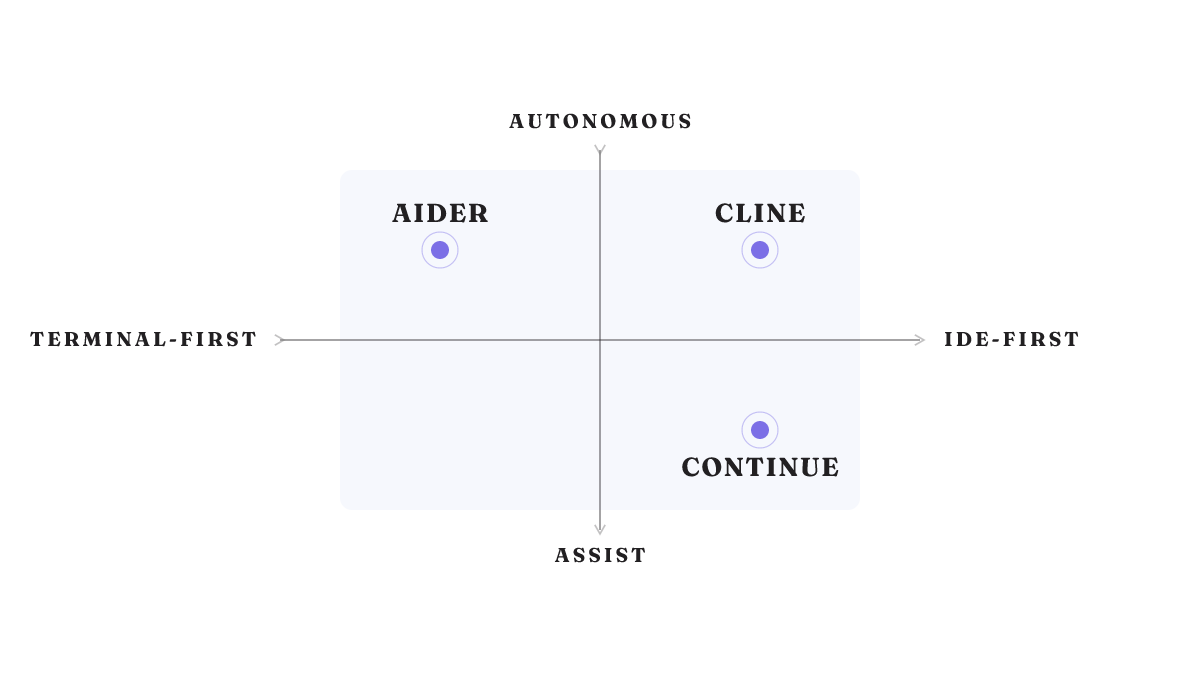
The first is where the agent lives. The AI-coding market has split along one line in particular: terminal-first background agents versus IDE-first assistants pinned to your editor. That is the same line that separates Aider from Cline.
The second is how far the agent goes before you step in. Call it autonomy versus assist. An autonomous agent takes a task and runs it. An assist tool helps while you drive.
Place the three tools and the fog clears:
- Aider: terminal-first, autonomous.
- Cline: IDE-first, autonomous.
- Continue: IDE-first, assist.
Axes simplify, so hold them loosely. Cline lives in an editor but acts on its own, so it straddles the autonomy line. The frame orients the call. It does not make it for you.
Aider: terminal-native, and Git does the bookkeeping
Aider lives in your terminal. Its signature move is quiet but real: every change it makes, it commits for you, with conventional commit messages. Your history stays clean without you thinking about it. Its architect mode lets it plan a change before it writes one.
Aider wins when you already live in the shell. You want the agent's work tracked in Git the moment it lands, and you are happy to read the diff after.
The cost is the flip side of the same coin. There is no sidebar and no per-change gate. Aider applies the edit, then you review it. If your instinct is to approve each change before it touches a file, that rubs the wrong way. No browser automation shows up for Aider either. So the aider vs cline split is not really feature-for-feature. It is whether Git-native automation or a visual approval gate fits your hands.
Cline: approve every change from the VS Code sidebar
Cline is the opposite shape. It is a VS Code agent that creates and edits files, runs terminal commands, drives a browser, and speaks MCP. But it moves step by step and waits for your yes on each change. Its install base runs into the millions, so this is a well-worn path, not an experiment.
It is also actively maintained. Cline ships regular updates, adding things like a scrollable task timeline and data-file uploads, and it tracks new Claude model families as they land.
The tradeoff mirrors Aider's. Cline does not auto-commit, so you commit by hand. It is tied to VS Code, with no terminal-first headless flow in the evidence. And versions ship fast, so treat any specific version number you read as already stale. Pick Cline when you want to see and approve every edit inside your editor.
The dimension the tutorials skip: Plan and Act model routing
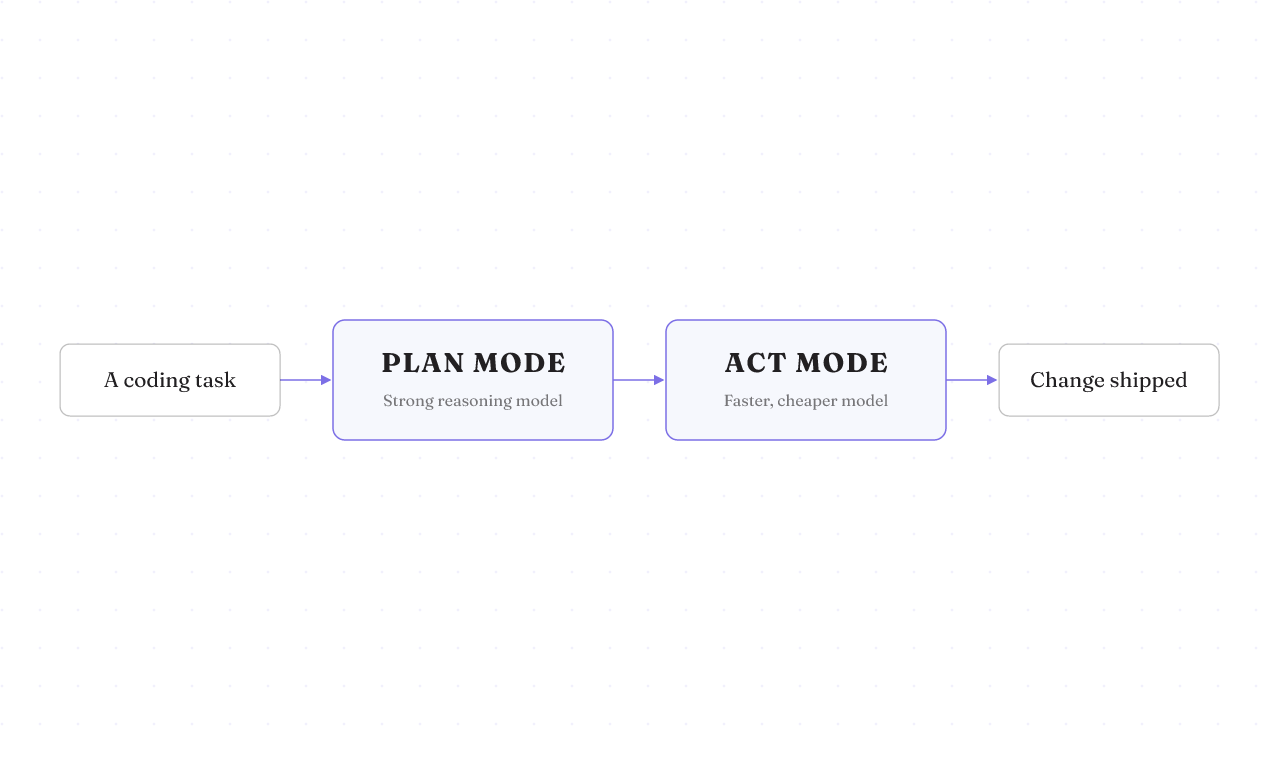
Here is what the generic aider vs cline posts leave out entirely. Cline splits work into two modes, Plan and Act, and lets you route a different model to each. So you can put a strong reasoning model on planning and a faster, cheaper one on execution, and pay for each only where it earns its keep.
Cline's own usage data backs the pattern up: planning and execution cluster on a small set of models, with deliberate pairings across the two modes. Do not fixate on which model leads any given snapshot. Those rankings shift month to month. The mechanism is the durable part, and it is a lever Aider does not expose the same way. If model cost and quality are a live tension for you, this one dimension may decide the whole thing.
Where Continue fits, and the cline vs continue question
Continue is the third name in every cline vs continue thread. It is an open-source assistant that runs in both VS Code and JetBrains, with autocomplete, chat, edit, and agent modes, powered by any model you point it at, including local ones through Ollama. That makes it the multi-IDE, assist-first option. It helps as you type rather than taking the wheel the way Cline does.
So cline vs continue is really autonomy versus assist wearing different clothes. Want an agent that goes and does the task in one editor? Cline. Want a strong assistant that spans two IDE families and stays in your lane? Continue. In the Reddit threads people stack cline vs continue vs aider and never land on an organizing answer. The two axes settle it: terminal or editor first, then autonomous or assist.
The same axis answers the aider vs cursor question people also type. Aider is terminal-first and autonomous. Cursor is an IDE-first assistant, at the commercial end of the same spectrum. Different pole, same map.
The neighbors: Cline vs Claude Code, Roo Code, and Kilo Code
Readers ask the adjacent questions too: cline vs claude code, continue vs cline vs roo code, kilo code vs continue. Honest answer first: solid current sources are thin on these, so place them by shape, not by feature specs I cannot stand behind.
- Claude Code sits near Aider. It is terminal-native and task-owning, the "hand it a job in the shell" end of the map.
- Roo Code and Kilo Code sit near Cline. They are VS Code-family agents in the sidebar shape.
That is the point of a frame. Once you know where Aider and Cline sit, you can locate any newcomer without waiting for a fresh spec sheet. Where the frame runs out of evidence, it says so instead of inventing a feature row.
The fit matrix: pick by your workflow, not the feature count
One table, built to be kept. Each tool has a cell where it loses.
| Dimension | Aider | Cline | Continue |
|---|---|---|---|
| Interface | Terminal CLI | VS Code sidebar | VS Code and JetBrains |
| Git automation | Automatic conventional commits | Manual commits | Assist-first, no auto-commit loop |
| Approval model | Review after changes apply | Approve every change first | Inline, as you work |
| Autonomy vs assist | Autonomous | Autonomous | Assist-first |
| Model routing | One model per run, architect mode to plan | Plan and Act, a model per mode | Any model, including local via Ollama |
| IDE reach | Terminal, editor-agnostic | VS Code | VS Code and JetBrains |
| Cost | Free, Apache 2.0, BYOK | Free OSS, pay for inference | Free OSS, paid plans above |
The matrix is a snapshot. These tools ship weekly, so read it for the shape of the choice, not as a permanent scorecard.
Why this axis is the one that matters now
You could have compared these tools on features two years ago and it would have worked. It does not anymore, and there is a reason. The category is consolidating around this exact split: terminal-first background agents on one side, IDE-first assistants on the other. When a market divides along a line, that line is the one worth deciding on.
The next differentiator forming behind it is MCP depth, how well a tool plugs into outside context and tools. Cline already supports MCP and keeps shipping capability updates, which is why it lands where it does. This is a read on the direction of travel, not a settled result, and reasonable engineers disagree on how fast it plays out. But the axis is where your bet actually sits.
What this comparison can't tell you yet
Fair is fair. This page organizes the decision. It is not a first-hand benchmark of Aider against Cline on the same task, because no honest one exists to lean on here. The head-to-head feature calls draw heavily on a single third-party comparison, so treat the fine-grained differences as one careful read, not gospel. And both tools change fast enough that any install count or version number is a moving target the moment it is written. What holds still is the frame. Tools move across it. The axes stay put. If you want the wider ranking and what to measure instead of features, rifty's best AI coding agents guide goes deeper, and the agent harness piece covers the control layer underneath all of them.
How to know you picked right, and what to do next
Skip the long deliberation. Two if-thens close it.
Want Git-native automation from your terminal, with commits written for you? Run Aider. Want to approve every change inside VS Code and route models per Plan and Act? Run Cline.
Both are free, open-source, and bring-your-own-key, so switching costs almost nothing. That changes the smart move. Do not over-analyze the table. Run the one that matches your surface on one real task for an afternoon, and let the work tell you. If you are still torn between the IDE-first names, the Claude Code, Cursor, and Copilot breakdown and the Cursor versus OpenCode comparison map the rest of that end of the field.