Key takeaways
"Everything Claude Code" is a community config bundle, not an Anthropic product. Three checks first:
- The top search result is a 544-star fork, not the upstream.
- Count components against a release tag, not a headline number.
- Each MCP server you add is a grant, not a speed knob.
This page hands you a method, not a fixed agent or skill count. The published numbers contradict each other, so a number you can verify beats a number you have to trust.
What 'everything claude code' actually refers to
Start with the distinction, because the coverage blurs it. "Everything Claude Code" (ECC) is a bundle of configs that sits on top of Claude Code. It is not Claude Code itself.
Claude Code is Anthropic's terminal-native coding agent. It runs tasks in your terminal, such as git workflows, edits, and PR comments, instead of only suggesting code, and it ships a plugin system and IDE integration. ECC is a layer you add to that.
ECC started as a hackathon build open-sourced in January 2026, put together by Affaan Mustafa. The build took eight hours, and the prize was API credits. From the start it spanned more than one tool: Claude Code, OpenAI Codex, Cursor, and OpenCode.
Hold onto one fact. ECC is a community project. No vendor supports it, and no vendor promises it will stay stable. Treat it like any third-party agent harness you pull into a working repo.
Which repo you're actually on, and why it matters
Here is the tension the ranking set skips. Search "everything claude code" and the top result is a fork with 544 stars, last committed January 23, 2026. That is not the upstream most write-ups actually describe.
The canonical upstream is affaan-m/everything-claude-code. You can confirm this without trusting anyone's word for it. Other active forks name "affaan-m main" as the tree they merged from, so the real upstream is visible in the fork history itself.
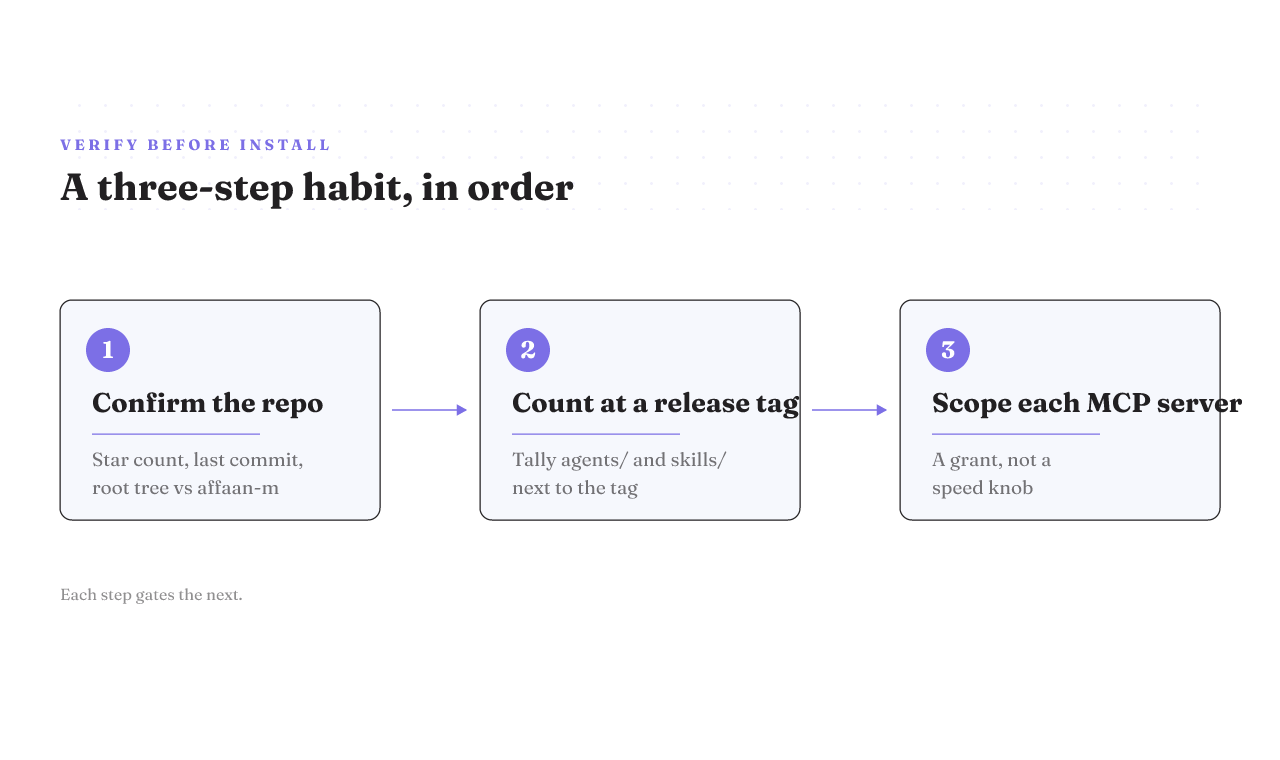
Your check has three parts. Read the star count, the last-commit date, and the root file tree, then compare all three against affaan-m/everything-claude-code. If the repo in front of you was last touched months ago and carries a few hundred stars, you are looking at a fork, not the source.
One caveat: star counts and commit dates move. This reading is from mid-2026, so rerun the check rather than memorizing today's top result.
Why the component counts don't agree, and how to count them yourself
Published coverage cannot agree on how big ECC is. Agent counts range across an order of magnitude. Skill counts do the same. None of the figures is tied to a release tag, which is exactly why they conflict.
The fix is boring and reliable. Check out a specific release tag. Count the entries under the agents/ directory and the skills/ directory. Write the number down next to the tag you counted at. Now you have a figure someone else can reproduce.
I am not going to hand you a single number here, and you should distrust anyone who does without naming a tag. A count without a tag is a moving target, and that includes any count on this page. Counting it yourself is the difference between agentic engineering and vibe coding.
What's inside: agents, skills, hooks, and the install manifest
A bundle like this installs in layers, and it helps to know them before you keep or cut anything.
Skills are the layer most people underestimate. A Skill is a folder Claude loads only when the task calls for it. It packages a procedure or a body of domain knowledge and stays out of the way until the task makes it relevant.
On top of skills, ECC bundles agents, hooks, and rules, plus a security scanner that runs static-analysis checks against the config bundle itself. Session hooks save and reload context between sessions, so a task carries forward instead of resetting.
The layer that matters most for control is the installer. ECC ships a manifest-driven selective install, so you can pull only the languages and components you need instead of the whole thing. Keep that in mind. It is what makes cherry-picking realistic later.
One honest note: the skills surface is still shifting. Field names, folder locations, and loading behavior change over time, so verify the specifics against current official docs rather than any snapshot, including this one.
Adding an MCP server is a grant, not a performance knob
Most guidance treats MCP servers as a tuning problem. ECC's own advice is to keep under about ten servers and eighty tools active per project, and to disable the ones you are not using. That keeps the model fast.
Speed is the smaller half of the story. When you add an MCP server, its tools become callable inside the model's own reasoning, not only when you explicitly ask for them. So the real question is reach. How much can the model touch once this server is attached? Adding a server is a grant, not a knob.
That reframes how you pick scope. A read-only docs server is a small grant. A server that can write to your database is a large one. Choose by blast radius, not by how many tools it unlocks.
The mechanics sit one level down from this page on purpose. If you are working out how to add MCP to Claude Code, the exact CLI to attach a server, where the MCP config file lives per project, and the command to list your active servers are all command-level steps. The same goes for the worked setups: wiring the GitHub MCP server, a Figma server, Context7, or a Supabase MCP server into Claude Code. Get the scope wrong on any of them and the grant is wider than you meant it to be. Attach a server at the right scope and transport on the companion page, which walks the add, scope, and verify steps in full.
What actually survives across six harnesses
ECC's selling point is one repo, many tools. It ships configs for Claude Code, Cursor, Codex, OpenCode, Gemini, and Antigravity. On paper, you write your setup once and run it everywhere.
The flat list hides a real question. A config that loads in Claude Code is not proof that its enforcement hooks fire the same way in an agent-first IDE. Terminal-native tools and IDE-native agents read config differently, and a hook that blocks a risky git action in one harness may be quietly ignored in another.
I will not hand you a survives-versus-degrades table per adapter, because that needs a first-party enforcement test I do not have. What I can tell you is that the six-harness list answers "does it load," not "does it enforce." Those are different promises, and the gap between them is where the surprises live.
Where Antigravity fits if you're comparing harnesses
If you landed here weighing antigravity vs claude code, here is the short version. Google Antigravity is an agent-first IDE built on Gemini models. It is free during its preview and leans on multi-agent orchestration, a Mission Control dashboard, and built-in browser automation and testing.
On raw capability, the two run close. Both handle SWE-bench-level problems, reported at roughly 76 percent or better on SWE-bench Verified. Capability is not the deciding factor between them.
The real differences are shape and stage. Claude Code is terminal-native and generally available. Antigravity is IDE-native, preview-stage, and tied to Gemini. Do not switch harnesses off this one paragraph. For the full google antigravity vs claude code breakdown, see the head-to-head comparison.
Keep everything, cherry-pick, or write your own
You have three honest options, and the right one turns on two questions. Is your stack single-language or polyglot? Will MCP servers run in production, or stay local?
| Your situation | Best default | Why |
|---|---|---|
| Single-language stack, MCP local only | Cherry-pick | You need a slice, not a dozen language ecosystems. Pull the agents and skills for your stack through the manifest. |
| Polyglot stack, MCP local only | Keep everything | The breadth earns its keep, and the install manifest lets you prune later. |
| Single-language, MCP in production | Cherry-pick, then audit servers | Fewer moving parts, and every server you enable is reachable inside the model's reasoning. |
| Polyglot, MCP in production | Write your own, or a thin cherry-pick | You want a bundle you can defend line by line when a server can act on prod. |
The table is reasoned from how the install manifest is organized, not from a benchmark. If your situation sits between two rows, default to cherry-pick. Wholesale is the harder choice to defend to a teammate, and writing your own costs the most time.
Your next move by situation
Whatever you install, the order stays the same: confirm the repo, count what you'll install, then attach servers deliberately.
If ECC is new to you, start by confirming you are on affaan-m/everything-claude-code and not a fork. If you already installed from the top search result, check its last-commit date against the upstream before you build on it. If you are wiring in MCP servers, scope each one to the smallest reach that does the job.
Then bookmark the method, not the numbers. The star counts, the top result, and the component totals will age. The command-level MCP companion covers the actual add, scope, and verify steps when you are ready to attach a server. The check you just learned outlives every number on this page.