Key takeaways
Copilot Studio can let one agent call others. Start with Power Automate or one agent when either can do the work. Give each child agent one responsibility. Before deployment, define how the system detects errors, pauses work, and sends it to a person.
Copilot Studio multi-agent orchestration is useful only when specialization earns its added boundaries. The design needs narrow roles, bounded tools, tested handoffs, traceable execution, and a clear stop path. Agent count is not a maturity score.
Should this workflow use one agent or several?
Use the workload condition to choose the smallest viable design before defining the agents.
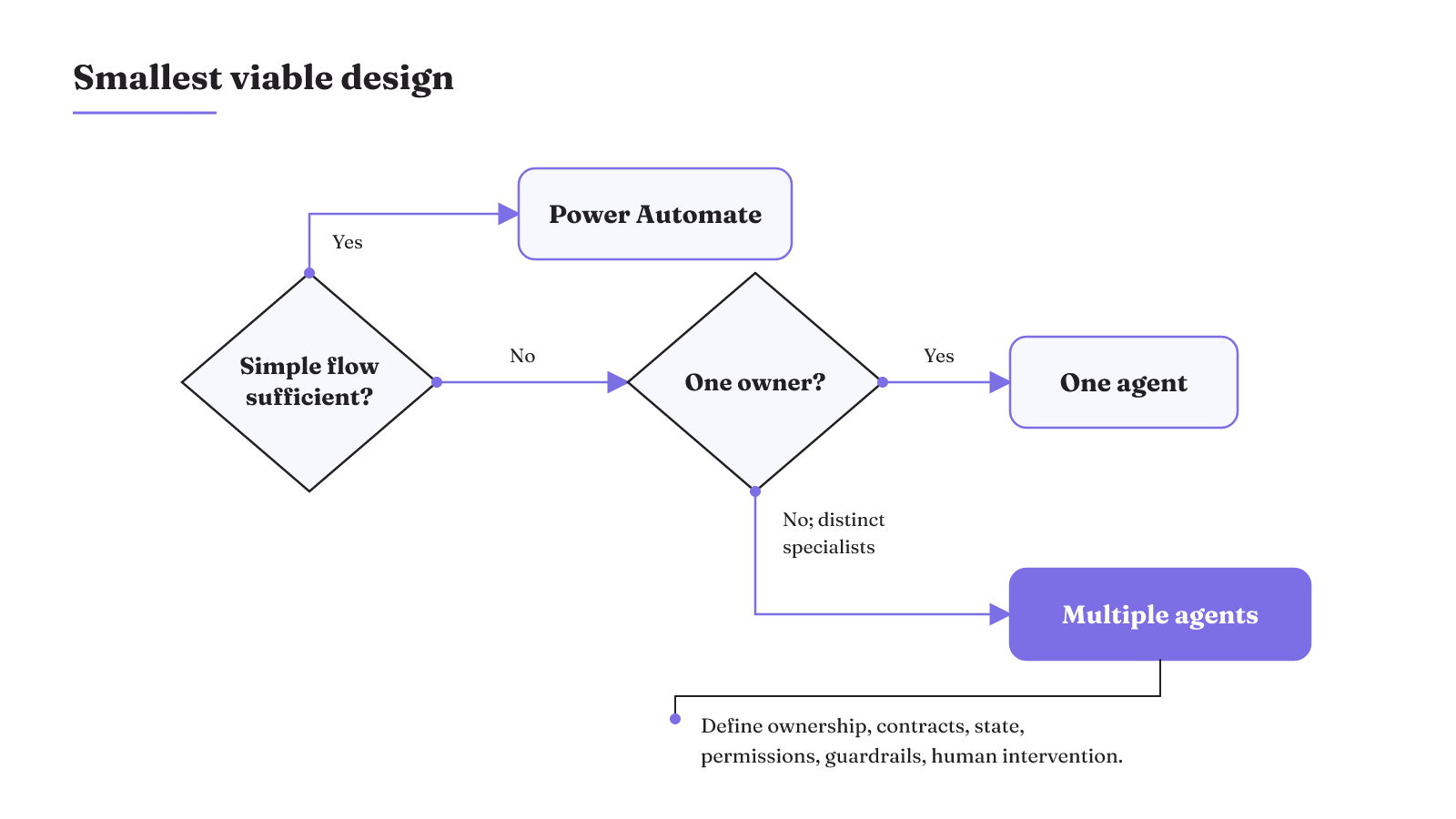
| Workload condition | Smallest viable design | Reason | Required boundaries |
|---|---|---|---|
| Fixed steps that a simple flow can solve | Power Automate | A deterministic flow is often more secure and reliable for this work. | Define the flow and its allowed actions. |
| Work that one agent can own | One agent | It avoids adding another routing and handoff boundary. | Keep ownership narrow, use small well-described units, and preserve needed state. |
| Distinct specialist responsibilities | Multiple specialized agents | Specialization can improve modularity, scalability, and manageability. | For every agent, record ownership, component contract, durable state, permissions, policy guardrails, and human-intervention points. |
Do not promote the design to the third row until every boundary field has an answer. The added agent should earn its place through specialization, not through the label "multi-agent."
This is the core decision behind broader AI agent architecture patterns: choose the system shape from the work and its control boundaries, not from a desired agent count.
Can Copilot use multiple agents?
Yes. In Copilot Studio, generative orchestration supports a design in which one agent calls other agents. There are two useful forms to distinguish.
An inline agent, also called a child agent, is a small reusable workflow inside the same agent. It shares context with the main agent, which simplifies passing data between them. Keep that child focused on one responsibility and test it well. This form suits a bounded piece of work that benefits from the parent's context.
A broader design can combine an orchestrator, specialist agents, and a shared knowledge layer. Each component does one job. That makes the handoffs explicit: the orchestrator routes, specialists own their assigned work, and the knowledge layer supplies shared information.
So, can two AI agents work together? Copilot Studio supports that arrangement, but the connection itself is only the beginning. The role, context, authority, test, trace, and stop conditions still need definitions.
Agent orchestration with GitHub Copilot is a separate context
The GitHub Copilot SDK can act as an agent provider in Microsoft Agent Framework multi-agent workflows alongside other providers. That statement is about an SDK integration in Microsoft Agent Framework. It does not establish a specific subagent feature inside VS Code or make that environment equivalent to Copilot Studio.
Copilot Studio multi-agent orchestration routes at runtime
Generative orchestration in Copilot Studio is an LLM-driven planning layer over tools, knowledge, and instructions. It reads the agent's instructions on every turn, then decides how to route the conversation and whether to invoke a knowledge source, topic, or tool.
The mechanism is easiest to reason about as a chain. Instructions carry always-on rules. The orchestrator reads them and selects the relevant knowledge, topic, or tool. A topic handles structured, multistep conversation flow and conditional logic. A tool reads or writes data in an external system.
That separation matters when you ask how to orchestrate multiple agents. Put stable behavioral rules in instructions. Put conditional conversation logic in a topic. Give tools specific capabilities instead of asking a large instruction block to stand in for a controlled process.
Runtime routing creates flexibility because the planning layer chooses among the available surfaces. It also means the design cannot be judged only by a clean happy-path diagram. The architecture must account for the information that moves, the point where a decision is made, and the behavior when a selected path fails.
Choose an architecture by information flow and failure mode
The architecture determines information flow, failure modes, and scaling behavior. A centralized hub favors predictability, but it can become a bottleneck. Decentralized and hierarchical patterns can offer greater resilience, but they give up some consistency. Those are operating tradeoffs, not labels for increasingly advanced systems.
Copilot Studio also allows a hybrid control pattern. A deterministic workflow skeleton can wrap a nondeterministic inline agent. The inline agent reasons over trigger data and selects tools, while the surrounding workflow supplies the fixed structure. This arrangement gives the reasoning step a defined place without turning every part of the workflow into a runtime choice.
Choose among these shapes by following the work. If a central route must remain predictable, accept the possible hub bottleneck. If resilience matters more than uniform behavior, a decentralized or hierarchical pattern may fit the workload. If only one part needs runtime reasoning, contain that part inside the deterministic skeleton.
The agent orchestration glossary provides the broader pattern definitions. The implementation question is narrower: what information and capabilities should be available at each decision point?
Context, knowledge, and tools define the working boundary
An agent's working boundary is the information it can use and the capabilities it can reach. In Copilot Studio, each tool is a specific capability for interacting with an external system, and Microsoft recommends limiting an agent to no more than 25–30 tools for best performance and results. Knowledge can ground responses in enterprise data from Power Platform, Dynamics 365, websites, and external systems. It can be set at the agent level or within a topic through a generative answers node. Context engineering favors the smallest set of high-signal information likely to produce the desired result. Fill one canvas for each responsibility.
- Responsibility
- Record the single piece of work the agent owns, plus the limits and expectations attached to that work.
- Check whether the ownership combines separate specialist jobs or leaves part of the result ownerless.
- Trigger
- Record the event, topic, runtime route, or handoff that starts the responsibility.
- Check whether an operator can identify the exact condition that gave this agent control.
- Context
- Record only the high-signal information needed for this step.
- Check which item changes the work and which item can be left out without blocking the responsibility.
- Knowledge
- Record the enterprise sources the work can use. Place each source at the agent level or inside a topic through a generative answers node.
- Check whether the source must be available across the agent or only within one structured flow.
- Tools
- Record each external capability the agent can perform. Treat the 25–30 tool recommendation as a ceiling, not a target.
- Check whether every reachable tool serves this responsibility and whether the total remains within the recommended limit.
- Permissions
- Record the data and actions the agent can reach under least-privilege governance.
- Check whether removing a permission would stop the defined responsibility or whether the access exceeds what the work needs.
- Handoff contract
- Record the required input, the output shape, the next owner, and the state that must survive the conversation.
- Check whether the receiving component can tell that the input is complete before it accepts control.
- Verification
- Record the check that must pass before the result is accepted or an external action continues.
- Check whether the result is observable and whether its pass or fail state is visible to the next owner.
- Failure behavior
- Record the error or invalid condition that pauses the route, then identify the human-intervention point that receives the work.
- Check that the route stops at that boundary.
Bound authority before an action completes
A clean handoff can still carry too much authority. Blurred role boundaries may pass excessive authority or stale context to another agent. That raises the chance of unintended tool use, duplicate actions, or execution continuing beyond a control point.
The response is containment before completion. Copilot Studio guardrails need policy enforcement and runtime monitoring to control prompt injection, tool misuse, and sensitive-data exposure. Containment-first controls govern prompts, tools, outputs, and escalation before an agent completes an action.
Apply those controls at the same boundary where responsibility changes. Define which prompts the receiving role may act on, which tools it may invoke, what outputs are acceptable, and which condition escalates the work. The goal is not a vague promise that the agents are supervised. It is a visible authority boundary around each action.
This also changes the meaning of a handoff test. A successful transfer is not enough. The test must cover the context passed, the authority received, and whether work stops at the intended control point.
A short authority review can expose the weak edge before an action runs. What responsibility is crossing the handoff? What context moves with it, and could that context be stale? Which tools become reachable after the transfer? Which prompt, output, or escalation condition should stop completion? Those questions are especially useful when two roles appear narrow on a diagram but share a broad set of tools.
Treat the stop condition as part of the action boundary. If the handoff reaches a control point, execution should not continue merely because another agent is available. The policy and runtime monitor need a defined place to contain the action before completion.
How should you test conversations and failure containment?
Test the normal path, the changed trajectory, and the stop path as separate scenarios. Connecting the agents does not finish the system.
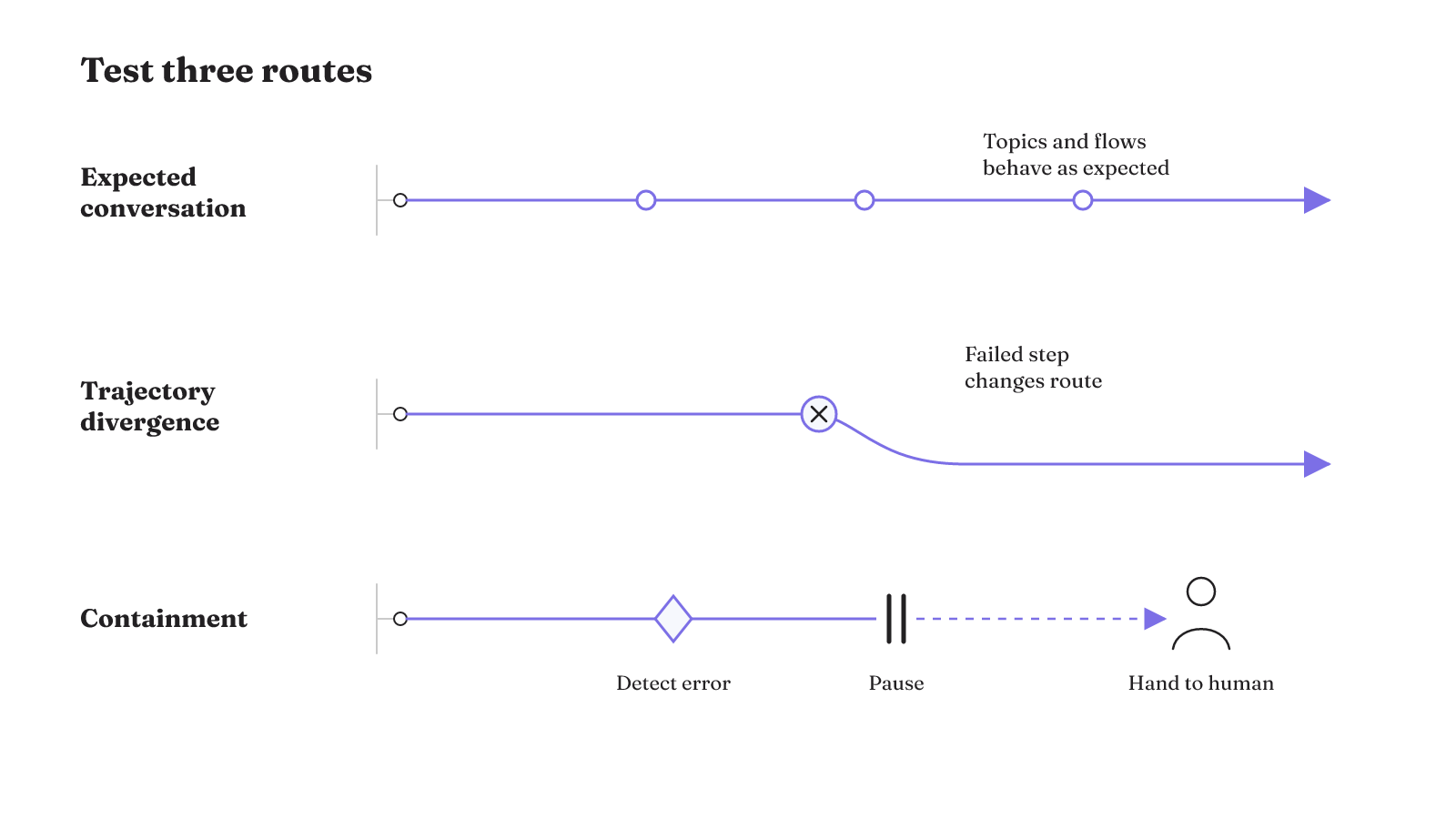
- Expected conversation: Use the Copilot Studio test panel to inspect how the agent leads the conversation. Check whether its topics and conversation flows behave as expected.
- Trajectory divergence: Force a step to fail and inspect the route that follows. In an agentic system, one failed step can send agents down different trajectories and produce unpredictable outcomes.
- Containment: Exercise the control that detects the error, pauses the workflow, and forwards the work to a human. Confirm that execution stops at that boundary.
The second scenario is where a conversational preview can be misleading if it becomes the whole test plan. A normal exchange proves that one path behaved as expected in the panel. It does not test the route created by a failed step or the containment behavior that should follow.
Run each scenario against the same responsibility boundary. On the normal path, inspect the topic and conversation flow. On the divergence path, locate the failed step and the route it created. On the containment path, look for three separate events: detection, pause, and transfer to a human. A trace that skips one of those events cannot show the complete stop path.
Reliable multi-agent operation at scale calls for careful engineering and comprehensive testing, along with detailed prompt and tool design and robust operations. The test set should therefore cover more than final answers. It should exercise the routing decisions, tools, handoffs, and control points that produce them.
An agent orchestration example can help turn these scenarios into an implementation map, but the useful test remains specific: expected flow, divergent route, and contained stop.
Trace the execution path, not just the final result
Multi-agent observability needs the full execution path. Aggregate metrics can miss coordination failures along nonlinear routes, even when the final result looks ordinary.
A useful trace record preserves:
- the actor or agent that performed each action;
- the timestamp for the action;
- the reason for the decision;
- the input data used;
- the interactions between agents; and
- the final result.
Together, those fields let an operator identify who acted, when the action occurred, and why. They also keep the input data, agent interactions, and result traceable for compliance and auditability.
This is different from recording only the start, finish, and overall outcome. Coordination failures can happen between those points. A route may branch, return to an earlier role, or pass through several agents before producing a result. Tracing nonlinear execution paths preserves the sequence needed to inspect that behavior.
Connect the trace to the test scenarios. The expected conversation should show the intended route. The failed step should show where the trajectory changed. The containment scenario should show the error, the pause, and the transfer to a human. Without that record, a stop path may exist in the design but remain hard to inspect in operation.
Read the record as a sequence, not as six isolated fields. The actor and timestamp locate the action. The reason and input data show what informed it. Agent interactions preserve the route, and the final result closes the record. That sequence is what lets an operator inspect a coordination failure that an overall success rate might hide.
Plan limits change the orchestration you can deploy
Licensing is an architecture constraint. The Copilot Studio for Teams plan, available in select Microsoft 365 subscriptions, supports classic orchestration and publishing agents to Teams. Generative orchestration is not available in that plan; Microsoft lists it for the standalone Copilot Studio subscription.
| Plan | Orchestration mode | Publishing channel | Material limit |
|---|---|---|---|
| Copilot Studio for Teams in select Microsoft 365 subscriptions | Classic orchestration | Teams | Generative orchestration is unavailable. |
| Standalone Copilot Studio subscription | Generative orchestration is listed | Outside channels supported | Publishing or sharing agents to outside channels requires this plan. |
Resolve that constraint before finalizing the system shape. A design that depends on generative orchestration cannot be mapped onto the Teams plan as if the capability were included. A design that must publish or share agents outside Teams also needs the standalone plan.
If the control boundaries are now clear, compare them with our VS Code multi-agent orchestration guide. Use the same questions about responsibility, context, authority, tests, traces, and stops while keeping the two product contexts distinct.