Key takeaways
- Start with one agent. Add a specialist when it materially improves isolation, prompt clarity, or trace legibility.
- Use worktrees to isolate parallel changes in the same repository.
- Review each result before creating a commit or pull request, or bringing it into the main workspace.
Cursor multi agent orchestration is not settled by starting more agents. The useful design question is whether every branch has a clear task, isolated execution, an output owner, an integration checkpoint, and a validation gate. Those controls make the arrangement inspectable before parallel work begins.
When is Cursor multi agent orchestration worth the coordination cost?
Multiple agents are worth the overhead when specialization materially improves capability isolation, policy isolation, prompt clarity, or trace legibility. That is a higher bar than finding two tasks that could run at once. Splitting a workflow too early adds prompts, traces, and approval surfaces without necessarily making the workflow better.
Read those four tests as changes to the operating contract. Capability isolation gives a specialist a bounded capability. Policy isolation gives a branch its own policy boundary. Prompt clarity makes the specialist's assignment easier to state. Trace legibility makes that branch easier to follow after it runs. The improvement should be material, not cosmetic. A renamed role with the same tools, policy, prompt, and trace does not earn another agent.
Final-output ownership is the first decision. A multi-agent workflow needs an owner at every branch. The owner may be the agent that receives control, or a manager that keeps control while using specialists as bounded capabilities. If ownership is vague, parallel execution leaves the important decision unresolved: who accepts the result that moves forward?
Write the owner beside the branch before execution begins. In a handoff, the specialist receives control. In an agents-as-tools arrangement, the manager stays in control. That choice determines where the completed work returns and which role owns the final output. It also exposes a weak split early: if nobody can name the return point, the orchestration design is incomplete.
Use this coordination-tax checklist before starting another agent:
- Specialization: Does the new agent materially improve capability isolation, policy isolation, prompt clarity, or trace legibility?
- Ownership: Who owns the final output from this branch?
- Isolation: Does parallel work on the same repository need a separate worktree? Cursor intends worktrees for running several agents on one repository without conflicts.
- Review load: Which extra prompts, traces, and approval surfaces will the split create?
- Acceptance: Who decides that a branch is ready to cross the integration checkpoint?
If the proposed split cannot clear those checks, keep one owner and one agent. Agent count is not the goal. A legible contract is. Our agent orchestration glossary places specialists and ownership patterns in the broader architecture.
Cursor's agent surfaces do different jobs
| Surface | Where it runs or appears | Established function | Control boundary |
|---|---|---|---|
| Worktrees | Agents Window; the IDE uses Worktree Skills commands | Moves an agent into a separate Git checkout with isolated files and changes | Isolates the task checkout from the main checkout |
| CLI | Scripts and automation workflows | Runs Cursor from an existing coding workflow | Places agent execution inside the script or workflow that invoked it |
| Automations | Background cloud agents started by schedules or events | Responds to GitHub, GitLab, Slack, webhooks, Linear, and other integrations | The configured trigger starts the background work |
| MCP | Cursor connected to an MCP server | Connects Cursor to external tools and data sources | Extends the tool and data boundary beyond Cursor |
| Plugins | Cursor Marketplace and cursor.directory | Provides discovery for official plugins, plus community plugins and MCP servers | Discovery does not define task ownership or integration |
Use the map to prevent a category error. Pick the surface that provides the needed execution, isolation, connection, or discovery function. Then define ownership and integration outside that selection, because those controls do not follow from the surface name.
A worked branch-and-merge workflow for Cursor
Consider one larger coding change that has parts you want to run in parallel. A controlled Cursor multi-agent workflow gives every control a place between initial scope and accepted code.
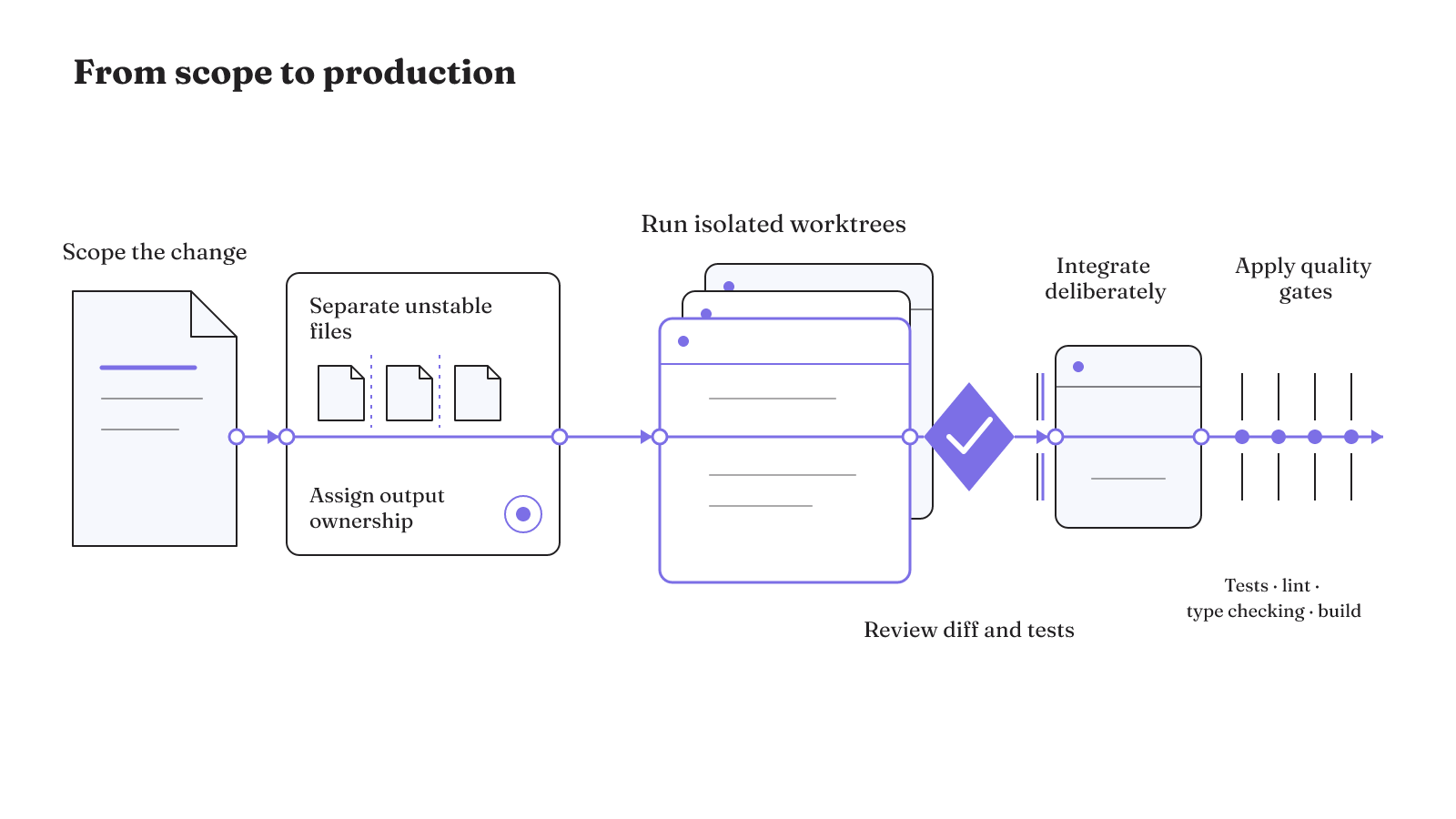
- Scope the change. Use Cursor's Plan Mode to scope the change before building the larger feature. The plan establishes the work that might be divided.
- Separate unstable file ownership. Decompose the work so parallel tasks do not compete over the same unstable files. Controlled parallel work separates tasks that would touch those files.
- Assign output ownership. Choose the orchestration pattern for each branch. A handoff transfers control to a specialist. An agents-as-tools pattern keeps a manager in control and treats specialists as bounded capabilities.
- Run isolated branches. Put each parallel task in a separate branch or workspace. Cursor worktrees provide each agent task with an isolated Git checkout, including its own files, dependencies, and changes, while the main checkout remains untouched.
- Review before integration. Inspect the diff and test results for each branch. When a Cursor agent finishes in a worktree, you can review the result before creating a commit or pull request, or bringing it into the main workspace.
- Cross the integration checkpoint. Bring forward the reviewed result through the chosen commit, pull-request, or main-workspace path. This is an explicit acceptance action, not a consequence of parallel execution.
- Apply production gates. Before the integrated change reaches production, automated quality gates can require tests, lint, type checking, and build completion.
The key branch decision is whether a specialist receives control or stays behind a manager. The key merge decision is whether the reviewed diff and test result are acceptable. Keeping those decisions separate makes the path from prompt to production easier to inspect. Our guide to multi-agent orchestration architecture goes deeper on the surrounding design choices.
What does /best-of-n actually decide?
Cursor's /best-of-n decides how to produce and compare candidates for the same task. It runs that task across multiple models and gives each run its own isolated worktree. Parallel model runs therefore do not write into one shared checkout while the candidates are being produced.
The command does not make the integration decision. /best-of-n compares the candidate runs, but it does not automatically merge a selected result into the main checkout. Selection and integration remain separate actions.
The phrase "same task" sets the useful boundary. /best-of-n is a candidate-comparison mechanism: several models attempt one assignment in separate worktrees. It is not the same decision as splitting a feature among specialists with different assignments. One produces alternatives to compare. The other produces branches that need named owners and an integration plan.
That boundary should shape the operating contract. The candidate phase needs one task that each model can attempt. The return path still needs an owner who selects a result and deliberately brings it into the main checkout. An isolated candidate is not accepted code merely because it won the comparison.
Before starting the runs, name the person or manager agent that will own candidate selection. After comparison, keep the chosen worktree at the integration checkpoint until that owner takes the deliberate action required to move the result. This preserves the distinction Cursor itself makes between comparing candidates and changing the main checkout.
Use /best-of-n when the decision is which candidate result to carry forward. Do not treat the comparison itself as a merge approval. The worktree contains a candidate; the main checkout changes only through the later integration action.
Cursor Automations handle recurring and event-driven cloud work
Cursor Automations fit work that should run as a background cloud agent on a schedule or in response to a supported event. Their documented tasks include reviewing recent pull-request commits for bugs, reviewing vulnerabilities, triaging Slack bug reports, and summarizing codebase changes on a schedule.
These are separate assignments, not one bundled supervisor. Recent pull-request commits can be reviewed for bugs. A vulnerability review can run as its own task. Slack bug reports can be triaged, while a scheduled run can summarize codebase changes. Each Automation still needs its own trigger, instructions, and tools.
Those examples define a practical boundary. An Automation can watch for a trigger and perform the configured background task. The orchestration contract still needs to name what the run may do with its result and who owns any change that moves forward.
You can create a Cursor Automation through the Agents Window, the Automations website, the /automate skill, or a Marketplace template. With the /automate skill, a plain-language workflow description configures three things: the triggers, the instructions, and the tools.
The creation surface does not change that contract. Starting in the Agents Window, on the website, from a skill, or with a template still leads to a configured Automation. For a control review, inspect the resulting trigger, instructions, and tools. Those fields say when the run begins, what work it receives, and which capabilities it can use.
Treat those three fields as the Automation's immediate control surface:
- The trigger determines when the background work starts.
- The instructions define the assigned work.
- The tools define the capabilities available to that run.
This is enough to place Automations in a Cursor multi-agent design without promoting them into a role the documentation does not establish. They handle recurring or event-driven cloud work. Branch ownership, result review, and integration approval remain decisions in the surrounding workflow.
Cursor CLI belongs in scripts and CI/CD workflows
The CLI is the better fit when agent work needs to enter an existing script, shell workflow, or CI/CD path. Cursor describes its CLI as a way to integrate with existing coding workflows, and it can run in scripts and automation workflows.
Three placements make that boundary concrete:
- A documentation or security task: Cursor CLI can update documentation or trigger a security review. It can also be used to build custom coding agents.
- A shell-driven task: CLI agents can run shell commands with safety checks and output display. The visible output keeps the command result in the workflow that launched it.
- A CI/CD task: Cursor CLI integrates with GitHub Actions for automated CI/CD workflows.
The surrounding script still matters. It defines when the CLI is called and what happens after the visible output returns. That makes the CLI useful as an execution surface inside an existing control path. It does not, by itself, answer how many agents the job needs or who owns a final branch.
Place the ownership decision around the invocation. The workflow that calls the CLI can display the shell output and preserve its safety checks. A separate acceptance decision can then determine whether the result moves farther through the CI/CD path. For a GitHub Actions integration, the action provides the automated workflow placement; it does not replace the final-output owner.
For a custom coding agent, start with the same threshold used elsewhere: add specialization only when it materially improves isolation, prompt clarity, policy separation, or trace legibility. Then put that agent behind the script and review path that owns its output. If the workflow includes a shell command, preserve the safety checks and output display rather than treating the run as an invisible background step.
This gives the CLI a narrow, useful role in the design. It can carry a documentation update, security review, custom coding agent, shell task, or GitHub Actions job into an existing workflow. The orchestration design around that call still supplies task boundaries, branch ownership, review, and acceptance.
This distinction also helps when comparing editor-level approaches. Our Antigravity vs Cursor guide keeps that product choice separate from the branch, review, and validation contract described here.
MCP extends the tool boundary and adds security obligations
MCP changes what Cursor can reach. MCP servers expose capabilities that connect Cursor to external tools or data sources. That connection is useful, but it expands the trust boundary beyond the coding surface and into the systems behind each server.
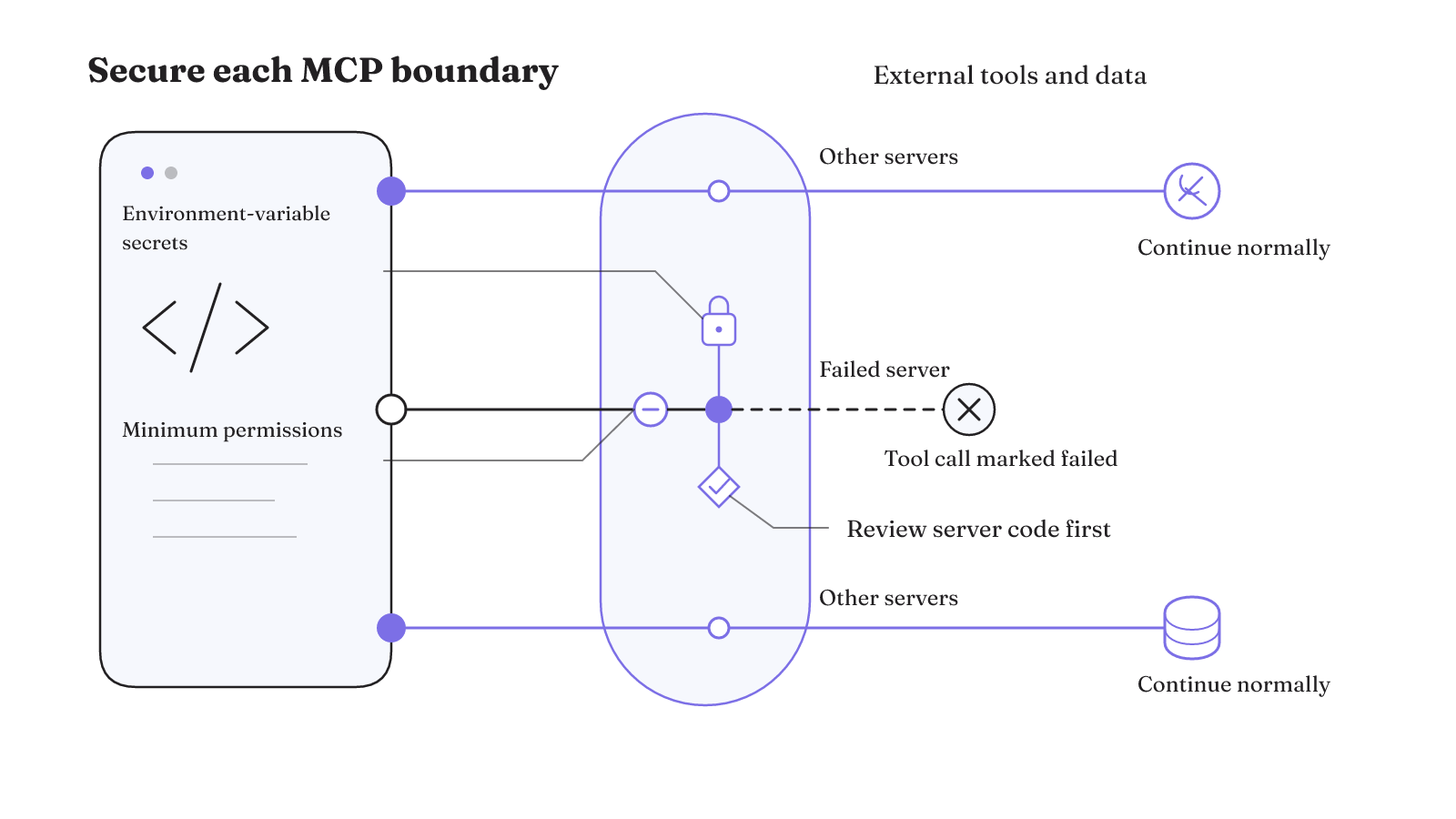
Failure handling is scoped to the server call. When an MCP server fails, Cursor marks its tool call as failed while other MCP servers continue working normally. The failed call is visible as a failure, and one server failure does not stop the other MCP servers.
That failure behavior gives the operator a specific signal to inspect: the affected tool call is marked failed. It also gives the rest of the MCP layer a boundary, because the other servers continue working normally. A workflow can therefore record the failed call without describing the entire set of MCP connections as unavailable.
Sensitive connections need three controls:
- Store secrets used by MCP servers in environment variables instead of hardcoding them.
- Give MCP API keys only the minimum permissions required.
- Review MCP server code before connecting it to sensitive systems.
Apply all three before the sensitive connection is active. Environment variables keep the secret out of hardcoded server code or configuration. Minimum permissions bound what the API key can do. Prior code review addresses the server that will receive that access. None of the controls substitutes for another: storage, permission scope, and server code are three parts of the connection boundary.
These controls belong to the external-capability boundary. They do not decide which agent owns a branch, and connectivity does not establish an orchestration pattern. MCP gives Cursor access to capabilities. The agent contract must still define when those capabilities may be called and who owns the resulting work.
Review that boundary per server. Name the external capability, the secret it uses, the permissions on its key, and the code that implements the server. If a call fails, keep that failed-tool-call signal attached to the affected branch while the other MCP servers continue normally. This makes the MCP state visible without confusing it with branch integration.
This is where a control-first design earns its keep. A task may run in a worktree, a script may invoke Cursor CLI, an Automation may start from an event, and an MCP server may expose an external tool. Each mechanism has a distinct boundary. The branch owner and integration checkpoint remain explicit across all of them.
For the same control questions in a different coding environment, read our VS Code multi-agent orchestration guide.