Key takeaways
- Choose fully managed, Databricks Apps custom, or external through AI Gateway.
- Dynamic Client Registration is unavailable across Databricks MCP paths.
- Production readiness includes credential rotation, component replacement, rollback, and supply-chain response.
Databricks managed MCP servers are not one deployment shape. The useful choice is where the server runs, where credentials sit, which identity reaches a resource, and which controls remain available when access must change. Treat the working connection as the start of that decision, not its finish.
Which Databricks managed MCP server path fits?
The available deployment options are fully managed servers, custom servers through Databricks Apps, and external servers through AI Gateway. Choose among them by locating the governed object, credentials, operating work, invocation record, and recovery test. If your team cannot name who owns each of those controls, the endpoint is not ready for production data. The same rule applies to every row: client compatibility and resource permissions are necessary, but the operator must also be able to observe use, remove access, rotate credentials, replace a compromised component, and return to a known-good version. Treat those ownership decisions as part of deployment, not as work to assign after the connection succeeds.
| Path | Governed object or control point | Credential handling | Operational burden | Auditability | Recovery needs | Known constraint |
|---|---|---|---|---|---|---|
| Fully managed | Managed Databricks resources; in Azure, Unity Gateway controls access and monitors MCP activity, while Unity Catalog enforces permissions | In Azure Databricks, Unity Catalog manages credentials | Maintain client compatibility and each identity's Unity Catalog grants | On Azure, Unity Gateway monitors MCP activity | Test credential rotation, component replacement, and rollback to a known-good version | Dynamic Client Registration is not supported |
| Custom in Databricks Apps | A custom MCP server hosted through Databricks Apps | Personal access tokens are not supported for Apps-hosted MCP servers | Operate the custom server in Databricks Apps and use an authentication path that does not depend on personal access tokens | Define and test the invocation record for the custom server | Test replacement of a compromised component, credential rotation, and rollback to a known-good version | Dynamic Client Registration is not supported |
| External through AI Gateway | An MCP Service registered as a Unity Catalog securable | A Unity Catalog HTTP connection stores the external endpoint and credential information | Maintain the MCP Service and HTTP connection; when the workspace restricts IPs, permit the gateway environment to connect outbound to it | Audit and usage logging can track every invocation of the registered securable | Test external credential rotation, compromised-component replacement, and rollback to a known-good version | Dynamic Client Registration is not supported; HTTP connections require a region with Model Serving support |
Authority follows the request across five boundaries
Picture a developer asking an assistant to use a governed Databricks resource. The client connection is only the first boundary. The MCP endpoint or service, Databricks identity, Unity Catalog permissions, resource, and external credential path can each carry a different part of the authority.
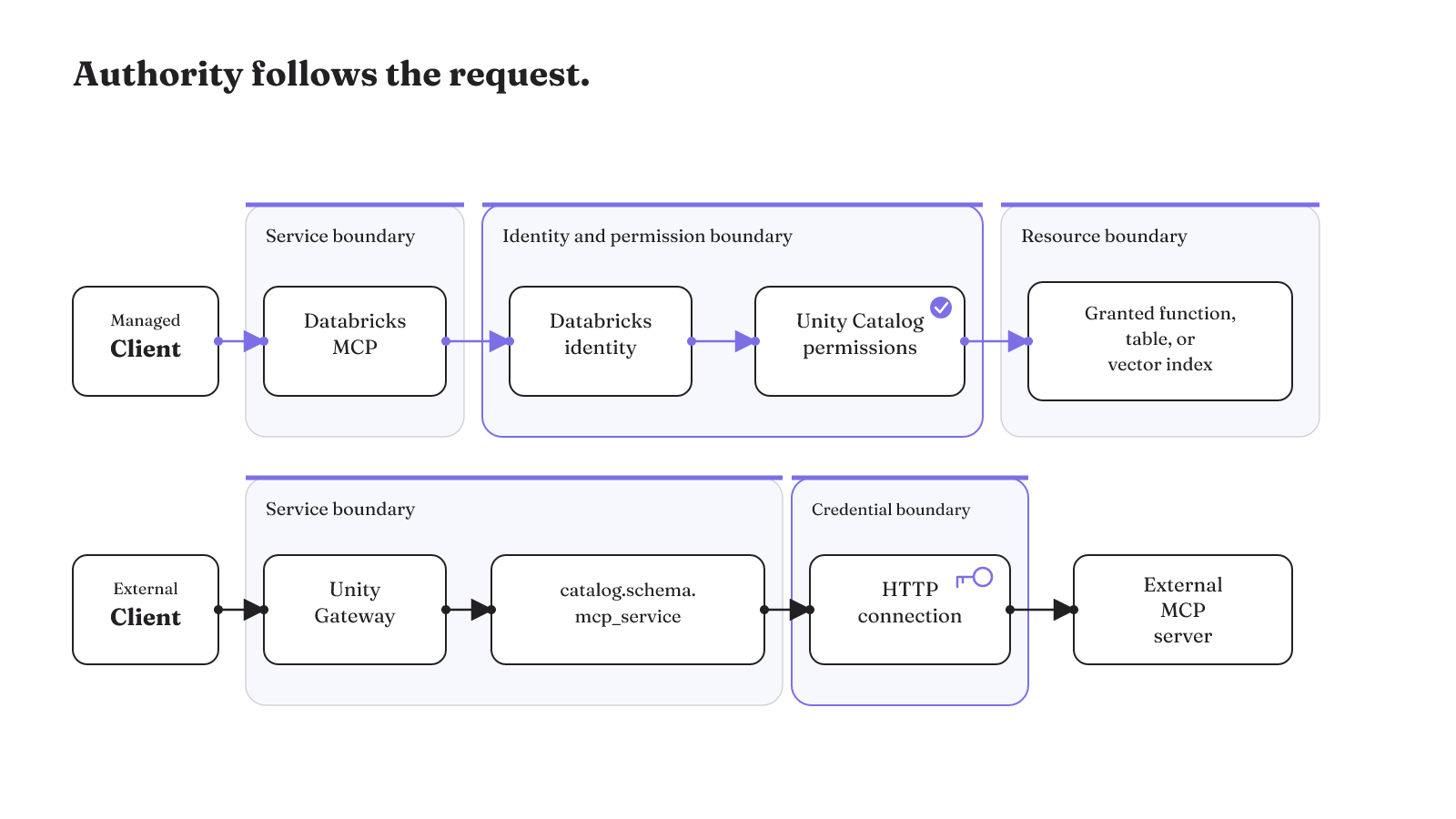
Here is the compact map:
- Client. An MCP-capable assistant or IDE connects from the development environment.
- Endpoint or service. The managed lane reaches a Databricks MCP. The external lane reaches Unity Gateway and an MCP Service named
catalog.schema.mcp_service. - Identity and permissions. Unity Catalog permissions continue to apply separately to each Databricks identity using the integration.
- Resource. A connected assistant or IDE can reach granted Unity Catalog functions, tables, and vector indexes through Databricks MCPs.
- External credential boundary. For an external server, the MCP Service is integrated with a Unity Catalog HTTP connection that holds its endpoint and credential information.
In lane form, the documented paths are:
- Managed: client → Databricks MCP → Databricks identity and Unity Catalog permissions → granted function, table, or vector index.
- External: client → Unity Gateway →
catalog.schema.mcp_service→ Unity Catalog HTTP connection → external MCP server.
The map prevents a common design mistake: treating the URL as the whole permission model. MCP-capable clients can access Databricks data and tools from their development environment, but the connecting Databricks identity still has its own Unity Catalog permissions. A reachable endpoint does not replace those grants.
The external lane also makes credential placement concrete. A Unity Catalog HTTP connection stores endpoint and credential information. Agents then connect to the external MCP server through the MCP Service integrated with that connection. This keeps the external credential boundary distinct from the client configuration and from the resource permissions applied inside Databricks.
For a protocol-level view of the server role, our MCP server glossary provides the smaller conceptual frame. The Databricks decision adds the service identity, Unity Catalog grants, and HTTP connection around that protocol role.
How do Claude Code and other clients connect?
Claude Code can connect to a Databricks HTTPS endpoint as a remote MCP server. Its client configuration needs the correct transport and scope. Those choices are separate from the Databricks identity and permissions behind the endpoint.
Databricks documents direct queries from Claude, Claude Code, Cursor, Replit, and other MCP-enabled tools. For Claude Code, a server URL is treated as a remote MCP server. Use --transport http for an HTTPS endpoint unless the endpoint instructions specify SSE.
Scope controls where Claude Code writes that MCP configuration. Commands use local scope by default. Select --scope project when the configuration belongs to the project, or --scope user when it should be available at user scope. Before adding the endpoint, decide which of those locations matches the intended users of the configuration. Our Claude MCP add guide keeps that client-side setup in one place.
Two authentication limits can stop the connection even when the endpoint and transport look correct:
- External clients and IDEs that require Dynamic Client Registration cannot use Databricks OAuth authentication.
- MCP servers hosted on Databricks Apps do not support personal access tokens.
Those are client-path constraints, not resource permissions. Passing the client check does not change which Unity Catalog resources the Databricks identity may use.
Claude's Messages API offers another connection shape. Its MCP connector can connect the Messages API directly to remote MCP servers, without a separate MCP client. The connector can enable all tools, allowlist tools, denylist tools, and apply settings to individual tools. That makes tool selection part of the API connection design, while Databricks permissions remain attached to the Databricks identity.
The connector's tool controls answer a narrower question than the Databricks grants. An allowlist or denylist determines which remote tools the Claude connection exposes. Unity Catalog permissions determine what the Databricks identity can reach. Keep both names in the deployment record: the client-side tool setting and the Databricks identity behind it. Then a change to one layer does not get mistaken for a change to the other.
Keep the two Claude paths clear. Claude Code has a local, project, or user configuration scope and a transport choice for the remote URL. The Messages API connector has direct remote-server connectivity and tool-level controls. If the target is an IDE other than Claude Code, Databricks also lists other MCP-enabled tools, but the same Dynamic Client Registration limitation still applies when the client requires that OAuth flow.
If the working environment is VS Code, the guide to using MCP servers in VS Code covers that client context. The Databricks-side decision still begins with a compatible authentication path and an identity whose Unity Catalog permissions match the intended resources.
Can Databricks Genie use MCP?
Yes. Genie Spaces are one of the fully managed Databricks MCP server types. The other documented managed types cover Unity Catalog functions, SQL, and Vector Search. The resource type matters because Genie and Databricks SQL do not have the same action boundary.
Genie endpoints are read-only. Databricks SQL can execute writes when the connecting identity's permissions allow them. So the meaningful check for SQL is the permission set on that identity. A Genie connection keeps its documented read-only endpoint behavior.
Do not flatten those resource types into a generic "data tool" permission. If an assistant can reach both Genie and Databricks SQL, name each endpoint and inspect the identity permissions attached to the SQL path. The supported behaviors differ even though both can sit behind MCP access.
Endpoint layout may also depend on the integration. In the TrueFoundry registration flow, Unity Catalog functions, Genie spaces, SQL, and vector search from a Databricks workspace are exposed as separate endpoints. That is an integration-specific example, not a rule for every Databricks MCP connection. It does show why endpoint inventory matters: the resource family is visible in the registration shape rather than hidden behind one undifferentiated endpoint.
The same separation helps with client exposure. When a client supports tool controls, keep its allowed tools aligned with the intended endpoint. This does not replace Unity Catalog permissions, but it avoids presenting every connected tool to every client configuration.
Managed MCP pricing follows the underlying feature
Managed MCP does not introduce one pricing basis for every resource. Pricing depends on the underlying Databricks feature, so the resource inventory is also the starting point for a cost inventory.
- Unity Catalog functions: serverless general compute pricing.
- Genie Agents: serverless SQL compute pricing.
- Databricks SQL servers: Databricks SQL pricing.
- AI Search indexes: AI Search pricing.
This mapping belongs beside the endpoint list. A managed deployment that exposes a Unity Catalog function has a serverless general compute basis. A Genie Agent has a serverless SQL compute basis. Databricks SQL and AI Search each retain the pricing basis of their own feature.
The practical budgeting unit is therefore the underlying resource type, not the words "managed MCP." Start with the functions, Genie Agents, SQL servers, and AI Search indexes that the client will reach. Attach the documented pricing basis to each one. That preserves the difference between a serverless general compute workload, a serverless SQL workload, Databricks SQL, and AI Search.
It also keeps resource behavior and resource cost in the same inventory without merging them. Genie has a read-only endpoint boundary and uses serverless SQL compute pricing. Databricks SQL uses Databricks SQL pricing and can execute writes when the connecting identity has permission. The behavior does not establish the price, and the price does not establish the permission. Both facts belong to the named resource.
For architecture comparisons beyond this Databricks choice, our LangGraph and MCP comparison separates orchestration concerns from the protocol connection. Here, the cost question stays narrower: identify the Databricks feature behind each managed endpoint and use that feature's pricing basis.
Production readiness extends past a successful connection
A successful tool call proves that one path worked. Production readiness asks whether you can see the server, limit its authority, record its use, remove access, and recover after a compromise. Run these seven checks before connecting production data:
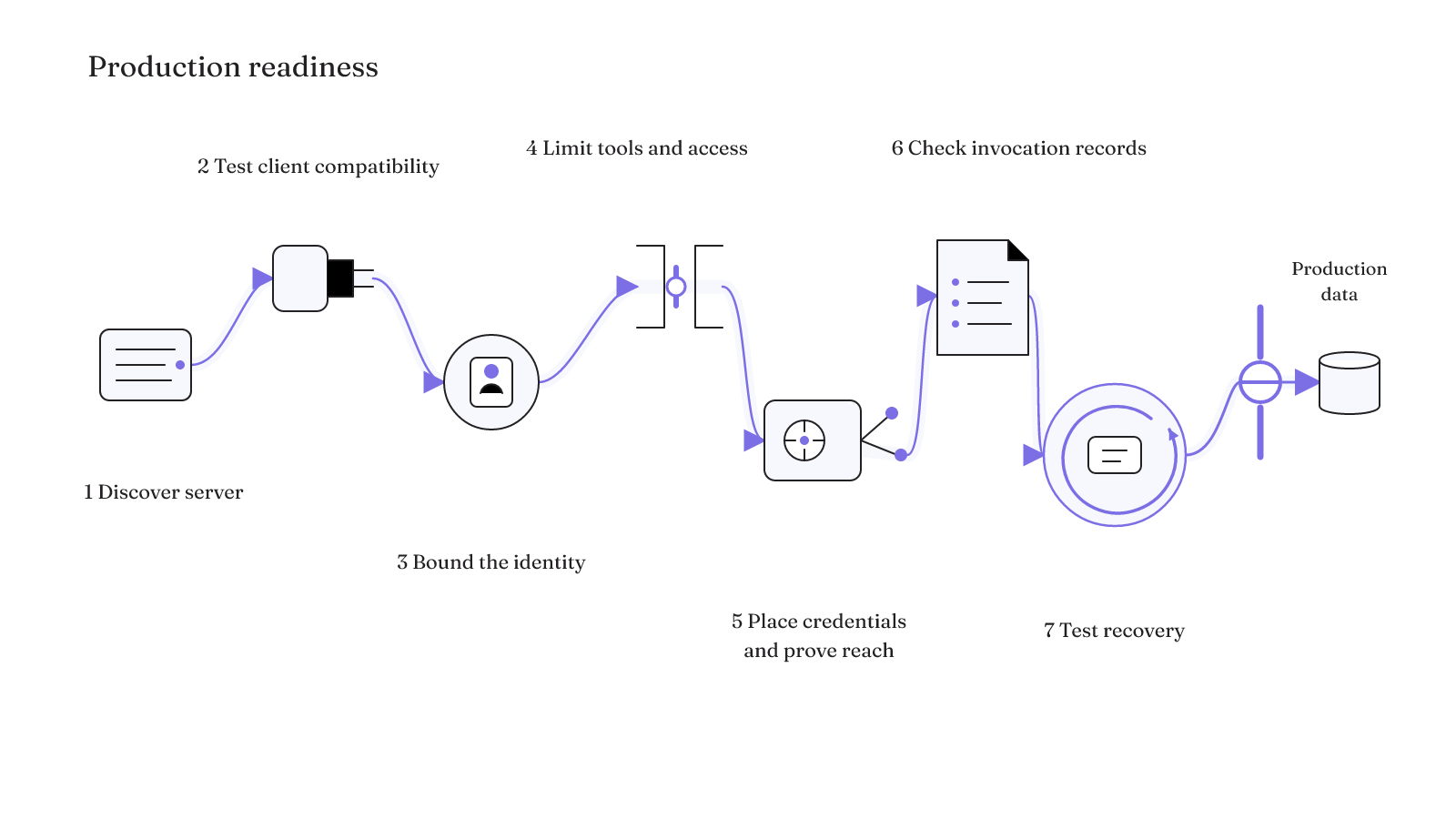
- Discover the server. Confirm that the required Databricks MCP server appears in the workspace under AI Gateway > MCPs.
- Test client compatibility. Confirm that the client does not require Dynamic Client Registration for Databricks OAuth. For an external HTTP connection, also confirm the region supports Model Serving.
- Bound the identity. Record the Databricks identity used by the integration and the Unity Catalog permissions granted to that identity.
- Limit tools and removal paths. For a registered MCP server, use invocation grants, exposed-tool selection, and service policies that allow or deny individual tool calls. Record which grant or policy removes access.
- Place credentials and prove network reach. Use a Databricks HTTP connection to send authenticated external REST requests without embedding credentials in application code. If the workspace has IP restrictions, allow the environment hosting the MCP gateway to make outbound connections to it.
- Check invocation records. For an MCP server registered as a Unity Catalog securable, use audit and usage logging to track every invocation.
- Run a failed-run recovery test. Exercise access removal, log capture, compromised-component replacement, credential rotation, rollback to a known-good component version, and the response to an upstream supply-chain compromise. Record whether every step worked and who owns the repair.
Run that exercise with a nonproduction identity and a known tool call. Remove its invocation grant or apply the deny policy, repeat the call, and inspect the audit and usage log. For an external server, rotate the credential stored for the HTTP connection and repeat the connection test. Replace the affected component or return it to a known-good version, then test the intended path again. The drill passes only when the removed path stays unavailable, the invocation record captures the attempt, the rotated credential works on the intended path, and the rollback restores the expected component. If workspace IP restrictions apply, include the gateway environment's outbound connection in the exercise.
How to manage MCP servers after launch
Use the same control points as an operating record. Keep the workspace server inventory, the integration identity, its Unity Catalog grants, the exposed-tool selection, and any service allow or deny policies together. For an external server, include the HTTP connection and the environment that needs outbound access to an IP-restricted workspace. Audit and usage logs can track each invocation of a server registered as a Unity Catalog securable. Recovery procedures should name the credential rotation, component replacement, known-good rollback, and upstream supply-chain response paths before they are needed.
The access-removal check deserves a real owner before launch. Registered MCP servers support invocation grants, exposed-tool selection, and allow or deny service policies. Those controls define how access can be narrowed without treating the client configuration as the only switch.
Recovery needs the same level of specificity. The MCP incident-readiness guidance includes component replacement, credential rotation, rollback to known-good versions, and response to upstream supply-chain compromise. Run those actions as a failed-run exercise, capture the invocation record, and confirm that the revoked path stays unavailable before production access depends on the design.
Use the deployment table to select the control path, then complete the checklist against the exact client, identity, tools, credentials, network, logs, and recovery process that will carry production access.