Key takeaways
- Repository instructions make project context durable.
- Isolated workspaces separate parallel sessions.
- Session logs expose activity, tools, and validation.
- Copilot review can miss problems, so people must validate its feedback.
Harness engineering for GitHub Copilot starts at the boundary between a model response and a repository change. A model can propose an edit. The surrounding system decides which context reaches it, which tools it can use, where its work runs, what gets checked, and what a reviewer can inspect afterward.
That is the method we use here. We look at named Copilot surfaces and follow a task from repository context through execution, verification, and traceability. The aim is not a feature score or a model ranking. It is a practical answer to a harder question: does the workflow expose enough control for the work you plan to delegate?
We keep current product facts scoped to their named surfaces and separate visibility from correctness. A recorded action can support review without proving that the action should be accepted.
Which GitHub Copilot harness are you evaluating?
Here, "harness" can mean four different things: the wider coding-agent system, a Copilot Studio runtime, a GitHub Copilot custom agent, or an Agent Skill.
| Term | Where it appears | What it controls |
|---|---|---|
| Coding-agent harness | General agent architecture | Infrastructure around an LLM coding agent. It includes session management, context delivery, tool design, architectural enforcement, failure recovery, and human oversight. The wider agent-harness landscape uses the term at this system level. |
| Copilot Studio harnesses | Microsoft Copilot Studio | The model supplies reasoning and generation. The harness controls model calls, supplied components, response interpretation, and tool calls. Within Copilot Studio, the GitHub Copilot harness powers reasoning-heavy, multi-step agents and workflows. The standard harness powers rule-based agents and agent flows. Microsoft documents both runtime choices. |
| GitHub Copilot custom agents | GitHub Copilot development workflows | Focused instructions, best practices, coding patterns, and domain knowledge for specialized development tasks. GitHub's custom-agent workshop presents this as reusable task specialization. |
| Agent Skills | GitHub Copilot | On-demand instructions packaged with scripts, code samples, and reference data for specialized tasks. The Agent Skills documentation describes the contents of that package. |
For a repository evaluation, use the system-level meaning as the outer boundary and name the narrower feature when discussing it. This prevents a custom instruction package from standing in for execution, review, or recovery controls it does not describe. Our introduction to harness engineering develops that system boundary in more detail.
Model quality is one part of the operating system
Treat model selection and workflow control as two separate review tracks.
| Decision dimension | Model contribution | Harness contribution |
|---|---|---|
| Task fit | Models differ in speed, cost efficiency, accuracy, reasoning, and multimodal input. Fit depends on the task. | The Copilot plan and product surface determine which models are available to a user. |
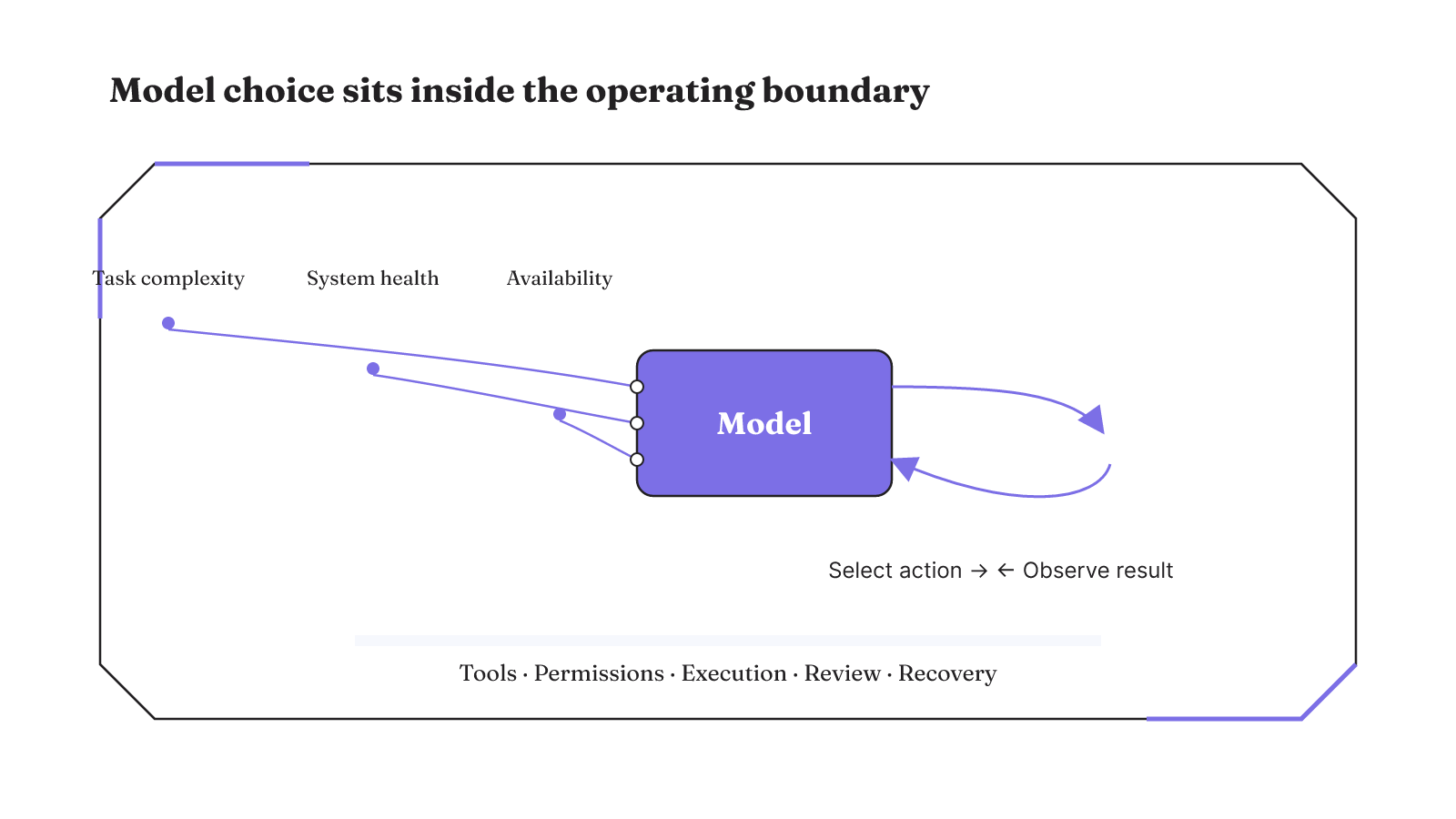
| Action loop | The model selects an action, observes its result, and then selects another action toward the task. | Available actions can include searching code, inspecting callers, editing an implementation, and running a test. |
| Operating boundary | The model works within the task and actions made available to it. | The evaluation covers the specific agent, tool set, permission boundary, execution environment, branch policy, network access, review, and failure recovery because these factors help determine operational risk. |
| Automatic routing | Task-complexity evaluation informs model routing. | Automatic model selection combines that evaluation with real-time system health and availability. |
Model availability can change as models are replaced or updated, and the available set varies across plans and product surfaces. Record the surface and plan beside any model result. Otherwise, an evaluation can turn a temporary menu into a general claim about Copilot. Automatic routing also needs a narrow reading: it describes how a task is routed, not whether the selected model is universally best. Two users on different plans or product surfaces may have different model choices. A result from one surface therefore does not describe model availability everywhere else. The routing inputs also answer a narrower question than the repository audit. They explain how Copilot selects a model using task complexity, service health, and availability. They do not cover the tools, permissions, execution, review, or recovery boundary around that model.
Repository context becomes durable through files
Repository context becomes more dependable when it lives in files instead of being reconstructed in every prompt. GitHub Copilot repository custom instructions can define project-specific coding standards, frameworks, and tools for repository-scoped conversations. That gives the repository a durable place to state the working context an agent should receive.
Custom agents add a more focused layer. They can carry instructions, best practices, coding patterns, and domain knowledge for specialized development tasks. Their files live at the project level in .github/agents or globally in ~/.copilot/agents. Each definition combines YAML frontmatter with a Markdown prompt.
The distinction between project and global placement is concrete. A project-level definition travels with the repository context. A global definition sits in the user's Copilot environment. The file shape also makes the specialization inspectable as configuration and prose, rather than leaving it inside a transient chat.
Teams can encode expertise as reusable accessibility, security, or testing agents. Those are task domains named in GitHub's guidance, not claims that the agents guarantee accessible, secure, or correct code. The useful control is that focused team guidance can be written down, reviewed, and invoked again. GitHub's repository customization documentation covers the repository-scoped instruction surface.
This creates three useful inspection points. First, repository instructions show which project standards, frameworks, and tools are presented in repository-scoped conversations. Second, the agent file shows the focused instructions and knowledge attached to a specialized task. Third, its location shows whether the definition belongs to one project or to the user's global environment. Those are visible configuration choices. They can be reviewed without relying on a remembered chat prompt.
The accessibility, security, and testing examples keep specialization narrow. Each custom agent can carry focused guidance for one development concern.
Execution isolation is concrete, not implied
The GitHub Copilot app supports directing agents, reviewing changes, and managing pull requests across parallel workstreams. Parallel work becomes an execution question as soon as more than one session can touch a repository. For sessions started in new working trees, the app uses isolated workspaces so one session does not change another session's working files.
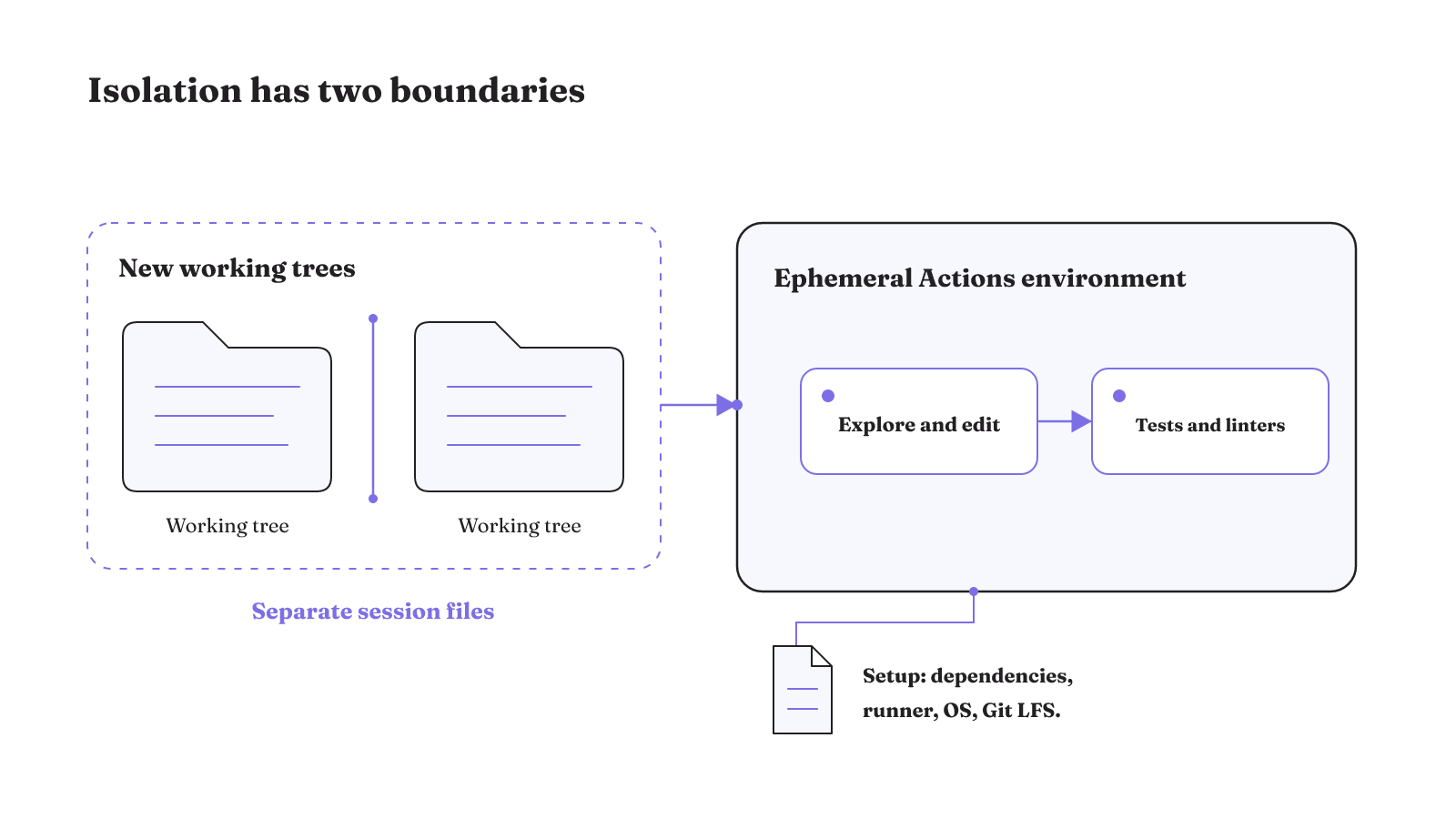
The cloud agent adds a separate execution mechanism. It runs in an ephemeral environment powered by GitHub Actions. Inside that environment, it can explore code, make changes, and run automated tests and linters. The practical chain is specific: a task gets its own working area, the cloud agent works in an ephemeral Actions environment, and repository checks can run before changes move onward.
Environment setup is configurable. A Copilot setup steps file can preinstall dependencies, select larger or self-hosted runners, choose Windows in place of the default Ubuntu environment, and enable Git LFS. Those controls matter when a repository cannot be built or checked in a bare default environment. The cloud-agent environment guide documents each option.
Isolation has a precise benefit here: one session cannot alter another session's working files when those sessions run in new working trees. It does not, by itself, prove that a change is correct or safe. Tests, review, and the repository's other controls still have separate jobs.
There are two boundaries to inspect. The working-tree boundary separates the files used by parallel sessions. The ephemeral environment is where the cloud agent explores code, edits it, and runs automated tests or linters. Saying that work is "isolated" without naming the working tree and execution environment leaves too much hidden.
Configuration then decides whether that environment matches the repository. Dependencies, runner size or hosting, operating system, and Git LFS support are explicit setup choices. A repository that needs one of them should express it in the setup steps file. The resulting environment is still temporary, but its preparation can be inspected before the agent's work is judged.
What does GitHub Copilot CLI add to the harness?
Copilot CLI can bring remote CI evidence and local code into the same diagnosis. Through the GitHub MCP server, it can access GitHub Actions workflow runs, job logs, and check statuses. It can combine that material with local files and correlate a CI failure with the relevant code.
That creates a concrete diagnostic path. The agent reads the failed workflow run, inspects the job log and check status, then relates those signals to files available locally. The value is not merely terminal access. It is the connection between a remote failure record and the repository state being investigated. GitHub provides a worked CI test-failure diagnosis flow for this surface.
Task-optimized automatic model selection is also available in Copilot CLI. The same option appears in Copilot Chat on GitHub, VS Code, the GitHub Copilot app, and JetBrains IDEs. Because this availability spans several surfaces, the CLI decision should focus on the evidence it can join: workflow runs, logs, checks, and local files. Model routing is one part of that workflow, not its defining control.
For CI diagnosis, keep the inputs visible as separate records. A workflow run gives the remote execution context. Job logs show what happened during that run, and check statuses show the reported state of checks. Local files provide the code being investigated.
This makes the CLI useful at a specific boundary: the failure exists in GitHub Actions, while the candidate cause may live in local code. The GitHub MCP server provides the connection between them. The evaluation question is whether that joined view helps a reviewer follow the failure back to code, not whether the terminal interface feels more agentic.
Copilot review still needs human validation
GitHub Copilot code review can return two concrete outputs: feedback and, where possible, suggested changes that can be applied. Its agentic capabilities run through GitHub Actions. That places the review feature in an executable workflow, not just a conversational comment box.
The hard boundary is equally clear. GitHub says Copilot code review is not guaranteed to find every pull-request problem. Its feedback should be validated and supplemented with human review. A suggested change is therefore review material, not an automatic correctness decision.
This is where human control belongs in the workflow. The tool can surface feedback and make an applicable edit easier to apply. A person still needs to judge whether the finding is valid and whether the proposed change belongs in the pull request. GitHub's code-review instructions show how feedback and suggested changes appear.
Feedback and suggested changes also require two different judgments. Feedback may identify a concern for a reviewer to examine. A suggested change adds an edit that can be applied where the product can provide one. Neither output removes the need to validate the finding. The limitation belongs here, at the review boundary, because this is where a person decides what enters the pull request.
GitHub Actions is the execution mechanism for the feature's agentic capabilities. That fact makes the review run inspectable as part of the surrounding workflow. It does not change the stated limitation: Copilot review may miss pull-request problems, and human review must supplement its feedback.
Can you trace what Copilot changed and why?
GitHub exposes a trace from session activity to the resulting commit. In the agents panel, a session's log and overview show progress, token usage, and session length. The session log also exposes the reasoning and tools used to understand the repository, make changes, and validate the work.
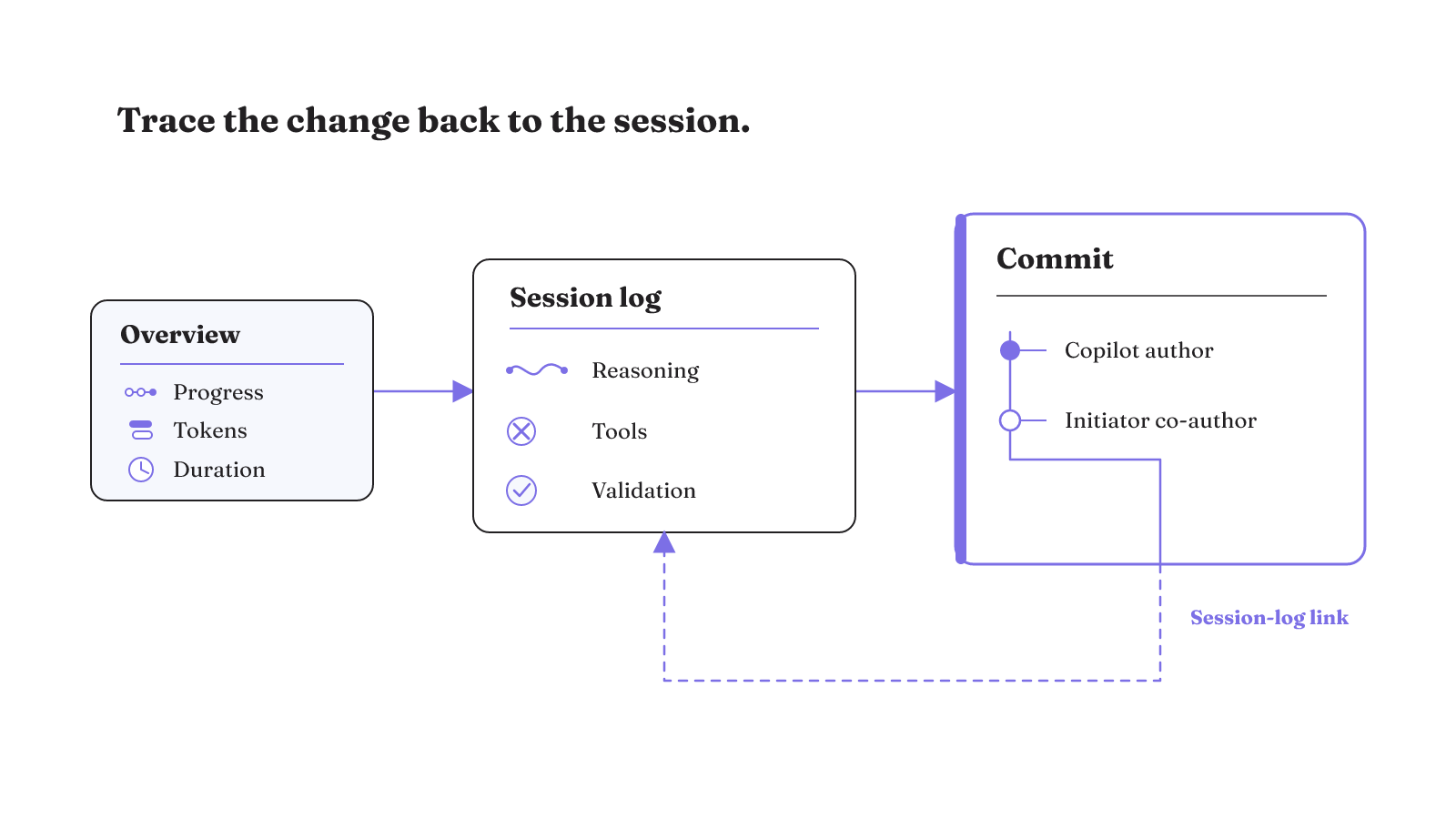
That trace continues through execution. The ephemeral environment can run tests and linters before pushing. Reviewers can therefore inspect which tools were used and what validation activity appeared in the session, alongside the produced change. The agent management documentation describes these session views.
Cloud-agent commits add authorship and a return path. They identify Copilot as the author and the person who initiated the task as co-author. Each commit message links back to the session logs for code review or audit traceability. A reviewer can move from the commit to the recorded session, then inspect reasoning, tool use, tests, or linters shown there.
This visibility helps reconstruct the path taken. It does not establish that every action was appropriate or every validation was sufficient. Logs and commit links make the work inspectable. Human judgment still determines what the trace means for approval.
The trace has three layers. The overview carries operational facts such as progress, token usage, and session length. The log records reasoning, tool use, repository understanding, changes, and validation activity. The commit records Copilot as author, the task initiator as co-author, and a link back to the session. Together, those layers let a reviewer move from code history to the recorded work that produced it.
The overview shows session state and resource indicators. The log shows the repository path and tools. The commit carries attribution and a return link. These views support inspection, not approval.
Harness engineering for GitHub Copilot starts with repository readiness
| Audit area | Minimum condition | Evidence to inspect |
|---|---|---|
| Pilot scope and acceptance criteria | Use a repository where developers can open pull requests. Choose a well-scoped, low-risk task, such as adding tests for existing behavior. Define the behavior and check output that the resulting pull request must demonstrate. | Inspect the selected repository, bounded task, expected existing behavior, named checks, and resulting pull request. Keep the trial result tied to this task instead of treating it as a verdict on every repository. |
| Instruction files | Inventory the repository custom instructions and custom-agent files used for the trial. Repository instructions can define project standards, frameworks, and tools. Agent definitions can live in .github/agents or ~/.copilot/agents as YAML frontmatter plus a Markdown prompt. | Inspect the exact files available to the session and whether each definition is project-level or global. For a specialized agent, inspect its instructions, best practices, coding patterns, and domain knowledge. Accessibility, security, and testing are concrete specialization examples. |
| Permission boundary | Evaluate the specific agent, tool set, and permission boundary together with the execution environment, branch policy, network access, review, and failure recovery. | Record the agent and tools used for the trial. Inspect the execution environment, branch policy, network access, review boundary, and every granted permission that can affect the repository task. |
| Access governance | Access to the Copilot app is governed through Copilot licenses and enterprise or organization policies. | Inspect the license assignment and the enterprise or organization policy that applies to access. |
| Test evidence | Run repository checks for formatting, analyzers, architecture, tests, restore behavior, and secret hygiene. The cloud agent can also run automated tests and linters in its ephemeral GitHub Actions environment. | Inspect each check definition and its output. Match those results to the reasoning, tools, tests, and linters shown in the session log, then inspect the change itself during review. |
| Checkpoints and failed-run resumption | Require direct trial evidence for checkpoint persistence, failed-run resumption, rollback, and recoverable state. An unknown result fails this audit row. | Interrupt or fail the bounded task at a recorded point. Inspect what state persists, what work resumes, what must restart, and which repository changes need to be undone. Record each result separately. |
| Increment size | Divide planned work into increments small enough to check and inexpensive to undo. | Inspect the stated boundary and resulting change for each increment. Review the check output and undo cost before increasing the size of the next increment. |
| Usage cost | Cloud-agent sessions consume GitHub Actions minutes and AI credits. AI-credit use depends on the model and tokens processed during the session. | Inspect Actions-minute use, AI-credit use, the model, and tokens recorded for the trial. |
Run a bounded recovery test
Recovery needs its own test because the execution environment and failure-recovery behavior are part of the repository-access decision. Keep the task small enough to check and inexpensive to undo.
- Define the pass line. Use a low-risk task, such as adding tests for existing behavior. Write down the expected behavior, the exact local checks, and the pull-request result you will inspect.
- Capture the starting state. Record the working tree, branch, commit, repository instructions, custom-agent files, selected agent, tools, and granted permissions. This gives the interrupted run a specific starting boundary.
- Start the task and stop it after a recorded repository change. Save the visible session state, changed files, and completed check output at that point. Do not describe this stop as a checkpoint unless Copilot exposes one.
- Attempt to continue the task. Record whether the same session continues, which state remains visible, which work has to restart, and which repository changes have to be undone. Use "unknown" for any behavior the trial does not expose.
- Close the trace. Inspect the session's reasoning, tools, tests, and linters. Follow the resulting commit's session-log link and confirm its author and co-author. Record the Actions minutes, AI credits, model, and tokens used by the trial.
- Review the pull request. Copilot feedback and suggested changes remain review material. Validate the findings and supplement them with human review before accepting the trial result.
Use our harness engineering framework to map these responsibilities around your coding agent. If you want to compare how other repositories expose similar controls, browse our open-source AI-agent repository analysis.