Key takeaways
- Microsoft 365 Copilot mainly generates content and analyzes data from natural-language commands.
- Agent Builder and Copilot Studio create agents and workflows with different operating limits.
- GitHub Copilot cloud agent can autonomously change repository code inside explicit access, branch, check, and review boundaries.
Is Copilot agentic AI? The Agency Test at a glance
Sometimes. Copilot is not one behavior. The useful distinction is between prompted generation, bounded task execution, and broader agentic AI. We classify the exact surface by what it can observe, retain, decide, and change. A narrow agent may complete a bounded task well without pursuing a wider goal as conditions change.
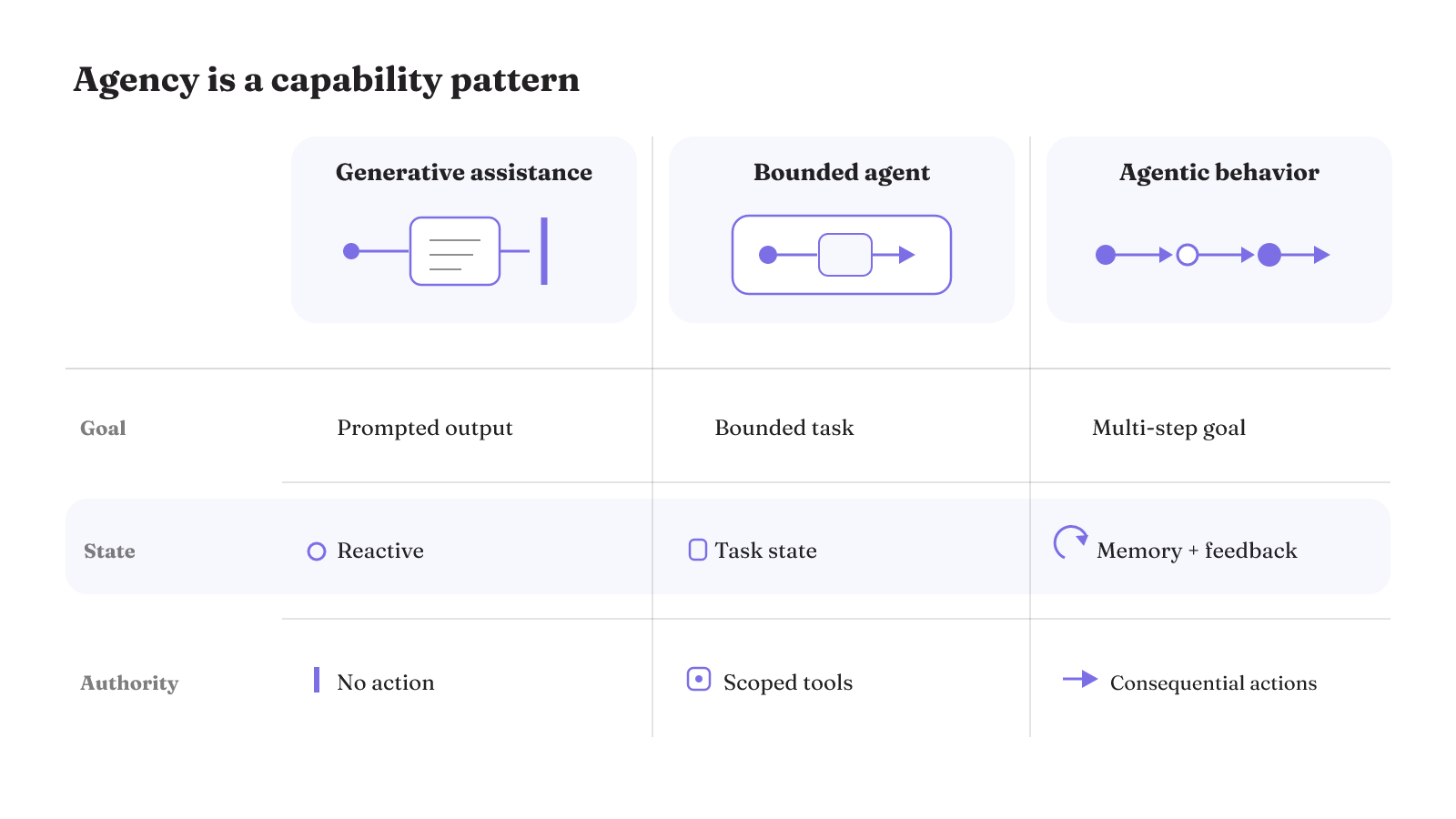
| Capability | Generative assistance | Bounded agent | Agentic behavior |
|---|---|---|---|
| Output | Produces prompted text, images, code, or summaries, then stops | Completes a task inside a narrow operational scope | Pursues a goal across multiple steps |
| Multi-step goal pursuit | Does not reliably manage a process from start to finish | Performs a bounded task | Manages progress toward a goal across steps |
| Tools and APIs | Produces an output in response to a prompt | Can use tools, call APIs, and fetch data | Can call APIs, query databases, and trigger actions |
| Task state | Is described as stateless and reactive | Can maintain task state | Can maintain memory |
| Adaptation | Reacts to requests | Makes bounded decisions | Adapts to feedback |
| Action authority | Stops at the generated output | Acts within the task's bounded scope | Can trigger actions without waiting for human intervention |
| Controls | Does not automatically verify facts reliably | The operational scope bounds the task | Least privilege, approvals, guardrails, and tool-call tracing constrain consequential action |
This is why tool use alone does not settle whether a Copilot surface is agentic. Bounded agents can use tools and maintain task state, while broader agentic behavior adds wider goal pursuit and adaptation. The risk changes with the authority: generative AI can hallucinate a fact, while agentic AI can execute an incorrect production action.
That larger action surface brings its own failure modes. Autonomous-agent risks include prompt injection through retrieved content, leakage of personally identifiable information, hallucinated real-world actions, runaway costs from recursive tool loops, and behavioral drift. Least-privilege permissions and restricted tool actions reduce exposure and abuse. Human approval for sensitive actions, inline guardrails, and tracing each tool call place controls on the execution path.
Microsoft 365 and Dragon Copilot examples center on generated content
Microsoft 365 Copilot is primarily a generative surface in this comparison. It combines large language models with Microsoft 365 data and apps, accepts natural-language commands, produces content, and analyzes data. Those documented behaviors fit the left side of the Agency Test: a person asks, the model produces or analyzes, and the interaction centers on an output.
That matters because generated content is not the same as independent process ownership. Generative AI responds to prompts and stops at its output. In most implementations, it does not automatically verify facts or reliably manage an entire multi-step process. A fluent response may be useful, but fluency does not establish retained task state, adaptation, or authority to act.
Dragon Copilot offers a more specialized example of the same basic pattern. For the versions listed by Microsoft in the United States and English-speaking Canada, users can enter freeform prompts inside structured clinical-note plans. AI can then generate or modify plan content. The surface is domain-specific, yet the documented action still begins with a prompt and produces content inside a defined plan.
The domain and interface change, but the classification question stays behavioral. Content generation and data analysis describe what comes back from the model. They do not, by themselves, answer whether a system maintains progress toward a goal or can act on a production environment. For these two surfaces, the documented examples resolve the output question. A separate capability would need its own observable action path.
So, is Copilot generative AI or agentic AI? Microsoft 365 Copilot and this Dragon Copilot feature are clear generative examples. The label changes only when the specific surface gains a different action model.
What does Copilot Agent Builder build?
Agent Builder in Microsoft 365 Copilot builds declarative agents for Microsoft 365. Microsoft positions it as an immediate, interactive development experience for quick and straightforward projects.
That puts Agent Builder in a different category from a prompt box that only produces content. The artifact being created is an agent, not just a generated answer. But the word agent does not by itself prove broad, autonomous goal pursuit. An AI agent can use tools, call APIs, fetch data, maintain task state, and make bounded decisions while remaining inside a narrow operational scope.
This is the practical difference between an AI agent and agentic AI. A bounded agent can perform well within its assigned task without autonomously pursuing a wider goal through changing conditions. Agentic behavior asks more of the surrounding system: multi-step goal pursuit, memory, adaptation, and authority to trigger actions.
For a declarative agent, the useful inspection point is the configured run. Look for the state the agent maintains, the decisions it can make, and the actions it can trigger. Then compare those capabilities with the project's stated scope. This keeps a well-bounded agent in the category its behavior supports without treating a narrow scope as a defect.
Agent Builder's documented fit is therefore useful classification evidence. It is designed for declarative agents and quick, straightforward projects. That tells you what it builds and the kind of development experience it targets. It does not, on its own, establish that every declarative agent retains task state, replans from results, or acts autonomously. To answer those questions, inspect the behavior of the agent you actually configure.
Copilot Studio expands from agent building to workflows and governance
Copilot Studio moves further into system construction. Microsoft documents it as a graphical, low-code studio for building and managing AI-powered agents and workflows. Those agents and workflows can connect to organizational data and systems and be published to user channels.
Can you use Copilot as agentic AI? Yes, when the configured Copilot surface actually runs autonomously or pursues a goal through actions. Copilot Studio supports background autonomous agents, but their execution has an important boundary: they cannot ask a user to sign in while they are running. Authentication design therefore sits directly on the execution path. A background run cannot depend on an interactive sign-in appearing halfway through the work.
Tool access is only one part of this classification. The Agency Test also asks whether the system keeps task state, adapts from feedback, and has authority to trigger consequential actions. An agent can connect to data and systems yet still remain a bounded agent. The exact workflow, permissions, and run mode determine how far its agency extends.
Governance is part of the product surface, not a separate label applied after deployment. Copilot Studio includes geographic data residency, data-loss prevention, standards certifications, regulatory compliance, environment routing, and regional customization. Its app creation experience is also in preview. Those details belong beside the capability because they shape the environment in which an agent is built and operated.
These controls answer practical operating questions that the word agent cannot. Data residency and regional customization concern where the system operates. Data-loss prevention, certifications, and compliance concern the rules around that environment. Environment routing affects where work is directed. None of these labels replaces the need to inspect what a particular workflow can do, but each can constrain the setting around that workflow.
For background autonomous agents, least privilege is especially relevant. The run cannot pause to ask a user to sign in, so the permissions and available actions must already match the job. That makes authentication, tool scope, and approval boundaries part of the design before execution begins.
This is also the useful boundary in our agentic AI example: classify the system by its actual loop, authority, and controls, not by the noun in its product name.
Is GitHub Copilot agentic AI?
GitHub Copilot cloud agent is the clearest yes in this set of examples. GitHub documents it as an autonomous agent with access to code. It can push changes to a repository. That makes it a concrete example of agentic AI: the system can work on code and take a consequential repository action, not merely return a proposed snippet in chat.
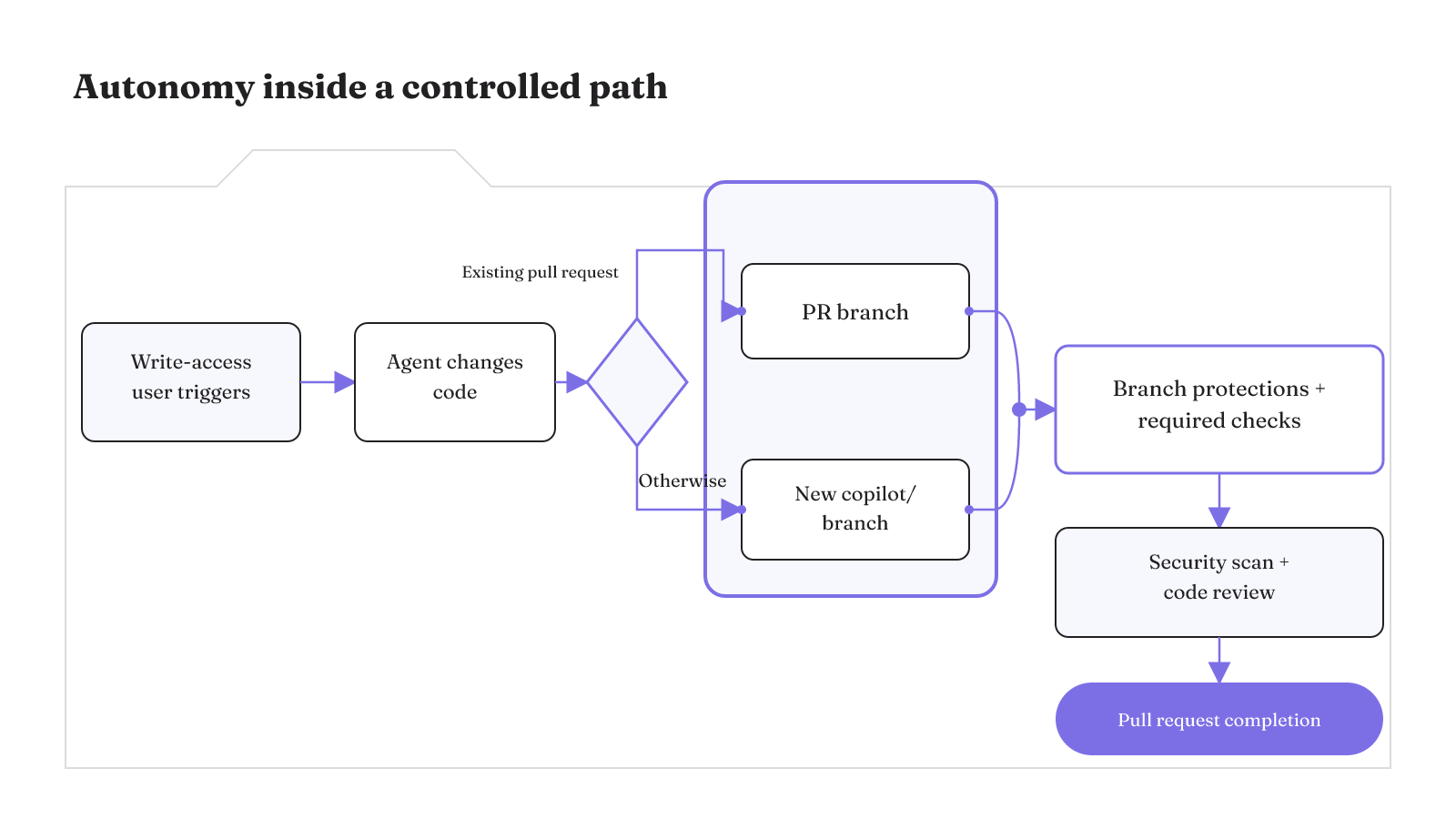
The more instructive point is that autonomy does not mean unlimited authority. Only users with repository write access can trigger GitHub Copilot cloud agent. Comments from users without write access are not presented to it. Trigger authorization is therefore explicit before the agent begins work.
Its write path is also bounded. When triggered from an existing pull request, the cloud agent can push only to that pull-request branch. In other cases, it can push only to a new copilot/ branch. Branch protections and required checks still apply. The agent can change code, but it does not receive general permission to write across repository branches.
Verification continues inside that constrained path. GitHub says the cloud agent checks generated code for security issues by default, obtains a Copilot code review, and tries to resolve identified issues before completing the pull request. The resulting action path is concrete:
- A user with repository write access triggers the cloud agent.
- The agent works with repository code.
- It pushes to the existing pull-request branch or a new
copilot/branch. - Branch protections and required checks remain in force.
- Security checks and Copilot code review examine the generated changes before pull-request completion.
This is an important design pattern. Autonomous action and retained control can coexist. Agency appears in the ability to work toward a code-change goal and push repository changes. The harness appears in trigger access, a single writable branch, required checks, security scanning, and review. Calling the whole experience either "just generative AI" or "unbounded autonomy" would miss the system that governs the action.
The branch boundary also makes the unit of authority legible. The cloud agent does not merely suggest a change, because it can push code. Yet the push lands on one defined branch and remains subject to repository checks. The question "Is GitHub Copilot agentic AI?" therefore has a precise answer for the cloud agent: yes, with a documented action boundary around who can start it, where it can write, and what review remains in force.
Tools and repository instructions shape the coding agent's reach
The cloud agent's reach can expand through configured tools. Repository-configured Model Context Protocol servers can give GitHub Copilot cloud agent and Copilot code review access to external tools and data sources. This is a specific extension point, not evidence that every Copilot session has the same access.
Visual Studio provides another concrete tool boundary. There, MCP servers can extend GitHub Copilot agent capabilities to file access, repository management, and pull-request creation. Each of those capabilities changes what the agent can touch or cause. A generated answer remains inside the conversation. File access reaches the working environment. Repository management and pull-request creation reach shared development state.
Repository custom instructions shape a different part of the loop. They can guide Copilot in understanding the project and in building, testing, and validating changes. Instructions provide project-specific direction, while MCP servers provide routes to tools and data. Together, they show why "uses tools" is too coarse as a classification.
This separation matters during configuration. A repository instruction can tell the agent how to approach a build or validation step, while an MCP server can provide the capability used during that step. Direction and access are different controls. Recording them separately makes it easier to see whether a failure came from missing project guidance, missing tool access, or authority that should not have been granted.
When evaluating this surface, map the mechanism to the authority it creates:
- External data and tool access come from repository-configured MCP servers.
- File access, repository management, and pull-request creation can be added through MCP servers in Visual Studio.
- Project understanding, building, testing, and validation can be guided by repository custom instructions.
- Repository changes still travel through the cloud agent's authorized trigger and branch constraints.
The question is not how many integrations appear in a configuration. It is which tools are available to a particular run, what state the agent can change, and where checks or approval interrupt that path. Tool use can support bounded task execution or broader agentic action. Authority and control tell you which one you are looking at.
Verification and usage costs complete the GitHub cloud-agent picture
An autonomous coding agent is easier to judge when its work can be tested in the environment where it runs. GitHub says that when Copilot can build, test, and validate changes in its own development environment, it is more likely to produce good pull requests that can be merged quickly. That is a conditional result: the build, test, and validation capability must be available to the agent.
Those verification steps do not make execution free. GitHub Copilot cloud agent uses GitHub Actions minutes and AI credits. AI-credit consumption depends on the model selected and the number of tokens processed during the session. This makes operating cost part of the same system boundary as tools and verification. A longer or more token-heavy run can consume a different amount of AI credits, while the development work also uses Actions minutes.
Verification and usage should be read together when you evaluate a run. First identify whether the agent's development environment supports the build, test, and validation work that improves its chance of producing a good pull request. Then account for the Actions minutes used by the cloud agent and the AI credits tied to model and token use. That comparison keeps the quality condition and the usage units visible without turning either one into a blanket promise about results or cost.
Apply the Agency Test to the exact Copilot surface and configuration you are evaluating. Identify the goal, tools, retained task state, adaptation, action authority, checks, and usage units. If you need to set the system boundary before granting tools or write access, read our comparison of AI agents and agentic AI.