
Key takeaways
- Directory size does not settle quality.
- DNS verification provides a concrete namespace identity signal.
- Keep API-key permissions to the minimum required, and check whether the marketplace has a manual removal path.
Is there an MCP marketplace?
Yes. The MCP servers market has several kinds of discovery surface, not one universal store. The useful distinction is what each surface does and what it shows before a server receives access to tools or data.
| Discovery model | Named example | Available function |
|---|---|---|
| Central metadata registry | Official MCP Registry | Stores metadata for publicly accessible servers and makes published servers browsable. |
| Curated catalog | Docker MCP Registry | Supports server discovery, deployment, and integration with MCP clients and Docker tooling. |
| Product and community split | Cursor marketplace and cursor.directory | Separates official plugins from community plugins and MCP server listings. |
These surfaces can all help someone find a server. They do not expose the same discovery model, however, so the word "marketplace" tells us less than it first appears to. Before treating a listing as an installation recommendation, identify whether the surface is publishing metadata, curating a catalog, or separating first-party and community entries.
That distinction keeps discovery useful without asking it to carry a trust decision it was not designed to settle.
The MCP servers market is larger than a useful shortlist
At least a dozen active marketplaces, directories, and registries compete for attention. Their inventories vary sharply. One market review found catalogs with more than 8,000 entries and curated collections with 30 verified entries. The same review found that most discovery services were free, while a few charged for API access. Many provided no information about server safety, maintenance, or client compatibility. The biggest directory is not necessarily the best one.
If your search is "MCP servers market free," free discovery is common. Free access does not answer whether a particular listing is maintained, compatible with your client, or appropriate for the authority you plan to grant.
A large inventory can widen the search. A small curated catalog can narrow it. Neither count determines the information available for a responsible connection decision. Inspect what each listing makes visible about identity, execution, permissions, and removal.
This changes how a shortlist should be built. Catalog size can tell you how many entries a service tracks, while curation can tell you that a collection has been narrowed. The observed range, from more than 8,000 entries to 30 verified entries, does not establish that either endpoint provides the better server for a particular client. Compare the listing details that bear on the planned connection.
What free discovery does and does not answer
Most marketplaces and directories can be used without paying for access, while a few charge for API access. That price boundary concerns access to the discovery service. The same market review found that many free services omitted information about safety, maintenance, or client compatibility. Free discovery can produce candidates, but the listing still has to carry enough detail for the connection decision.
Keep the API question separate as well. A directory can be free to browse even when API access carries a charge. Neither access model supplies the missing safety, maintenance, or compatibility information. Those fields have to be present in the listing or remain unresolved.
Use a marketplace trust scorecard before choosing a listing
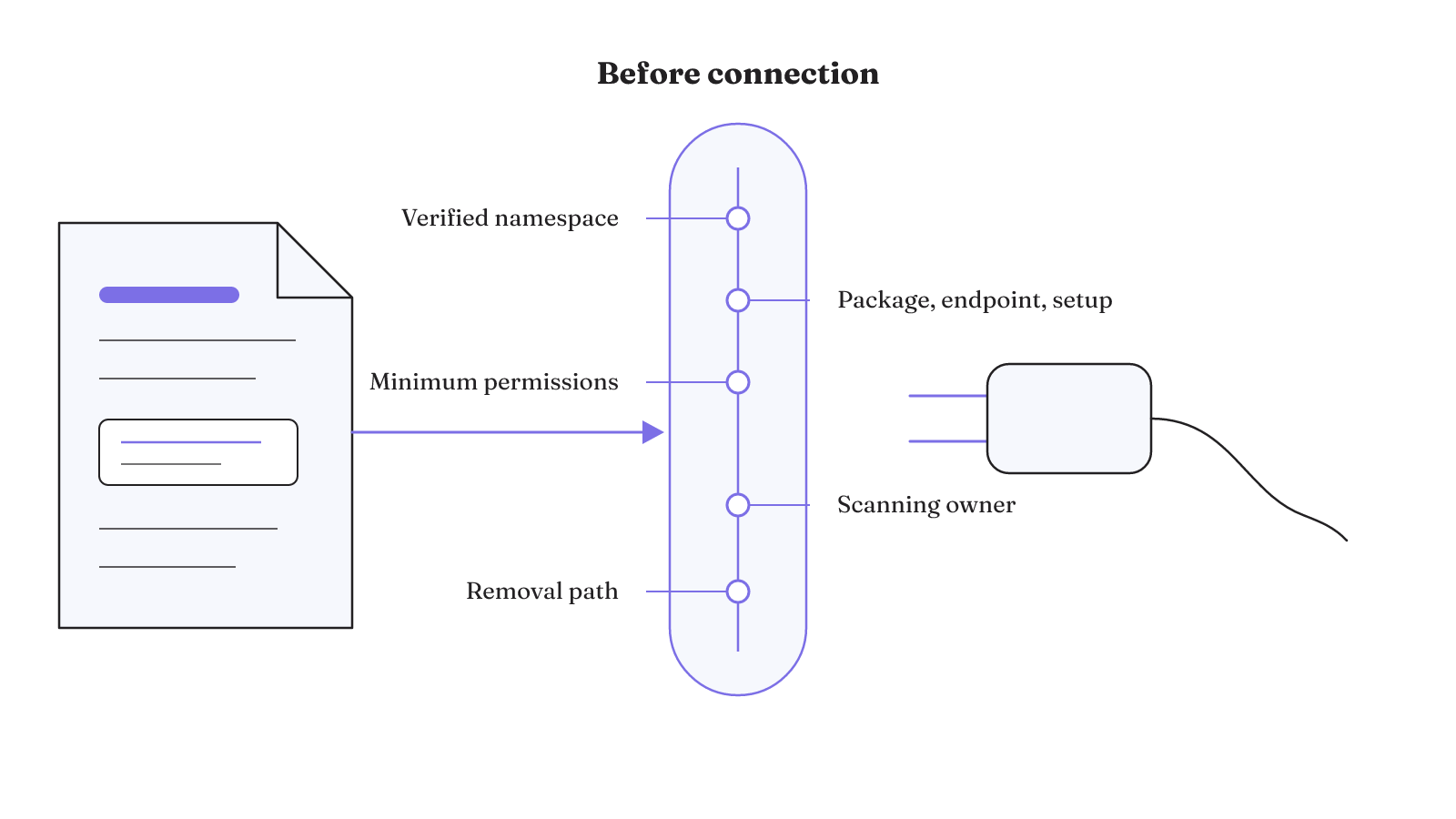
A useful MCP servers marketplace makes concrete details visible. The goal is not to turn a badge into a verdict. It is to see what can be checked before installation and what remains unknown.
| Check | Visible signal | Decision value |
|---|---|---|
| Namespace identity | The MCP Registry manages namespaces through DNS verification. | Shows that a registry namespace passed its DNS verification step. |
| Package or endpoint | Registry metadata locates the server package or remote endpoint. | Identifies the package to inspect or the endpoint the client would contact. |
| Execution inputs | Registry metadata states execution instructions and environment variables. | Exposes the inputs required to start and configure the server. |
| Installation detail | Standardized installation and configuration information is present. | Makes the documented setup visible before connection. |
| Permission scope | API-key permissions are limited to the minimum required. | Keeps the credential scope tied to the server's stated need. |
| Scanning owner | npm, PyPI, and Docker Hub perform their own scanning and vulnerability detection. | Identifies where package-level scanning occurs without treating it as a complete MCP review. |
| Removal and reporting | Registry maintainers can manually remove spam or malicious servers; community reporting is still under consideration. | Separates the current takedown path from a possible future reporting feature. |
Use the scorecard as a threshold for further inspection. A blank field is not proof of bad behavior, but it is an unanswered part of the access decision. A listing with clear identity and setup details may still need code review, narrow credentials, and an execution boundary. Marketplace moderation, package scanning, and client permissions are different controls. One should not be treated as a substitute for the others.
The official registry is useful and still in preview
The official registry solves a real coordination problem. It gives server creators one place to publish metadata, and its REST API lets MCP clients and aggregators discover available servers. This common discovery layer can reduce the number of incompatible listing formats a client or aggregator has to interpret.
Its current lifecycle matters just as much as its function. The MCP Registry remains in preview, and breaking changes or data resets may occur before general availability. An official source can therefore be authoritative about its own metadata while still being operationally unsettled.
For builders consuming the API, preview status belongs in the integration plan. A client or index built around registry data should not quietly assume that the present interface and stored data are permanent. For someone browsing listings, the simpler boundary is enough: official registry inclusion gives you standardized discovery information, while the listing itself still needs the identity, execution, permission, scanning, and removal checks above.
The registry is useful because it makes discovery more legible. Its preview status is a reason to keep the surrounding integration controllable, not a reason to discard the discovery layer.
There are two current functions to keep in view. Creators can publish server metadata in one place. Clients and aggregators can use the REST API to discover what is available. Neither function changes the preview notice: breaking changes or data resets may occur before general availability. Build against the function that exists while keeping that lifecycle boundary visible.
Are MCP servers still useful?
Yes. MCP servers still give AI applications controlled access to local resources and tools, and current clients continue to use external server connections. Their usefulness comes from that connection, not from the existence of a marketplace listing.
Cursor, for example, uses MCP to connect to external tools and data sources. Users can manage servers through Customize or mcp.json. Codex also continues to support external MCP servers. The removed Codex capability was hosting Codex as an MCP server, not support for connecting Codex to external servers.
The local-resource model can expose control at the action boundary. In the documented local MCP example, Claude can work with files and folders only with explicit permission for each action. That example does not define how every client handles approval, but it shows why client behavior belongs in the evaluation alongside the server listing.
These examples cover three distinct forms of current use. Cursor manages connections to external tools and data sources. A local server can extend an AI application with controlled access to local tools and resources. Codex can connect to external MCP servers even though hosting Codex itself as an MCP server was removed. "Still useful" is therefore a workload question about the resource and control boundary, not a vote on every server in a directory.
This is also why a plain definition of an MCP server only gets the evaluation started. The practical question is what a particular server connects to, how the client manages it, and where permission is granted. A directory helps you discover the component. The client and harness determine how that component enters the working system.
Tool access changes the security decision
An MCP server can move an AI application from generating text to acting through connected systems. MCP can enable a model to discover tools, call APIs, read resources, trigger workflows, and operate across multiple systems. That authority makes installation a security decision, even when discovery takes only one click.
Connections to tools, APIs, databases, files, and workflows introduce risks that include prompt injection, tool poisoning, credential misuse, unauthorized actions, and data exfiltration. Those categories point to different failure paths. A server can affect what a model sees, which tool it selects, what credentials it uses, and what action reaches an external system.
Authorization flows add another boundary. MCP proxy servers connected to third-party APIs can face confused-deputy attacks that obtain authorization codes without proper user consent. A marketplace identity signal does not, by itself, explain how that proxy handles consent or credentials.
Maintenance history matters after installation too. In one documented incident, a popular MCP server used to deploy AI agents turned malicious in an update. The lesson is narrow but important: inspecting the initial listing cannot settle the behavior of every later version.
Treat the listing as the start of a control review. The closer a server sits to sensitive files, credentials, workflows, or external APIs, the more its code, permissions, execution environment, and update path matter.
Map authority before connection. Note whether the server can expose resources, call an API, trigger a workflow, or operate across systems. Then keep the risk categories visible during review: prompt injection, tool poisoning, credential misuse, unauthorized actions, and data exfiltration. It prevents the breadth of the connection from disappearing behind a convenient install action.
Separate three questions during that review. What can the model discover or call? Which resources, workflows, and systems become reachable? Does a proxy stand between the model and a third-party API? The documented confused-deputy risk belongs to that proxy case and concerns authorization codes obtained without proper user consent. The broader five risk categories apply to MCP connections with tools, APIs, databases, files, and workflows.
Compatibility starts with the client and transport
A server is useful only when its transport and lifecycle fit the client that will run it. MCP defines two standard client-server transport mechanisms: stdio and Streamable HTTP.
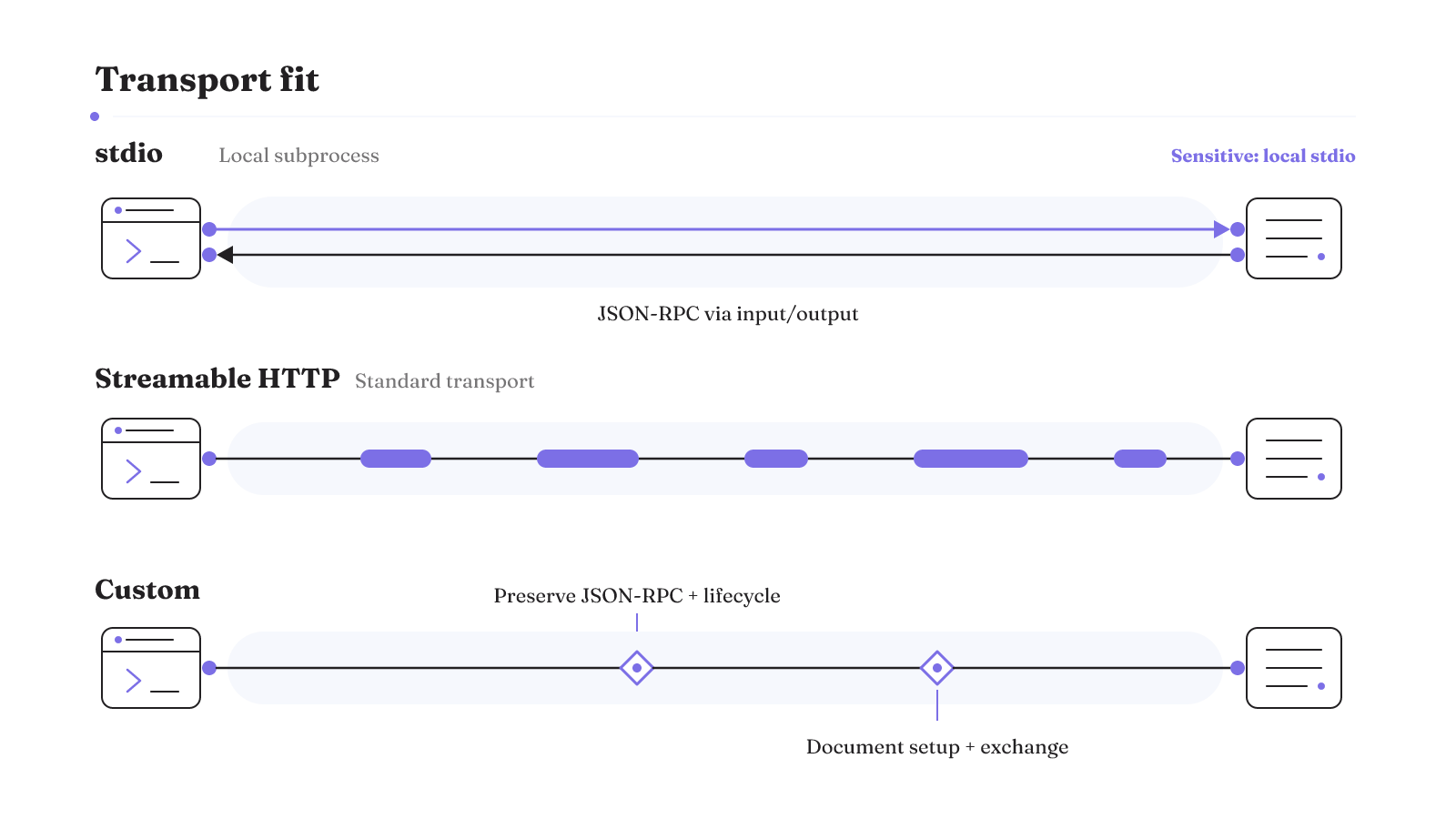
With stdio, the MCP client launches the server as a subprocess. The client and server then exchange JSON-RPC messages through standard input and output. The mechanism is concrete: the client starts a local process, writes protocol messages to its input, and reads protocol messages from its output. Sensitive MCP servers should be run locally with stdio.
Streamable HTTP is the other standard transport. If a server uses a custom transport, the implementation must preserve MCP's JSON-RPC message format and lifecycle requirements. It should also document how the connection is established and how messages are exchanged. Without those details, a custom transport leaves basic interoperability questions unanswered.
Compare the server's stated transport and startup instructions with the client's supported configuration. Record whether it uses stdio, Streamable HTTP, or a custom transport. For a custom option, inspect its documentation for connection establishment and message exchange, along with preservation of the JSON-RPC format and MCP lifecycle requirements.
For stdio, the execution relationship is especially visible. The client owns the subprocess launch, while standard input and output carry the JSON-RPC messages. That makes the local process model part of the compatibility check. The separate guidance for sensitive MCP servers is to run them locally with stdio.
For a concrete client setup, our guide to using MCP servers in VS Code keeps the configuration question attached to the client where it belongs.
A pre-install verification routine before you grant access
Once a listing passes the discovery checks, use a short pre-install routine. The steps below address secret handling, code inspection, and execution boundaries. They do not depend on a marketplace calling a listing "trusted."
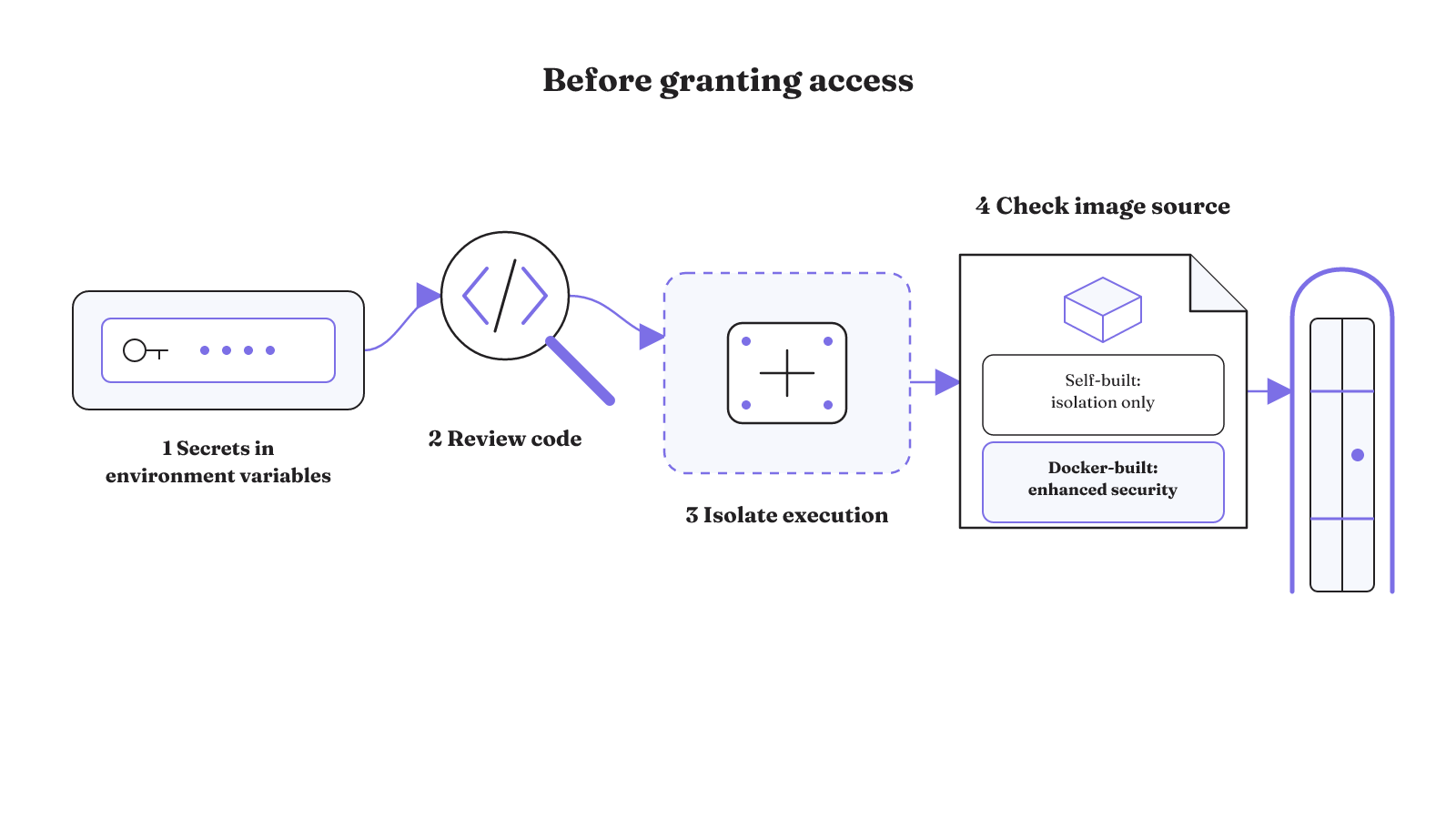
- Move secrets out of configuration text. Store MCP secrets in environment variables instead of hardcoding them.
- Review the server code before sensitive access. Code review should happen before an MCP server is connected to sensitive systems.
- Consider an isolated execution environment. Isolation gives the server a clearer boundary from the rest of the working system.
- Identify who built the container image. Self-built images receive container isolation, but they do not include the enhanced security features of Docker-built images. Do not treat those image types as equivalent.
Keep the permission check beside this routine. API keys should carry only the minimum permissions the server requires. Then record the package or endpoint, execution command, environment variables, transport, and image source you actually accepted. These are the details that make a later review or removal more tractable.
The order is deliberate. Secret storage addresses how credentials enter the configuration. Code review addresses what will be connected to a sensitive system. Isolation addresses where the server executes. The image distinction prevents container isolation from being mistaken for the enhanced security features Docker assigns to Docker-built images. Complete each check on its own terms instead of letting one positive signal stand in for the rest.
The practical standard is modest: a marketplace should help you find a candidate, but access follows only after the candidate's identity, setup, permissions, transport, scanning responsibility, and removal path are visible enough to judge. Use the trust scorecard before connecting your next server.
If GitHub is part of the workload, our GitHub MCP servers guide applies governance, maintenance, scope, and hosting checks to the server-selection decision. Read it before granting repository access.