Key takeaways
- An autonomous agent is a model plus a harness: the context it sees, the tools it calls, the controls around its actions.
- Identical model, different harness, different behaviour.
- None of the three AI coding agents compared here verifies its own output.
- Score candidates on six axes, then test on your repo.
The evidence below is coding-agent evidence, not enterprise-workflow deployment data. Read it as a mechanism that transfers, not a measurement that does.
You have probably watched this happen. An agent does something impressive on Tuesday. On Thursday the same setup, the same model, produces a mess nobody can explain. Then you open a page about autonomous AI agents hoping for an answer and get a definition, a four-stage diagram, and a demo request.
The definition is not the problem. The problem is that almost every page locates autonomy inside the model, in its ability to learn and improve on its own. That is the wrong layer. It cannot explain why the identical model feels sharp in one tool and careless in another, and it gives you nothing to specify against when you have to defend a purchase.
An agent is a model plus a harness
An agent is the sum of two things. The model supplies the intelligence. The harness supplies the context it can see, the tools it can call, and the controls that fire around its actions. That second half is what decides what the agent can actually do.
This is not a fringe view. The whole framework category exists to sell scaffolding: toolkits of pre-built parts for perception, reasoning, action, and memory. Nobody ships a framework to improve the model. They ship one to build the harness around it. And the shift is structural: single-prompt interactions are giving way to long-running, goal-driven software, with the framework layer sitting in the critical path of the architecture.
While we are here, settle the taxonomy question most readers arrive with. All autonomous agents are AI agents. Not all AI agents are autonomous. A tool that answers a question is an agent in the loose sense. A tool that takes a goal, plans, acts, and adjusts without asking you at each step is the autonomous kind, and it is the kind whose harness you had better understand.
Now the limit of the idea, before you build a purchase around it. The split is a lens, not a standard. Nobody publishes a harness spec sheet, there is no agreed vocabulary for the parts, and no vendor is obliged to tell you which controls fire where. You infer the harness from behaviour, which means a comparison chart can only ever narrow your shortlist. It cannot settle it. That is why the test at the end of this page matters more than any chart, including ours.
Why the same model feels different in two tools
Here is the cleanest proof of the thesis. Take three leading AI powered coding agents. Point them at the same repo. Their sense of your project comes from three different mechanisms.
One reads an explicit project memory file you write and maintain, and exposes hooks plus MCP so you can wire in your own handlers. Another compacts context automatically, keeps checkpoints, and holds persistent repo memory across sessions. A third uses context rules plus a convention-based markdown file the community settled on rather than the vendor.
Three mechanisms. Three different pictures of your codebase. Same model underneath, if you configure it that way. The agent that reads a file you curated behaves like it has read your architecture doc, because it has. The one compacting on the fly behaves like a colleague who skimmed the repo and is now working from memory.
That last one is not a slur, it is the tradeoff. Context handling is never free. Bigger windows cost more per run. Compaction is what keeps a four-hour session alive, and it is the same mechanism that drops the detail you needed in hour three. Persistent memory behaviour varies tool to tool with no standard to compare against, so what one agent carries into tomorrow's session is not what another does.
The wrapper objection, answered
There is a loud position on this topic and it deserves a straight answer instead of a polite detour. The skeptical practitioner take is that most agents are nothing more than a chat wrapper or a Zapier clone with better marketing.
They are largely right about what currently ships. And the harness explains why they are right without making the whole category fake. A thin harness plus a strong model is a wrapper. The model does the thinking, nothing structures it, and the result is impressive-then-brittle. That is the honest description of most products in this space.
The sentiment data backs the skeptics more than the vendors. One major agent launch drew real enthusiasm, and it did not hold. Read that as a reason to distrust launch-week sentiment in either direction. What a demo shows you is model capability. What you are buying is the harness, and it takes longer than launch week to see one.
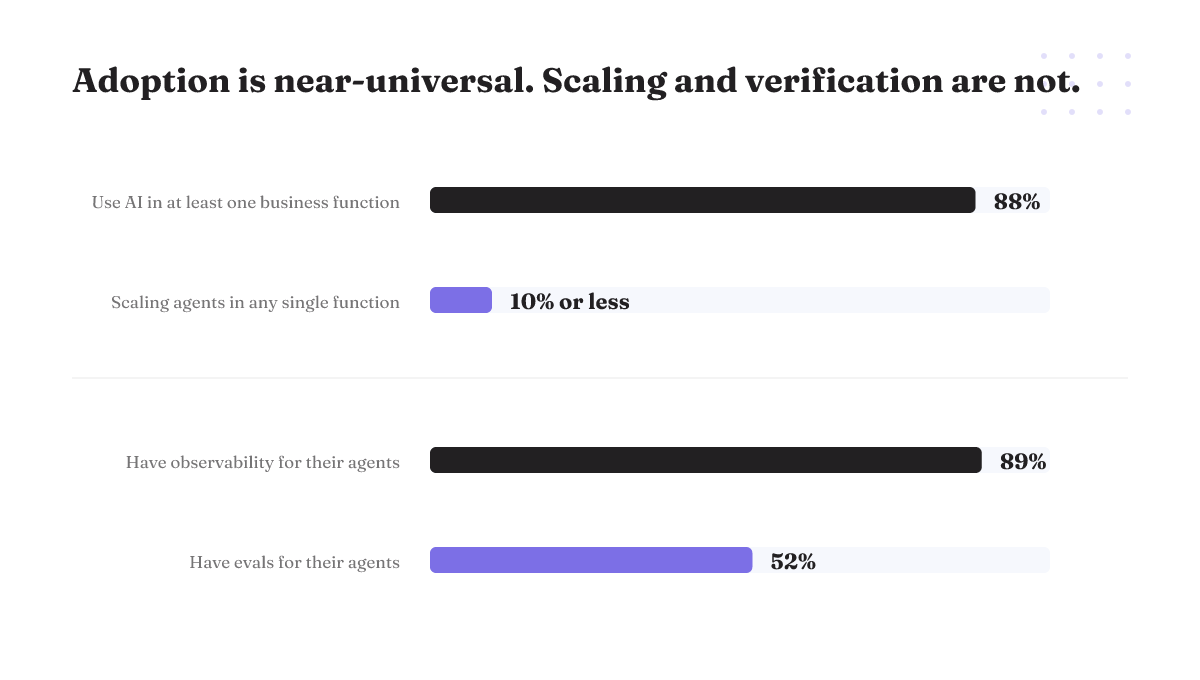
The adoption numbers say the same thing from a different angle. Roughly 88% of organizations now use AI in at least one business function, but in any single function no more than 10% report scaling agents. Near-universal adoption, near-zero scaling. Something breaks between the pilot and the fleet, and it is not the model getting dumber. Read that generously: those figures span every business function, while the mechanism below is demonstrated on coding agents. The reasoning transfers, the measurements do not.
Six axes that decide how an agent behaves
Stop comparing agents on how smart they seem. Compare them on the harness. Six axes change what actually happens on your repo: model flexibility, review posture, parallelism, project context, governance surface, and entry price.
Model flexibility is the one that will not sit in a table. Tools split structurally here, some tied to a single model and some open across several, and the answer moves with each release. Ask the vendor, in writing, which models you can run next quarter.
The other five, applied to three tools that represent three genuinely different integration paradigms rather than three versions of the same product. Antigravity, for instance, ships two distinct modes, one of them a familiar editor. That is a paradigm difference, not a feature difference, and it is the reason these three are worth comparing at all.
| Axis | Cursor | GitHub Copilot | Antigravity |
|---|---|---|---|
| Review posture | Conservative, approval-gated by default | Not confirmed | Not confirmed |
| Parallelism | Up to 8 agents in parallel, each on a different part of the codebase | Not confirmed | Not confirmed |
| Project context | Context rules plus a convention-based project markdown file | Automatic compaction, checkpoints, persistent repo memory | Not confirmed |
| Governance surface | Not confirmed | Enterprise Cloud policy keeping Copilot data inside a chosen region | Not confirmed |
| Entry price | Not confirmed | $10/mo Pro, $39/mo Pro+, free plan for individuals | Not confirmed |
| Verifies its own output | No | No | No |
A cell reading not confirmed means that behaviour is not publicly checkable to the standard the rest of the table holds. That is itself the finding: on four of these six axes only one vendor's behaviour can be established from outside the product, which is exactly why the six-run test below beats any chart, ours included.
Read the verdicts, not just the cells. Every option loses somewhere.
Cursor's default posture is conservative and approval-gated. That is a real answer to the question of who signs off, not an accident of configuration, and whether it fits depends on whether you want a human standing in the path. Decide that before you compare anything else. Copilot's entry pricing is public and low enough to trial without a business case, and the compaction that keeps its long sessions alive is the same mechanism that trades detail for endurance. Antigravity gives you a second working mode alongside the familiar editor, and it is also the one whose launch enthusiasm did not hold.
Then there is the bottom row, which appears on no vendor's version of this table. None of these tools confirms that the code it produces works. Not one. Hold that thought.
Controls that govern an agent, and the one that does not
If you are specifying a harness, this is the vocabulary to specify in. Controls sort two ways at once.
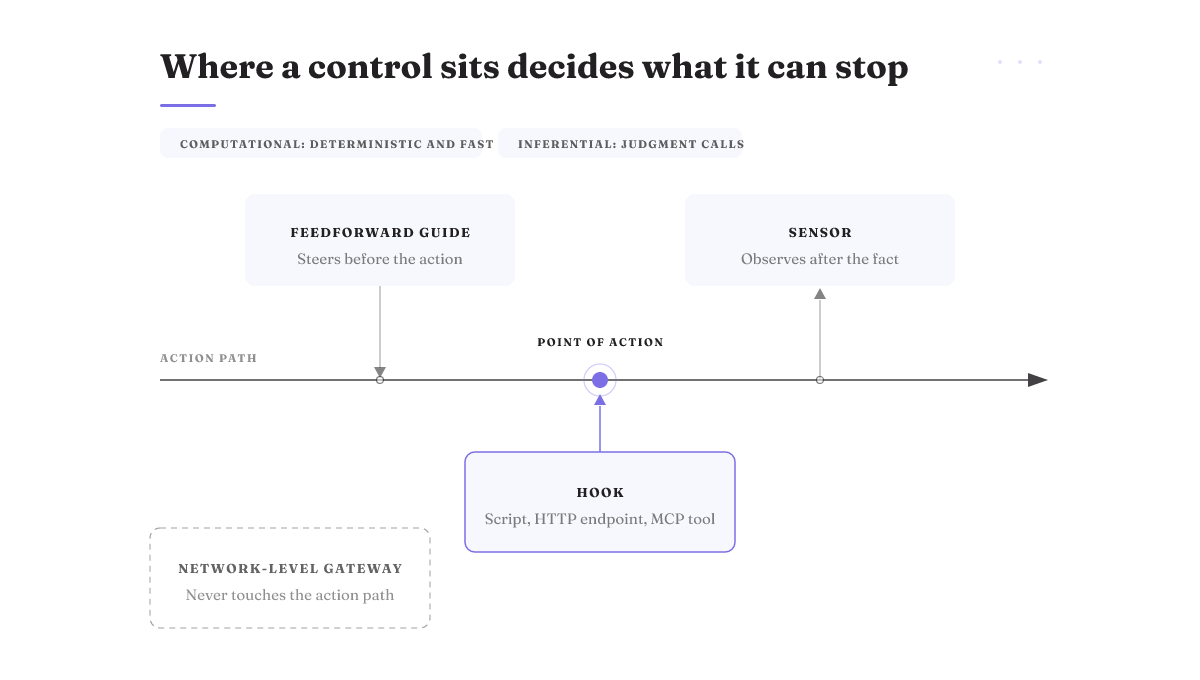
By kind: computational controls are deterministic and fast. A script checks a condition and blocks or allows. The other kind is inferential, and the distinction earns its keep in procurement. Ask a vendor which of its controls are deterministic checks and which are judgment calls, because only the first sort behaves the same way twice.
By timing: feedforward guides steer the agent before it acts. Sensors observe after the fact and tell you what happened. Both are useful. Only one prevents anything.
Now the part that saves you a procurement mistake. Agent hooks are user-defined handlers, a script, an HTTP endpoint, an MCP tool, that fire at the point of action. That placement is the whole feature: the control runs where the agent does the thing. A network-level LLM gateway cannot govern an agent's real behaviour. If your governance plan is a gateway, budget for a second control that sits where the actions happen, because the gateway is not it.
The field has this backwards at scale. Observability sits at roughly 89% adoption while evals sit at 52%. Most teams can tell you in detail what their agent did after it did it. Far fewer can tell you whether it was right.
Four ways agents fail, and where the cost lands
Vendor pages have a limitations section that is really a benefits section in a quieter font. Here are four real ones.
Mid-run termination. A long-running agent dies at minute forty of a sixty-minute run. The cost is not a simple retry. Measure it on the first long run you attempt and keep the number; it is the figure you will use to decide how long you let an agent run without a human nearby.
Compaction dropping detail. The mechanism that keeps a long session alive is a summarizer, and summarizers drop things. The agent does not announce degraded context. It just starts making decisions from a thinner picture and sounds equally confident doing it, and the cost lands on whoever reviews the output.
Memory that does not behave the same way twice. Persistent memory behaviour varies between tools with nothing to compare against. What one agent carries from Monday into Tuesday, another quietly does not, so a workflow you tuned around one tool's recall does not survive a swap.
No self-verification. This is the expensive one. None of these tools confirms its own output works. The agent writes the code and hands it to you with the same confidence whether it compiles or not. Which lands exactly where practitioners say it does: quality is now a top barrier to getting agents into production, cited by 32%, while 57% already have agents running there. Cost concerns fell. Quality did not.
What autonomous AI agents actually ship today
Fair question, and the ranking pages dodge it entirely. Two pieces of evidence are worth your time.
In OpenAI's Codex experiment, roughly 1,500 pull requests were merged. That is real throughput, and it is the kind of figure the category's explainer pages never carry. Read it for what it measures: PRs merged inside one team's process, with that team's review culture and that team's codebase. It says agents can produce mergeable work at volume. It says nothing about maintenance cost two quarters later.
For terminal agents there is a public Terminal-Bench 2.1 leaderboard. Go check the current standings yourself rather than trusting a number quoted in an article, including this one. Benchmarks move, and a benchmark score does not transfer to your repo anyway.
The useful frame is a ladder, not a switch. At the partially autonomous rung, an agent given a goal can plan, execute, and adjust a sequence of actions using a domain-specific toolkit with minimal oversight. That rung is genuinely useful. It is also not the rung the marketing implies, so when a vendor says autonomous, ask which one they mean and what happens at the step above it.
Cost, billing, and where your data sits
Procurement will ask three questions. Have the answers ready.
Entry price. GitHub Copilot starts at $10/mo for Pro and $39/mo for Pro+, with a free plan for individual developers. That free tier matters more than it looks: it is how you run the test in the next section without a purchase order.
Billing model. All three tools changed pricing materially during 2026, with Copilot moving to usage-based billing. Say the uncomfortable part to finance now rather than in month four: usage-based billing makes next year's number an estimate, not a line item, and the estimate gets worse the more of your work you hand to agents.
Data location. GitHub Enterprise Cloud customers can enforce a policy keeping Copilot data inside a chosen region. Confirm your region is covered before you write it into a contract. And retention scope for non-IDE agent usage is genuinely unsettled, which means the honest entry on your vendor questionnaire is an open item with a review date, not a checked box. If your compliance posture cannot carry an open item, that is a reason to wait rather than a detail to smooth over.
Run the six-run test on your own codebase
This is the part worth keeping. Comparisons that hold codebase, task set, and developer constant are the ones that produce decision-grade signal. Everything else is watching someone else's demo on someone else's repo.
The protocol:
- Pick one repo. Your real one, with its real mess.
- Pick five tasks you would genuinely assign this week. Include one refactor across files, one bug with a bad reproduction, and one task with an ambiguous spec.
- Use one engineer for all runs. Rotating people rotates the variable you are trying to isolate.
- Run each tool twice: once at its default settings, once with the harness configured properly. Write the memory file. Set the context rules. Wire one hook.
- Record per run: wall-clock time, whether it finished or terminated mid-run, how many review passes before merge, and what it got wrong that a human would not have.
Six runs. One repo, one engineer, two configurations per tool.
Compare run one against run two on the same tool before you compare tools against each other. The default run tells you what arrives out of the box. Nobody can tell you in advance what the configured run gives you on your codebase, which is the entire reason to run it rather than read about it.
Note what you are measuring. Your engineer's day is now review and direction rather than typing, so measure review load, not lines produced. And be clear about the limits before you present the results. Six runs on one codebase is a sample of one team on one repo with one engineer's habits baked in. It tells you what fits you, not what is best in general, it costs real engineering time you have to defend, and a second engineer running the same protocol may well rank the tools differently.
When an autonomous agent is the wrong call
There is a disqualifier that outranks every axis in the table above. If you cannot verify the output cheaply, do not deploy an autonomous agent against it.
The logic is short. None of the three tools above verifies its own work. So verification lands on a human. If checking the output costs nearly as much as producing it, you have not removed work, you have moved it from creation to review and added a confident-sounding intermediary. Code is a good fit precisely because verification is cheap: tests run, types check, CI fails loudly. Work with no equivalent oracle is a bad fit, whatever the demo showed.
The field is moving from step-by-step approval toward bounded autonomy, where an agent acts freely inside defined limits. That is the right direction. It is also a direction, not a finished practice. Teams that adopt bounded autonomy before they can verify output have not reduced their review load, they have converted it into incident load, which is the same work at a worse time of day.
If you are building rather than buying, the field is wide. LangGraph, the OpenAI Agents SDK, the Claude Agent SDK, Google ADK, and CrewAI were all active options as of July 2026, among a dozen or so others. Standing up an open source AI coding agent on one of these is a real path, and it changes the question you are asking. It stops being which tool to buy and becomes how to create AI agents whose context, tools, and controls you specify yourself. Anyone working out how to create an AI agent from these parts discovers the harness argument the hard way, because they now own every piece of it.
Where to take this next
Two moves. Run the six-run test, and read the tool-by-tool detail behind the table above: Claude Code vs Cursor vs Copilot for the harness mechanics side by side, and Antigravity vs Cursor if the two-mode split is what you are weighing.
On our own position, briefly. Rifty is harness engineering. The model supplies the intelligence; we work on the other half, the context an agent can see, the tools it can call, and the controls that fire around its actions. Control as a first-class feature, agents legible and reversible at every step, nothing irreversible shipping without operator sign-off. In the vocabulary above that means feedforward guides that steer before an action rather than sensors that observe after it, and deterministic handlers firing at the point of action rather than a log of the conversation. It is a research lab operating by introduction, not a product you can buy this week. If an approval-gated IDE agent already covers your risk, you do not need us, and the table above is the more useful artifact.
If you are running agents where an irreversible action would actually hurt, request an introduction.