You already found the syntax. claude mcp add registers a Model Context Protocol server in one line. The decision underneath it is the part every guide skips: which transport, which scope, and what invoking that server's tools now lets the model do on its own.
Key takeaways
- Decide transport before scope, not just the command syntax.
- stdio attaches natively in the CLI; the API connector needs HTTP.
- Each scope writes to a different file: project, local, or user.
- Those paths come from testing, so verify on your own machine.
What claude mcp add does, and where the config lands
MCP lets Claude Code reach tools beyond its built-in set: searching an issue tracker, querying a database, driving a browser. Those tools come from MCP servers that run locally on your machine or as hosted services. claude mcp add is how you register one so Claude Code knows it exists.
Use the command, not the file. Hand-editing .mcp.json is not always picked up by Claude Code, so the supported path is the command. But the command is not a safe no-op either. Running claude mcp add against a server that already exists can overwrite the existing entry, reported against Claude Code 2.0.60. So treat a re-add as a write, not a refresh, and check what you have before you run it.
Where the config lands depends entirely on scope, and that is the choice most people never make.
First check you're on the Claude Code CLI, not the desktop app or the API connector
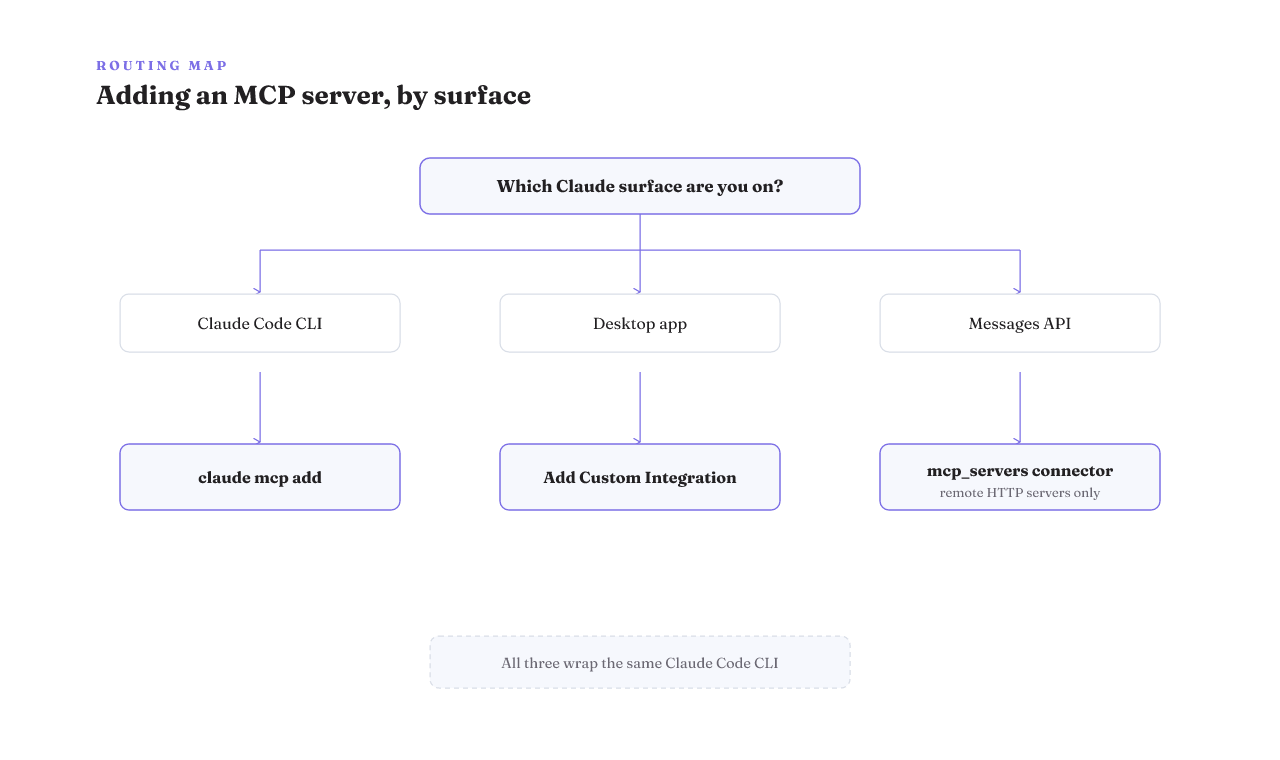
Half the pages that rank for this command answer a different product. Before you follow any steps, confirm which Claude surface you're actually on. There are three, and they are not interchangeable.
The CLI is where claude mcp add lives. Claude Code also lets you add servers from other surfaces, including the desktop app, VS Code, and the web. The consumer desktop app does it through its own "Add Custom Integration" path, which needs the desktop app itself and is a separate entry point, not the same command. And the Messages API exposes a third way in through its mcp_servers connector, which reaches only remote servers.
Here's the trap. The CLI, the desktop app, and Claude Code on the web all wrap the same underlying Claude Code CLI, and most runtime errors map to the same API error codes. The engine is shared, so the surfaces look alike and it's easy to follow the wrong one. The split isn't in the engine. It's in how you add a server, and that difference decides whether your steps even apply.
Pick the transport first: stdio or Streamable HTTP
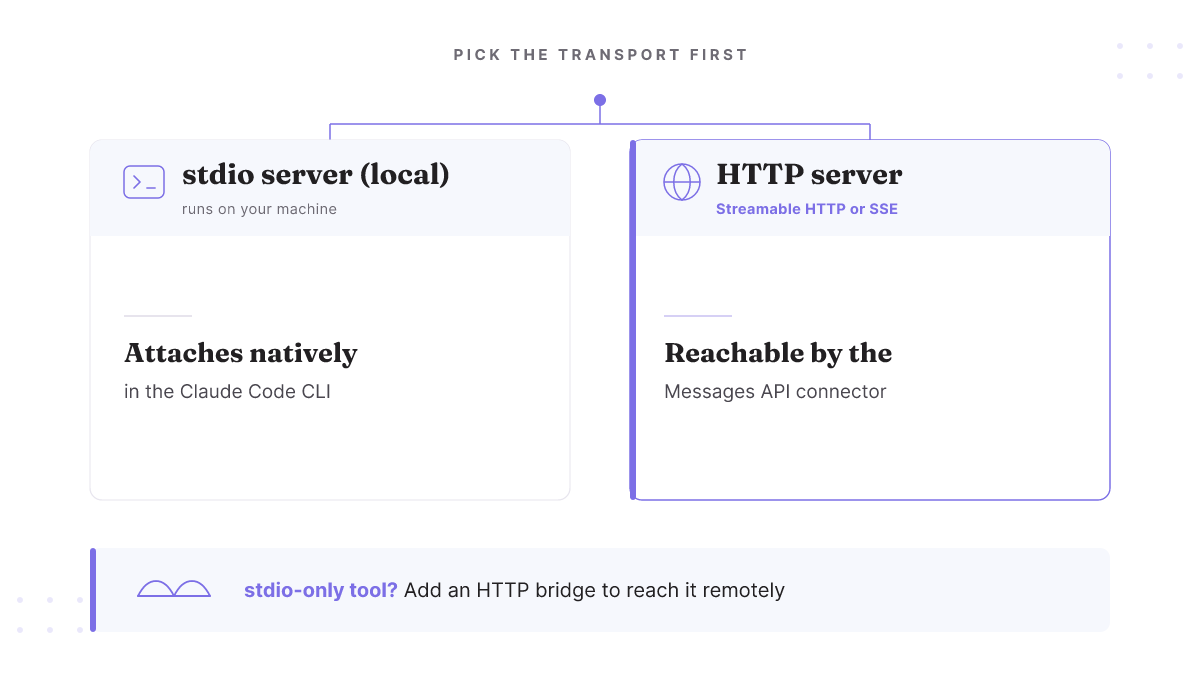
Transport is the first branch because it decides whether the server can be reached at all. A local server that speaks over stdio attaches natively inside the Claude Code CLI. That's the common case for a dev tool running on your own machine.
The remote path is different. The Messages API MCP connector connects only to servers exposed over HTTP, using Streamable HTTP as the current baseline or SSE. A local stdio server cannot be connected directly there. So if you want a stdio-only tool reachable through the API connector, it needs a bridge that exposes it over HTTP first.
Pick the transport that matches where the server has to be reachable. This bundle doesn't confirm the exact transport-flag string, so match the capability to your case and read the flag off your own CLI rather than copying one from a guide.
Scope is a grant, not a storage preference
Every ranking guide calls --scope optional and moves on. It isn't optional in any way that matters. Scope decides where the config is written, who can see it, and what the model is allowed to invoke once it's there. Read it as a grant.
| Scope | Writes to | Who sees it | What invoking its tools grants |
|---|---|---|---|
| local (default) | ~/.claude.json, keyed per project path | Only you, in this one project | The model can call this server's tools in your sessions on this project |
| project | .mcp.json in the repo root | Anyone who clones the repo, once committed | Every teammate's Claude gains the same tool calls when they open the project |
| user | ~/.claude/.mcp.json | Only you, across every project | The model can invoke the server in all your projects |
One rename ruins copied commands. What is now called local was formerly called project, so a --scope value pasted from an older 2025 guide attaches the server at a different scope than its name suggests. If you copied --scope project expecting "just me," you may now be writing a committable file the whole team inherits.
Two honest limits. The path column here rests on third-party testing, not a line in the CLI's own scope reference, so confirm each path against your own machine. And the scope you want is a real decision: personal tool, keep it local; team tool everyone should share, commit it at project.
Why following the popular guide leaves your shared scope sharing nothing
The dominant install guide contains its own contradiction. It describes project scope as the shared one, committed through .mcp.json. Then, a few steps later, it tells you to run:
echo -e ".env\n.mcp.json" >> .gitignore
Obey both and you've quietly disabled the exact sharing you chose project scope to get. The committed file that was meant to hand the server to your team never reaches the repo.
There's a real reason the tip exists, so the fix isn't "never gitignore it." A committed .mcp.json leaves no clean place for per-developer secrets, and nobody wants a token in version control. The fix is to choose scope on purpose and keep credentials out of the committed file: share the server definition at project scope, and keep tokens in a local override or an environment variable that never gets committed.
The 'every server eats your context window' warning is out of date
For a while, the standard caution was that each MCP server you attach loads its tool schemas up front and eats into your context window, so you should add servers sparingly. That math has changed. As of mid-2026, Claude Code defers tool schemas and loads MCP tools on demand through ToolSearch, so the eager-loading cost the old warnings describe no longer holds.
Don't over-correct on this one. It's fast-moving behavior, and it changes only the context-cost side of the ledger. It does not make scope a free choice. Scope still governs permission and configuration isolation: who can see the server and what the model can invoke. That's the reason to stay deliberate, whether or not the tools cost you tokens up front.
Verify it attached, and what to do when it doesn't
After you run the command, confirm it took. claude mcp list shows whether the server is configured. It's the fast check before you assume anything worked.
If the server isn't there, or a re-add seems to have clobbered a server you already had, that matches the known overwrite and manual-edit behavior above rather than something exotic on your end. And once the server does load, a tool that fails at runtime usually surfaces as an API error. Because the CLI, desktop, and web all wrap the same engine, most of those messages map to a documented Claude API error code, so match the terminal message to the error reference instead of guessing.
Your next step depends on what you're attaching
The decision is small once you've made the two branches explicit. Attaching a local dev tool for yourself: run it over stdio and keep it at local, or project if the rest of the team should get it too. Standing up a server the whole team relies on: expose it over HTTP and commit it at project scope so a clone inherits it. Either way, claude mcp list tells you whether it landed.
The rest is server-specific. Pick the real thing you're attaching and apply the same transport-then-scope decision to it, starting with the server install guide that matches your stack. And before you widen user scope across every project, it's worth reading how the harness decides an agent's blast radius, because scope is where that radius starts. That's the whole shift: you stop copying a command and start making a choice you can defend to a teammate.