Key takeaways
- ahujasid/ableton-mcp is the reference repo the search points at. Start there.
- Choose uisato's extended fork if a model will edit sessions you care about.
- Install with uv, copy the Remote Script, then run one mcp add.
- This is a starting pick, not a ranking. Coverage and safety decide the rest.
What Ableton MCP is, and what you're choosing between
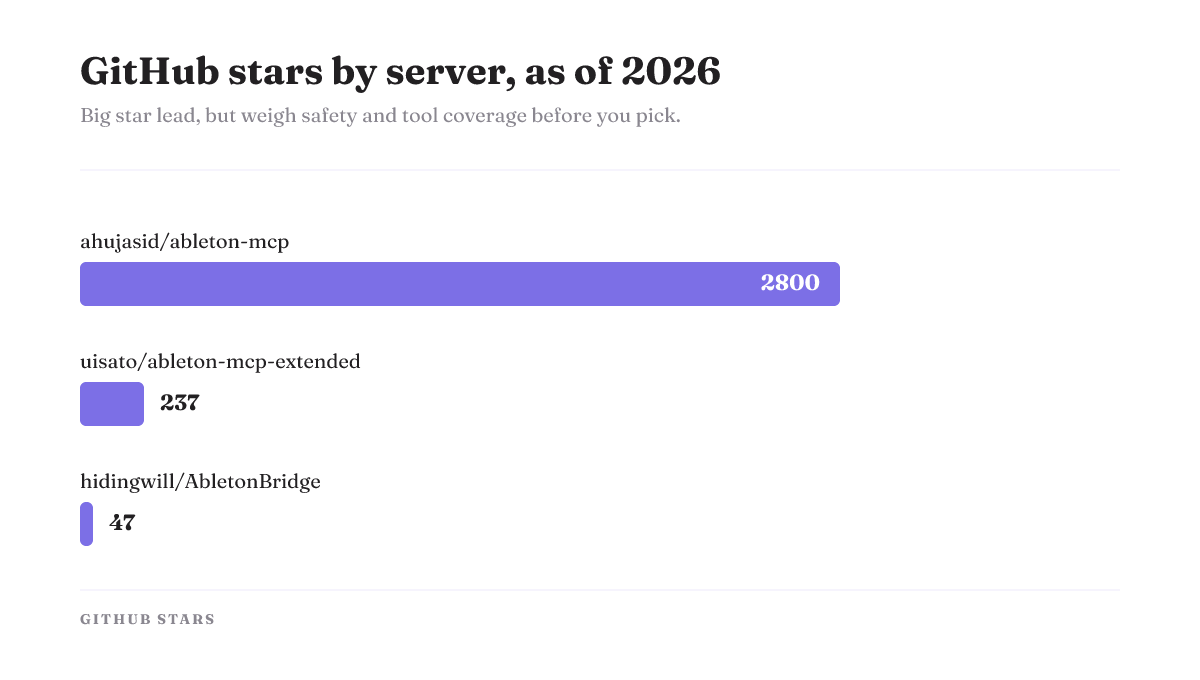
Type "ableton mcp" into GitHub or Google and you land on one repo: ahujasid/ableton-mcp. That is the reference implementation the query is after. It is open-source and MIT-licensed, first committed in March 2025, and still active, with the latest commit on June 4, 2026. It also carries the biggest following in the set, roughly 2.8k stars and 374 forks as of that June date. So the raw search is answered. Install that one and you are running.
The click hides the real question, though. There is no longer a single Ableton MCP. There is a base server, a safety-focused fork, a 359-tool bridge, and a Codex-driven variant. They are not interchangeable, and "install the top result" is no longer the same as "install the right one."
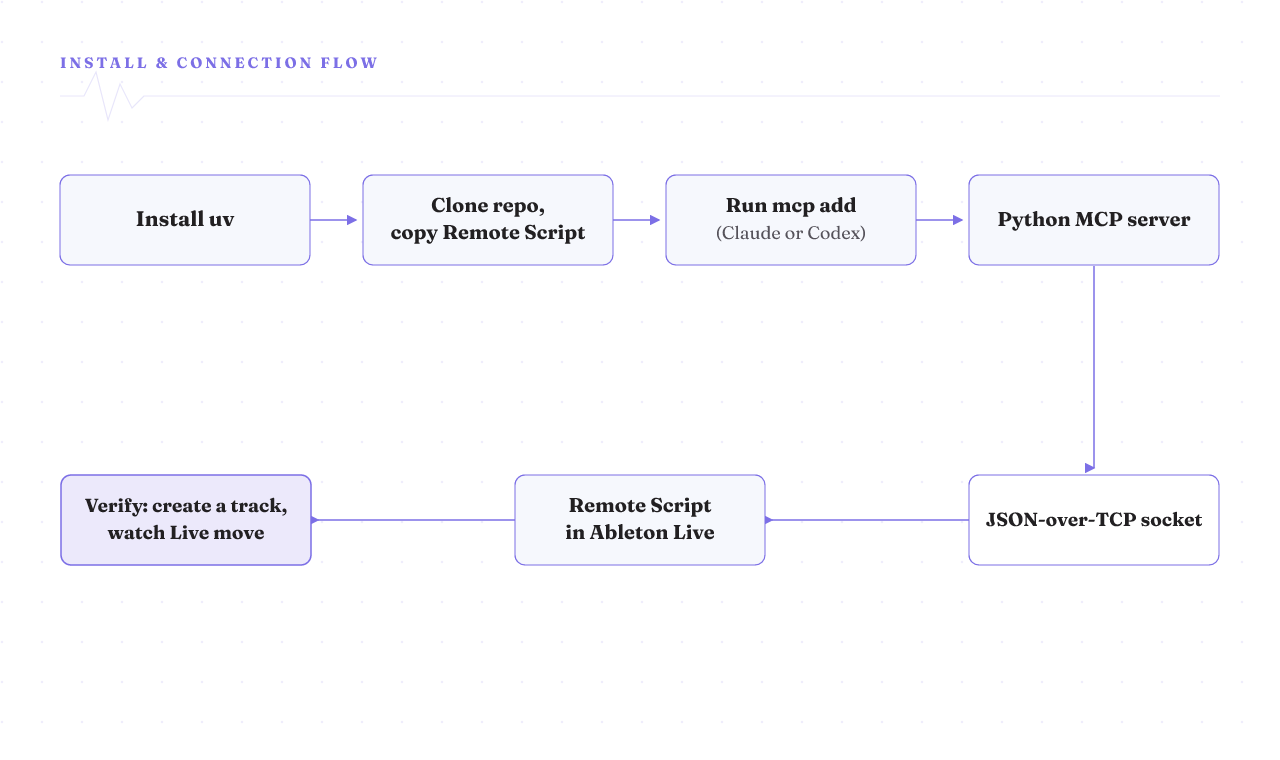
Under the hood, all of them do the same trick. An Ableton MCP server uses two pieces. An external Python server runs on your machine and speaks the Model Context Protocol to your AI client. A small Remote Script sits inside Ableton Live's MIDI Remote Scripts directory. The two talk over a JSON-over-TCP socket. Once that bridge is up, a client like Claude Desktop or Cursor can create tracks, write MIDI clips, load devices, change tempo, and start or stop playback in a session you have open. That is the whole shape of it, and every server on this page is a variation on it.
Pick your server by coverage and safety, not star count
Here is the comparison the top results never run. Read the star counts as round, as-of numbers, not fixed facts. They move.
| Server | Tool coverage | Safety guards | Adoption (as of) | Client support | Don't pick if |
|---|---|---|---|---|---|
| ahujasid/ableton-mcp | Reference set: tracks, MIDI clips, device loading, tempo, transport | None built in | ~2.8k stars / 374 forks (Jun 2026) | Claude Desktop, Cursor | You want a delete guard out of the box |
| uisato/ableton-mcp-extended | Base set plus a songwriter skill and ElevenLabs | Track-deletion safety tool, last-track guard, group-track guards | ~237 stars / 56 forks (May 2026) | Same client base as ahujasid | You want the largest, most-tested community |
| hidingwill/AbletonBridge | 359 tools (340 core + 19 optional ElevenLabs) | Not a stated feature | ~47 stars / 12 forks (Jun 2026) | Claude | You want a proven, widely-run base |
| bschoepke Ableton Live MCP | Natural-language-first, driven through Codex | Not a stated feature | Show HN, 123 points | Codex (OpenAI) | You need a track record, not a fresh entrant |
The logic behind the table is simple. If you are just trying it out and want the path most people have walked, the reference server is the safe default. If a model is going to touch a set you would hate to lose, the extended fork is the pick, because it adds a track-deletion safety tool, a last-track guard, and group-track guards the base server does not have. It also ships a structured songwriter skill and ElevenLabs voice work, and it was last updated in May 2026.
Want raw surface area? AbletonBridge exposes 359 tools, 340 core plus 19 optional ElevenLabs voice and SFX tools, and it is under active development, with 106 commits and a June 9, 2026 update. The catch is adoption: around 47 stars and 12 forks, so far fewer people have shaken out its edges. And if you would rather just talk your way through a track than manage tools at all, bschoepke's variant is built for exactly that. Its author used Codex to direct a full EDM track by chatting, MIDI instruments, vocals through the macOS say command, and sidechain dynamics included. It is also the newest and least-proven of the four, resting on a single Show HN post.
None of these is flatly "the best." Each loses somewhere, and the table is there so you lose on purpose, not by accident.
Match your goal to a server in one line
Skip the table and use this if you already know your goal.
- Just trying it and want the well-worn path: ahujasid/ableton-mcp.
- A model will edit a set you care about: uisato/ableton-mcp-extended, for the delete and last-track guards.
- You want the widest toolset and don't mind small adoption: hidingwill/AbletonBridge.
- You'd rather talk than manage tools, and you run Codex: bschoepke's variant.
Which client drives it: Claude, Codex, or ChatGPT
Your client matters as much as your server. Most of this ecosystem grew up around Ableton MCP and Claude: the reference server is documented for Claude Desktop and Cursor, and AbletonBridge is built to give Claude direct control of the session. If Claude Desktop is what you have open, you are on the main road.
The OpenAI side runs through Codex, its coding agent, not the ChatGPT chat window. The setup below registers the server with codex mcp add just as easily as claude mcp add, and bschoepke's variant was designed around Codex from the start. So when people search "ableton mcp chatgpt," the honest answer is: drive it with Codex. There is no evidence here for a plug-and-play ChatGPT desktop path, so do not count on one until a server documents it.
Install it: uv, the Remote Script, and one mcp add
The download is a git clone, not an installer. On macOS the path is three steps.
- Install uv, the Python package runner these servers use. A one-line
curlscript does it. - Clone the server's GitHub repo, then copy its Remote Script into Ableton's User Library Remote Scripts folder. That is the piece Live loads so it can listen on the socket.
- Register the server with your client. Run
claude mcp addfor Claude, orcodex mcp addfor Codex, pointing at the cloned project.
That is the working shape for every server here, though the exact command and folder layout vary by repo, so read the one you picked. This path is macOS-specific. Windows is a different story, and it is the next thing to know.
What it does out of the box, and where it stops
Set your expectations before you start prompting. A developer who spent his December 2025 holiday break on ahujasid/ableton-mcp found the out-of-box tools good enough for basic creation and editing in Session view, and no further. They did not cover Arrangement view, devices and device chains, or mixing, the "real DAW" work most tracks need. He got to a finished mashup only by writing 70+ automation tool calls himself and reverse-engineering enough of the .als file format to inject tempo and volume automation the Python API never exposed.
Two things follow. First, if your plan is "generate clips and ideas in Session view," the base server likely delivers. Second, if your plan is full arrangement and mixing, expect to reach past the default toolset or pick a higher-coverage server. That account is from December 2025, so treat it as the boundary one run hit then. Later releases may have widened it, and the extended fork and AbletonBridge already aim higher.
Where setup breaks, and how much control you're handing over
Setup is not friction-free, and Windows is where it bites. An open issue on the ahujasid repo reports the server refusing to stay connected on Windows 10, tied to Python-version conflicts and a pywin32 install that fails. That is one user's report, not a guarantee it will happen to you, but it is the failure to watch for. If you are on Windows, pin a known-good Python version and confirm pywin32 actually installs before you blame the server.
Then there is the part the tutorials skip entirely: what you are handing the model. A server that can create tracks, load devices, and delete things is write access to your live set, granted to an agent. The base server has no built-in guard against a destructive edit, which is exactly the gap uisato's fork closes with its delete and last-track guards. Think about that before you point a model at a session you care about. Work on a copy first. Give the agent the narrowest server that covers your task, not the widest one you can find. Control you can see and undo beats capability you cannot. That is the whole idea behind an agent harness: keep the surface legible and reversible, so a wrong move is a small one.
What the Reddit and Show HN threads actually settle
The community results that rank for this search are worth reading, with a caveat. The Reddit thread and the experiment write-ups prove the thing runs and show real people making music with it. They do not compare the servers or resolve which to install, and a single Show HN or bug report is one data point, not a verdict. Use them for "does this work at all" and "what did someone hit," then come back to the table for "which one is mine." A guardrails-first setup turns those scattered war stories into a checklist you actually follow.
Confirm it works, then decide your next move
Once it is wired up, verify the bridge with one small call. Ask your client to create a track or fire a clip, then watch it happen in the open Ableton session. If Live moves, the socket bridge between the Remote Script and the Python server is live, and you are connected.
A first successful call confirms the connection, not the coverage. If you only need Session-view ideas, you are done. If you want Arrangement, devices, or mixing, revisit the table and weigh the extended fork or AbletonBridge before you invest in a workflow the base server cannot finish. Doing the same for Blender next? Our Blender MCP breakdown runs the same decision the same way.