Key takeaways
- Yes, App Store Connect MCP servers exist. Several sit on GitHub.
- The 326-star reference server has been read-only since February 26, 2026.
- Pick on maintenance and key scope, not advertised tool counts.
- Issue a role-limited, single-app key before the first tool call.
What you are actually automating
App Store Connect is the console where the work around shipping an app happens. Builds, testers, subscriptions, pricing, provisioning, and who on your team can touch any of it.
Apple exposes that work through a REST API. It automates the actions you take in App Store Connect, ships a downloadable OpenAPI specification, and authorizes every call with a JSON Web Token built from keys your organization issues out of its own account. That is the whole authorization story. No password, no session, just a signed token tied to a key you created.
The documented areas are specific: in-app purchases and subscriptions, TestFlight builds and testers, Xcode Cloud workflows, users and access, and provisioning across bundle IDs, capabilities, signing certificates, devices, and profiles.
Apple documents that list as what its API automates, and an MCP server is a client of that API like any other integration. Follow the plumbing and the conclusion is yours to check rather than mine to assert: a wrapper carries whatever the thing it wraps exposes, so a project advertising more tools than another is slicing the same documented areas differently. Keep that in mind every time you read a capability count.
The reason anyone wants the wrapper is the interface underneath it. Getting to your reviews means clicking through dropdown after dropdown, waiting on page loads, and landing on a table that shows ten reviews at a time. An agent that can just answer "what are people complaining about this week" removes an afternoon of clicking.
The App Store Connect MCP servers on GitHub, and the one that is dead
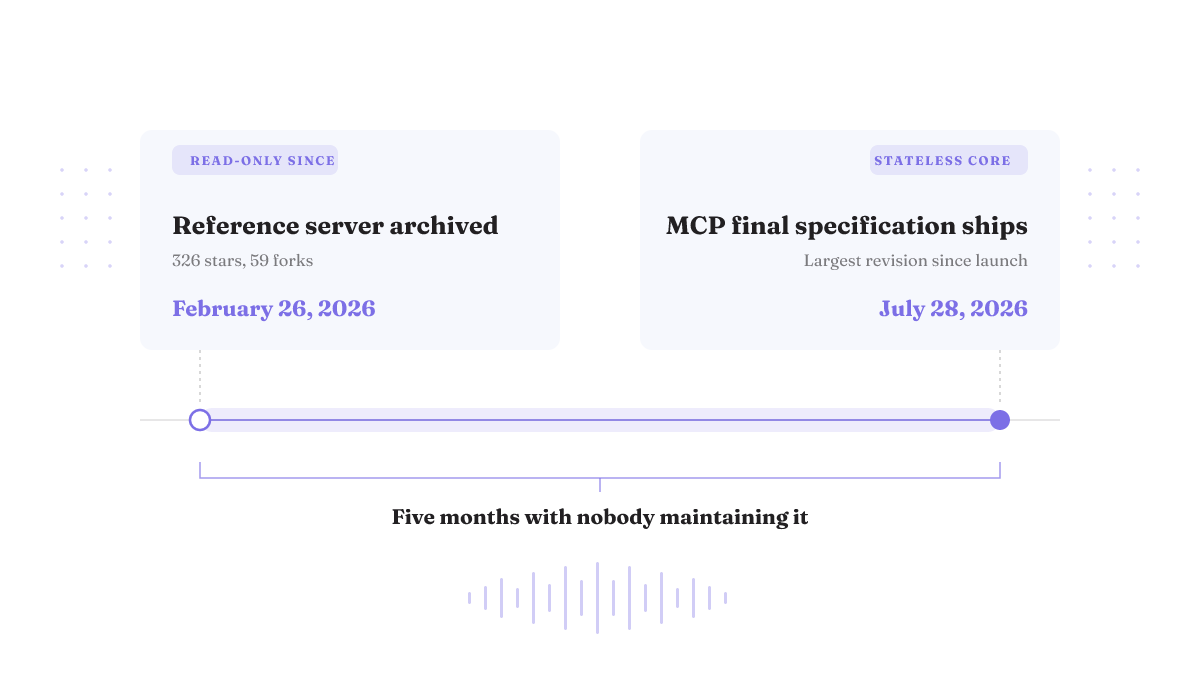
One repository carries the weight of this search: JoshuaRileyDev/app-store-connect-mcp-server. It has 326 stars and 59 forks. Its owner archived it on February 26, 2026, and it has been read-only since.
Those two facts sit oddly together. Three hundred and twenty-six stars is a real audience. February 26 is five months of nobody merging anything.
An archived repo is not automatically broken. Read-only code pointed at a stable API can keep working for a long time. The risk is narrower and worse: when the API moves or the protocol moves, nobody is there to fix it. Right now both are moving. Which is also why any server named on this page is a snapshot and the checks below are the part worth keeping.
A maintained successor exists and describes itself as covering the same API surface plus more, consolidating the endpoints into a small set of opinionated tools instead of exposing raw ones. Two of its tools use MCP Sampling, so your own client's model does the language work rather than the server paying for it. Those are the project's own words about itself, including its framing that other servers hand you 80 to 293 raw endpoints while it hands you 13 tools. Nobody counted both sets against a shared definition, so read those numbers as positioning.
Reddit is where this question actually gets asked, and what comes back is usually a link, not an assessment. Treat a thread as a way to find candidates, then run your own checks. The same rule applies to any repo you find there or in a wider survey of MCP servers on GitHub.
Does Apple support MCP? Apple's published App Store Connect documentation is a REST API with an OpenAPI specification and JWT authorization. Every server named on this page was written by an independent developer against that API.
You are choosing across a protocol revision
Maintenance matters more this quarter than usual.
The release candidate for MCP 2026-07-28 is the largest revision of the protocol since launch. Its core change is that the protocol goes stateless and scales on ordinary HTTP infrastructure. The final specification ships on July 28, 2026.
That is not a paperwork change if you host anything remotely. A remote MCP server previously needed sticky sessions so a client kept hitting the same instance, a shared session store behind it, and deep packet inspection at the gateway to route correctly. A stateless core that runs on ordinary HTTP is aimed straight at that scaffolding. Deployment gets simpler for anyone still maintaining their server.
Which brings the archive date into focus. A project frozen in February 2026 is frozen on the older side of the biggest protocol change so far. No published account establishes whether any specific App Store Connect MCP server has shipped an update for the revision, so nobody can hand you that answer, including this page. Check it yourself: open the repository, look at the most recent commits, and compare the dates against July 28, 2026. If you would rather not do that check, you should not be pasting a key into that server.
Four things to check before you install any of them
The four axes below change the outcome of this decision and are checkable in about ten minutes: whether the code is maintained across the 2026-07-28 revision, whether it reaches the areas Apple's API documents, how narrow its key can be, and whether it does anything your existing scripts do not. Tool counts are on none of them, because no two projects count tools the same way.
| Axis | What good looks like | Where you check it | Fail signal |
|---|---|---|---|
| Maintenance across the revision | Commits after the July 28, 2026 final specification, and an issue tracker someone answers | The repository's commit history and open issues | "This repository was archived by the owner. It is now read-only", or a last commit from before February 2026 |
| Reach against Apple's API | Named coverage of the areas you need: in-app purchases and subscriptions, TestFlight builds and testers, Xcode Cloud workflows, users and access, provisioning across bundle IDs, capabilities, signing certificates, devices, and profiles | The README, checked against Apple's documented automatable areas | A tool count with no mapping to API areas |
| Key scope | Runs on a key that can be assigned a role with limited permissions, inherit the app access assigned to its user, be rotated, and be revoked independently | Your App Store Connect keys page, plus the server's auth docs | Setup instructions that tell you to use an Admin key |
| Overlap with fastlane | Does something your existing pipeline cannot, such as ad-hoc questions over live data | Your own release scripts | Re-implements uploads you already automated |
Run it on the 326-star repository and the first axis ends the conversation: archived February 26, 2026, read-only since. No score on the other three axes rescues that.
Two of these four checks take ten minutes of your own clicking. The checklist does not save you that. It tells you which ten minutes are worth spending. Score a candidate on all four before you install it. Three good axes and a bad key story is still a bad choice.
Scope the key before the first tool call
An API key is not a string you paste into a setup screen. It is an access badge into your Apple Developer account and the App Store Connect systems behind it. Take that seriously and the argument follows on its own merits: the failure mode is not the key mechanism, it is treating permanent Admin access as the normal way to connect a developer tool. You do not have to accept that framing to test it, and testing it costs one key.
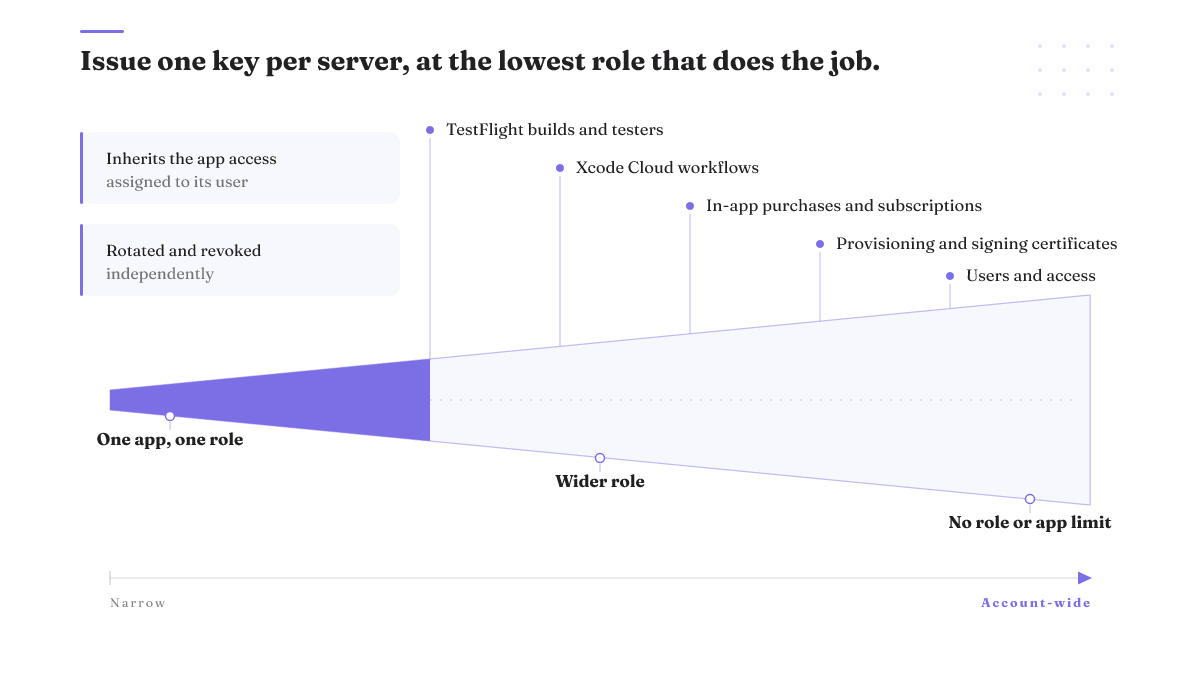
Look at what an unnarrowed key is pointed at. TestFlight builds and tester groups. Provisioning profiles and signing certificates. In-app purchase and subscription configuration. Users and access, meaning who else can get in. A key you have not limited by role or by app is aimed at that whole documented surface, so one confused tool call reaches all of it.
The controls that make that smaller are already in the key model. Keys can be assigned roles with different permissions. A key can inherit the app access assigned to its user, so it sees one app instead of all of them. Keys can be rotated. Keys can be revoked independently, without touching anything else. And they work without sharing passwords.
Use all of it. Issue a key for this server alone, at the lowest role that does the job, scoped to a single app. Rotate it on a schedule you actually keep.
The cost is real and worth naming. A tightly scoped key will break tool calls the server advertises, and the error will read like a bug rather than a boundary you set on purpose. You will spend a few minutes confused. That is the trade, and it is a good one. It is the same instinct behind building agentic systems you can reverse: decide the reach before the first call, not after the first incident.
How connecting a client actually works
Exact install steps differ by client, by server, and by release, and they change often enough that a config block printed here would be wrong within a quarter. So this section gives you the mechanism, and you read the current README of whichever server you picked after it has passed the four checks. The mechanism is simpler than the setup guides make it look.
Your client, Claude Code or Claude Desktop or anything else that speaks MCP, is configured to launch or reach an MCP server. You give that server an App Store Connect key. From there it is an ordinary consumer of Apple's REST API: every call it makes is authorized by a JSON Web Token built from that key, issued out of your organization's account, exactly like any other integration. Nothing about the MCP layer widens what the key can do, and nothing about it narrows what the key can do either.
That is why the two questions worth asking about any App Store Connect MCP server are who maintains it and how narrow a key it will run on.
Some servers ship more than raw tools. The maintained successor lists three slash-command prompts and a Claude Skill alongside its 13 tools. What that skill adds beyond the tools themselves is not something any published account spells out, so treat App Store Connect skills as an unproven convenience rather than a reason to pick one server over another.
When it returns 401
Your first tool call fails with a 401. Start with the token, not the server.
A 401 is an authorization failure. Developers report 401 responses from App Store Connect API integrations even when following a documented client library implementation, which means a working code sample is not proof your setup is right.
Three places to look, in order. Token construction first, since every call is authorized by a JWT built from your key and a malformed or expired token fails the same way a wrong one does. Then the key's role, because a read call against an area your role does not cover fails at the door. Then app access, since a key that inherits a user's access to one app cannot see the others.
No published root-cause breakdown for these failures exists, so nobody can hand you a checklist that resolves every case. What you get is the right order to search in. If you narrowed the key in the previous section, start there. The 401 you just hit may be your own boundary working.
When you do not want an MCP server here at all
Sometimes the answer is no server.
If the job is releases, the command-line path already exists and has documentation behind it. fastlane's deliver uploads screenshots, App Preview videos, metadata, and binaries to App Store Connect, and it can push a new ipa or pkg from any Mac without Xcode. When someone asks about an App Store Connect CLI, that is the tool with a published command surface behind it, and it is what an MCP server is competing against for release work.
The split is clean. fastlane is a scripted pipeline. It wins on repeatability, on running in CI, and on doing the same thing at 2am that it did yesterday. It loses on ad-hoc questions. If what you want is "which subscription tier lost the most renewals last month", a script is the wrong shape and a conversational tool is the right one.
The other branch is smaller and underrated. One iOS developer shipped a .NET library, a CLI tool, and an MCP server that does one thing: fetch App Store reviews so an AI assistant can analyze them. One job, one narrow surface, a key that needs almost nothing. If you want to automate App Store Connect for a single recurring question, a small server you understand beats a large one you do not. That is the same reasoning behind judging an MCP server by what it earns.
What to do this week
Take whichever server you were about to install and run the sequence.
Open its repository and read the last commit date against July 28, 2026. If the header says the repository was archived by the owner and is now read-only, as the 326-star reference server has since February 26, 2026, stop there. Map its README against Apple's documented areas: in-app purchases and subscriptions, TestFlight builds and testers, Xcode Cloud workflows, users and access, provisioning. Then go to your App Store Connect keys page and issue a fresh key assigned the lowest role that covers the job, inheriting the app access assigned to a single app. Make one read-only tool call. If it holds, widen slowly, one permission at a time, rotate the key on a schedule, and remember you can revoke that one key independently without touching anything else.
What this page cannot tell you is which server to install. Maintenance status changes faster than any published guide can track, including this one. February's reference server was fine in January. The checks outlive the answer, which is why they are the thing to keep, and why how you evaluate agent tooling matters more than which repo is winning this month.