Key takeaways
- Default: joshuayoes/ios-simulator-mcp, roughly 2,100 stars. Pin v1.3.3 or later.
- Want heavier automation? Choose an idb-backed server on Facebook's idb.
- Want deterministic regression tests? Apple's XCUIAutomation beats any MCP server.
- These picks rest on public project docs, not a bench test we ran.
You searched for an iOS Simulator MCP server, and the results are five near-identical READMEs and one Reddit thread. Each one pitches its own server. None tells you which to run, or whether an MCP server is even the right tool. So you either grab the top GitHub link by star count and miss its security caveat, or you burn an afternoon installing three servers to feel the difference.
Here is the decision the READMEs cannot give you, because each one only sees itself.
Choose the automation foundation before the server
Every one of these servers drives the same thing underneath: Apple's simulator frameworks. CoreSimulator is the private framework that exposes simulator features on macOS, and simctl is the command-line tool built on top of it. FBSimulatorControl is the macOS framework that Facebook's idb uses. This layer decides what any server can actually drive, so get it right first and the rest is detail.
The servers split into two camps. Direct-toolset servers like joshuayoes and @mseep expose each simulator operation as its own named tool, so the agent taps, types, and takes a screenshot by calling discrete commands. idb-backed servers ride Facebook's idb instead, which runs a companion on your Mac plus a portable client that can live anywhere, and exposes small primitives you sequence into workflows. That difference in control style bounds what your agent can do.
A strong foundation does not promise a good wrapper. A thin server on idb can still hand your agent a narrow, buggy tool surface. So judge the foundation first, then judge the server sitting on it.
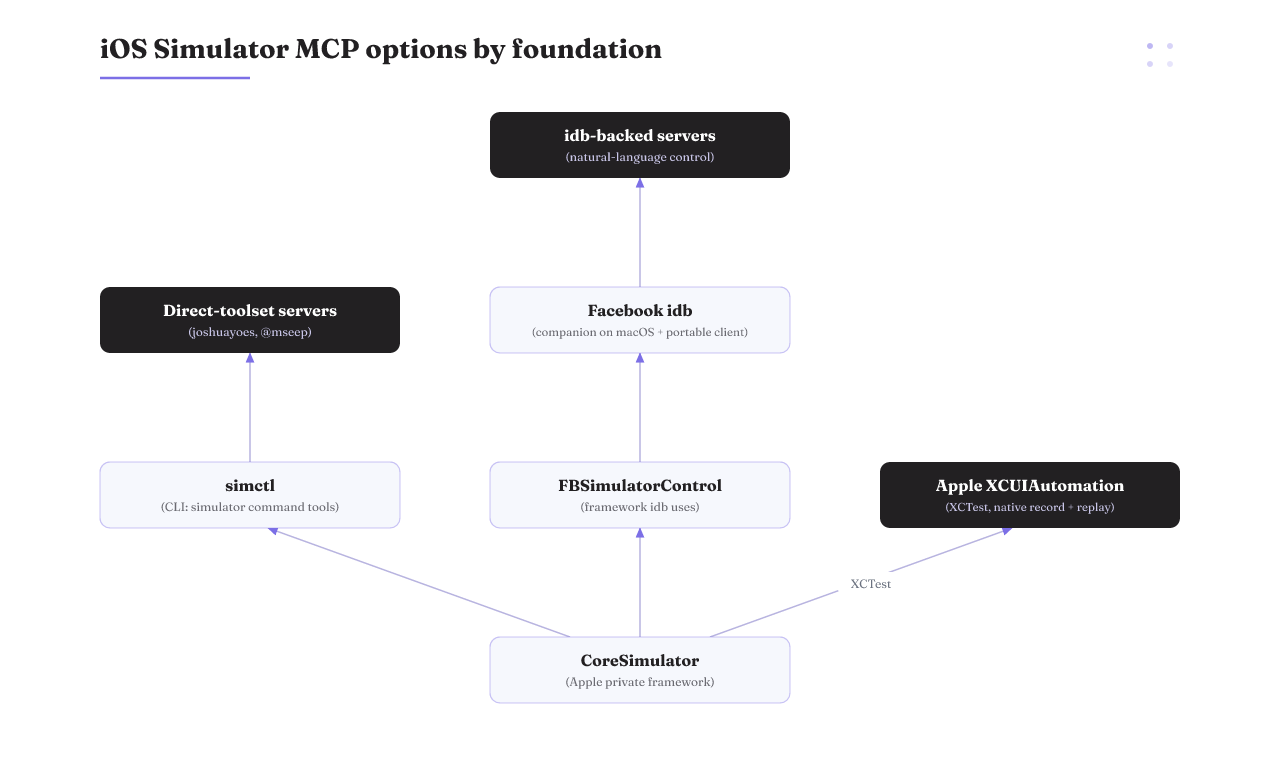
The iOS Simulator MCP servers at a glance
| Option | Foundation | Control style | Install | License | Rough adoption | Pick this if |
|---|---|---|---|---|---|---|
| joshuayoes/ios-simulator-mcp | Simulator command tools | Direct toolset | npm / GitHub | Not stated | ~2,100 stars | You want the most-adopted default and a simple tool surface |
| @mseep/ios-simulator-mcp | Simulator command tools | Direct toolset | npm | Not stated | Lower, standalone | You want env-var tool filtering and a QA-in-agent-mode flow |
| mcp-server-simulator-ios-idb | Facebook idb | Natural language | GitHub | Apache-2.0 | A few hundred stars | You want plain-English commands over idb |
| Facebook idb | FBSimulatorControl | CLI / library, not a server | GitHub / PyPI | Not stated | ~5,200 stars | You are building your own wrapper or scaling to a device lab |
| Apple XCUIAutomation | XCTest / CoreSimulator | Record and replay | Xcode | First-party | Native to Xcode | You want deterministic regression tests, not agent exploration |
Adoption figures are a July 2026 snapshot and new servers appear monthly, so read this as a decision aid, not a live leaderboard. The mcp-server-simulator-ios-idb row is an option worth knowing, not a pick we link or endorse.
Read the SERP with suspicion
Before you trust the ranking, know that the listings get the basics wrong. One aggregator page lists a creation date that is years off and a star count that does not match the repo. Numbers like these move week to week, so read them from the project's own GitHub or npm page, never from a registry's cached snippet. Everything here is a July 2026 snapshot. Treat each figure as a starting point you re-check, not a live scoreboard.
The default pick, and the version you must pin
joshuayoes/ios-simulator-mcp is the most-adopted server in the field, at roughly 2,100 stars. It gives your agent a direct toolset: get information about a simulator, control UI interactions, and inspect UI elements. You install it from npm and point your client at it. For most people, this is the safe default.
One thing you cannot skip. Versions before 1.3.3 shipped command-injection bugs, now fixed. Install v1.3.3 or later. The history matters past the patch: these servers run real commands against your machine, so the version you pin is a security decision, not a formality. Most stars means most popular, not proven to fit your harness.
Direct-toolset servers and controlling the tool surface
The @mseep/ios-simulator-mcp package shows what a direct toolset looks like in practice. Its tools cover the booted simulator's ID, a description of every accessibility element on screen, tap by coordinate, text input, swipe, inspection of the element at a point, and screenshots. It positions itself as a QA step in agent mode, run right after your agent implements a feature.
The useful lever is tool filtering. Set the IOS_SIMULATOR_MCP_FILTERED_TOOLS environment variable to a comma-separated list, and those tools never register. The agent cannot call what is not there. That is your first blast-radius control.
One caution. @mseep's tool surface looks like joshuayoes' own, and it carries lower standalone adoption, so you may be choosing a fork of the same code. Check which one is actively maintained before you commit.
The idb-backed route for heavier automation
When you need more than tapping coordinates, look at a server built on Facebook's idb. idb is an actively maintained automation tool at roughly 5,200 stars. It runs a companion on macOS and a client that can run anywhere, and it exposes small primitives you sequence into real workflows. A server on top of idb can take plain-English commands and turn them into those primitives. The main idb-backed option, mcp-server-simulator-ios-idb, is Apache-2.0 licensed with a few hundred stars.
The tradeoff is real. idb is a library, not an MCP server, so you depend on whatever wrapper you pick, and a wrapper can lag the foundation it rides on. Confirm the exact server you choose is still actively maintained before you build on it.
When Apple's own XCUIAutomation is the right call
Apple ships its own way to drive the simulator, and none of these servers weighs it. With XCUIAutomation and XCTest you record an interaction, let Xcode build the element queries for you, then replay that test across dozens of locales, device types, and system conditions. For a suite that catches regressions the same way every run, this beats any MCP server.
It is first-party and reproducible. It is also not agent-native. There is no conversational tool surface out of the box, and you author the tests in Xcode. If you want an agent to explore your UI on its own, XCUIAutomation does not fit. If you want deterministic regression coverage, it wins.
Wiring your pick into Claude Code without giving up control
Say you picked joshuayoes and you run Claude Code. You add the server to your MCP config in the client, the same way you add any MCP server. Then you keep the agent on a short leash.
Three moves keep control legible and reversible:
- Register only the tools the job needs, using the filtering env var, so the agent's surface matches its task.
- Pin the fixed version, so you know exactly what code runs.
- Keep the agent on the simulator, never a real device, so nothing it does can ship or leave your Mac.
You can wrap the whole setup as a named skill your agent invokes, which keeps the config in one place. The point of these moves is simple. Handing an agent tap, type, and screenshot control means it can drive your app for real. The trade is between letting it run unattended and keeping a human sign-off on anything that leaves the simulator.
A pre-install check for any MCP server
Run the same short check on whatever you pick, so a strong star count never talks you past a weak fit:
- Version and security: is there a fixed release to pin, and does the project name past vulnerabilities plainly?
- License: does it match what your project can ship?
- Maintenance: when did it last commit or release, and is it a fresh fork of another repo?
- Tool surface: do the exposed tools cover your job without exposing more than you want?
- Foundation: direct simulator tools or idb, and does that match the automation you actually need?
When none of these is the right tool
Two jobs point away from a simulator MCP server. If you run tests at scale in a CI or device lab, go to idb's remote-automation design directly. Its companion-and-client architecture is built for that, and a thin wrapper only adds friction. If you need a deterministic regression suite, use XCTest. And keep the scope in view: these are simulator servers, so for real hardware they are not the path.
For release automation rather than UI testing, a different server fits better, like an App Store Connect MCP server. The honest rule holds either way: for physical devices and large parallel runs, a purpose-built pipeline beats every simulator MCP server today. Do not force an MCP server into a job it was not built for.
How we compared, and what we didn't test
This page ranks the servers by the automation foundation they ride on, then by adoption, license, and security posture, all read from public project pages: GitHub, npm, PyPI, and Apple's docs. We did not bench-test these servers inside a live harness. So treat tool-by-tool reliability as an open question, not a settled score. Adoption is a July 2026 snapshot, and new servers appear monthly.
Deciding how much control to hand the agent
Every choice above is the same small decision, made four times. Filter the tools. Pin the version. Stay on the simulator. Keep a human on anything irreversible. Each one makes what the agent can do legible, and keeps it reversible, so nothing irreversible ships without your sign-off. That is the whole idea behind harness engineering: the control layer is the product, not the model.
Rifty is a research lab on running companies on agents, open by introduction, not a server you install. If you just need an iOS Simulator MCP server today, install one above and pin it. If the real question is how much of that control surface to expose to an agent, read the agent-harness explainer next.