Key takeaways
- Two directions: your agent reaching Teams chats, channels and messages through Microsoft Graph, or your Teams bot turned into an MCP server.
- The bot path needs
User.ReadBasic.All(Microsoft Graph, Application) with admin consent granted. - Both first-party Teams servers are preview, not for production use.
Yes, Microsoft Teams MCP servers exist. Here is whose.
Search the term and you land on a spread of pages that read like the same product. They are not the same product. Developers are still asking whether MCP for Teams exists at all, and whether Microsoft ships its own. People typing "Microsoft 365 MCP" are asking the same question in different words. The answer is yes, and more than once.
Three first-party surfaces are live today.
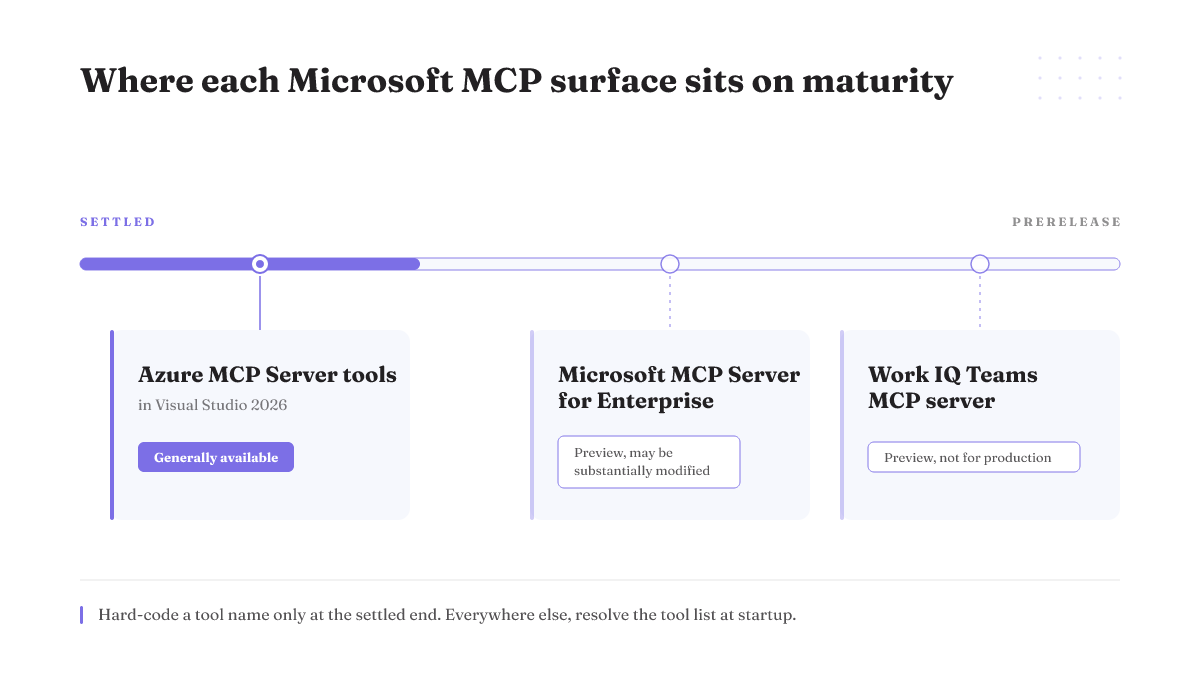
The Work IQ Teams MCP server is a Graph-backed server for managing chats, channels, users and the messages inside them. Microsoft's Copilot Studio reference for it carries a blunt line most summaries drop: preview features have restricted functionality and aren't meant for production use.
The Microsoft MCP Server for Enterprise sits at a tenant endpoint and translates natural language requests into Microsoft Graph API calls against your Entra tenant. Also preview, and flagged as a prerelease product that may be substantially modified before release.
The Microsoft Teams SDK now carries MCP as its agent orchestration layer, so agents share memory and tools through a common interface.
There is also a community Graph server on GitHub that lets AI assistants work with Teams users, chats, files and organizational data.
Say the tradeoff out loud rather than in a footnote: both first-party Teams-side servers are prerelease previews that Microsoft reserves the right to change substantially, and the Work IQ one is documented as not meant for production. Neither is a surface you would want carrying a customer-facing workflow this quarter.
So the honest headline is not "Teams MCP shipped." It is: Teams MCP shipped twice, in preview, pointing in opposite directions.
First decide which direction you are building
Here is the split every ranking page leaves out.
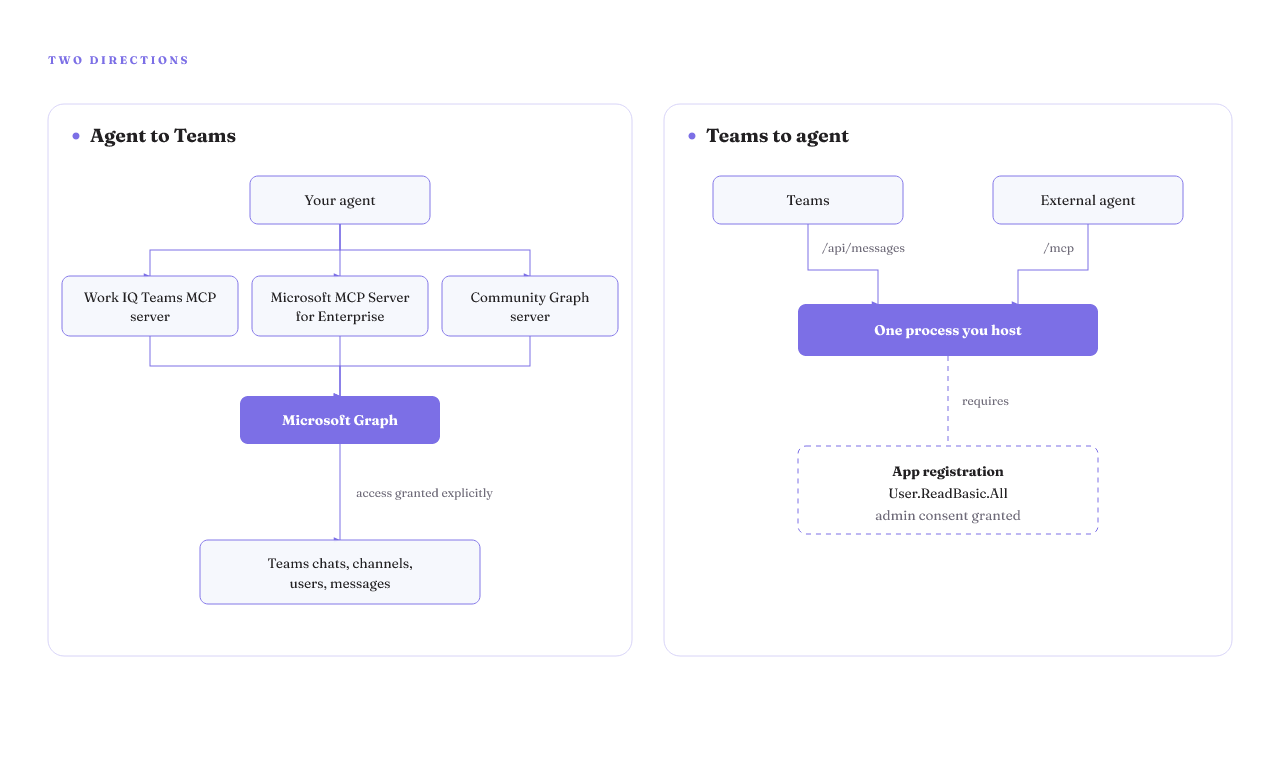
Agent to Teams. Your agent reads and writes Teams data through Microsoft Graph. That is the Work IQ server, the Enterprise server, and the community Graph server.
Teams to agent. A Teams bot is itself turned into an MCP server, so an external agent can reach people inside Teams. Ask a question, wait for a reply, notify someone.
One architectural detail settles that these are different products rather than variants. In the Teams SDK guide, the bot and the MCP server run in the same process and expose two HTTP surfaces: /api/messages for Teams and /mcp for agents. You are not configuring a Graph client. You are hosting a service that Teams talks to on one port and your agent talks to on another.
The registrations behind them are different too, and that is the expensive part. The bot-as-MCP-server path needs an app registration holding User.ReadBasic.All (Microsoft Graph, Application) with tenant admin consent granted. The community Graph server signs a user in through the OAuth 2.0 device code flow instead. Those two are not the same conversation with your tenant, and the tool list is the last question, not the first. If you are still deciding how many servers to wire into one agent at all, that is a separate problem about agent orchestration tooling.
Some teams genuinely need both directions. That is fine, and it is honest to say what it costs: two registrations, two consent conversations, two hosting stories and two things to keep running. The split is not always clean, and nothing on this page makes running both cheaper.
Route yourself before you install anything
| Path | Direction | Hosting | Authorization | Graph permission | Admin consent | Maturity | Unmeasured |
|---|---|---|---|---|---|---|---|
| Work IQ Teams MCP server | Agent to Teams | Not published | Graph-backed | Not published | Not published | Preview, not for production | 403 path, churn rate |
| Microsoft MCP Server for Enterprise | Agent to Teams | Microsoft-hosted tenant endpoint | Graph-backed | Not published | Not published | Preview, may be substantially modified | 403 path, churn rate |
| Community Graph server (floriscornel/teams-mcp) | Agent to Teams | Not published | User-delegated, OAuth 2.0 device code | Not published | Not published | Community-maintained, unofficial | 403 path, churn rate |
| Teams bot exposed as MCP server (Teams SDK) | Teams to agent | You host, one process, two surfaces | Application-level | User.ReadBasic.All (Graph, Application) | Yes | Documented guide, GA not stated | 403 path, churn rate |
| Remote MCP server in the Microsoft 365 app manifest | Teams to agent | You host, remote | Not published | Not published | Not published | Documented registration path | 403 path, churn rate |
| Azure MCP Server in Visual Studio 2026 | Not a Teams path | Ships in the IDE | Not applicable | Not applicable | Not applicable | Generally available | Contrast row |
Two columns a buyer would want most are missing on purpose. Nobody has published what each path returns when consent is refused, and nobody has published a dated diff of how the tool surface moves. Guessing either would be the useful part of this table, invented.
The last row is not a Teams path. It is there so you can see, in the same view, what a settled Microsoft MCP surface looks like next to these.
Admin consent is where these setups actually die
The Teams SDK guide states the gate in one line. The bot's app registration needs the User.ReadBasic.All permission (Microsoft Graph, Application) with admin consent granted. One line, then the tutorial moves on.
Here is what it looks like when you cannot get that consent. A developer installing a custom Teams app into a team through Graph, using a daemon service principal on the client credentials flow, gets a 400 Bad Request. The message says the required permissions have not been consented to. The code is fine. The tenant said no.
The other version of this wall is quieter. A small team wants an agent to reach one mailbox and the SharePoint sites behind one Teams team, including private channels. The supported routes run through an Application Access Policy in Exchange Online PowerShell, or through Teams resource-specific consent configured at admin level. Both need someone with admin rights and time. Plenty of organizations have neither. Nobody has published how often this ends a project, so read it as what the failure looks like when it happens, not as a frequency.
None of this is optional plumbing. Access through Microsoft Graph has to be granted explicitly, either by assigning Graph permissions or through role-based access control such as Microsoft Entra RBAC. Under that sit two authorization models: application-level, where there is no signed-in user and the permissions granted to the application decide everything, and user-delegated, where a member of the Entra tenant is signed in. Both are built on OAuth 2.0 scopes in the Microsoft identity platform.
Which model you pick changes who has to say yes. Under application-level authorization there is no signed-in user at all, so the grant to the application is the whole story. Under user-delegated authorization a tenant member has to be signed in for the call to happen.
How to write the consent ask your admin will approve
You are asking for one specific thing, so ask for it specifically. Write four things down before you send anything.
The exact permission string, not a category. User.ReadBasic.All (Microsoft Graph, Application) is a request an admin can evaluate in ten seconds. "Graph access for our AI project" is not.
The model, in plain terms. Application-level authorization means there is no signed-in user and the permissions granted to the application decide what it can reach, so the grant is tenant-wide and stays on when everyone goes home. That is precisely the property that makes a security team pause, so say it yourself before they find it.
The direction. An admin hears "agent" and pictures something reading every chat in the company. If you are building the Teams-to-agent path, your bot is exposed on /mcp and talks to people who chose to talk back, which is a much smaller ask than a Graph client with a tenant-wide read.
The smallest permission that does the job. If a read scope covers your first milestone, ask for the read scope and come back later.
Where this stops working: if nobody in your tenant owns Graph permissions, a well-written ask has nowhere to land. That is not a drafting problem, and no wording fixes it.
Preview means your tool names are not a stable interface
Microsoft's own guidance on the preview Teams server is short: tool names and parameters may change, so avoid hard-coded dependencies. Treat it as a build requirement rather than a disclaimer.
It means your agent cannot address tools by literal name in a prompt or a config file. Resolve the tool list at startup, match on capability, and fail loudly when an expected tool is gone rather than silently skipping the step. Log the tool list you actually got, with a date. When something breaks in five weeks, that log is the only way you will know whether the surface moved or your prompt drifted.
Contrast that with Azure MCP Server tools, which are generally available out of the box in Visual Studio 2026. On a surface like that you can put a tool name in a config file and expect it to still be there. Nothing on the Teams side has earned that yet.
How fast do preview tools actually churn? Nobody has published a dated tools list diff, so the rate is unknown. Weekly and yearly both fit what is documented. Build for the weekly case, because the cost of being wrong runs one way: startup resolution you did not need is a few lines, and a hard-coded tool name you did need to resolve is a silent failure in production.
What breaks after the tutorial ends
The Copilot Studio reference names the runtime failures and then stops. They are worth reading slowly.
A tool call can return 429 when you are throttled, 403 when a permission is missing, and 404 when the chat is invalid. The one that will actually hurt you is the fourth note: the message-posting operation is not idempotent, so blind retries are unsafe.
Read that against how your agent framework is configured. If it retries a failed tool call automatically, that is a blind retry against a non-idempotent write, and it is doing it on your behalf without asking. Find the setting before you ship anything that posts.
Two guards, both cheap. Generate the message id on the client and dedupe on it before you send, so a repeated call cannot become a second message. And when a call comes back 429, back off instead of firing again immediately; the documented instruction on this surface is to avoid blind retries, and a throttled endpoint is exactly where a tight loop does the most damage.
At what request rate do the 429s start? No published test says. You will have to instrument your own tenant and watch. If you are designing the retry and approval layer around an agent more broadly, that belongs in how you build agentic systems, not in per-tool error handling.
Can you reuse the MCP server you already run in Cursor or Claude Desktop
A developer asked exactly this under Microsoft's Teams SDK announcement: how do I reuse the MCP servers I already run from VS Code or Claude Desktop and make them available in Teams.
The short answer is yes, with a caveat that is most of the work.
A remote MCP server becomes reachable from agents in Teams by registering it in the Microsoft 365 app manifest. That is the mechanism. If your server already runs as a remote service with an authorization model your tenant accepts, registration is the bridge.
The caveat is what "remote" rules out. The server you run in Cursor or Claude Desktop is usually a local process, started on your machine, holding your own credentials. The community Graph server, for instance, authenticates through the OAuth 2.0 device code flow against Microsoft Graph. A local process carrying one developer's sign-in does not lift into a tenant unchanged.
So reuse means re-hosting: same tool code, new hosting, and an authorization model the tenant will accept. That last piece is most of the work, and it is the piece you cannot finish alone if the consent for it sits with an admin. Budget for the auth, not the code.
What none of this can tell you yet
This page is a routing aid built from documentation. It is not a bench test, and here is exactly where that shows.
No path on this page has a published price. Not Copilot Studio licensing, not Graph consumption, not hosted options. The routing table has no cost column because there is nothing honest to put in it.
Microsoft warns that preview tool names and parameters may change, but no dated capture of a Teams MCP tool list exists, so the churn rate stays unknown. The same gap sits under the error codes: the reference states that a post is not idempotent and that 429s happen, and no published test names the request rate where throttling begins or reproduces a duplicate post under a default retry policy.
Nobody has audited the registry listings for these servers against their upstream repositories either, so treat a listing's star count or install badge as unchecked rather than as a selection signal. Read the repo.
What would change the recommendations here: a pass and 403 table from a tenant where application-level consent is refused, a dated tools list diff, and a load test. Any of the three would move this from routing to measurement.
Pick your door and start here
Do not start by installing anything. Start by naming your direction and your authorization model, then request the permission before you write code.
Solo developer, personal tenant. Take the community Graph server. It authenticates through the OAuth 2.0 device code flow against Microsoft Graph and covers Teams users, chats, files and organizational data, which is enough surface to find out whether the thing you want to build is worth a tenant conversation at all.
Developer inside a locked-down enterprise tenant. Your first task is a conversation, not a repo. Find out today whether tenant admin consent is obtainable for the permission your path needs.
Team building a Teams-facing agent. You are on the bot-as-MCP-server path. Request User.ReadBasic.All (Microsoft Graph, Application) with admin consent now, plan two HTTP surfaces in one process, and treat preview tool names as data you look up rather than strings you ship.
And the case where none of this works: if you cannot get admin consent and cannot get an admin to care, no door on this page opens. Build against a personal tenant, or stop, rather than spending a quarter pretending the enterprise path is a week away.
One more thing worth reading before you wire a second server into the same agent: how to choose MCP servers that earn their context budget.