Key takeaways
- Canonical pick: svnscha/mcp-windbg, roughly 1.4k stars, actively maintained, wraps Microsoft's CDB.
- Installing it hands your agent run_windbg_cmd, a pass-through to arbitrary debugger commands.
- Alternatives fit kernel work; this guide reads public repos, not a live benchmark.
Type windbg mcp into a search box and you get a scatter of GitHub repos, an aggregator page, and a Hacker News thread. What you do not get is the one thing you came for: which server to install, whether it is safe, and how it works. The field is small, and it has a clear leader. Here is the whole shape of it, plus the question the top results bury in a comment.
What "WinDbg MCP" actually means
WinDbg is Microsoft's debugger for Windows crash dumps and live targets. MCP, the Model Context Protocol, is an open standard from Anthropic that lets a language model call external tools in a structured way. Put the two together and a WinDbg MCP server is the bridge. It hands your AI assistant a set of debugger actions it can call, then feeds the debugger's output back.
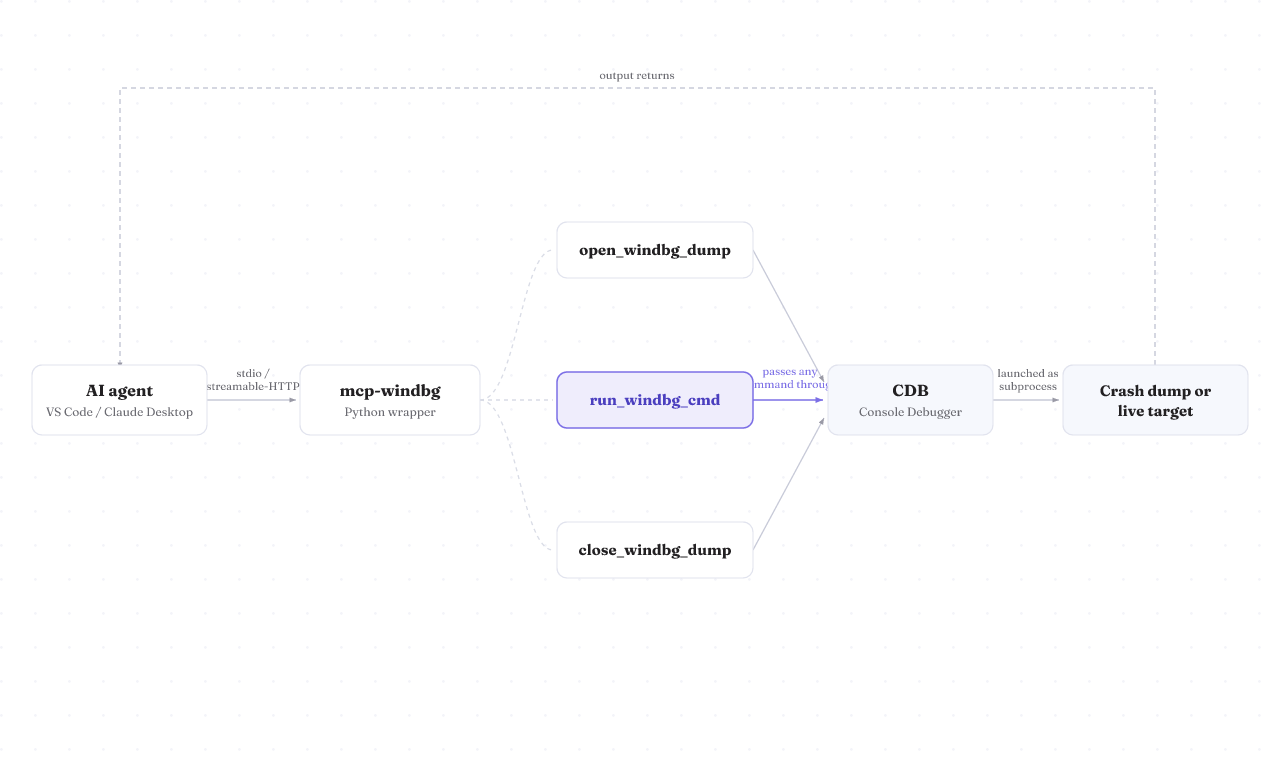
The mechanism is plainer than it sounds. The server launches CDB, Microsoft's console version of WinDbg, as a subprocess. It exposes a few debugger actions as MCP tools. Your client, VS Code or Claude Desktop, talks to it over stdio or streamable-HTTP. That is the whole trick, and it is why the tool surface stays small.
Applied well, this lowers the bar for reading a crash dump. As one practitioner walking through MCP for debugging, reversing, and threat analysis puts it, the model interacts with the dump for you. You ask a question in plain English instead of recalling the exact !analyze incantation. It is Windows-only. And it does not remove your job: the agent can be confidently wrong about a root cause, and you still have to check it.
The canonical pick: svnscha/mcp-windbg
When people say windbg mcp, they almost always mean svnscha/mcp-windbg. It is the most-adopted and actively maintained server in the field: roughly 1.4k stars, 138 forks, and 46 commits, with its README trimmed as recently as mid-July 2026. Those numbers move, so read them as a snapshot, not a live count.
Its author is candid about what it is. This is a thin Python wrapper around CDB, not a purpose-built debugging brain. Treat that as a strength. A small wrapper is easy to read, easy to audit, and has a tool surface you can hold in your head. It is also why the security question later in this guide is sharp instead of hand-wavy. You can see exactly what the agent can reach.
How the WinDbg MCP servers compare
Three projects show up when you actually look. They are not interchangeable, so here they are on the same axes.
| Server | Implementation | Maintenance signal | Clients and transports | Security surface |
|---|---|---|---|---|
| svnscha/mcp-windbg | Python wrapper that launches CDB as a subprocess | ~1.4k stars, 138 forks, 46 commits; README updated mid-July 2026 | VS Code, Claude Desktop; stdio and streamable-HTTP | run_windbg_cmd passes arbitrary commands through to CDB |
| NadavLor/windbg-ext-mcp | Bridges LLM clients to WinDbg for real-time kernel debugging | ~112 stars, 32 forks, 13 commits; last commit September 2025 | Cursor, Claude, VS Code | Command access to a live kernel target |
| gengstah/windbg-mcp (pybag) | Wraps pybag, exposing every pybag debugger function as a tool | Adoption and maintenance not well established | Any MCP-compatible client | Broad: every pybag function is exposed |
Read the maintenance column first. It is the one that tells you which project will still answer an issue next quarter. On that axis svnscha wins by a wide margin, and it is not close.
When to reach for an alternative
The maintained leader is not always the right call. NadavLor/windbg-ext-mcp is built for real-time, AI-assisted kernel debugging across Cursor, Claude, and VS Code. If kernel work is your whole reason for wiring this in, it is worth a look. But it is markedly smaller, around 112 stars and 32 forks across 13 commits, and it has not seen a commit since September 2025. A quiet repo is a risk you take on knowingly.
The pybag-based gengstah/windbg-mcp goes the other way. Instead of wrapping CDB, it exposes every pybag Windows debugger function as a native MCP tool. That is broad coverage for any MCP-compatible client. How widely it is adopted or maintained is not well established, so you would be trading proven upkeep for reach. More tools is not automatically better. A larger surface is a larger thing to trust.
What you're actually granting: run_windbg_cmd
Here is the part the top results leave in a forum comment. svnscha/mcp-windbg exposes three debugger tools: open_windbg_dump, run_windbg_cmd, and close_windbg_dump. Two of them are narrow. The middle one is not.
run_windbg_cmd passes commands straight through to CDB. Whatever the agent decides to run, it runs. That is not a bug in the design. It is the design, and it is what makes the server useful. But it means wiring this in is, in plain terms, granting an AI agent arbitrary debugger command execution. On a crash dump that is data exploration. On a live target it is a much bigger blast radius.
There is no published advisory or CVE here, and nothing in this guide was tested on a live target. Treat this as a read of the tool surface, not a demonstrated exploit. The point is not that it is dangerous. The point is that the danger is a decision you should make on purpose, not one you inherit by running pip install.
A checklist before you let an agent drive the debugger
You are wiring an agent into a tool that does not have an undo. That is worth a moment of governance. None of this is exotic. It is the same restraint you would apply to any irreversible action.
- Start on dumps, not live production. A crash dump is a frozen artifact. Let the agent read it before you ever point it at a running kernel.
- Keep a human on any command the agent issues. Read-then-run beats run-then-explain when the tool has real reach.
- Prefer read-oriented commands. Analysis, stack walks, and symbol lookups tell you almost everything and change nothing.
- Treat
run_windbg_cmdaccess as a deliberate grant, not a default. Turn it on for a reason, scope it, and know it is on.
This is judgment applied to the tool surface, not a benchmarked control set, and no first-party test measured its effect. If you want the fuller version of the argument, it is the same one behind where to put a human inside the agent loop and building a control layer around an agent. An agent with a pass-through to your debugger is exactly the case those pieces are written for.
Getting it running, and the WinDbg download catch
The install shape is simple to describe and easy to trip on. The server is Python-based and drives everything through CDB, so CDB has to exist on the machine first. That means WinDbg and the Debugging Tools for Windows need to be installed before the server can do anything. No CDB, no debugger, no answers.
The common friction is the path. Installing WinDbg or the modern WinDbg app does not always put windbg.exe or cdb.exe where the server expects them, because the Debugging Tools for Windows install separately from the app itself. If the server cannot find CDB, that is the first place to look. Beyond that, pinning an exact setup or version here would be guessing, so confirm the current steps against the project's own wiki and Microsoft's debugging-tools docs rather than a version number from a blog.
WinDbg AI, agent, and Copilot: what "AI-assisted debugging" delivers
Search for WinDbg AI, a WinDbg agent, or WinDbg copilot and you are circling the same idea from three angles. In practice it looks like this: GitHub Copilot or Claude, inside VS Code, queries a crash dump in natural language and explains a likely root cause. It can do that only because the MCP server is feeding the model the debugger's real output. The intelligence is the model. The reach is the server.
Which is the honest catch. "Copilot for crashes" and "an agent with debugger access" are not two features. They are one wiring, described in a friendly voice and a wary voice. The same connection that lets the model explain a bugcheck is the one that lets it run whatever command it decides it needs. You do not get the first without granting the second.
Also searched: X64dbg MCP and WinDbg Preview
A few loose ends worth closing straight. The pybag family, led by gengstah/windbg-mcp, is the real second path here: it hands any MCP-compatible client every pybag debugger function, which is a different bet from svnscha's thin CDB wrapper. If you came looking for an X64dbg MCP server with the same footing, there is not an established equivalent to point you to yet. Better to know that than to chase a repo that does not carry the same weight.
WinDbg Preview is the modern WinDbg app, the same debugger under a newer shell, distributed by Microsoft. For the current download and its exact distribution, go to Microsoft directly rather than trust a second-hand version string.
If your next tool is a disassembler rather than a debugger, the Binary Ninja MCP decision is the sibling question, and the same run-any-command read applies there too. Whichever server you pick, the choice that matters is not which repo. It is whether you decided, on purpose, to let an agent run any command your debugger will accept.