Key takeaways
- fosdickio's server (405 stars) fits most people driving Binary Ninja from the UI.
- mrphrazer's headless server suits automation and CI runs.
- Real analysis needs a paid license: $299 Personal or $1,499 Commercial.
You searched "binary ninja mcp," found four or more competing servers, and still can't tell which one to install. That's the actual problem, and no README solves it, because each README only sells its own project. This page reconciles the three live options into one decision, names the cost the tutorials skip, and adds a lens none of them cover: what an agent can reach inside your binary, and what you keep reversible.
The short version is above. Here is the reasoning, and the wiring.
What Binary Ninja MCP is, and what an agent can drive
Binary Ninja MCP is the plumbing that lets an LLM agent query Binary Ninja for you. In practice it is two parts: a plugin that runs inside Binary Ninja, and a small MCP server that speaks the Model Context Protocol so a client like Claude Desktop can call it. The most-adopted project, fosdickio/binary_ninja_mcp, ships that plugin plus an HTTP MCP server and an optional bridge, so the client drives Binary Ninja for AI-assisted reverse engineering. It is released under GPL v3.0.
What does the agent actually do? You ask it a question about a loaded binary in plain language, and it calls the server instead of you clicking through menus. The classic move is asking for the pseudo-C of a function: the agent fetches the decompiler output and reads it back to you. Read actions like that are the bread and butter. The exact set of tools each server exposes is not published in one clean list anywhere, so treat the named examples here as representative, not the full menu. Check each repo for its own tool inventory.
The choice the tutorials skip: UI plugin or headless
Here is the fork that decides everything, and no single-server walkthrough names it. Two of the live servers are UI plugins. One is headless.
A UI-plugin server runs inside an open Binary Ninja window. You load a file, the plugin exposes it, and your agent queries what you are already looking at. fosdickio's server and MCPPhalanx's server both work this way. This is the right shape for interactive analysis, where you and the agent take turns on the same binary.
A headless server runs with no UI at all. mrphrazer/binary-ninja-headless-mcp, by reverse-engineering author Tim Blazytko, is built for this: batch jobs, CI pipelines, and unattended runs across many files. Binary Ninja has no separate batch mode. Headless work means invoking the core analysis library from your own scripts without launching the UI.
That power has a price. Headless analysis needs a Commercial or Ultimate license, or a dedicated headless license, plus a separate Python install. So the axis is not which install button you click. It is whether you want a partner in an open window or a worker in a pipeline.
The three servers side by side
| Server | Adoption and maintenance | Workflow | Install path | Notable capability |
|---|---|---|---|---|
| fosdickio/binary_ninja_mcp | 405 stars, 84 forks, 50 commits (latest Apr 2026) | UI plugin | Plugin + HTTP MCP server + optional bridge | Works with clients like Claude Desktop |
| mrphrazer/binary-ninja-headless-mcp | 226 stars, 16 forks, 11 commits (latest May 2026), no tagged release | Headless / CI | Core library called from your scripts | Automation with no UI open |
| MCPPhalanx/binaryninja-mcp | Plugin-manager install, auto-start on file load | UI plugin | Binary Ninja plugin manager | @-mention chat, auto-start and port in settings |
Now the honest "don't pick this one if" for each.
fosdickio is the default for most people. It has the widest adoption and steady maintenance, its latest changes landing April 2026. Don't pick it if you need true headless, no-UI automation, because it is built to drive an open window.
mrphrazer-headless is the automation choice, maintained by a known author with recent commits from May 2026 and visible test discipline. Don't pick it if you want a large community and a tagged release you can pin today. It has neither yet.
MCPPhalanx has the smoothest first install: it goes in through the plugin manager and auto-starts. Don't lean on it if repo-level adoption signal matters to you, because the documentation that surfaces publicly reads more like a listing than a maintained project page.
One warning about the numbers. Some MCP registry and aggregator listings report fosdickio at 73 stars and 22 forks. That is stale. The repository itself shows 405 and 84. When you compare servers, read the counts off GitHub, not off a catalog page that hasn't refreshed.
What it costs and what you need before you start
This is the wall the ranking tutorials let you hit at the worst moment: after you've wired everything up. So take it first.
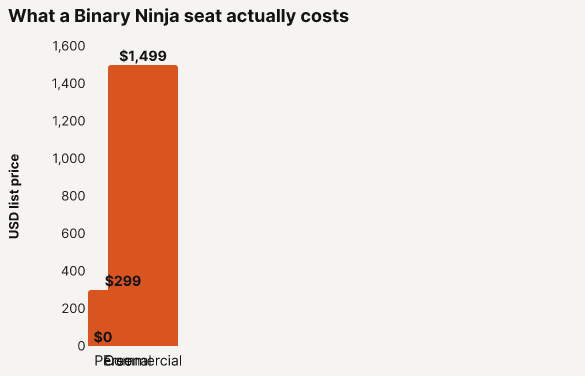
Binary Ninja has a Free tier at $0, but MCP-driven and headless analysis is not what the free tier is for. The paid tiers are Personal at $299 and Commercial at $1,499, with student pricing of $74 and $374. Headless automation specifically requires Commercial, Ultimate, or a headless license. Assume you need a paid seat, and treat the free tier as a look, not a workshop. These are list prices, not what any one negotiation lands at.
Platform support is broad. Binary Ninja runs on Ubuntu 22.04 and 24.04, macOS 14 and 15, and Windows 10 and 11, on x64 and arm64. The floor is a 2 GHz multi-core CPU, 8 GB of RAM, and 4 GB of free disk. The current stable release is Binary Ninja 5.3, "Jotunheim," which added better Ghidra and IDA interoperability plus NDS32 decompilation. The 5.3.9757 build from June 2026 is a bugfix and stability release.
To get the pieces: download Binary Ninja itself from its site, and get the MCP servers from their GitHub repositories. There is no single "binary ninja mcp download" button. Each server lives in its own repo, and the repo README carries the install command you should trust.
Wiring a server into your LLM client
The plugin-manager path is the fastest way to a working setup, so start there.
Install the server through Binary Ninja's plugin manager, the same way you'd add any Binary Ninja plugin. Once it's in, the MCP server starts on its own the first time you load a file. You don't run a separate command. Whether it auto-starts, and which port it listens on, live under Settings, in the MCP Server section. Then point your client at it. A client like Claude Desktop connects over the HTTP server, or the bridge, that the plugin stands up.
Two things are deliberately not pinned here. The exact config keys and the current release tag differ by server, and the primary version tags for these projects aren't settled enough to quote. Pull the authoritative install command and config from each repo's README, not from a blog that may lag the code.
A worked query: driving Binary Ninja from chat
Here is what "it works" looks like, end to end. You load a binary. In your client's chat, you type an @-mention of the server followed by what you want, like: "@binaryninja-mcp get pseudo C code for the main function." The agent calls the server, the server asks Binary Ninja for the decompiler output, and the pseudo-C comes back in the chat.
That is the pattern. The exact tool names and the shape of the output vary by server, and no public benchmark has measured response quality across the three, so read this as the move, not a guaranteed result.
What the agent can reach, and what to keep reversible
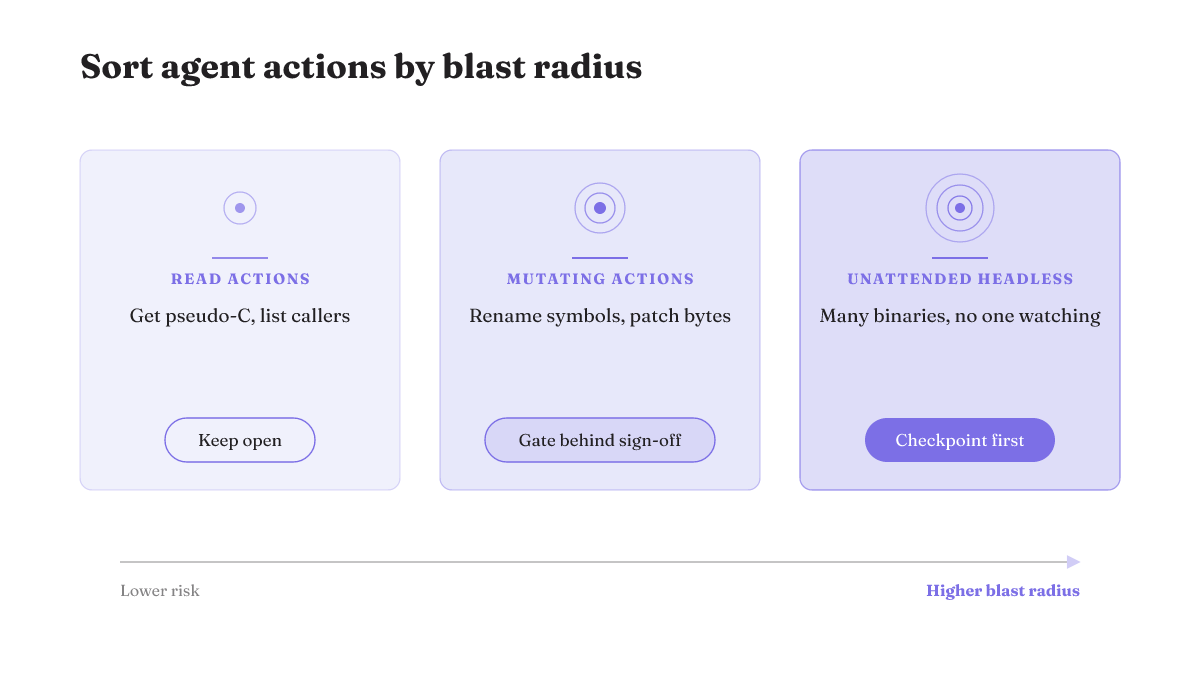
This is the part every README leaves out, and it is where a harness earns its keep. When you hand an agent a live connection into your binary, sort what it can do by blast radius.
Read actions are low risk. Getting pseudo-C, listing callers, walking the control flow: none of that changes your database, so let the agent do it freely. Mutating actions are different. Renaming symbols, patching bytes, or a headless run that touches many binaries unattended can quietly rewrite work you can't easily undo. That is where you want a checkpoint before anything ships, and a way to roll back.
Be clear-eyed about one thing: these servers do not ship an approval or undo layer. Reversibility is a posture you impose on the harness, not a feature you toggle on. The principle is simple. Keep read actions open, gate the mutating ones behind your sign-off, and make sure every change is reversible by default. That is the same control-first stance Rifty writes about for agent harnesses: legible, steerable, and reversible at every step. If you're adding guardrails around what an agent may touch, a binary you're reversing is exactly the place to start.
Confirm it's working, and where to go next
The success check is quick. After a file loads, the server should show as listening on the port you configured. Send a test query, and a real analysis result should come back, not an error. If nothing connects, check two things first: the auto-start and port settings under the MCP Server section, and whether your machine actually meets the platform minimums above. That covers the common connect-and-port failures. It won't cover deep debugging, which needs a hands-on run per server.
Where this recommendation stops. This pick rests on adoption and design shape, not a hands-on latency or tool-coverage benchmark. No one has published a head-to-head test of the three, and community discussion is scattered across GitHub and forums like r/reverseengineering rather than settled in one place. If a measured comparison changes the math, the recommendation should move with it. For now, fosdickio for interactive UI work, mrphrazer-headless for automation, and a paid license either way.
Wiring up a different tool next? The same "which server, at what cost, kept reversible how" questions carry over to driving Blender from an agent or the iOS simulator.