Key takeaways
- For most Wolfram Alpha MCP setups, install Wolfram's official Cloud MCP first. It is free and needs no API key.
- The popular community repos require a WOLFRAM_API_KEY, and the most-copied one looks frozen.
- Need sessions, local files, or notebooks? Skip Cloud and read the Local section.
You searched "wolfram alpha mcp," landed on a starred GitHub repo, and you are one config paste from installing it. Stop for a minute. The ranking set has a blind spot: every page documents one server, so none of them tells you the better default is sitting one result away, free, with no key.
Here is the whole decision in one line. Wolfram publishes its own Cloud MCP that is free for limited personal use and connects with no API key. The community servers that most listings push at you hard-require a WOLFRAM_API_KEY. So the popular choice is the more expensive, more fiddly one, and almost nobody says so.
Which Wolfram Alpha MCP server to install, by client and job
If you want your assistant to answer math, symbolic, or factual questions and nothing more, install the official Cloud MCP. It works with the mainstream hosts, including ChatGPT, Claude, Claude Code, Cursor, VS Code, Windsurf, Gemini, and Zed, plus any MCP-compatible client. There is no key to provision and no repo to clone. That covers the large majority of readers who typed this search.
The honest limit: the free Cloud tier is scoped to limited personal use. It is not a production answer service. If you need to run heavy volume, or your job depends on files, saved sessions, or notebooks, Cloud will not do it. Those readers want the Local option below, which runs on paid Wolfram software, or a managed host that carries its own rate limits.
The decision table: key, tool surface, capability, and maintenance
Keep this table. It is the comparison every single-server page skips, and it works for the next tool you wire in too.
| Server | API key | Tool surface | State and files | Maintenance |
|---|---|---|---|---|
| Wolfram Cloud MCP (official) | None | Wolfram Alpha queries | Stateless, single requests, no files | Official, current |
| Wolfram Local MCP (official) | None, but needs licensed Wolfram software | Full Wolfram Language | Sessions, local files, notebooks | Official, current |
| SecretiveShell/MCP-wolfram-alpha | WOLFRAM_API_KEY | Single query tool | Depends on your host | README last touched Dec 20 2024 |
| Docker image (mcp/wolfram-alpha) | WOLFRAM_API_KEY | Single query tool | Depends on your host | Updated about 11 months ago |
| Managed host (e.g. Pipedream) | Wolfram account | Query tool | Provider-managed | Varies by provider |
One caveat before you lean on it. This table compares what each server documents, not what we measured. No first-hand connection test or latency benchmark sits behind these rows, so it cannot rank the servers on real-world speed or reliability. It ranks them on the things you actually decide with: do I need a key, what can it do, and is anyone still maintaining it.
Cloud vs Local is the real fork the listings hide
Both official servers reach the same engine, because Wolfram Cloud technology is the platform behind Wolfram|Alpha, alongside Wolfram|One and Mathematica. The fork is not the answer quality. It is the shape of what you can do.
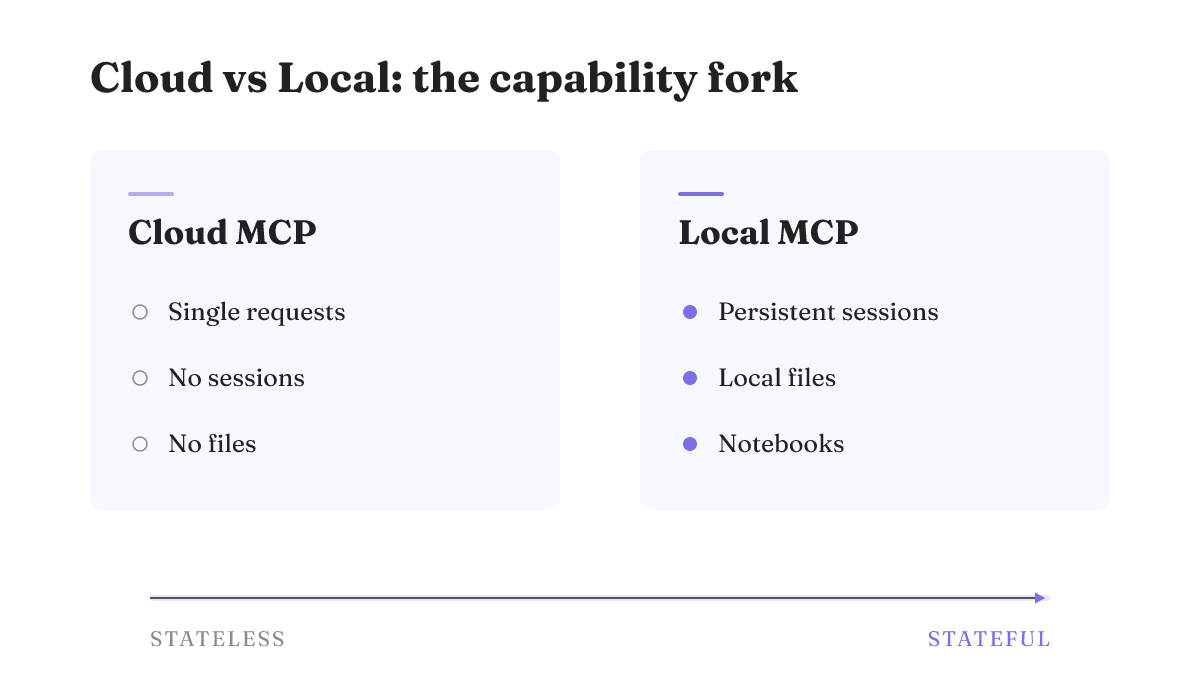
Cloud MCP is stateless. It takes single requests, keeps no session between them, and has no file upload or download. You ask a question, you get an answer, that is the contract. Local MCP is the heavier tool: it adds persistent sessions for multistep work, local file access, and notebook support. If your agent has to carry state across steps or touch files on disk, that is a Local job, not a Cloud one.
Local's extra power is not free. It requires Wolfram|One, Mathematica, or a licensed Wolfram Engine to run. That is a paid prerequisite, and most people evaluating a quick MCP connection do not already have it. So the real question is simple. Do you need files and sessions badly enough to license Wolfram software? If not, Cloud is the answer.
The community repos are key-gated and mostly frozen
The server the SERP pushes hardest is SecretiveShell/MCP-wolfram-alpha, which shows 75 stars and 19 forks with its most recent commits pushed Aug 18 2025. Its README was last updated Dec 20 2024. It requires you to set a WOLFRAM_API_KEY, and it exposes a single query tool. The Docker image in the same neighborhood was last updated about 11 months ago and wraps one tool too.
Frozen does not mean broken. A single-query wrapper can work fine for months, and self-hosting a repo hands you control the free Cloud tier's limits do not. The real problem is that the install page gives you no maintenance signal at all. A repo last touched in December 2024 looks identical to one shipped last week. If you are going to trust a community server, vet the repo the way you would any GitHub MCP server before you paste its config: check the last commit, the open issues, and whether the key setup still matches the README.
Why the star counts never agree
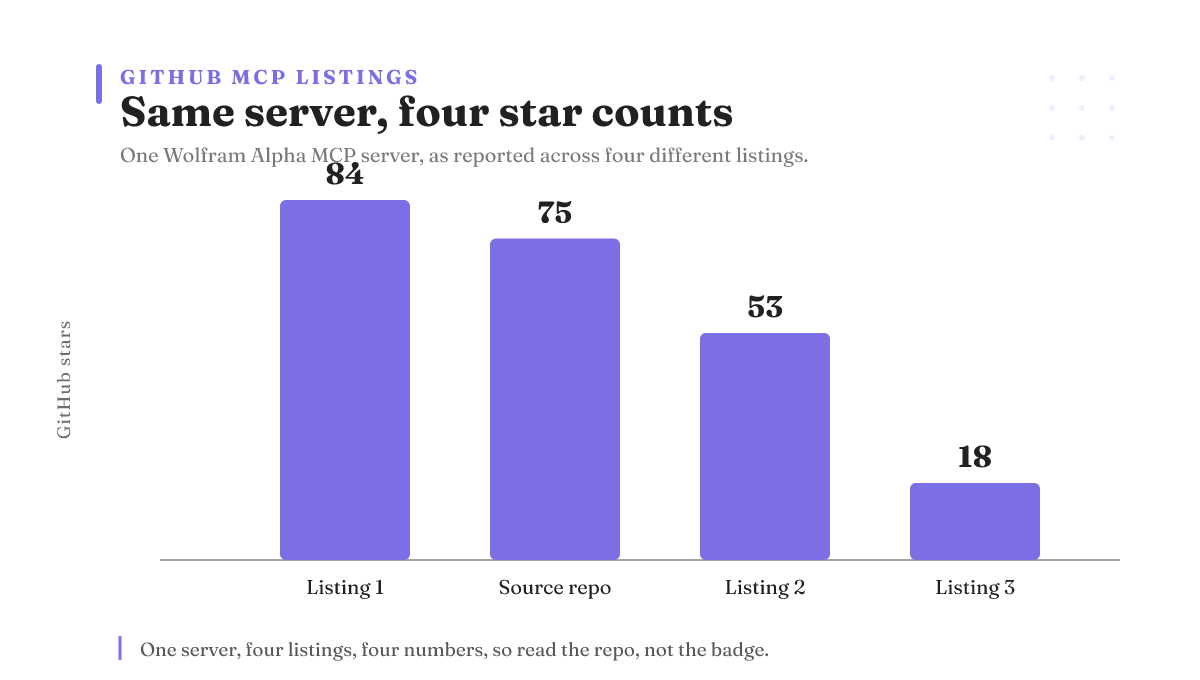
Here is a tell that the popularity numbers are not trustworthy. The same Wolfram Alpha MCP server shows up as 84 stars on one listing, 75 on its own source repo, 53 on a third, and 18 on a fourth. Same server, four different numbers.
The reason is dull and important: aggregators mirror different forks and rarely say which repo they point at. One listing tracks the upstream, another tracks a copy, a third tracks a copy of the copy. None of them shows you the fork it is counting. Without walking each listing back to its actual GitHub source, there is no way to reconcile them to one true figure, and we have not run that audit. So do not shop by star count here. It is noise. Read the repo directly instead.
Where MCP is heading, and why stateless Cloud fits it
This choice ages better than a config paste deserves to. The Model Context Protocol is an open standard, and its maintainers are moving the protocol toward a stateless core that scales on ordinary HTTP infrastructure, removing the need for sticky sessions and shared session stores. That is the same shape as Wolfram's stateless Cloud MCP.
The direction matters more than any version number, and MCP is still evolving, so treat this as a trend rather than a shipped release. A stateless remote server is cheaper to run, easier to scale, and simpler to reason about than one that has to remember who you are between calls. When you pick the key-less, stateless option today, you are picking the design the standard itself is walking toward.
How to connect it to your client
The key-less path is short. Open the official Cloud MCP page, copy the remote MCP URL it gives you, and paste it into your client's MCP settings. There is no key field to fill. In Claude, add it as a remote MCP server; in Cursor, VS Code, Windsurf, or Zed, drop the same URL into that client's MCP config. Because Cloud MCP needs no API key, the whole setup is one paste.
If you choose to self-host a community server instead, the shape is the familiar one, with one extra step. You still add an entry to your client's mcpServers config, but you also supply the key as an environment variable:
{
 "mcpServers": {
 "wolfram-alpha": {
 "command": "...",
 "env": { "WOLFRAM_API_KEY": "your-wolfram-appid" }
 }
 }
}
Get the App-ID from Wolfram Alpha, and take the exact command and args from the repo's README so they match the version you cloned. The key-less Cloud path is the fastest start but caps at limited personal use. The self-hosted, key-required path trades that key setup for control over your own rate limits and hosting.
When this is a control decision, not just a config paste
Look at what you just chose on. Not features. You chose the option with no key to leak, no session state to reason about, and nothing to unwind if you remove it tomorrow. That is a control decision, and it is the same call worth making every time you wire a tool into an agent: prefer the piece that is legible, reversible, and cheap to pull out over the one that is a little more capable but harder to see and harder to undo.
That lens is what Rifty writes about. Rifty is a by-introduction-only lab, not a product you sign up for to install an MCP server, so if you just needed the fastest working config, the official Cloud MCP page above is all of it and you are done. But if you are wiring many tools into agents and you care about keeping control legible and reversible, read Rifty's take on the agent harness and apply the same test to the next tool you add.