Key takeaways
- A Godot MCP server lets an AI client drive the Godot editor live.
- Which one to pick depends on your client: Claude, Cursor, Copilot, or Gemini.
- No server one-shots a whole game. You stay in the loop.
What a Godot MCP server actually is
Yes, there is an MCP for Godot. More than one, in fact.
A Godot MCP server connects your AI client to the Godot editor. Instead of the model just printing code for you to paste, the server lets it launch the editor, run the project, capture debug output, and control execution. That live feedback loop is the whole point. The agent changes something, runs it, reads what broke, and tries again.
MCP itself is an open standard for wiring an AI client to outside tools. Because it is a standard, one server works across MCP-aware clients without custom glue for each one. A Godot MCP server is simply one whose tools act on a Godot project: its scenes, its scripts, its run output. That is the mechanism. The rest is which build you run.
The four maintained servers, side by side
Here is the part the search results make you assemble yourself. Four servers are worth knowing as of July 2026. The counts below move week to week, so read them as a dated snapshot from each project's own page.
| Server | AI clients | Tool coverage | License | Maintenance, July 2026 |
|---|---|---|---|---|
| coding-solo/godot-mcp | Any MCP-aware client | The base loop: launch, run, read debug output | Check the repo | The original build others extend |
| IvanMurzak/Godot-MCP | Any MCP-aware client | No published category count | Check the repo | 178 stars, 14 forks, 195 commits; last commit Jul 20 |
| Godot MCP Pro | Claude Code, Cursor, Windsurf, Cline | 163 tools across 23 categories | Proprietary | v1.15.1, dated Jul 19 |
| Godot-MCP (asset 5245) | Claude, Cursor, GitHub Copilot, Gemini, or any MCP-aware client | Inspect and drive the project | Check the listing | Asset Library listing |
Read the table by what you need, not by what sounds biggest. coding-solo is the base the others build on. IvanMurzak is the one with fresh commits landing daily. Godot MCP Pro has the widest raw tool count, but it is proprietary and community-submitted, so it is not an official engine component. Asset 5245 is the broad-client option.
Now the honest side. Pro is the wrong call if you need to read or change the server's own source, or if a proprietary license is a non-starter for your project. Its 163 tools look decisive, but a big tool count is not the same as a tool you will use. IvanMurzak publishes no category breakdown, so you cannot line up its coverage against Pro's. coding-solo's star count and license are not settled in this snapshot, so treat it as a proven base rather than a spec sheet. Asset 5245 wins on client breadth but shows little public detail on what its tools actually cover.
Match a godot mcp server to your AI client
The compatibility lists are scattered one server at a time. Here they are in one place.
- Claude or Claude Code: Godot MCP Pro and asset 5245 both name it.
- Cursor: both name it.
- GitHub Copilot: asset 5245.
- Gemini: asset 5245.
- Windsurf and Cline: Godot MCP Pro.
So if you live in Copilot or Gemini, asset 5245 is your default. If you run Windsurf or Cline, Pro is the one with your client on the label. Claude and Cursor users can go either way. If you are still adding an MCP server to Claude for the first time, start there, then come back and pick.
A few clients that people search for are not on any published list here. If your setup is Google's Antigravity, a VS Code MCP extension, or you write C# instead of GDScript, note that no server names these directly. MCP is client-agnostic by design, so an MCP-aware client should attach. Treat that as "should work," not "confirmed." The server drives the editor and the project files, not one scripting language, so C# versus GDScript is not what decides compatibility. And "native" is worth saying plainly: there is no engine-native Godot MCP. Every option here is a community server or addon, not a built-in Godot feature.
Wiring one up
Godot MCP Pro is the clearest install path, so use it as the shape. Three steps. Copy the addon into your project. Enable the plugin in Project Settings. Then install the MCP server itself.
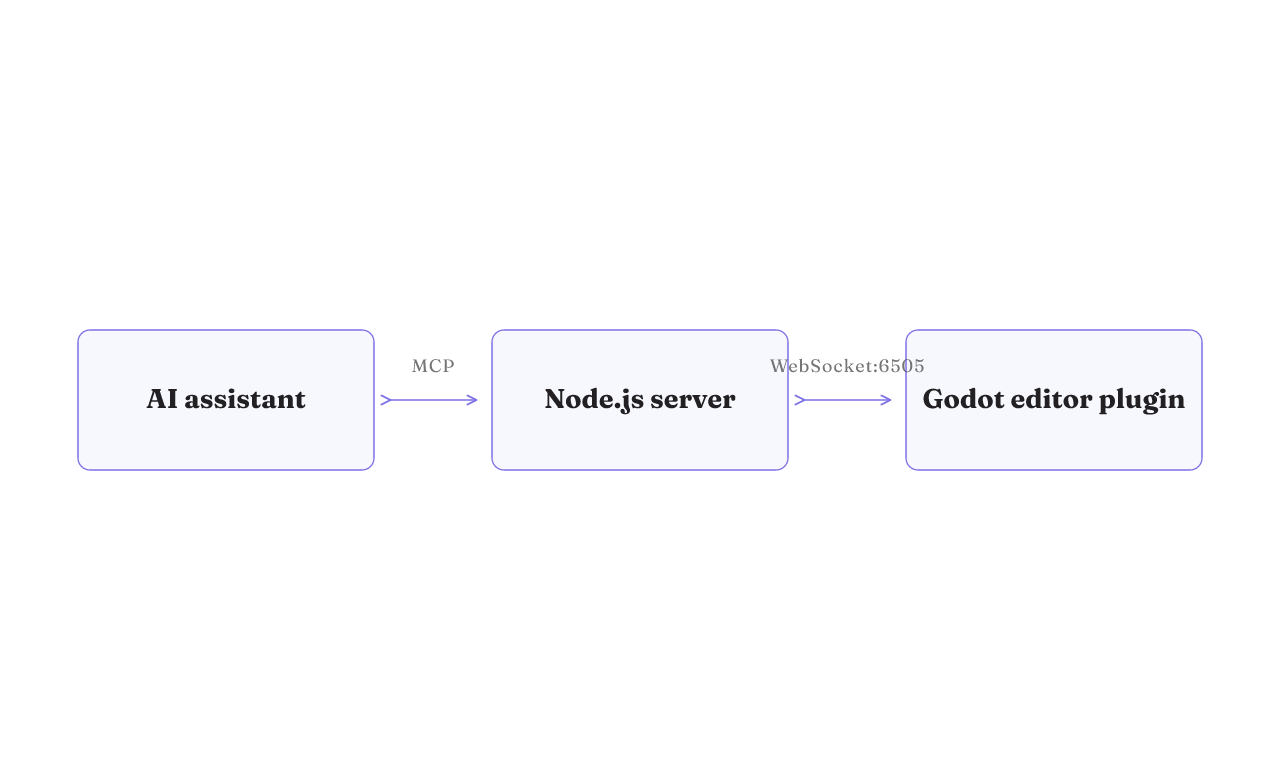
Once it is enabled, the chain runs like this: your AI assistant talks over MCP to a Node.js server, which talks over WebSocket:6505 to the Godot editor plugin. That WebSocket bridge is what lets the agent reach into a running editor instead of a static file.
These exact steps are Pro's. The other servers differ in their specifics, and Pro's proprietary license may rule it out for you. If it does, the matrix above points you to the open builds.
What it won't do: the one-shot myth
The optimistic version, the one you will see repeated, is that an agent can "create, iterate, and test a complete game without manual intervention." It is a good demo and a bad plan.
The maker of a free, open-source Godot MCP server said the quiet part out loud: it "CANT 1 shot an entire game." That is the ceiling, stated by someone who built one. What you get is a live editor feedback loop, not an autonomous game factory. The agent can run your project and read the error. It cannot own the design, the scope, or the thousand small calls a finished game needs.
Some nearby questions this page will not fake an answer to. Whether Godot can hit AAA fidelity, whether it is worth adopting in 2026, and who ships it in production are real questions, but the MCP layer does not change any of them. Adding an agent to the editor does not raise the engine's ceiling. It changes who moves the mouse.
Drive it on a leash: the supervised loop
Once you accept the ceiling, the workflow writes itself. You direct. The agent creates a change, tests it against the live feedback loop, and reports back. You look, then send the next step. One supervised move at a time, not an unattended run overnight.
The reason to work this way is reversibility. When the agent runs one step and shows you the result, you can catch a wrong turn before it compounds into ten more. That is a point of view, not a benchmark: control beats speed when the cost of a bad step is an hour of untangling. It is the same logic behind a supervised agent harness, and the reason how far you let an agent run is a decision worth making on purpose rather than by default.
How to tell it's actually connected
There is one signal that beats a parsed config file. Ask the agent to launch the editor and run the project. If it comes back with real debug output from your project, the loop is live. Text you recognize from your own scene, an error from your own script: that is the bridge working.
What that signal does not tell you is whether the change was right. Captured output proves the connection, not the correctness. You still open the scene and check the result yourself. The loop earns your trust on wiring, not on judgment.
Where this comparison stops
Two honest limits. First, the numbers here are a July 2026 snapshot. Star counts, commit counts, and tool totals shift, so re-check the repo or listing before you lean on a figure. Second, this is a decision map drawn from what each project publishes, not a first-hand run of driving Godot end to end. When a setup transcript and a measured result exist, they will sharpen the picture past what public docs can show.
Wiring another creative tool to an agent follows the same pattern. If Godot is not your only target, the Blender MCP walkthrough runs the same play: connect it, drive it supervised, keep the ceiling in view.