Key takeaways
Unity MCP wires an AI agent into the Unity Editor so it can build scenes, edit C# scripts, and drive your project. Three servers dominate the choice. Pick CoplayDev if you're a solo builder who wants free and popular. Pick IvanMurzak if you need Runtime control, not just the Editor. Pick Unity's official server only if you already pay for a Unity subscription. The star counts and versions below are a July 2026 snapshot, so treat them as current-as-of, not fixed.
What Unity MCP actually is, and what an agent can do with it
You searched "unity mcp," landed on four pages that each describe one tool, and still can't tell which one to install. Start with the shared part.
MCP is the Model Context Protocol, an open standard that lets AI agents talk to outside tools and data in a structured way. A Unity MCP server is the bridge on top of it. It connects an agent like Claude Code to your Unity Editor and hands the model a real set of tools to work with.
What can the agent touch through that bridge? On the Editor side, it can create scenes and GameObjects, edit C# scripts, manage assets, run tests, profile, and build. That is the working surface an agent drives when you type an instruction in plain language.
One catch shapes everything below. This capability isn't uniform across servers. Some reach only the Editor. One also reaches Runtime, your game while it plays. So "what can it do" really depends on which server you pick, and that is the next question.
The three Unity MCP servers, side by side
Here is the whole field on one screen. No single-server page will give you this view, because each one only describes itself.
| Server | Cost and license | Scope | Named clients | Stars | Version | Maintained by |
|---|---|---|---|---|---|---|
| CoplayDev/unity-mcp | Free, MIT | Editor | MCP-standard clients | ~12.7k | v10.1.0 | Community, not Unity |
| IvanMurzak/Unity-MCP | Free, Apache-2.0 | Editor and Runtime | Claude Code, Cursor, Windsurf, Gemini, Copilot | ~3.6k | v0.86.0 | Community |
| Unity official (AI Assistant) | Paid Unity subscription | Editor | Claude Code, Cursor, Windsurf, VS Code Copilot | n/a | AI Assistant 2.0.0-pre.1 | Unity, first-party |
CoplayDev/unity-mcp is the most-starred community server, free under MIT, with roughly 12.7k stars and 1.3k forks. It shipped v10.1.0 in mid-July 2026 and states plainly that it is not affiliated with Unity Technologies. It gives an agent broad Editor control: it manipulates assets, manages scenes, edits materials, creates and edits scripts, and automates undo, play, and build.
IvanMurzak/Unity-MCP is the second free option, licensed Apache-2.0, with about 3.6k stars and 325 forks. It is very active, at v0.86.0 with commits landing the same day. Its edge is scope: it covers both Editor and Runtime, and it can expose any C# method as a tool.
Unity's own server is the paid path. It ships inside the Unity AI Assistant package, currently on the 2.0 pre-release line. That is a first-party, officially maintained route, which the two community servers are not.
Stars and versions on these repos move week to week. Read the numbers above as a dated snapshot, and check each repo before you commit.
Editor or Runtime: the line that decides what your agent can touch
This is the axis the single-tool pages never draw, and it decides more than price does.
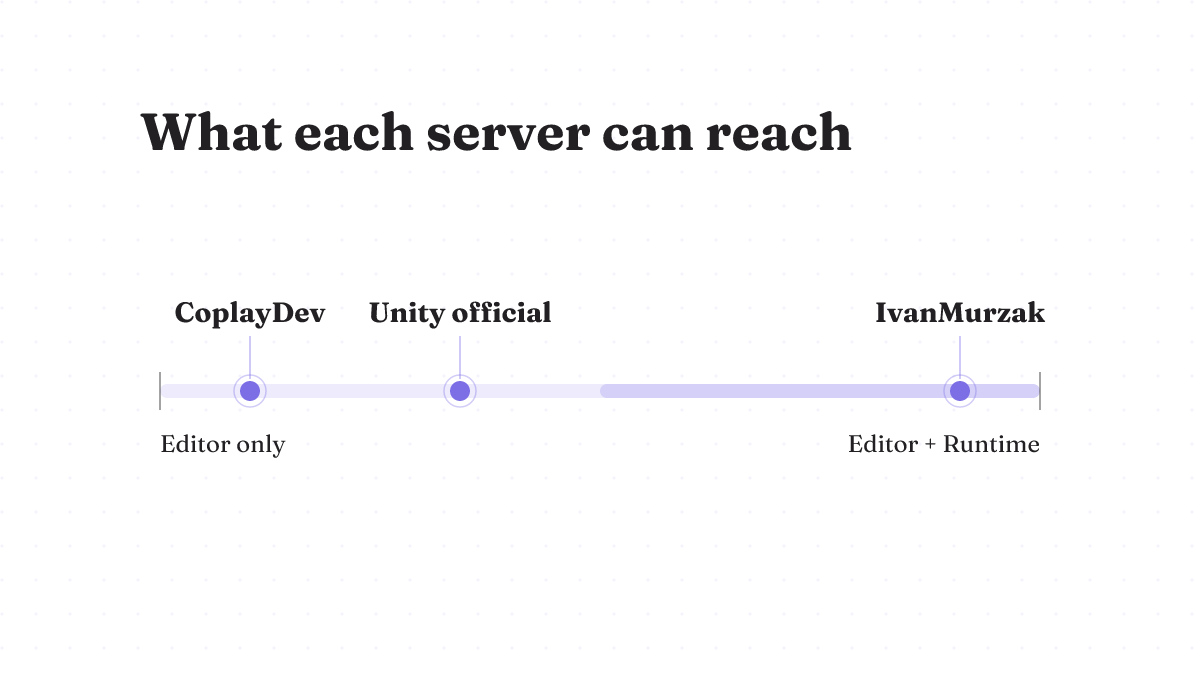
Editor scope means the agent works on your project at rest: it opens scenes, writes scripts, wires assets, and kicks off a build. That covers most of what a solo builder wants an agent for. Both CoplayDev and Unity's official server sit here.
Runtime scope means the agent can also reach into your game while it runs. IvanMurzak is the one that crosses that line. If you want an agent to inspect or change live objects during play, or to call arbitrary C# methods you expose as tools, that is a capability the Editor-only servers simply don't have. If you never leave the Editor, you're paying attention to a feature you won't use, and CoplayDev's larger community is the more sensible trade.
Which server to pick for your situation
Enough framing. Here is the call.
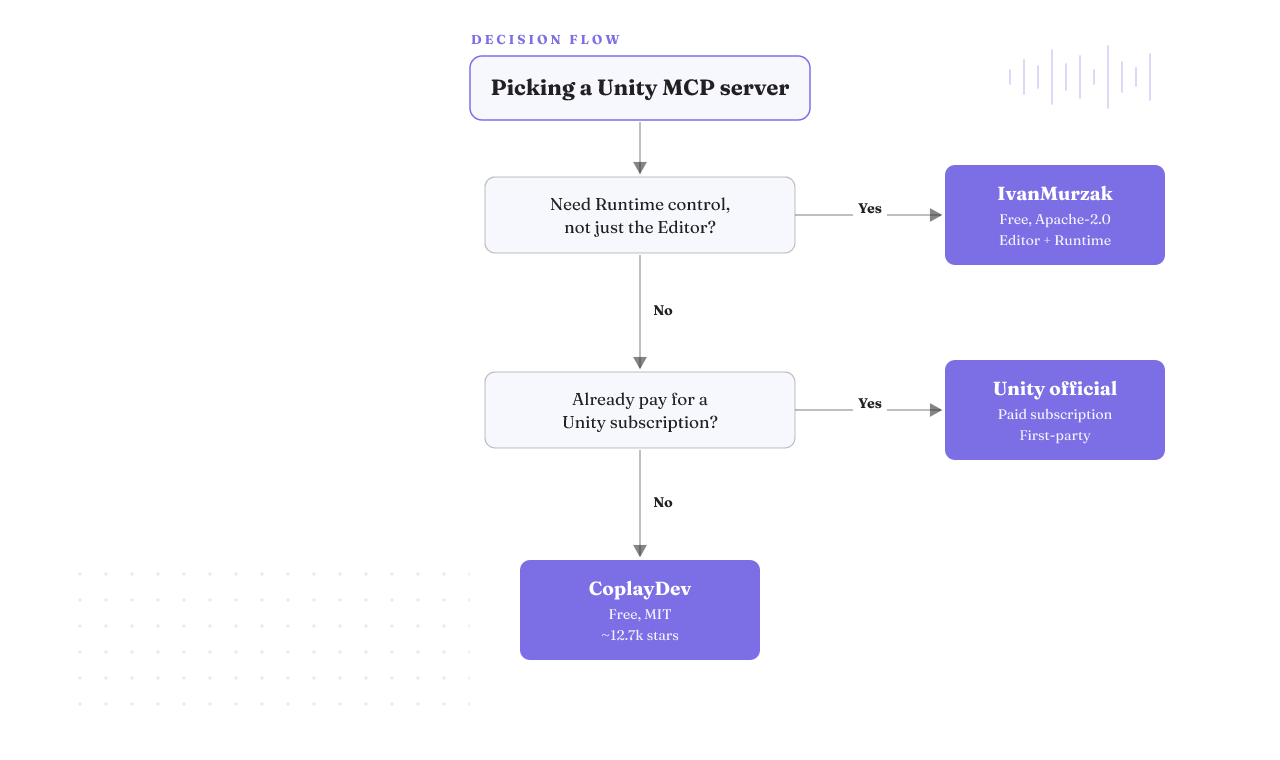
If you're a solo indie on a budget, take CoplayDev. It's free, it's MIT, and its roughly 12.7k stars mean the most eyes on bugs and the most worked examples when you get stuck. For most people asking "best MCP for Unity," this is the default.
If you need Runtime control, take IvanMurzak. The Editor-plus-Runtime scope is the reason to accept a smaller community, and being able to expose any C# method as a tool is worth it when your work lives in play mode.
If your team already pays for a Unity subscription, the official server earns a look. You get a first-party path that does not consume Unity AI credits, delivered through a package Unity maintains.
Now the honest part, because a fair comparison names where the free pick loses. Go with a community server and you get no official Unity support path and no SLA. Maintenance rests on volunteers, and volunteer projects slow down or stop. Don't pick a free server if a stalled repo would block your team or if you need someone contractually on the hook when the bridge breaks. That is a real risk the paid first-party option removes.
Free community server, or the paid official one
This is the pivotal split, and the single-tool pages leave it implicit. State it plainly.
Unity's official MCP server requires a paid Unity subscription. The upside worth knowing: it does not burn your Unity AI credits. CoplayDev (MIT) and IvanMurzak (Apache-2.0) are both free and open-source, with no subscription in the way.
What the free path costs you is support and a warranty, not features. On raw Editor capability, the community servers are strong. What you trade is the official channel and the accountability that comes with paying.
One number is missing on purpose. The exact subscription tier and dollar price for the official path aren't settled here, so treat that as a gap to price for yourself, not a figure to assume.
Which AI clients actually connect
"MCP for Unity Claude Code" is the most common version of this question, so start there: yes, Claude Code connects, on both the official path and IvanMurzak.
Unity's official happy-path setup names Claude Code, Cursor, Windsurf, and VS Code Copilot, and connects them to a running project in a few minutes. IvanMurzak works for free with Claude Code, Cursor, Windsurf, Gemini, and Copilot. CoplayDev speaks the MCP standard, so standard MCP clients attach to it the same way.
What about the newer agents? If you're eyeing Antigravity or ChatGPT Codex, note that no server's supported-client list names them yet. MCP is client-agnostic by design, so one may connect if it speaks the protocol. But you'd be on unsupported ground, so test it before you build a workflow on it rather than assuming it's blessed.
Setting up MCP for Unity, and what actually breaks
The vendor pitch is "a few minutes." That is true on a clean machine, and it is not the whole story. Two failures the happy-path guides skip are worth knowing before you start.
The first hits macOS. The Claude CLI fails to start with a dyld "Library not loaded" ICU error. The cause is a Homebrew Node linked against an ICU version that got removed underneath it. The documented fixes are to reinstall Homebrew Node so it links against the current ICU, or to switch to a Node managed by NVM. This is macOS-specific, so Windows and Linux users won't see it.
The second hits a specific Unity version. On Unity 6.3 with the AI Assistant, there's a filed report that the MCP bridge hard-rejects every connection before the user-approval flow even runs. If your client can't connect at all on that version and never gets to prompt you for approval, this is the likely cause, and it's a known bug rather than something you misconfigured.
Both are documented single-source reports, not universal outcomes, so read them as risks to check for, not things that will definitely happen to you. Either way, the lesson is the same: confirm the bridge actually connects before you trust an agent to drive your Editor.
Why control and reversibility matter when an agent drives your Editor
That Unity 6.3 bug points at something bigger than a version number. The bridge was supposed to reject connections until you approve them. An approval gate is the whole point of letting an agent touch a live project: nothing lands until you say so.
When you pick a server, weigh that as a feature, not a footnote. An agent that can edit scripts, move assets, and trigger builds is powerful and blunt. You want a setup where a bad instruction is caught before it runs and undone after, not one where the agent acts first and you audit later. Read the free-versus-paid choice through that lens too. Support and accountability are part of staying in control when the tooling misbehaves.
The Terms of Service question, still open
There is a policy risk you should hold in view, stated honestly.
CoplayDev's server is explicitly not affiliated with Unity Technologies, and Unity's own server is the paid, first-party alternative. That gap is exactly why a Terms of Service question hangs over the community servers. Developers are asking whether recent Unity Terms of Service changes restrict third-party MCP or AI-agent integrations. As of now, that question is unresolved, and no authoritative answer is established here.
So don't treat it as settled either way. If you plan to rely on a third-party server, read the current Unity Terms of Service yourself before you commit, and re-check it as Unity's policy moves. That is a five-minute checkpoint that can save a rebuild later.
What this comparison can't tell you
Fair is fair, so here is where this page stops.
There's no first-hand install of all three servers across macOS, Windows, and Linux behind these picks. The two failure modes above are real documented reports, but they aren't reproduced here, and your machine may hit neither or something else. The official server's exact subscription tier and price aren't named. And the Terms of Service clause itself hasn't been read and dated. Where those inputs would change your decision, verify them at the source before you lean on them.
Your next step once you've picked
You have a server in mind. Here is how to actually get it.
For a community server, install from its GitHub repo: CoplayDev or IvanMurzak, following the repo's own instructions. A quick note on a common wrong turn: the official Unity MCP server does not come from the Asset Store. You add it through the Unity AI Assistant package instead. Then wire your AI client, point it at the bridge, and confirm it connects before you rely on it. The setup section already showed why that last check matters.
Running MCP for a different engine? The Godot MCP guide walks the same decision for that side.