Key takeaways
- Wiring Claude or Cursor? Start with the 54yyyu local server.
- Living in the Zotero desktop app? Use the cookjohn plugin.
- Won't install anything? Try the hosted MCP for Zotero proxy.
- Want private search, no chat assistant? A desktop RAG app, not MCP.
These picks come from each tool's own docs and repositories, not a hands-on install by us.
What a Zotero MCP server actually does
A Zotero MCP server is a connector, and that is the first thing to get straight. It links your Zotero library to an AI assistant over the Model Context Protocol. Once wired, the assistant can search your library, summarize papers, analyze citations, and extract PDF annotations. It reaches Claude, ChatGPT, Cursor, and other clients.
The word "connector" is doing real work. The server does not think for you. It hands your assistant a door into the library, and the assistant does the reading. Every option here is community-built, so trust, upkeep, and features vary from one build to the next. That is exactly why picking one is harder than any single setup guide admits.
The four shapes of Zotero AI tool, at a glance
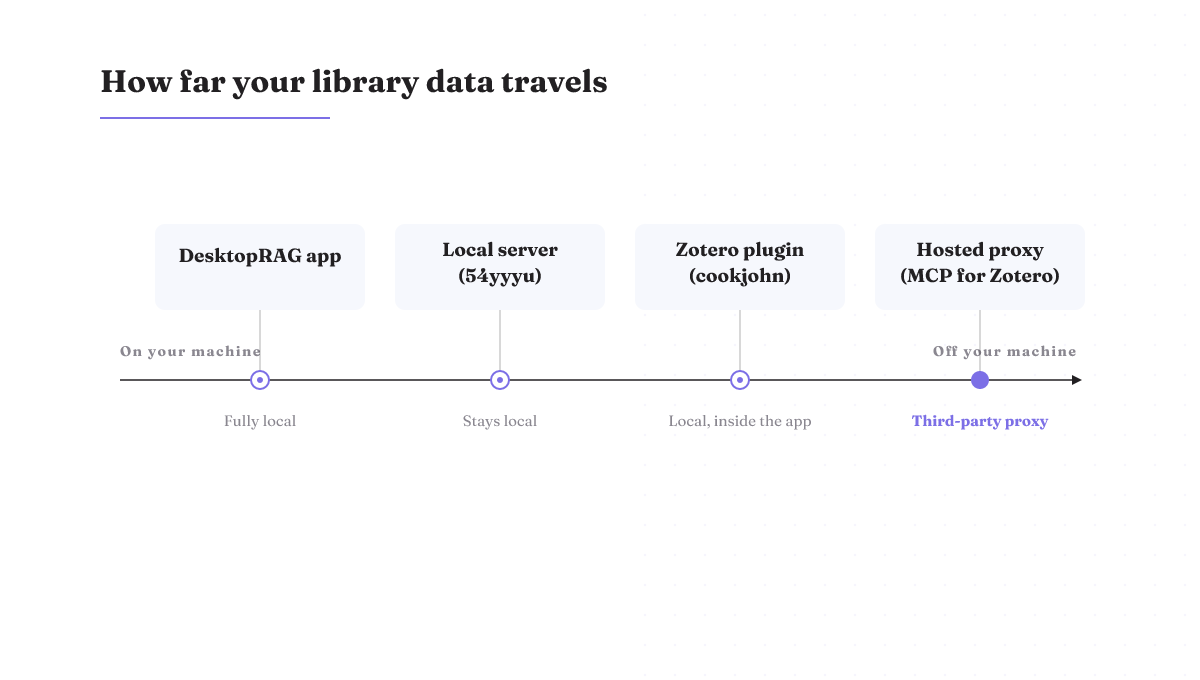
Here is the whole landscape in one view. Four shapes, sorted by how you install them and where your library data ends up.
| Shape | Install model | Where your data flows | Semantic search | Read or write | Pick this if |
|---|---|---|---|---|---|
| Local server (54yyyu) | Install a local Python server | Stays local; a cloud embedding model sends text to that provider | Optional [semantic] extra, off by default | Read: search, summarize, extract | You wire Claude, Cursor, or Claude Code |
| Zotero plugin (cookjohn) | Install an .xpi plugin; the server runs inside Zotero | Local, inside the Zotero desktop app | Check the cookjohn repo | Read; see the repo for writes | You live in the Zotero desktop app |
| Hosted proxy (MCP for Zotero) | No install; paste an endpoint URL and a token | Routes through a third-party proxy | Depends on your assistant | Read and write | You refuse to install anything |
| Desktop RAG app | Install a desktop app that indexes your PDFs | Fully local vector database | Yes, across your whole PDF library | Read-only search, not wired to an assistant | You want private search, no chat assistant |
Each shape loses somewhere. The local server keeps semantic search off until you add it. The plugin ties you to the Zotero desktop app. The hosted proxy routes your access through someone else. The desktop RAG app is not an MCP server at all, so your assistant never sees the library.
The local server: 54yyyu, with semantic search as an add-on
For most people, the local server is the default, and the 54yyyu build is the one to try first. You install it as a local Python server, and your library stays on your machine.
Semantic search is the part worth understanding. It ships as an [optional [semantic] extra install, not on by default](https://mcpservers.org/servers/54yyyu/zotero-mcp). When you turn it on, you pick an embedding model: a free local default, or OpenAI, Gemini, or Ollama. That choice is a privacy choice. The local default keeps text on your machine. Pick OpenAI or Gemini and you send your library text to that provider to build the vectors.
Because these speak the Model Context Protocol, any MCP client can wire in. That covers Claude, Cursor, and Claude Code. The repo lives on GitHub, and that is where you confirm the current version before you install. Read the star and commit counts off the repo itself, not off a listing that lags behind it.
The Zotero plugin: cookjohn runs the server inside Zotero
If you basically live inside the Zotero desktop app, the cookjohn build fits how you already work. It packages the MCP server inside a Zotero plugin, so there is no separate server process to start and babysit. Its GitHub repository shows release v1.5.0, dated June 10, 2026, with roughly 1,000 stars and 124 commits.
You install it the way you install any Zotero plugin: as an .xpi file you add from inside Zotero. The tradeoff is the coupling. The server lives and dies with the desktop app, so it is not a standalone service you can point other machines at. For its exact tool set, read the repo, since a plugin's features move faster than any guide can track.
The hosted proxy: no install, but your library routes elsewhere
The hosted option, MCP for Zotero, skips installation entirely. You sign in, add a Zotero API key, and get an MCP endpoint URL plus a token. Paste those into your AI client and you are done. The service proxies the Zotero API and keeps only your encrypted credentials, and it is free. Your assistant can then read and write to the library.
Here is the catch, and it is the one that matters most. Your library access now runs through a third party's proxy instead of staying on your machine. For some readers that is a fair trade for zero setup. If your rule is that agent access stays under your control and on your hardware, this is the shape you skip. Routing an agent's access through a proxy is a control decision, not just a convenience one.
Not everything called Zotero AI is MCP: desktop RAG apps
Not every tool labelled "Zotero AI" is an MCP server, and this is where the search results quietly mislead people. A desktop RAG app is a different product. On first launch it indexes your library's PDFs into a local vector database, stored alongside your Zotero metadata like tags, collections, and authors. After that you can run private semantic queries across your whole PDF collection, all on your own machine.
What it does not do is hand your library to Claude or ChatGPT. It is not an MCP server, so there is no assistant on the other end. If your goal is to let your AI assistant talk to your library, a RAG app does not get you there, however good its search is.
Do you want semantic search or RAG? That decides the shape
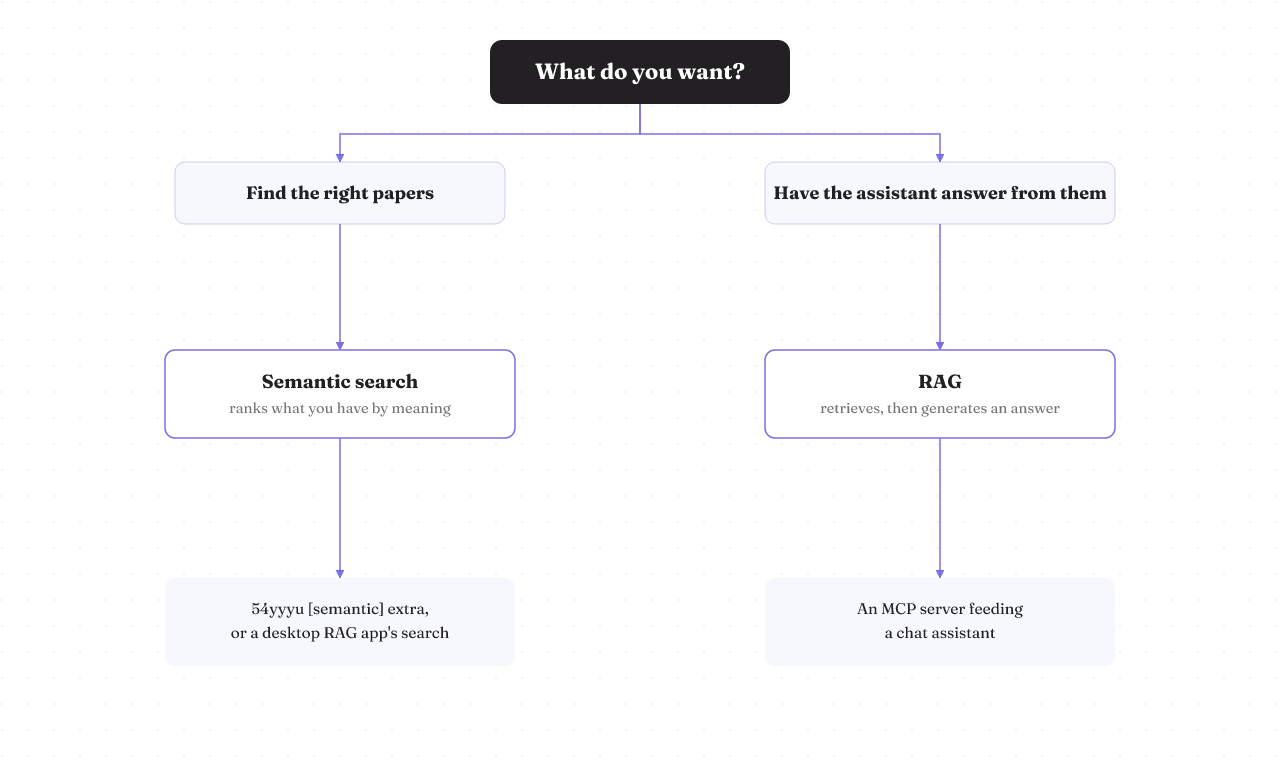
This is the question the Reddit threads keep circling and never resolve: do you want semantic search or RAG? The answer picks your shape.
The difference is simple once stated. Semantic search ranks what you already have by meaning; RAG goes further and actively retrieves knowledge to generate an answer. Search finds the right papers. RAG uses them to write you a response.
So map it to the job. Want to find the right items in a big library? You want semantic search: the 54yyyu [semantic] extra, or a desktop RAG app's search. Want your assistant to read those items and answer from them? You want an MCP server feeding a chat assistant. In practice the line blurs, and some tools do both. Still, that split is the fastest way to know which shape you are reaching for.
Which one to install first
Put it together and the pick falls out by who you are.
Wiring Claude, Cursor, or Claude Code and you want the common path? Start with the 54yyyu local server. Already living in the Zotero desktop app? The cookjohn plugin meets you there. Refuse to install anything and fine with a proxy? The hosted MCP for Zotero. Want fully local, private semantic search and no chat assistant at all? A desktop RAG app, and skip MCP entirely.
There is also a clean "do not pick an MCP server" case. If your rule is that everything stays on your machine and never touches a proxy or an external embedding API, then a local-only RAG app is your answer, not any server that opens a door for an assistant.
One honest note. This ranking is built from each tool's own docs and repositories, not from a first-hand install test by us. Treat it as a map of the shapes, then confirm the details against the server you choose.
Before you wire it up
Two practical points before you connect anything. MCP connection settings live in each client's own config file, and the exact path differs by client. Keep secrets like API keys in environment variables, not hardcoded into a config you might share. The precise file names change often enough that the server's own README is the source to trust, not a value copied off a page like this one.
If you are wiring more than one MCP server, the same four-shape question applies to each. rifty works through the same call for other tools in its guides on the Blender MCP server and the Ableton MCP server. No signup, no gate. Just the next decision.